extract + TextMapAdapter를 사용하여 사용자 정의 traceId 구현
작성자: 刘锐
개요
특정 시나리오에서는 코드로 사용자 정의 traceId를 구현해야 합니다.
구현 방식: tracer.extract를 사용하여 SpanContext를 생성하고, 생성된 SpanContext를 상위 노드 정보로 사용한 후 asChildOf(SpanContext)를 통해 현재 span을 생성합니다.
TraceId 매개변수 정의 방식
tracer.extract로 SpanContext를 생성할 때 내부적으로 ContextInterpreter가 이를 해석하여 해당 traceId와 spanId를 가져옵니다. ContextInterpreter의 일부 구현 코드는 아래에서 설명합니다.
전파자
ddtrace는 여러 전파 프로토콜을 지원하며, 각 전파 프로토콜의 traceId 매개변수 이름이 다릅니다.
Java의 경우 ddtrace는 두 가지 전파 프로토콜을 지원합니다:
- Datadog: 기본 전파 프로토콜
- B3: B3 전파는 헤더
b3및x-b3-로 시작하는 헤더의 사양입니다. 이러한 헤더는 서비스 경계를 넘는 추적 컨텍스트 전파에 사용됩니다. B3에는 두 가지 방식이 있습니다.- B3SINGLE (B3_SINGLE_HEADER): 헤더 key가
b3인 방식 - B3 (B3MULTI): 헤더 key가
x-b3-인 방식
- B3SINGLE (B3_SINGLE_HEADER): 헤더 key가
Datadog 전파자를 사용하여 사용자 정의 traceId 구현
Datadog 전파자 활성화
메커니즘 소스 코드 소개
ddtrace는 기본적으로 Datadog를 기본 전파 프로토콜로 사용하며, 인터셉터는 DatadogContextInterpreter입니다. 일부 코드는 다음과 같습니다:
    public boolean accept(String key, String value) {
        case 'x':
            if ("x-datadog-trace-id".equalsIgnoreCase(key)) {
                classification = 0;
            } else if ("x-datadog-parent-id".equalsIgnoreCase(key)) {
                classification = 1;
            } else if ("x-datadog-sampling-priority".equalsIgnoreCase(key)) {
                classification = 3;
            } else if ("x-datadog-origin".equalsIgnoreCase(key)) {
                classification = 2;


        ....

        switch(classification) {
            case 0:
                this.traceId = DDId.from(firstValue);
                break;
            case 1:
                this.spanId = DDId.from(firstValue);
                break;
            case 2:
                this.origin = firstValue;
                break;
            case 3:
                this.samplingPriority = Integer.parseInt(firstValue);
                break;
        ....
    }
코드 구현
    /***
     * 사용자 정의 traceId 관련 정보를 설정하여 사용자 정의 분산 추적 구현
     * @param traceId
     * @param parentId
     * @param treeLength
     * @return
     */
    @GetMapping("/customTrace")
    @ResponseBody
    public String customTrace(String traceId, String parentId, Integer treeLength) {
        Tracer tracer = GlobalTracer.get();
        traceId = StringUtils.isEmpty(traceId) ? IdGenerationStrategy.RANDOM.generate().toString() : traceId;
        parentId = StringUtils.isEmpty(parentId) ? DDId.ZERO.toString() : parentId;
        treeLength = treeLength == null ? 3 : treeLength;
        for (int i = 0; i < treeLength; i++) {
            Map<String, String> data = new HashMap<>();
            data.put("x-datadog-trace-id", traceId);
            data.put("x-datadog-parent-id", parentId);

            SpanContext extractedContext = tracer.extract(Format.Builtin.HTTP_HEADERS, new TextMapAdapter(data));
            Span serverSpan = tracer.buildSpan("opt" + i)
                    .withTag("service_name", "someService" + i)
                    .asChildOf(extractedContext)
                    .start();
            tracer.activateSpan(serverSpan).close();
            serverSpan.finish();
            parentId = serverSpan.context().toSpanId();
        }
        return "build success!";
    }
B3 전파자를 사용하여 사용자 정의 traceId 구현
B3에는 Single Header 및 Multiple Header의 두 가지 인코딩 방식이 있습니다.
- Multiple Header 인코딩은 추적 컨텍스트에서 각 항목에 대해
X-B3-접두사 헤더를 사용합니다. - Single Header는 컨텍스트를
b3라는 단일 헤더로 구분합니다. 필드 추출 시 Single Header 변형이 Multiple Header 변형보다 우선합니다.
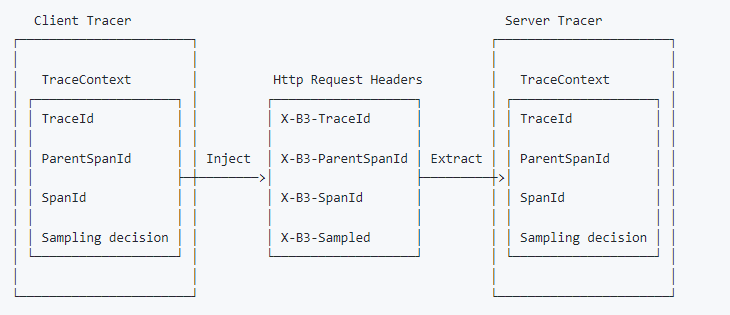
다음은 Multiple Header 인코딩을 사용한 예제 흐름입니다. 전파된 추적이 포함된 HTTP 요청을 가정합니다:
B3 전파자 활성화
메커니즘 소스 코드 소개
    public boolean accept(String key, String value) {
        ...
        char first = Character.toLowerCase(key.charAt(0));
        switch (first) {
            case 'f':
                if (this.handledForwarding(key, value)) {
                    return true;
                }
                break;
            case 'u':
                if (this.handledUserAgent(key, value)) {
                    return true;
                }
                break;
            case 'x':
                if ((this.traceId == null || this.traceId == DDId.ZERO) && "X-B3-TraceId".equalsIgnoreCase(key)) {
                    classification = 0;
                } else if ((this.spanId == null || this.spanId == DDId.ZERO) && "X-B3-SpanId".equalsIgnoreCase(key)) {
                    classification = 1;
                } else if (this.samplingPriority == this.defaultSamplingPriority() && "X-B3-Sampled".equalsIgnoreCase(key)) {
                    classification = 3;
                } else if (this.handledXForwarding(key, value)) {
                    return true;
                }
        }

        ...

        String firstValue = HttpCodec.firstHeaderValue(value);
        if (null != firstValue) {
            switch (classification) {
                case 0:
                    if (this.setTraceId(firstValue)) {
                        return true;
                    }
                    break;
                case 1:
                    this.setSpanId(firstValue);
                    break;
                case 2:
                    String mappedKey = (String)this.taggedHeaders.get(lowerCaseKey);
                    if (null != mappedKey) {
                        if (this.tags.isEmpty()) {
                            this.tags = new TreeMap();
                        }

                        this.tags.put(mappedKey, HttpCodec.decode(firstValue));
                    }
                    break;
                case 3:
                    this.samplingPriority = this.convertSamplingPriority(firstValue);
                    break;
                case 4:
                    if (this.extractB3(firstValue)) {
                        return true;
                    }
            }
        }

        ...
다음 메서드는 Single Header 방식을 처리하는 코드입니다:
    private boolean extractB3(String firstValue) {
        if (firstValue.length() == 1) {
            this.samplingPriority = this.convertSamplingPriority(firstValue);
        } else {
            int firstIndex = firstValue.indexOf("-");
            int secondIndex = firstValue.indexOf("-", firstIndex + 1);
            String b3SpanId;
            if (firstIndex != -1) {
                b3SpanId = firstValue.substring(0, firstIndex);
                if (this.setTraceId(b3SpanId)) {
                    return true;
                }
            }

            if (secondIndex == -1) {
                b3SpanId = firstValue.substring(firstIndex + 1);
                this.setSpanId(b3SpanId);
            } else {
                b3SpanId = firstValue.substring(firstIndex + 1, secondIndex);
                this.setSpanId(b3SpanId);
                String b3SamplingId = firstValue.substring(secondIndex + 1);
                this.samplingPriority = this.convertSamplingPriority(b3SamplingId);
            }
        }

        return false;
    }
Multiple Header 코드 구현
    private static void b3TraceByMultiple(){
        String traceId = DDId.from("6917954032704516265").toHexStringOrOriginal();
        Tracer tracer = GlobalTracer.get();
        String parentId = DDId.from("4025816492133344807").toHexStringOrOriginal();
        for (int i = 0; i < 3; i++) {
            Map<String, String> data = new HashMap<>();
            data.put("X-B3-TraceId", traceId);
            data.put("X-B3-SpanId", parentId);

            SpanContext extractedContext = tracer.extract(Format.Builtin.HTTP_HEADERS, new TextMapAdapter(data));
            Span serverSpan = tracer.buildSpan("opt"+i)
                    .withTag("service","someService"+i)
                    .asChildOf(extractedContext)
                    .start();
            serverSpan.setTag("code","200");
            tracer.activateSpan(serverSpan).close();
            serverSpan.finish();
            parentId = DDId.from(serverSpan.context().toSpanId()).toHexStringOrOriginal();
            System.out.println( traceId+"\t"+serverSpan.context().toTraceId()+"\t"+parentId);
        }

    }
참고: Multiple Header는
X-B3-TraceId와X-B3-SpanId두 개의 헤더를 반드시 전달해야 합니다. 인터셉터 분석 결과 대소문자를 구분하지 않습니다.
6001828a33d570a9    6917954032704516265 58c4b35f113ee353
6001828a33d570a9    6917954032704516265 330359b7aaea9d6b
6001828a33d570a9    6917954032704516265 1ac0dcd332f9262f
Single Header 코드 구현
    private static void b3TraceBySingle(){
        String traceId = DDId.from("6917954032704516265").toHexStringOrOriginal();
        Tracer tracer = GlobalTracer.get();
        String parentId = DDId.from("4025816492133344807").toHexStringOrOriginal();
        for (int i = 0; i < 3; i++) {
            String b3 = traceId+ "-"+parentId+"-1";
            Map<String, String> data = new HashMap<>();
            data.put("b3",b3);
            SpanContext extractedContext = tracer.extract(Format.Builtin.HTTP_HEADERS, new TextMapAdapter(data));
            Span serverSpan = tracer.buildSpan("opt"+i)
                    .withTag("service","someService"+i)
                    .asChildOf(extractedContext)
                    .start();
            serverSpan.setTag("code","200");
            tracer.activateSpan(serverSpan).close();
            serverSpan.finish();
            parentId = DDId.from(serverSpan.context().toSpanId()).toHexStringOrOriginal();
            System.out.println( traceId+"\t"+serverSpan.context().toTraceId()+"\t"+parentId);
            System.out.println("b3="+b3);
        }

    }
6001828a33d570a9    6917954032704516265 308287d022272ed9
b3=6001828a33d570a9-37de92c518846627-1
6001828a33d570a9    6917954032704516265 5e6fbaad91daef5c
b3=6001828a33d570a9-308287d022272ed9-1
6001828a33d570a9    6917954032704516265 2cfbc225bddf5e6d
b3=6001828a33d570a9-5e6fbaad91daef5c-1
참고: Single Header는 헤더에
b3만 전달하면 되며, 형식은traceId-parentId-Sampled입니다.
여러 전파자 활성화
두 가지 방식 중 하나를 선택하면 됩니다:
- System Property:
- Environment Variable: