Service Mesh 마이크로서비스 아키텍처 개발부터 카나리 배포까지 전체 프로세스 모범 사례(상)
개요
일반적으로 기업이 자체 컨테이너 환경을 구축한 후, 복잡한 배포 프로세스를 간소화하기 위해 GitlabCI, Jenkins를 사용하여 애플리케이션을 배포합니다. 동시에 Rancher를 사용하여 통합 리소스 오케스트레이션을 관리하고, Rancher 앱 스토어를 통해 애플리케이션 관리를 간소화합니다. 앱 스토어를 통해 DataKit을 원클릭으로 설치하면(자세한 내용은 DataKit 문서의 Helm 설치 방법 참조), Guance Rancher가 관리하는 Kubernetes 클러스터에 다양한 즉시 사용 가능한 관측 가능성 기능을 제공합니다. 이 문서에서는 잘 알려진 Bookinfo 사례를 통해 Guance를 활용하여 GitlabCI, Kubernetes 및 마이크로서비스의 관측 가능성을 구현하는 방법을 자세히 설명합니다.
시나리오 가정
한 회사가 Rancher를 사용하여 두 개의 Kubernetes 클러스터를 관리하고 있습니다. 하나는 개발/테스트용이고 다른 하나는 프로덕션용입니다. 회사는 개발/테스트 환경에 gitlab을 배포하여 CICD를 수행하며, BookInfo 프로젝트는 전자책 스토어로, 전형적인 다국어 마이크로서비스 프로젝트입니다. 현재 개발 중인 릴리스 버전이 개발/테스트 환경에 배포되고, 테스트를 통과하면 프로덕션 환경의 BookInfo에 대해 카나리 배포를 수행합니다. 이 회사의 관측 가능성 체계 구성 요소는 다음과 같습니다:
1.1 SRE는 두 환경의 Kubernetes 리소스 현황을 Guance에서 모니터링하여 용량 계획 및 장애 대응을 수행합니다.
2.1 개발자는 CI/CD 프로세스를 모니터링하여 소프트웨어 개발 주기 속도와 품질을 파악하고 오류가 발생한 파이프라인을 적시에 처리합니다.
2.2 SRE는 프로덕션 환경의 카나리 배포를 모니터링하여 버전 트래픽 전환 상태를 파악하고, 적시에 롤백하여 프로덕션 사용자에게 영향을 미치지 않도록 합니다.
3.1 SRE는 istio를 통해 전체 애플리케이션에 대한 분산 추적을 수행하고, Guance에서 애플리케이션의 주요 상태 지표를 확인하며, 비정상 요청을 적시에 처리합니다.
3.2 개발자는 자체 로그를 관리하고, 상태 이상 발생 시 Guance에서 분산 추적을 통해 로그 컨텍스트를 신속하게 찾아 문제를 해결합니다.
전체 실습 내용은 세 편으로 나누어 설명합니다.
사전 조건
- Kubernetes 설치
- Rancher 설치
- Gitlab 설치
- Metrics-Server 구성 요소 설치
- harbor 레지스트리 또는 기타 이미지 레지스트리 배포
- Istio 배포, Istio 기반 마이크로서비스 관측 가능성 모범 사례 숙지
- Gitlab-runner 구성, Gitlab-CI 관측 가능성 모범 사례 숙지
배포 단계
1단계: Rancher를 사용하여 DataKit 설치
1.1 DataKit 배포
1.1.1 배포 파일 다운로드
『Guance』에 로그인한 후, 『통합』 모듈을 클릭하고, 좌측 상단의 『DataKit』을 클릭한 후, 『Kubernetes』를 선택하여 datakit.yaml을 다운로드합니다.
1.1.2 토큰 구성
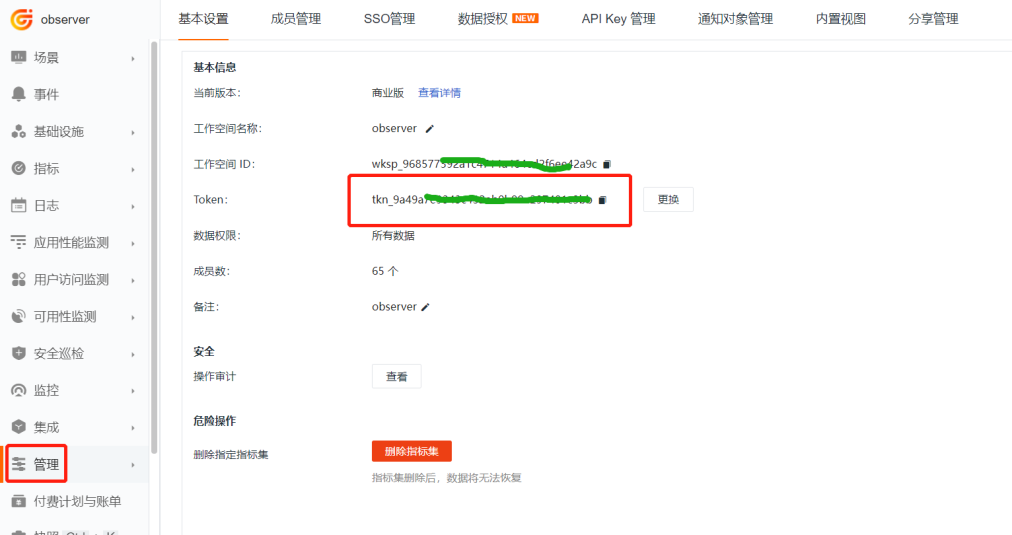
『Guance』에 로그인하고, 『관리』 모듈로 이동한 후, 아래 그림에서 토큰을 찾아 datakit.yaml 파일의 ENV_DATAWAY 환경 변수 value 값에서
1.1.3 글로벌 태그 설정
datakit.yaml 파일의 ENV_GLOBAL_HOST_TAGS 환경 변수 값 끝에 cluster_name_k8s=k8s-istio를 추가합니다. 여기서 k8s-istio는 클러스터 이름입니다. 이 단계는 클러스터에 글로벌 태그를 설정하는 것입니다.
        - name: ENV_GLOBAL_HOST_TAGS
          value: host=__datakit_hostname,host_ip=__datakit_ip,cluster_name_k8s=k8s-istio
1.1.4 네임스페이스 설정
DataKit이 선출 시 클러스터를 구분하기 위해 ENV_NAMESPACE 환경 변수를 설정해야 하며, 클러스터마다 값이 달라야 합니다. datakit.yaml 파일의 환경 변수 부분에 다음 내용을 추가합니다.
1.1.5 수집기 활성화
ddtrace 및 statsd 수집기를 활성화하려면 datakit.yaml 파일에서 ENV_DEFAULT_ENABLED_INPUTS 환경 변수를 찾아 마지막에 statsd,ddtrace를 추가합니다.
        - name: ENV_DEFAULT_ENABLED_INPUTS
          value: cpu,disk,diskio,mem,swap,system,hostobject,net,host_processes,container,statsd,ddtrace
1.1.6 DataKit 배포
『Rancher』에 로그인하고, 클러스터 탐색 탭에서 『k8s-solution-cluster』 클러스터를 선택한 후, datakit.yaml을 열고 리소스 파일 내용에 따라 k8s-solution-cluster 클러스터에서 해당 메뉴를 찾아 하나씩 리소스를 생성합니다.
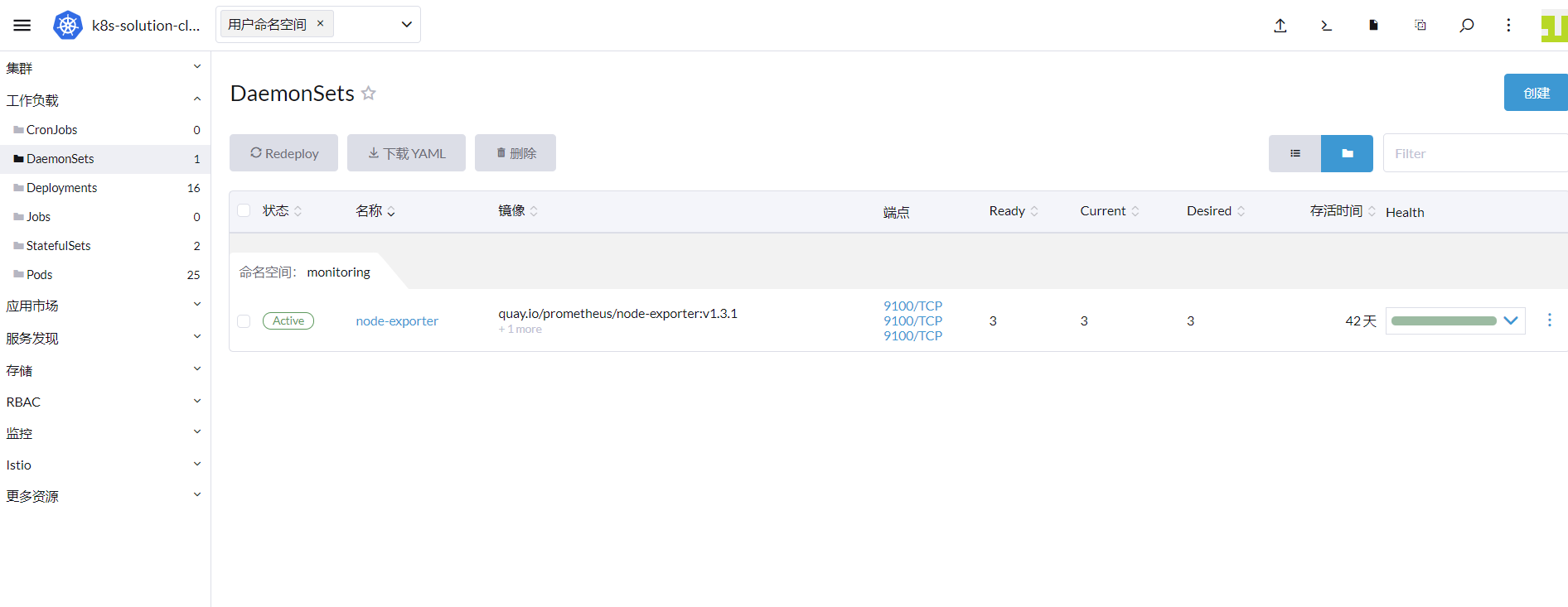
『참고』다음 단계를 신속하게 수행하기 위해 이번 작업에서는 ConfigMap을 병합한 후 kubectl 명령을 직접 사용하여 DataKit을 배포합니다.
1.2 ConfigMap 생성
container 수집기와 zipkin 수집기를 활성화하려면 먼저 container.conf와 zipkin.conf를 정의해야 합니다.
apiVersion: v1
kind: ConfigMap
metadata:
  name: datakit-conf
  namespace: datakit
data:
    #### container
    container.conf: |-
      [inputs.container]
        docker_endpoint = "unix:///var/run/docker.sock"
        containerd_address = "/var/run/containerd/containerd.sock"

        enable_container_metric = true
        enable_k8s_metric = true
        enable_pod_metric = true

        ## Containers logs to include and exclude, default collect all containers. Globs accepted.
        container_include_log = []
        container_exclude_log = ["image:pubrepo.guance.com/datakit/logfwd*", "image:pubrepo.guance.com/datakit/datakit*"]

        exclude_pause_container = true

        ## Removes ANSI escape codes from text strings
        logging_remove_ansi_escape_codes = false

        kubernetes_url = "https://kubernetes.default:443"

        ## Authorization level:
        ##   bearer_token -> bearer_token_string -> TLS
        ## Use bearer token for authorization. ('bearer_token' takes priority)
        ## linux at:   /run/secrets/kubernetes.io/serviceaccount/token
        ## windows at: C:\var\run\secrets\kubernetes.io\serviceaccount\token
        bearer_token = "/run/secrets/kubernetes.io/serviceaccount/token"
        # bearer_token_string = "<your-token-string>"

        [inputs.container.tags]
          # some_tag = "some_value"
          # more_tag = "some_other_value"

    #### zipkin
    zipkin.conf: |-
        [[inputs.zipkin]]
          pathV1 = "/api/v1/spans"
          pathV2 = "/api/v2/spans"
[inputs.container] 매개변수 설명
- container_include_metric: 수집할 컨테이너 메트릭
- container_exclude_metric: 수집하지 않을 컨테이너 메트릭
- container_include_log: 수집할 컨테이너 로그
- container_exclude_log: 수집하지 않을 컨테이너 로그
- exclude_pause_container: true는 pause 컨테이너 제외
container_include및container_exclude는image로 시작해야 하며, 형식은"image:<glob规则>"입니다. 이는 glob 규칙이 컨테이너 image에 적용됨을 의미합니다.- Glob 규칙은 경량 정규식으로,
*,?등의 기본 일치 단위를 지원합니다.
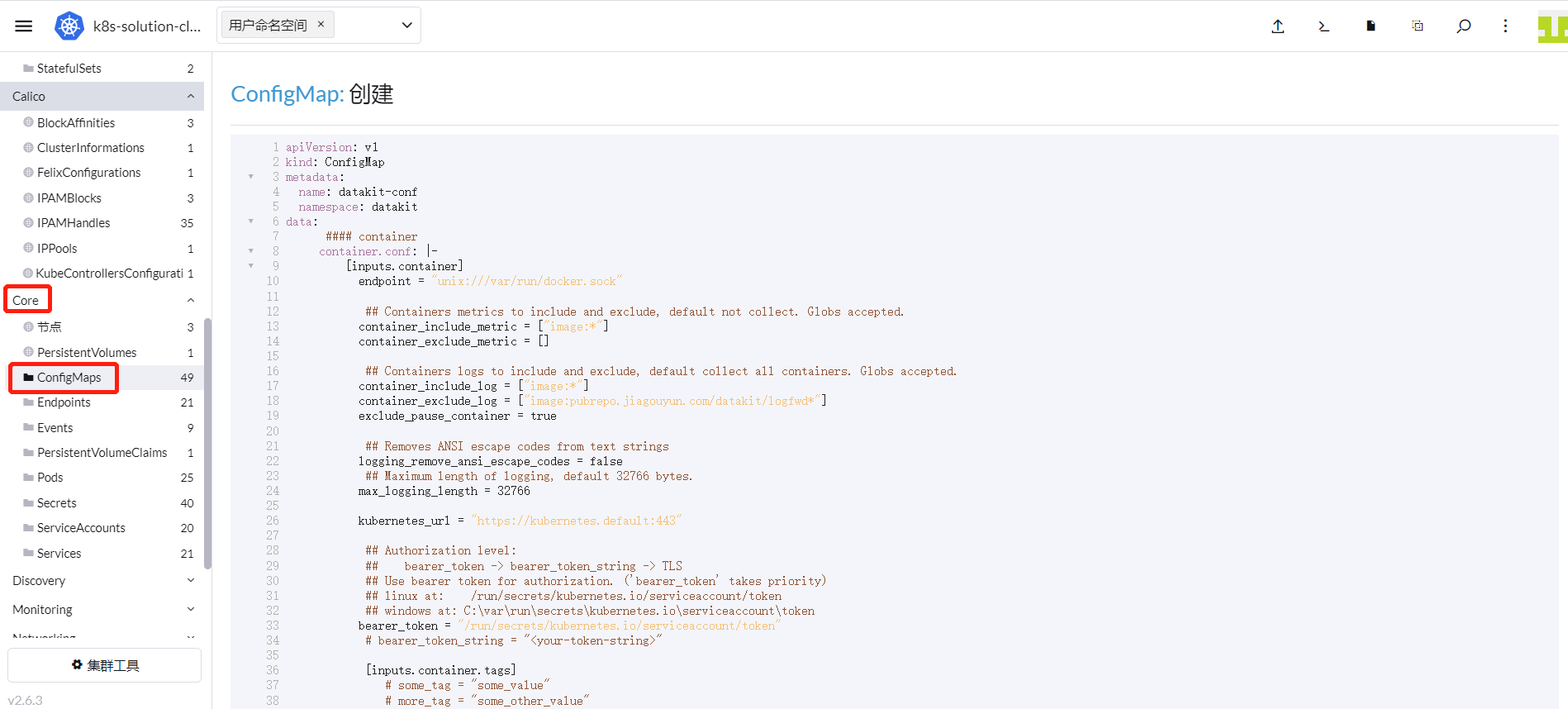
그런 다음 『Rancher』에 로그인하고, 클러스터 탐색 탭에서 『k8s-solution-cluster』 클러스터를 선택한 후, 『추가 리소스』 -> 『Core』 -> 『ConfigMaps』로 차례로 이동하여 위에서 정의한 ConfigMap을 yaml 형식으로 생성합니다.
마지막으로 DataKit과 ConfigMap을 연결합니다. 『k8s-solution-cluster』 클러스터에서 『워크로드』 -> 『DaemonSets』로 이동하여 DataKit을 찾고, 오른쪽에서 『YAML 편집』을 선택한 후 다음 내용을 추가하고 『저장』을 클릭합니다.
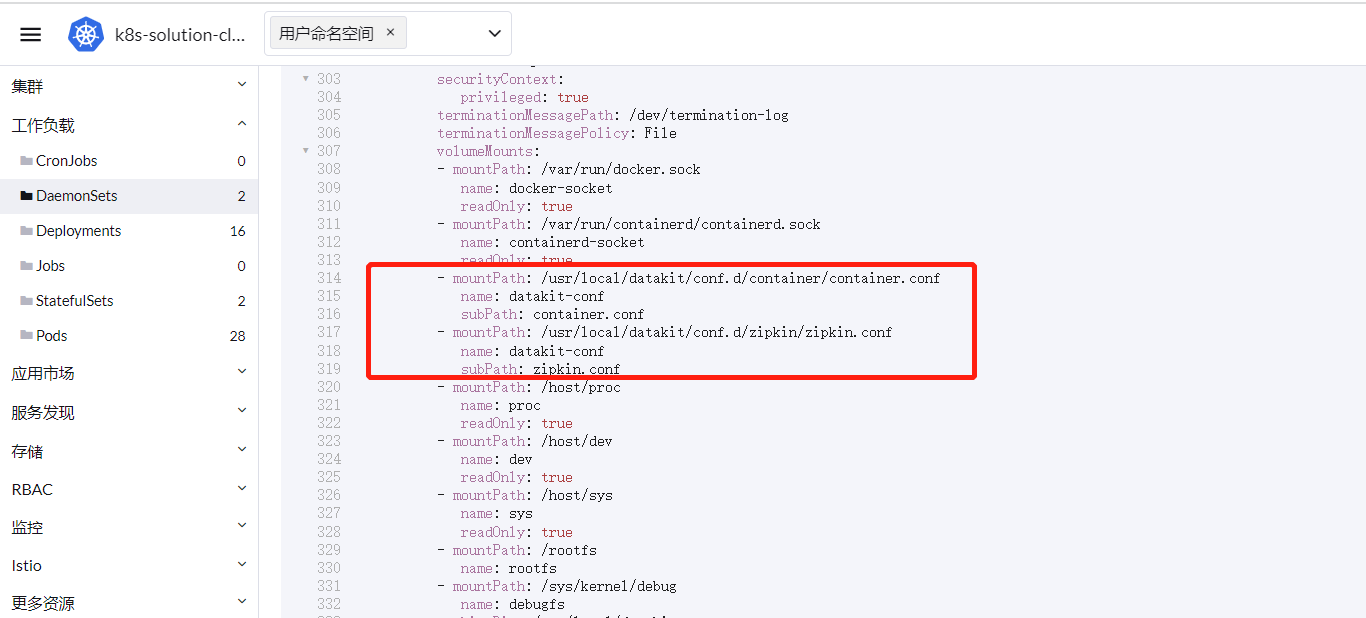
        - mountPath: /usr/local/datakit/conf.d/container/container.conf
          name: datakit-conf
          subPath: container.conf
        - mountPath: /usr/local/datakit/conf.d/zipkin/zipkin.conf
          name: datakit-conf
          subPath: zipkin.conf
kubectl 명령을 사용하여 DataKit을 생성하는 경우 ConfigMap에 정의된 내용을 datakit.yaml 파일의 마지막에 추가한 후, 위의 구성을 파일의 volumeMounts 아래에 추가합니다.
『참고』---를 구분자로 사용합니다.
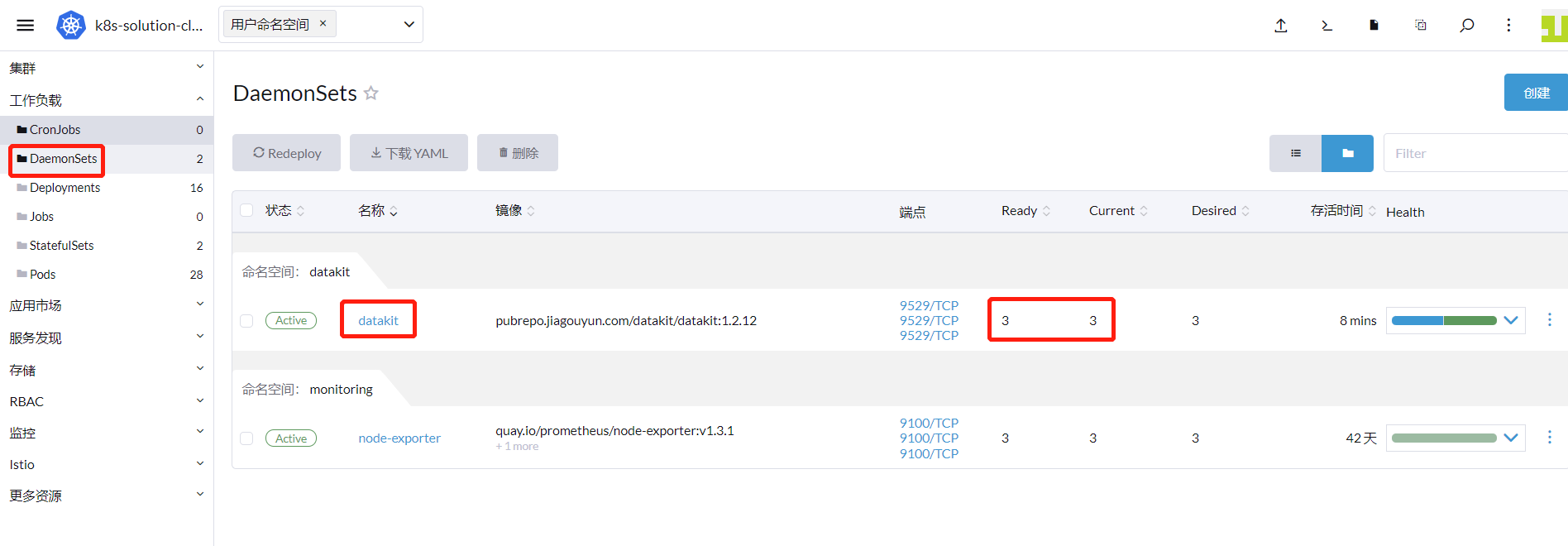
1.3 DataKit 실행 상태 확인
DataKit이 성공적으로 배포되면 아래 그림과 같은 실행 상태를 확인할 수 있습니다.
2단계: DataKit 서비스 매핑
Istio를 사용하여 추적 데이터를 전송하면 추적 데이터는 zipkin.istio-system의 Service로 전송되며, 포트는 9411입니다. DataKit 서비스의 네임스페이스는 datakit이고 포트는 9529이므로 변환이 필요합니다. 자세한 내용은 Kubernetes 클러스터에서 ExternalName을 사용하여 DataKit 서비스 매핑을 참조하세요.
3단계: DataFlux Function에서 DataKit 구성
Gitlab-CI를 사용하여 마이크로서비스를 배포할 때 Gitlab 실행 데이터를 수집하려면 DataFlux Function을 배포하고 DataKit을 구성해야 합니다. 자세한 단계는 Gitlab-CI 관측 가능성 모범 사례를 참조하세요.
4단계: Bookinfo 배포
2.1 소스 코드 다운로드
istio-1.13.2.zip을 다운로드합니다. 이후 사용되는 배포 파일은 모두 이 압축 파일에서 가져옵니다. 작업 편의를 위해 Rancher의 GUI 대신 kubectl 명령을 사용하여 리소스를 생성합니다.
2.2 RUM 활성화
웹사이트 호출 정보를 모니터링하려면 프론트엔드 데이터 수집을 활성화해야 합니다. 『Guance』에 로그인하고, 『실제 사용자 모니터링(RUM)』으로 이동하여 devops-bookinfo 애플리케이션을 새로 만든 후, 아래 JS를 복사합니다.
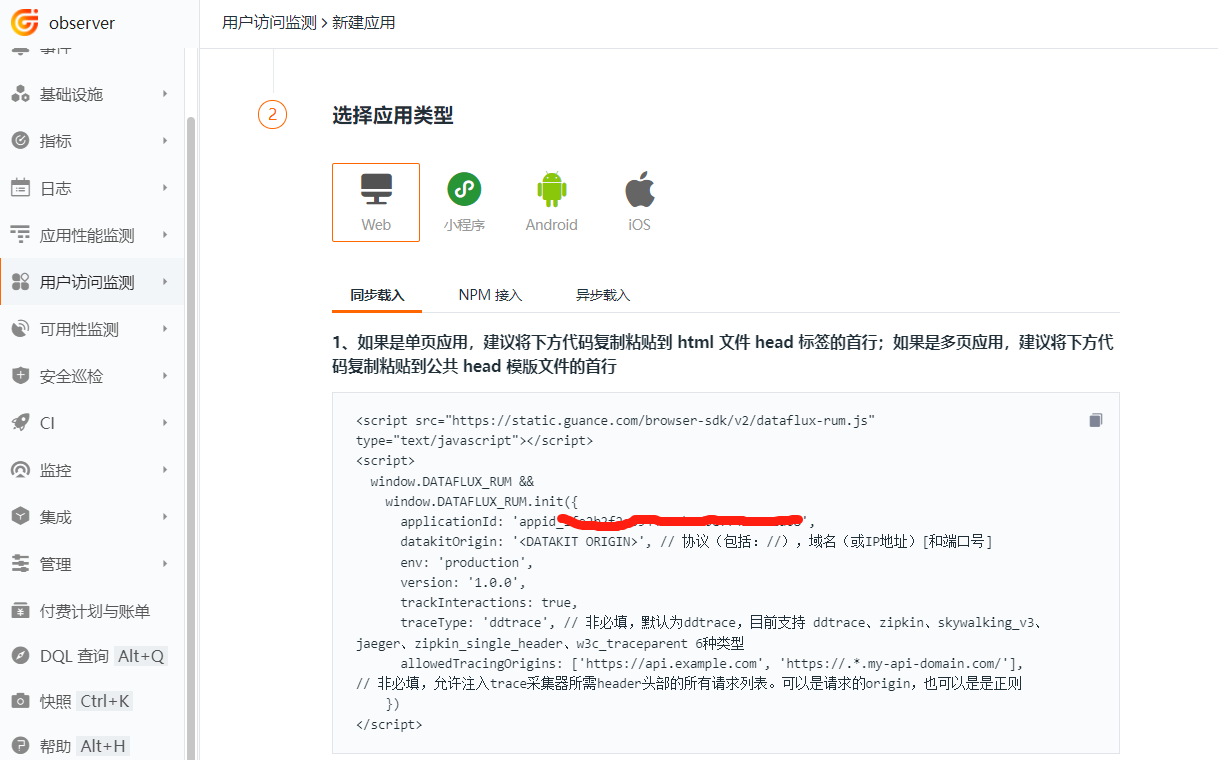
위 JS는 productpage 프로젝트의 모든 페이지에서 액세스할 수 있는 위치에 배치해야 합니다. 이 프로젝트에서는 위의 JS를 istio-1.13.2\samples\bookinfo\src\productpage\templates\productpage.html 파일에 복사합니다. 『참고』RUM 데이터 전송을 위한 DataKit 주소는 RUM 데이터 전송 DataKit 클러스터 모범 사례를 참조하세요.
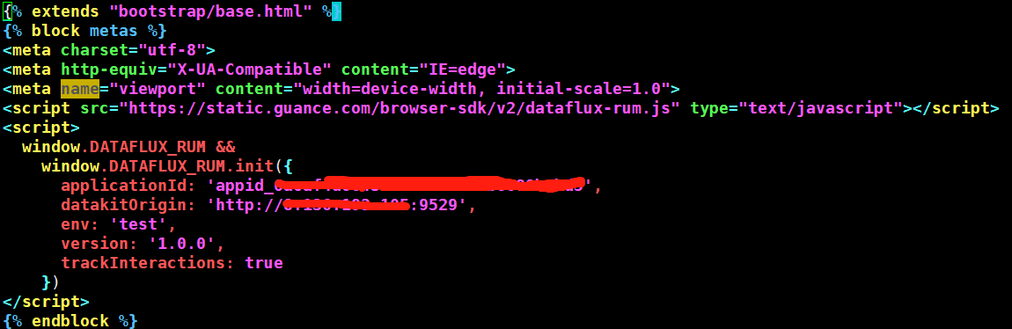
그런 다음 productpage의 이미지를 다시 빌드하여 이미지 레지스트리에 업로드합니다.
cd istio-1.13.2\samples\bookinfo\src\productpage
docker build -t 172.16.0.238/df-demo/product-page:v1  .
docker push 172.16.0.238/df-demo/product-page:v1
2.3 Sidecar 주입 활성화
prod 네임스페이스를 생성하고, 해당 네임스페이스에서 Pod 생성 시 Sidecar가 자동으로 주입되어 Pod의 인바운드/아웃바운드 트래픽이 모두 Sidecar를 통해 처리되도록 설정합니다.
2.4 productpage, details, ratings 배포
istio-1.13.2\samples\bookinfo\platform\kube\bookinfo.yaml 파일에서 reviews 마이크로서비스 배포 관련 부분을 제거하고, Service와 Deployment를 모두 prod 네임스페이스에 배포합니다. 모든 Deployment 컨트롤러의 Pod 템플릿에 annotations를 추가하여 Pod의 사용자 정의 수집을 활성화합니다. productpage 이미지는 이전 단계에서 생성한 이미지로 수정합니다. 전체 파일은 다음과 같습니다:
# Copyright Istio Authors
#
#   Licensed under the Apache License, Version 2.0 (the "License");
#   you may not use this file except in compliance with the License.
#   You may obtain a copy of the License at
#
#       http://www.apache.org/licenses/LICENSE-2.0
#
#   Unless required by applicable law or agreed to in writing, software
#   distributed under the License is distributed on an "AS IS" BASIS,
#   WITHOUT WARRANTIES OR CONDITIONS OF ANY KIND, either express or implied.
#   See the License for the specific language governing permissions and
#   limitations under the License.

##################################################################################################
# This file defines the services, service accounts, and deployments for the Bookinfo sample.
#
# To apply all 4 Bookinfo services, their corresponding service accounts, and deployments:
#
#   kubectl apply -f samples/bookinfo/platform/kube/bookinfo.yaml
#
# Alternatively, you can deploy any resource separately:
#
#   kubectl apply -f samples/bookinfo/platform/kube/bookinfo.yaml -l service=reviews # reviews Service
#   kubectl apply -f samples/bookinfo/platform/kube/bookinfo.yaml -l account=reviews # reviews ServiceAccount
#   kubectl apply -f samples/bookinfo/platform/kube/bookinfo.yaml -l app=reviews,version=v3 # reviews-v3 Deployment
##################################################################################################

##################################################################################################
# Details service
##################################################################################################
apiVersion: v1
kind: Service
metadata:
  name: details
  namespace: prod
  labels:
    app: details
    service: details
spec:
  ports:
  - port: 9080
    name: http
  selector:
    app: details
---
apiVersion: v1
kind: ServiceAccount
metadata:
  name: bookinfo-details
  namespace: prod
  labels:
    account: details
---
apiVersion: apps/v1
kind: Deployment
metadata:
  name: details-v1
  namespace: prod
  labels:
    app: details
    version: v1
spec:
  replicas: 1
  selector:
    matchLabels:
      app: details
      version: v1
  template:
    metadata:
      labels:
        app: details
        version: v1
      annotations:
        datakit/prom.instances: |
          [[inputs.prom]]
            url = "http://$IP:15020/stats/prometheus"
            source = "bookinfo-istio-details"
            metric_types = ["counter", "gauge"]
            interval = "60s"
            tags_ignore = ["cache","cluster_type","component","destination_app","destination_canonical_revision","destination_canonical_service","destination_cluster","destination_principal","group","grpc_code","grpc_method","grpc_service","grpc_type","reason","request_protocol","request_type","resource","responce_code_class","response_flags","source_app","source_canonical_revision","source_canonical-service","source_cluster","source_principal","source_version","wasm_filter"]
            #measurement_prefix = ""
            metric_name_filter = ["istio_requests_total","pilot_k8s_cfg_events","istio_build","process_virtual_memory_bytes","process_resident_memory_bytes","process_cpu_seconds_total","envoy_cluster_assignment_stale","go_goroutines","pilot_xds_pushes","pilot_proxy_convergence_time_bucket","citadel_server_root_cert_expiry_timestamp","pilot_conflict_inbound_listener","pilot_conflict_outbound_listener_http_over_current_tcp","pilot_conflict_outbound_listener_tcp_over_current_tcp","pilot_conflict_outbound_listener_tcp_over_current_http","pilot_virt_services","galley_validation_failed","pilot_services","envoy_cluster_upstream_cx_total","envoy_cluster_upstream_cx_connect_fail","envoy_cluster_upstream_cx_active","envoy_cluster_upstream_cx_rx_bytes_total","envoy_cluster_upstream_cx_tx_bytes_total","istio_request_duration_milliseconds_bucket","istio_request_duration_seconds_bucket","istio_request_bytes_bucket","istio_response_bytes_bucket"]
            measurement_name = "istio_prom"
            #[[inputs.prom.measurements]]
            # prefix = "cpu_"
            # name = "cpu"
            [inputs.prom.tags]
            namespace = "$NAMESPACE"
    spec:
      serviceAccountName: bookinfo-details
      containers:
      - name: details
        image: docker.io/istio/examples-bookinfo-details-v1:1.16.2
        imagePullPolicy: IfNotPresent
        ports:
        - containerPort: 9080
        securityContext:
          runAsUser: 1000
---
##################################################################################################
# Ratings service
##################################################################################################
apiVersion: v1
kind: Service
metadata:
  name: ratings
  namespace: prod
  labels:
    app: ratings
    service: ratings
spec:
  ports:
  - port: 9080
    name: http
  selector:
    app: ratings
---
apiVersion: v1
kind: ServiceAccount
metadata:
  name: bookinfo-ratings
  namespace: prod
  labels:
    account: ratings
---
apiVersion: apps/v1
kind: Deployment
metadata:
  name: ratings-v1
  namespace: prod
  labels:
    app: ratings
    version: v1
spec:
  replicas: 1
  selector:
    matchLabels:
      app: ratings
      version: v1
  template:
    metadata:
      labels:
        app: ratings
        version: v1
      annotations:
        datakit/prom.instances: |
          [[inputs.prom]]
            url = "http://$IP:15020/stats/prometheus"
            source = "bookinfo-istio-ratings"
            metric_types = ["counter", "gauge"]
            interval = "60s"
            tags_ignore = ["cache","cluster_type","component","destination_app","destination_canonical_revision","destination_canonical_service","destination_cluster","destination_principal","group","grpc_code","grpc_method","grpc_service","grpc_type","reason","request_protocol","request_type","resource","responce_code_class","response_flags","source_app","source_canonical_revision","source_canonical-service","source_cluster","source_principal","source_version","wasm_filter"]
            #measurement_prefix = ""
            metric_name_filter = ["istio_requests_total","pilot_k8s_cfg_events","istio_build","process_virtual_memory_bytes","process_resident_memory_bytes","process_cpu_seconds_total","envoy_cluster_assignment_stale","go_goroutines","pilot_xds_pushes","pilot_proxy_convergence_time_bucket","citadel_server_root_cert_expiry_timestamp","pilot_conflict_inbound_listener","pilot_conflict_outbound_listener_http_over_current_tcp","pilot_conflict_outbound_listener_tcp_over_current_tcp","pilot_conflict_outbound_listener_tcp_over_current_http","pilot_virt_services","galley_validation_failed","pilot_services","envoy_cluster_upstream_cx_total","envoy_cluster_upstream_cx_connect_fail","envoy_cluster_upstream_cx_active","envoy_cluster_upstream_cx_rx_bytes_total","envoy_cluster_upstream_cx_tx_bytes_total","istio_request_duration_milliseconds_bucket","istio_request_duration_seconds_bucket","istio_request_bytes_bucket","istio_response_bytes_bucket"]
            measurement_name = "istio_prom"
            #[[inputs.prom.measurements]]
            # prefix = "cpu_"
            # name = "cpu"
            [inputs.prom.tags]
            namespace = "$NAMESPACE"
    spec:
      serviceAccountName: bookinfo-ratings
      containers:
      - name: ratings
        image: docker.io/istio/examples-bookinfo-ratings-v1:1.16.2
        imagePullPolicy: IfNotPresent
        ports:
        - containerPort: 9080
        securityContext:
          runAsUser: 1000
---
##################################################################################################
# Productpage services
##################################################################################################
apiVersion: v1
kind: Service
metadata:
  name: productpage
  namespace: prod
  labels:
    app: productpage
    service: productpage
spec:
  ports:
  - port: 9080
    name: http
  selector:
    app: productpage
---
apiVersion: v1
kind: ServiceAccount
metadata:
  name: bookinfo-productpage
  namespace: prod
  labels:
    account: productpage
---
apiVersion: apps/v1
kind: Deployment
metadata:
  name: productpage-v1
  namespace: prod
  labels:
    app: productpage
    version: v1
spec:
  replicas: 1
  selector:
    matchLabels:
      app: productpage
      version: v1
  template:
    metadata:
      labels:
        app: productpage
        version: v1
      annotations:
        datakit/prom.instances: |
          [[inputs.prom]]
            url = "http://$IP:15020/stats/prometheus"
            source = "bookinfo-istio-product"
            metric_types = ["counter", "gauge"]
            interval = "60s"
            tags_ignore = ["cache","cluster_type","component","destination_app","destination_canonical_revision","destination_canonical_service","destination_cluster","destination_principal","group","grpc_code","grpc_method","grpc_service","grpc_type","reason","request_protocol","request_type","resource","responce_code_class","response_flags","source_app","source_canonical_revision","source_canonical-service","source_cluster","source_principal","source_version","wasm_filter"]
            metric_name_filter = ["istio_requests_total","pilot_k8s_cfg_events","istio_build","process_virtual_memory_bytes","process_resident_memory_bytes","process_cpu_seconds_total","envoy_cluster_assignment_stale","go_goroutines","pilot_xds_pushes","pilot_proxy_convergence_time_bucket","citadel_server_root_cert_expiry_timestamp","pilot_conflict_inbound_listener","pilot_conflict_outbound_listener_http_over_current_tcp","pilot_conflict_outbound_listener_tcp_over_current_tcp","pilot_conflict_outbound_listener_tcp_over_current_http","pilot_virt_services","galley_validation_failed","pilot_services","envoy_cluster_upstream_cx_total","envoy_cluster_upstream_cx_connect_fail","envoy_cluster_upstream_cx_active","envoy_cluster_upstream_cx_rx_bytes_total","envoy_cluster_upstream_cx_tx_bytes_total","istio_request_duration_milliseconds_bucket","istio_request_duration_seconds_bucket","istio_request_bytes_bucket","istio_response_bytes_bucket"]
            #measurement_prefix = ""
            measurement_name = "istio_prom"
            #[[inputs.prom.measurements]]
            # prefix = "cpu_"
            # name = "cpu"
            [inputs.prom.tags]
            namespace = "$NAMESPACE"
    spec:
      serviceAccountName: bookinfo-productpage
      containers:
      - name: productpage
        #image: docker.io/istio/examples-bookinfo-productpage-v1:1.16.2
        image: 172.16.0.238/df-demo/product-page:v1
        imagePullPolicy: IfNotPresent
        ports:
        - containerPort: 9080
        volumeMounts:
        - name: tmp
          mountPath: /tmp
        securityContext:
          runAsUser: 1000
      volumes:
      - name: tmp
        emptyDir: {}
---
2.5 Gateway 리소스 및 가상 서비스 생성
istio-1.13.2\samples\bookinfo\networking\bookinfo-gateway.yaml 파일을 수정하여 prod 네임스페이스를 추가합니다.
apiVersion: networking.istio.io/v1alpha3
kind: Gateway
metadata:
  name: bookinfo-gateway
  namespace: prod
spec:
  selector:
    istio: ingressgateway # use istio default controller
  servers:
  - port:
      number: 80
      name: http
      protocol: HTTP
    hosts:
    - "*"
---
apiVersion: networking.istio.io/v1alpha3
kind: VirtualService
metadata:
  name: bookinfo
  namespace: prod
spec:
  hosts:
  - "*"
  gateways:
  - bookinfo-gateway
  http:
  - match:
    - uri:
        exact: /productpage
    - uri:
        prefix: /static
    - uri:
        exact: /login
    - uri:
        exact: /logout
    - uri:
        prefix: /api/v1/products
    route:
    - destination:
        host: productpage
        port:
          number: 9080
2.6 productpage 접속
ingressgateway가 외부에 노출하는 포트를 확인합니다.

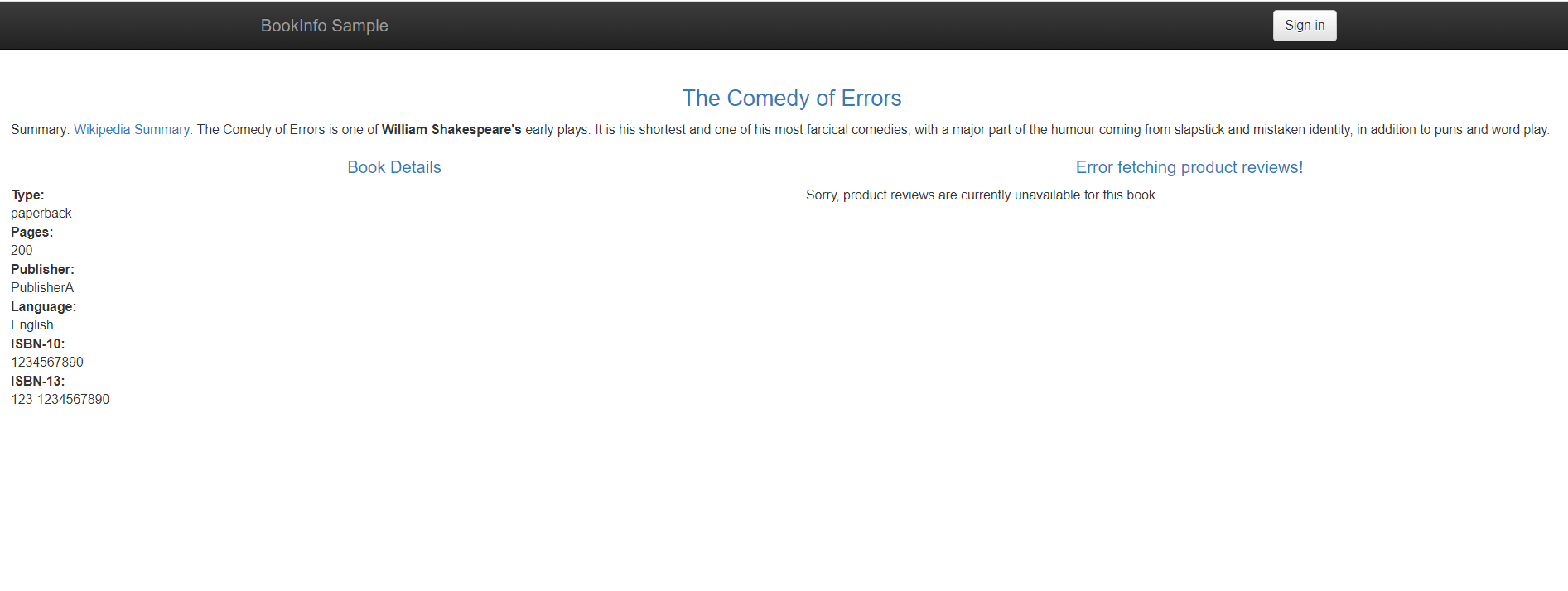
가상 서비스 규칙에 따라 브라우저에서 http://8.136.193.105:32156/productpage에 접속하면 productpage에 접속할 수 있습니다. 현재 reviews 서비스가 배포되지 않았으므로 Sorry, product reviews are currently unavailable for this book라는 메시지가 표시됩니다.
5단계: 자동화 배포
5.1 Gitlab 프로젝트 생성
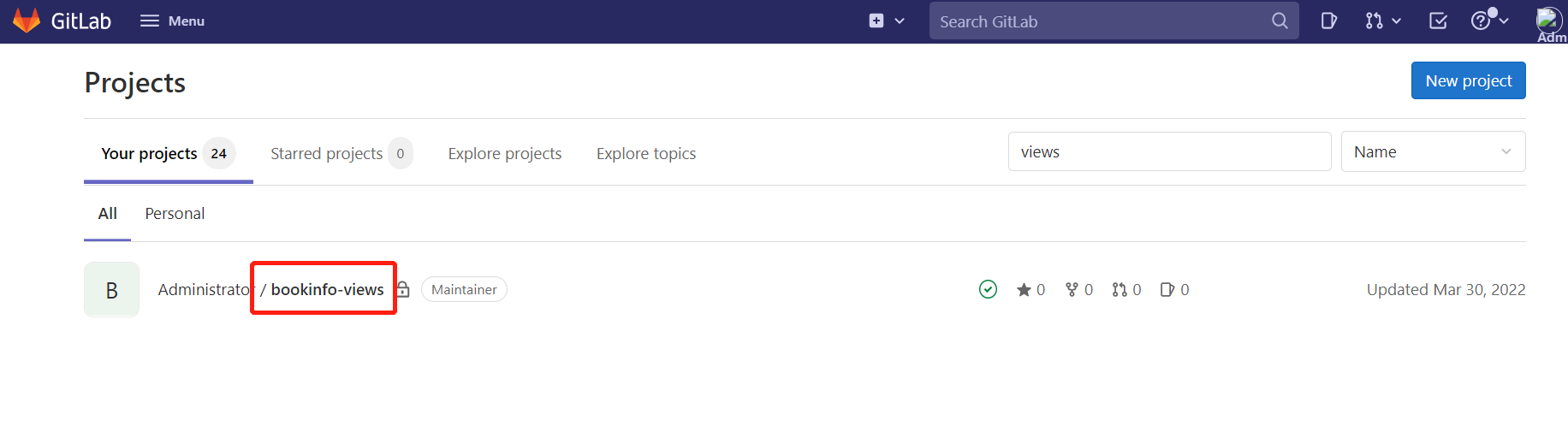
Gitlab에 로그인하여 bookinfo-views 프로젝트를 생성합니다.
5.2 Gitlab과 DataKit 연결
gitlab 통합 문서를 참조하여 Gitlab과 DataKit을 연결합니다. 여기서는 Gitlab CI만 구성합니다.
『Gitlab』에 로그인하고, 『bookinfo-views』 -> 『Settings』 -> 『Webhooks』로 이동한 후, URL에 DataKit이 설치된 호스트 IP와 DataKit의 9529 포트를 입력하고 마지막에 /v1/gitlab을 추가합니다. 아래 그림을 참조하세요.
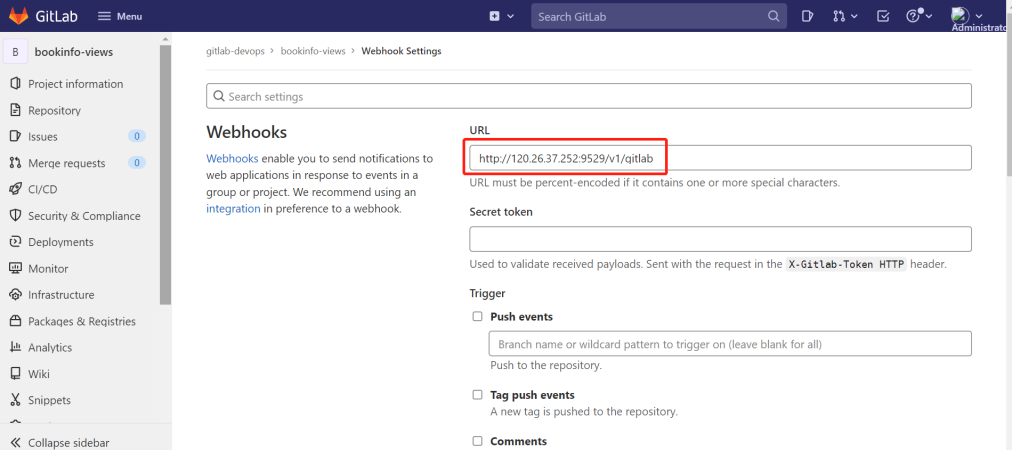
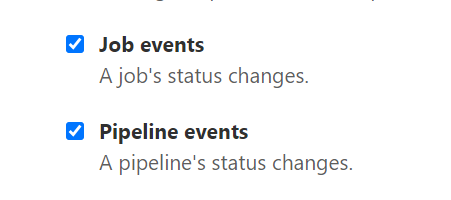
Job events와 Pipeline events를 선택하고, Add webhook을 클릭합니다.
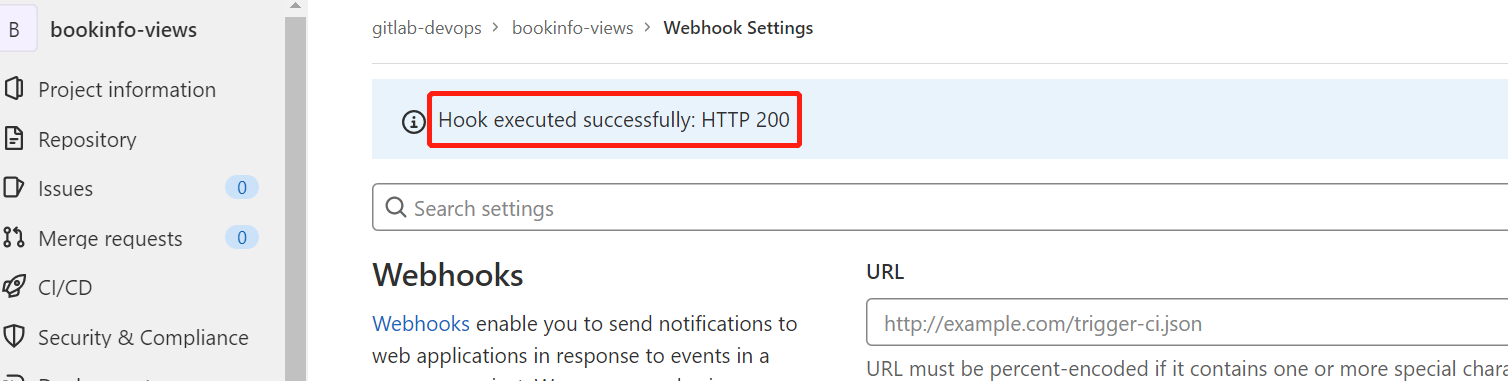
방금 생성한 Webhooks 오른쪽의 Test를 클릭하고 Pipeline events를 선택하면 아래와 같이 HTTP 200이 표시되면 구성이 성공한 것입니다.
5.3 reviews 마이크로서비스에 Gitlab-CI 구성
『Gitlab』에 로그인하고, 『bookinfo-views』로 이동한 후, 루트 디렉터리에 deployment.yaml과 .gitlab-ci.yml 파일을 생성합니다. annotations에는 project, env, version 태그를 정의하여 프로젝트 및 버전별로 구분합니다.
apiVersion: v1
kind: Service
metadata:
  name: reviews
  namespace: prod
  labels:
    app: reviews
    service: reviews
spec:
  ports:
  - port: 9080
    name: http
  selector:
    app: reviews
---
apiVersion: v1
kind: ServiceAccount
metadata:
  name: bookinfo-reviews
  namespace: prod
  labels:
    account: reviews
---
apiVersion: apps/v1
kind: Deployment
metadata:
  name: reviews-__version__
  namespace: prod
  labels:
    app: reviews
    version: __version__
spec:
  replicas: 1
  selector:
    matchLabels:
      app: reviews
      version: __version__
  template:
    metadata:
      labels:
        app: reviews
        version: __version__
      annotations:
        datakit/prom.instances: |
          [[inputs.prom]]
            url = "http://$IP:15020/stats/prometheus"
            source = "bookinfo-istio-review"
            metric_types = ["counter", "gauge"]
            interval = "60s"
            tags_ignore = ["cache","cluster_type","component","destination_app","destination_canonical_revision","destination_canonical_service","destination_cluster","destination_principal","group","grpc_code","grpc_method","grpc_service","grpc_type","reason","request_protocol","request_type","resource","responce_code_class","response_flags","source_app","source_canonical_revision","source_canonical-service","source_cluster","source_principal","source_version","wasm_filter"]
            metric_name_filter = ["istio_requests_total","pilot_k8s_cfg_events","istio_build","process_virtual_memory_bytes","process_resident_memory_bytes","process_cpu_seconds_total","envoy_cluster_assignment_stale","go_goroutines","pilot_xds_pushes","pilot_proxy_convergence_time_bucket","citadel_server_root_cert_expiry_timestamp","pilot_conflict_inbound_listener","pilot_conflict_outbound_listener_http_over_current_tcp","pilot_conflict_outbound_listener_tcp_over_current_tcp","pilot_conflict_outbound_listener_tcp_over_current_http","pilot_virt_services","galley_validation_failed","pilot_services","envoy_cluster_upstream_cx_total","envoy_cluster_upstream_cx_connect_fail","envoy_cluster_upstream_cx_active","envoy_cluster_upstream_cx_rx_bytes_total","envoy_cluster_upstream_cx_tx_bytes_total","istio_request_duration_milliseconds_bucket","istio_request_duration_seconds_bucket","istio_request_bytes_bucket","istio_response_bytes_bucket"]
            #measurement_prefix = ""
            measurement_name = "istio_prom"
            #[[inputs.prom.measurements]]
            # prefix = "cpu_"
            # name = "cpu"
            [inputs.prom.tags]
            namespace = "$NAMESPACE"
        proxy.istio.io/config: |
          tracing:
            zipkin:
              address: zipkin.istio-system:9411
            custom_tags:
              project:
                literal:
                  value: "reviews"
              version:
                literal:
                  value: __version__
              env:
                literal:
                  value: "test"
    spec:
      serviceAccountName: bookinfo-reviews
      containers:
      - name: reviews
        image: docker.io/istio/examples-bookinfo-reviews-__version__:1.16.2
        imagePullPolicy: IfNotPresent
        env:
        - name: LOG_DIR
          value: "/tmp/logs"
        ports:
        - containerPort: 9080
        volumeMounts:
        - name: tmp
          mountPath: /tmp
        - name: wlp-output
          mountPath: /opt/ibm/wlp/output
        securityContext:
          runAsUser: 1000
      volumes:
      - name: wlp-output
        emptyDir: {}
      - name: tmp
        emptyDir: {}
variables:
  APP_VERSION: "v1"

stages:
  - deploy

deploy_k8s:
  image: bitnami/kubectl:1.22.7
  stage: deploy
  tags:
    - kubernetes-runner
  script:
    - echo "deploy 실행"
    - ls
    - sed -i "s#__version__#${APP_VERSION}#g" deployment.yaml
    - cat deployment.yaml
    - kubectl apply -f deployment.yaml
  after_script:
    - sleep 10
    - kubectl get pod  -n prod
6단계: Gitlab CI 관측 가능성
6.1 reviews 마이크로서비스 배포
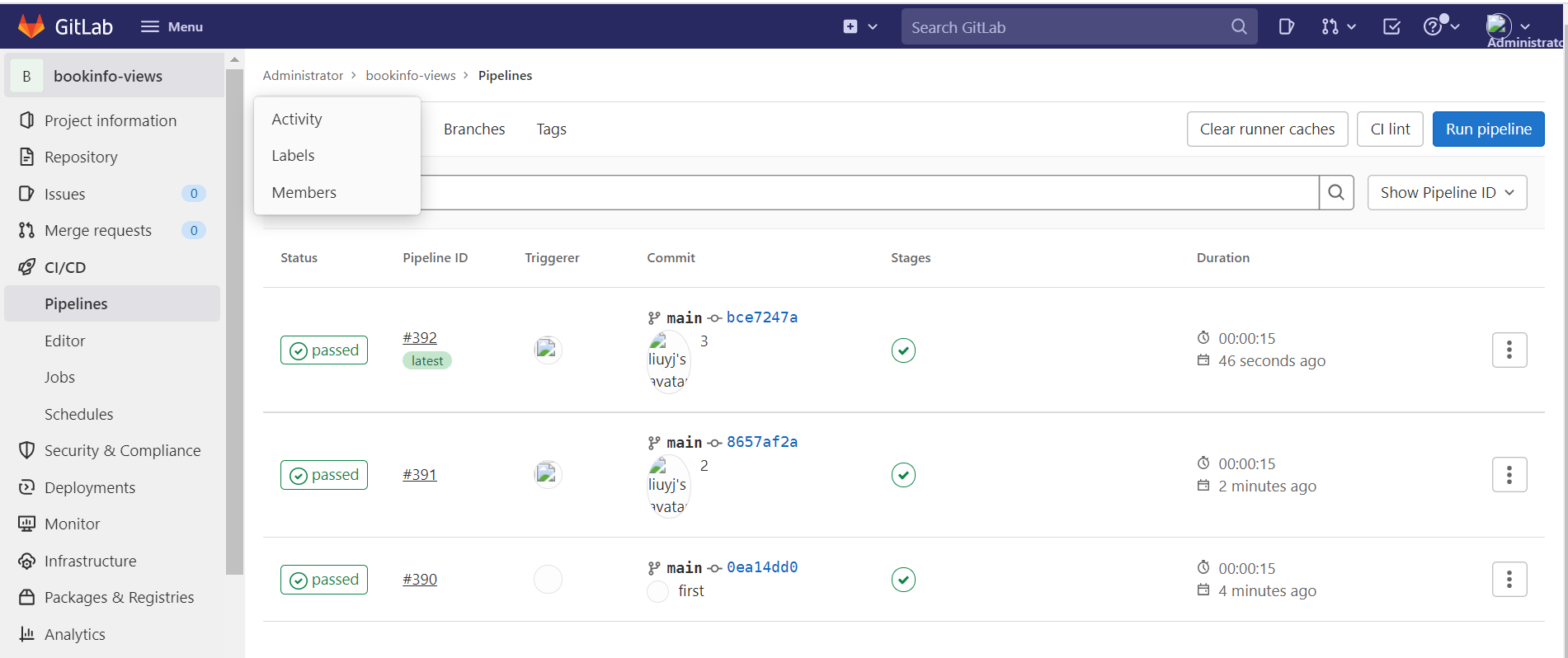
.gitlab-ci.yml 파일에서 APP_VERSION 값을 "v1"으로 변경하고 코드를 한 번 커밋한 후, "v2"로 변경하여 다시 커밋하고, "v3"로 변경하여 다시 한 번 커밋합니다.
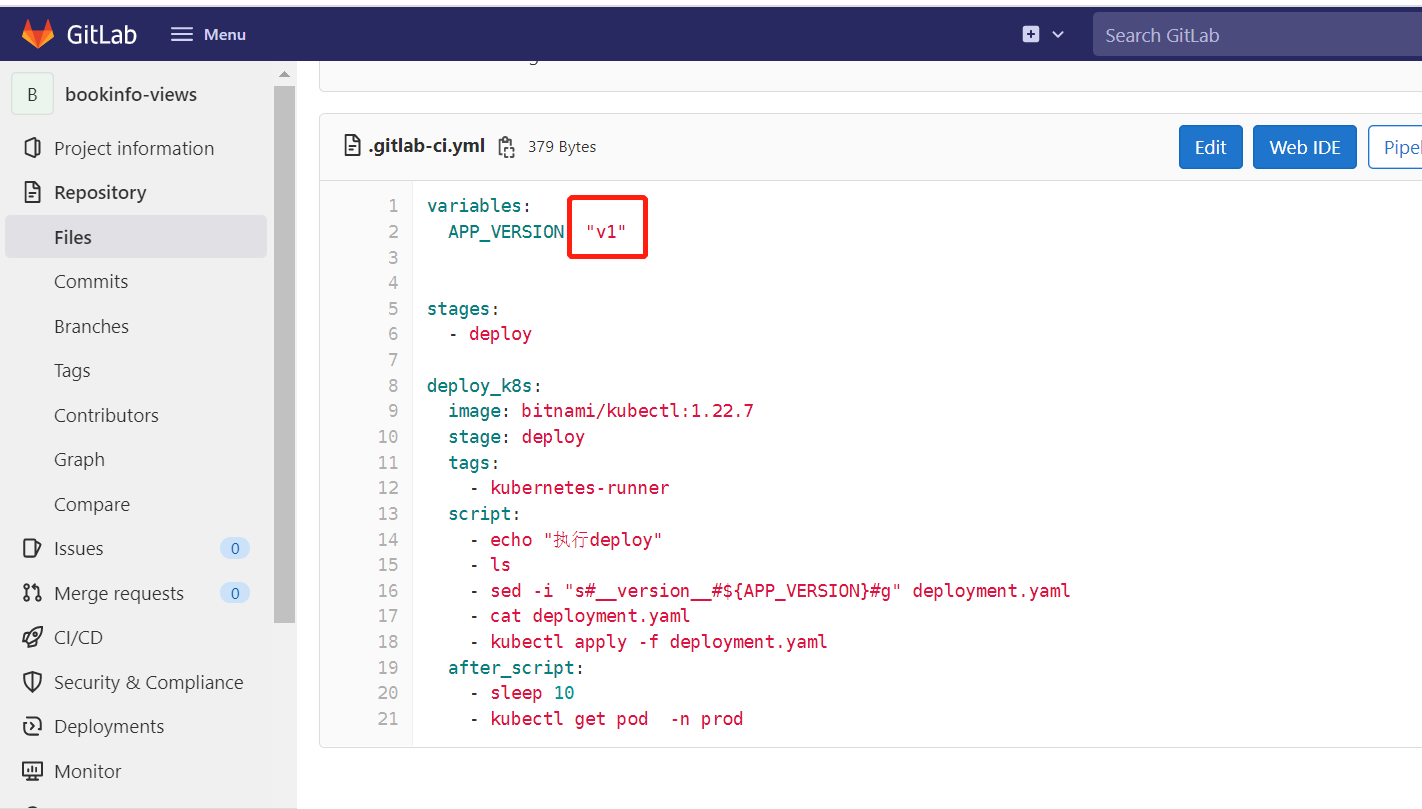
이제 Pipeline이 3번 트리거됩니다.
6.2 Gitlab CI 파이프라인 관측 가능성
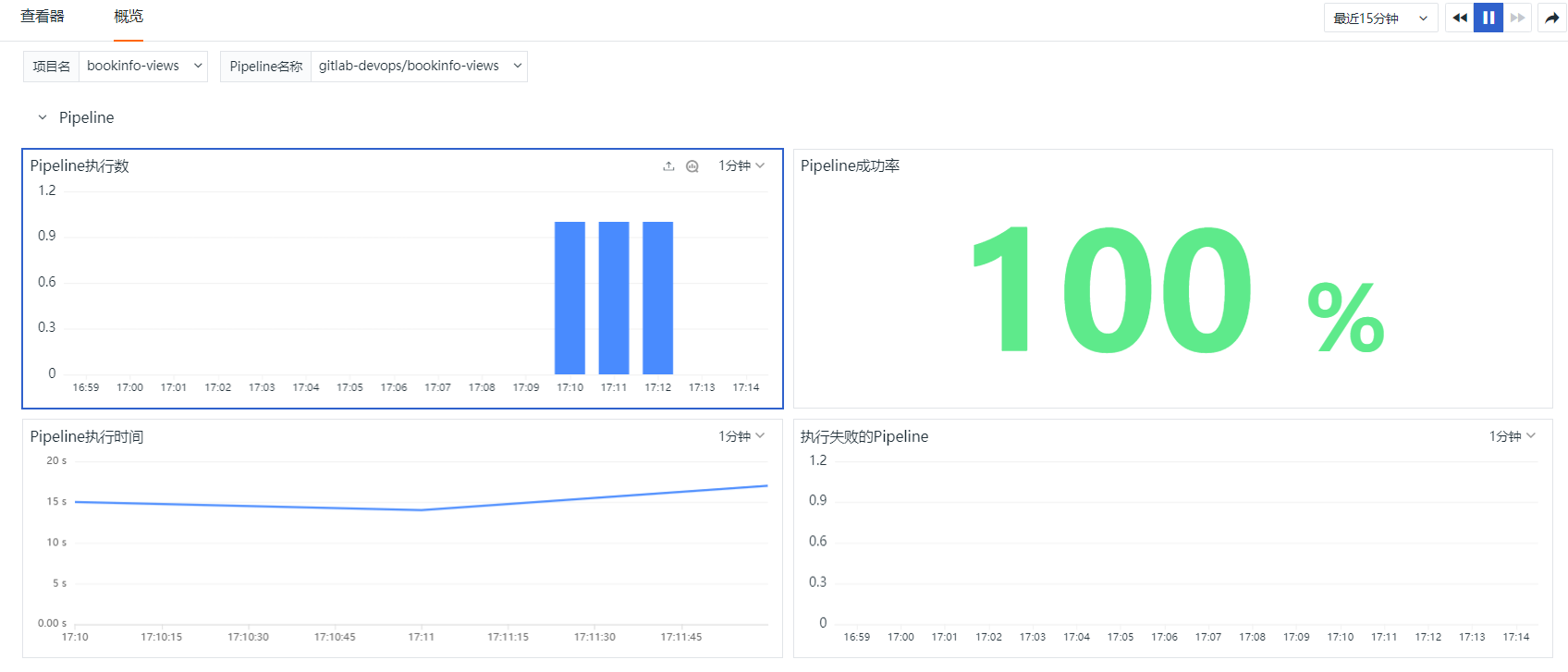
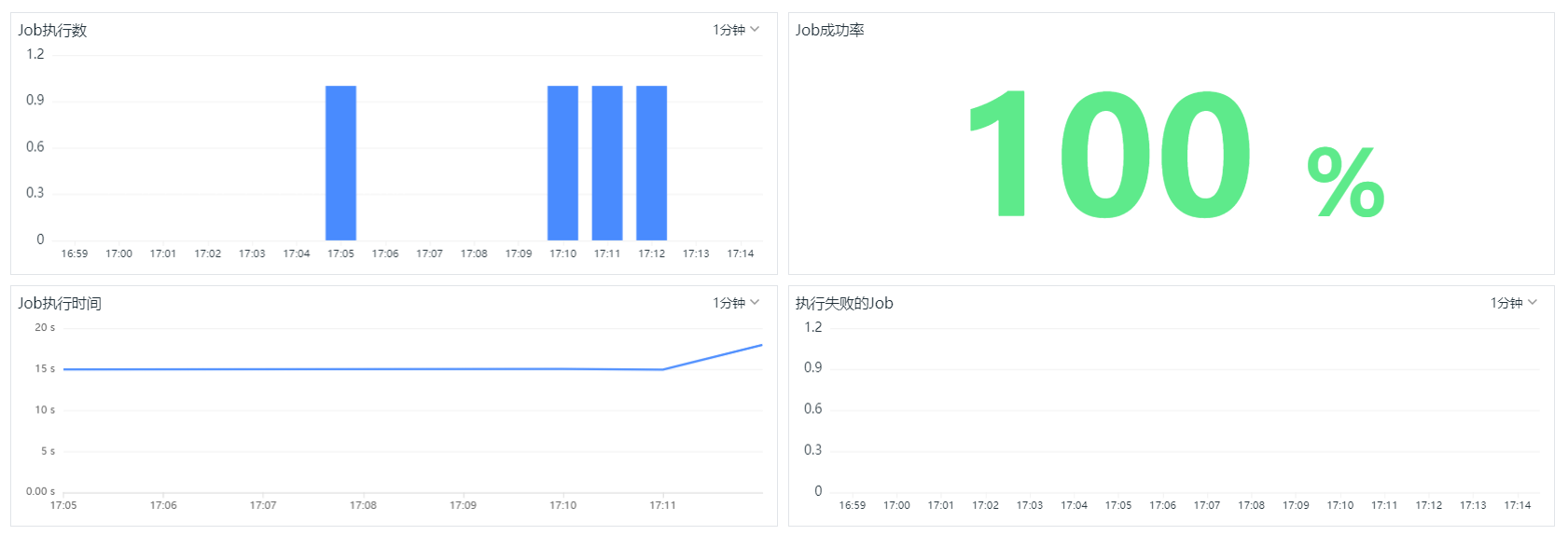
『Guance』에 로그인하고, 『CI』로 이동한 후, 『개요』를 클릭하여 bookinfo-views 프로젝트를 선택하고 Pipeline 및 Job 실행 상태를 확인합니다.
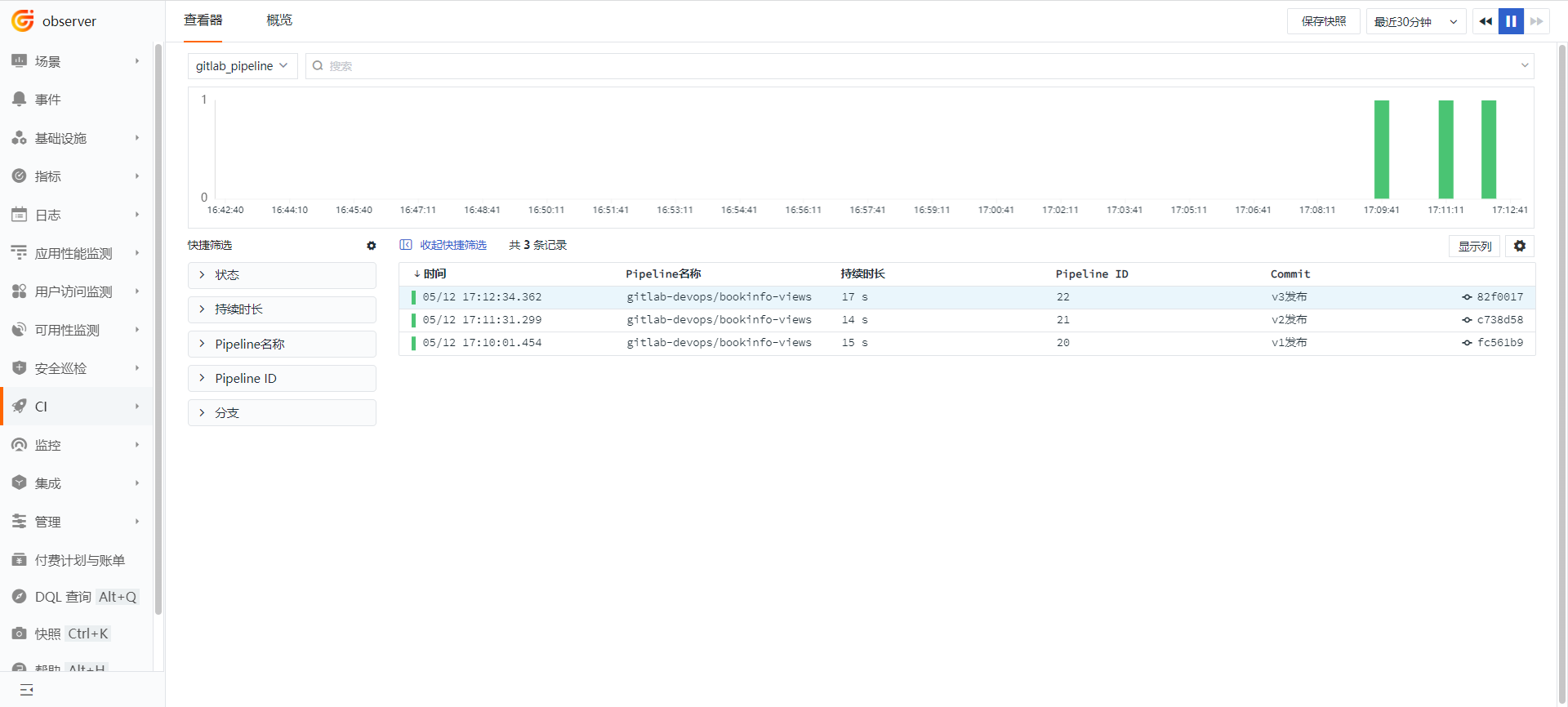
『Guance』에 로그인하고, 『CI』로 이동한 후, 『탐색기』를 클릭하고 gitlab_pipeline을 선택합니다.
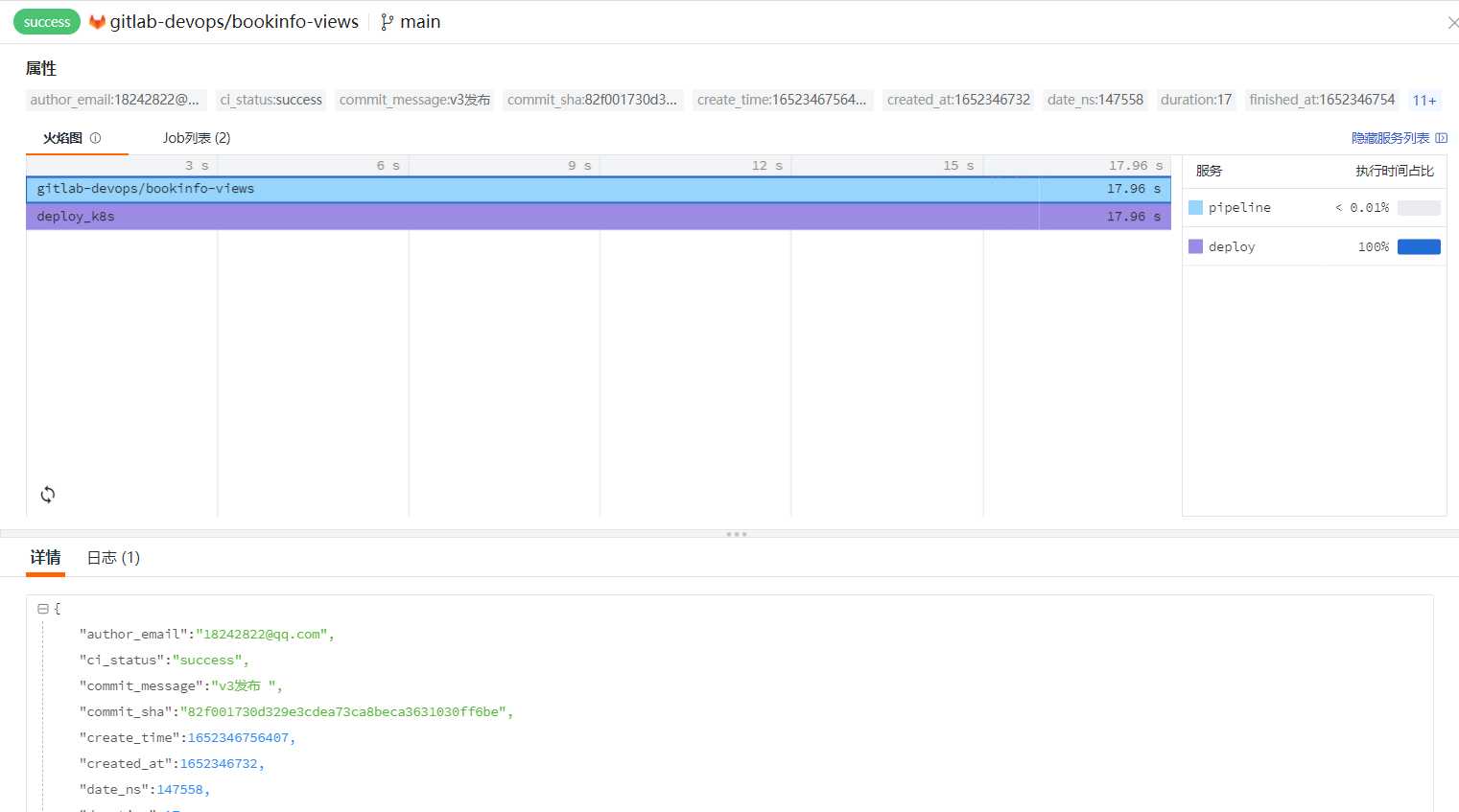
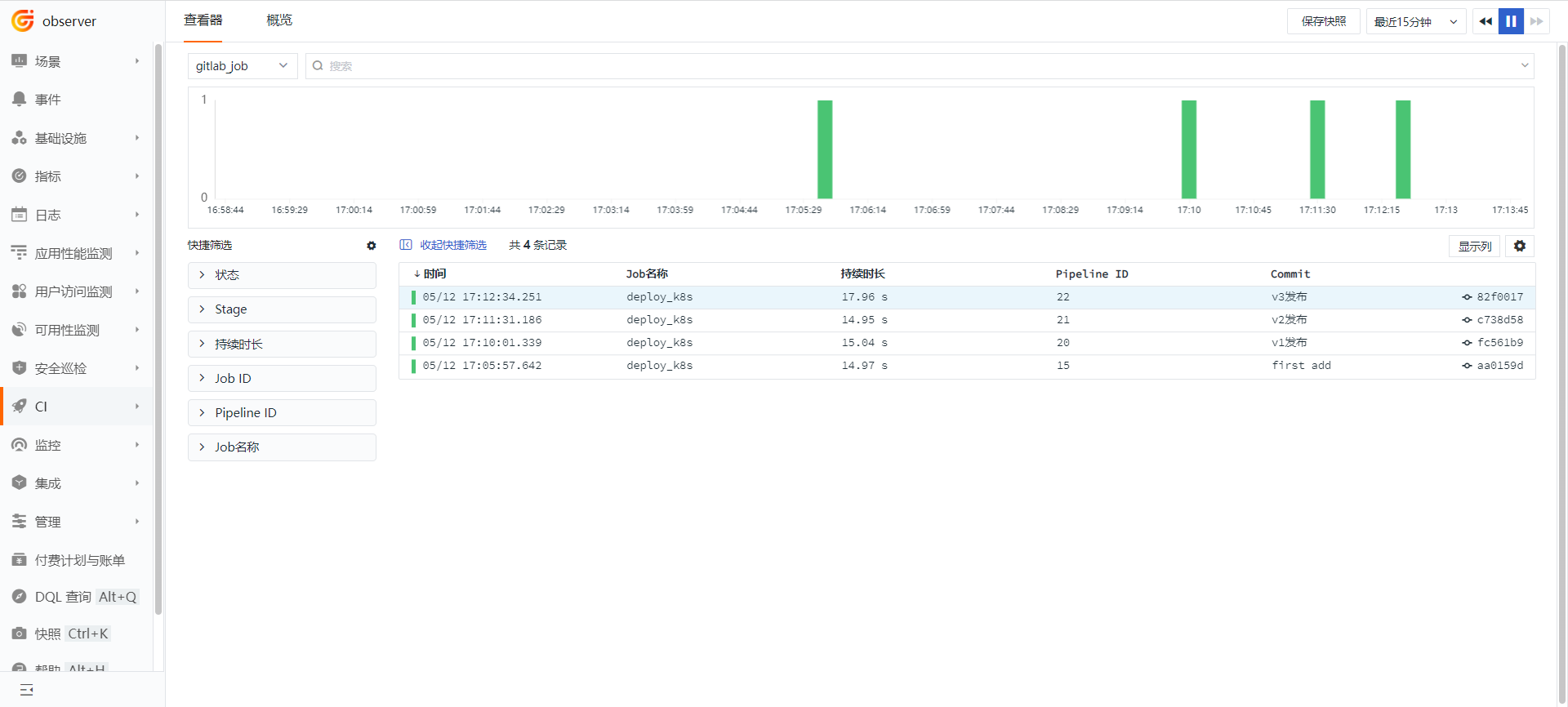
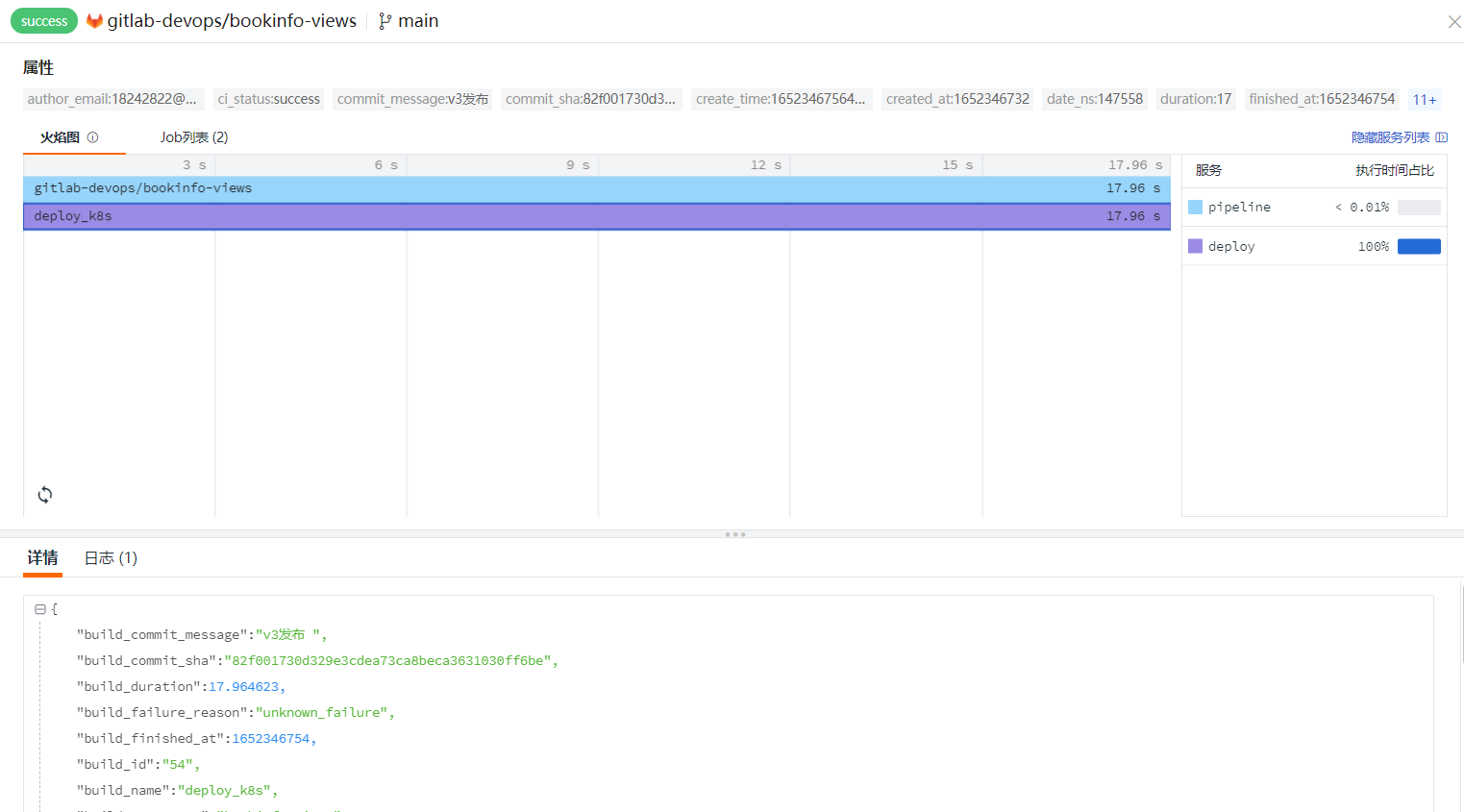
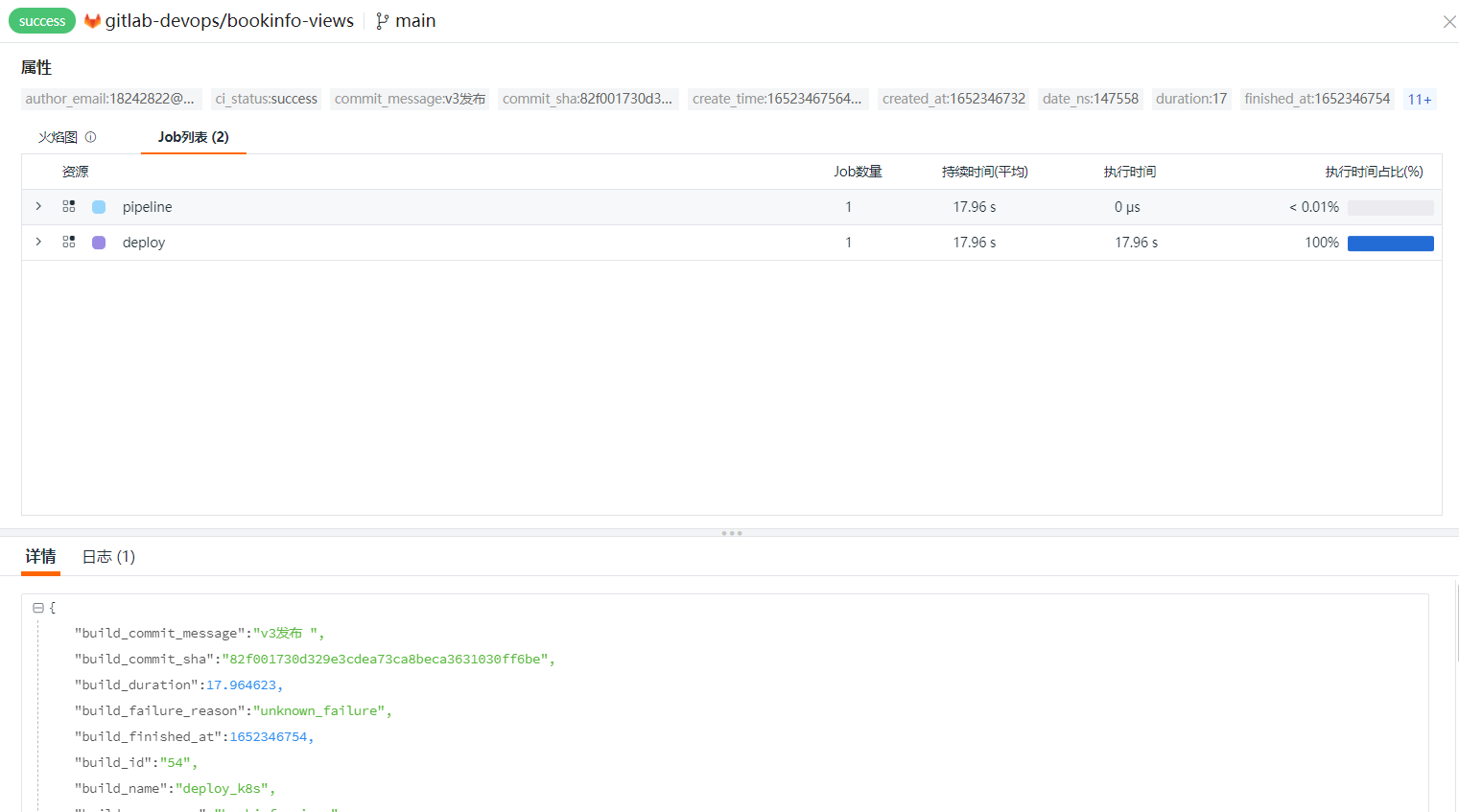
『Guance』에 로그인하고, 『CI』로 이동한 후, 『탐색기』를 클릭하고 gitlab_job을 선택합니다.