service mesh マイクロサービスアーキテクチャにおける開発からカナリアリリースまでの全フローベストプラクティス(前編)
はじめに
一般的な企業が独自のコンテナクラウド環境を構築した後、煩雑なリリースプロセスを簡素化するために、GitlabCI や Jenkins を使用してアプリケーションをデプロイすることがよくあります。また、Rancher を使用して統合的なリソースオーケストレーション管理を行い、Rancher のアプリケーションストアを通じてアプリケーション管理を簡素化します。アプリケーションストアから DataKit をワンクリックでインストール(詳細は DataKit ドキュメントの Helm インストール方法を参照)することで、Guance Rancher が管理する Kubernetes クラスタに対して、数多くのすぐに使える可観測性機能を提供します。本稿では、よく知られた Bookinfo サンプルを使用して、Guance を活用した GitlabCI、Kubernetes、マイクロサービスの可観測性を実現する方法を詳しく説明します。
ケース想定
ある企業は Rancher を使用して 2 セットの Kubernetes を管理しています。1 セットは開発テスト用、もう 1 セットは本番環境用です。企業は開発テスト環境に gitlab をデプロイして CICD を実施しており、BookInfo プロジェクトは電子書籍ストアであり、典型的な多言語マイクロサービスのプロジェクトです。現在開発中のバージョンが開発テスト環境にデプロイされ、テスト完了後、本番環境の BookInfo に対してカナリアリリース(グレイリリース)を実施します。この企業の可観測性体系の構成要素は以下の通りです。
1.1 SRE は Guance 上で両環境の Kubernetes リソース状況を監視し、キャパシティプランニングと緊急対応を行います。
2.1 開発者は cicd のプロセスを監視し、ソフトウェアのイテレーション速度と品質を把握し、エラーが発生したパイプラインを迅速に処理します。
2.2 SRE は本番環境でのカナリアリリースを監視し、バージョンのトラフィック切り替え状況を把握し、迅速にロールバックして本番ユーザーへの影響を回避します。
3.1 SRE は istio を使用してアプリケーション全体の分散型トレーシングを実施し、Guance 上でアプリケーションの健全性に関する主要な指標を確認し、異常なリクエストを迅速に処理します。
3.2 開発者は自身のログを管理し、健全性に異常が発生した場合、Guance 上で分散型トレーシングを通じてログのコンテキストを迅速に見つけ出し、問題を解決します。
本実践については、全 3 回に分けて解説します。
前提条件
- Kubernetes をインストールしていること。
- Rancher をインストールしていること。
- Gitlab をインストールしていること。
- Metrics-Server コンポーネント をインストールしていること。
- harbor レジストリまたはその他のイメージレジストリをデプロイしていること。
- Istio をデプロイし、Istio によるマイクロサービスの可観測性のベストプラクティス を理解していること。
- Gitlab-runner を設定し、Gitlab-CI の可観測性のベストプラクティス を理解していること。
デプロイ手順
ステップ 1:Rancher を使用した DataKit のインストール
1.1 DataKit のデプロイ
1.1.1 デプロイファイルのダウンロード
『Guance』にログインし、『インテグレーション』モジュールをクリックし、次に左上の『DataKit』をクリックし、『Kubernetes』を選択して datakit.yaml をダウンロードします。
1.1.2 token の設定
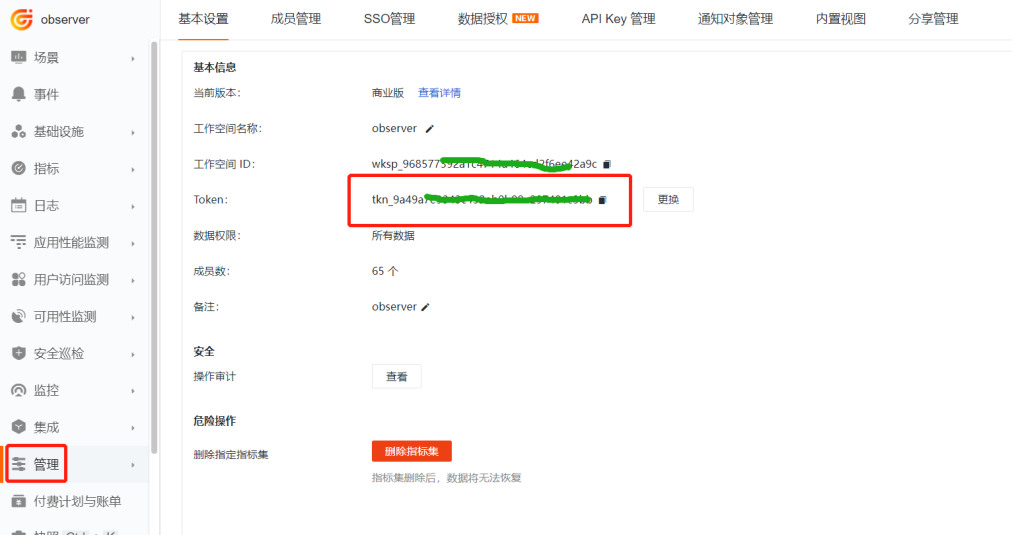
『Guance』にログインし、『管理』モジュールに入り、下図の token を見つけ、datakit.yaml ファイル内の ENV_DATAWAY 環境変数の value 値の中の
1.1.3 グローバルタグの設定
datakit.yaml ファイルの ENV_GLOBAL_HOST_TAGS 環境変数の値の最後に cluster_name_k8s=k8s-istio を追加します。k8s-istio はお客様のクラスタ名です。この手順でクラスタにグローバルタグを設定します。
        - name: ENV_GLOBAL_HOST_TAGS
          value: host=__datakit_hostname,host_ip=__datakit_ip,cluster_name_k8s=k8s-istio
1.1.4 名前空間の設定
DataKit が選挙時に異なるクラスタを区別できるように、ここで ENV_NAMESPACE 環境変数を設定する必要があります。異なるクラスタでは値を異なるものにする必要があります。datakit.yaml ファイルの環境変数部分に以下の内容を追加します。
1.1.5 コレクターの有効化
ddtrace コレクターと statsd コレクターを有効にします。datakit.yaml ファイル内の ENV_DEFAULT_ENABLED_INPUTS 環境変数を見つけ、最後に statsd,ddtrace を追加します。
        - name: ENV_DEFAULT_ENABLED_INPUTS
          value: cpu,disk,diskio,mem,swap,system,hostobject,net,host_processes,container,statsd,ddtrace
1.1.6 DataKit のデプロイ
『Rancher』にログインし、クラスタ参照タブで『k8s-solution-cluster』クラスタを選択し、datakit.yaml を開き、リソースファイルの内容に従って、k8s-solution-cluster クラスタ内の対応するメニューを見つけ、リソースを一つずつ作成します。
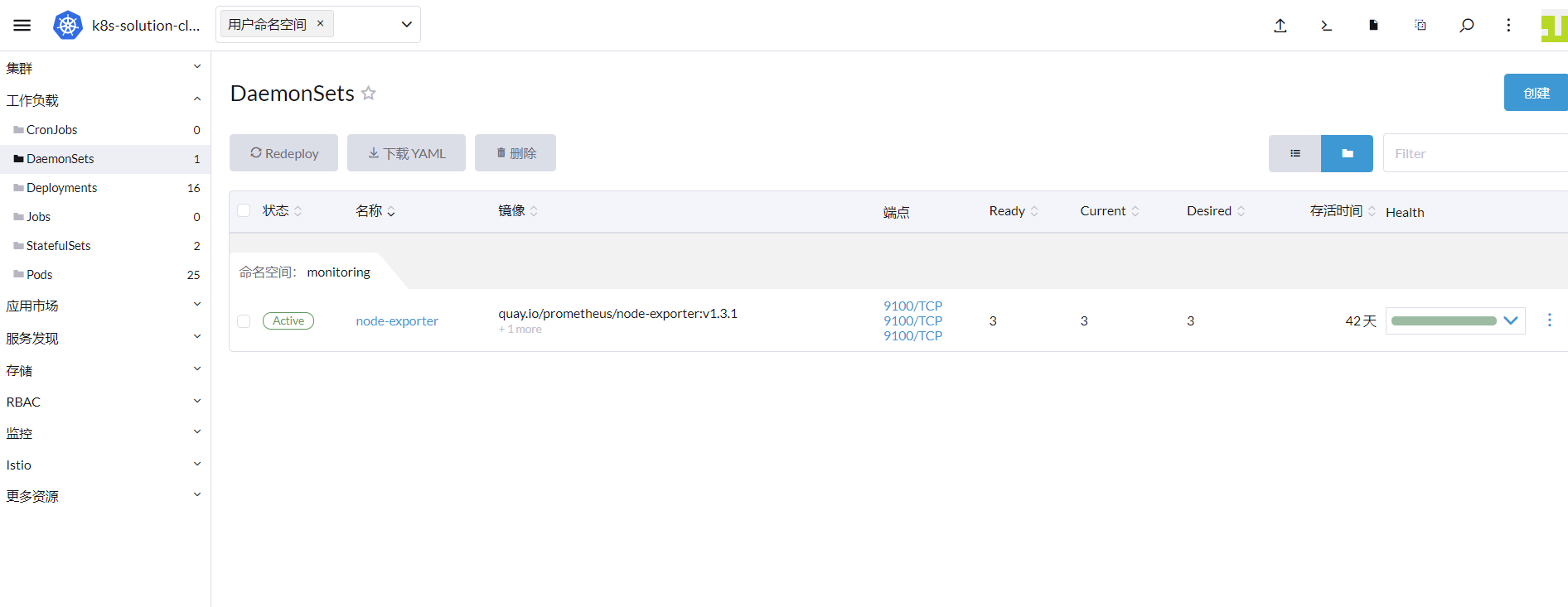
『注意』次の手順を迅速に実施するため、今回は ConfigMap を統合した後、直接 kubectl コマンドを使用して DataKit をデプロイします。
1.2 ConfigMap の作成
container コレクターと zipkin コレクターを有効にするには、まず container.conf と zipkin.conf を定義する必要があります。
apiVersion: v1
kind: ConfigMap
metadata:
  name: datakit-conf
  namespace: datakit
data:
    #### container
    container.conf: |-
      [inputs.container]
        docker_endpoint = "unix:///var/run/docker.sock"
        containerd_address = "/var/run/containerd/containerd.sock"

        enable_container_metric = true
        enable_k8s_metric = true
        enable_pod_metric = true

        ## Containers logs to include and exclude, default collect all containers. Globs accepted.
        container_include_log = []
        container_exclude_log = ["image:pubrepo.guance.com/datakit/logfwd*", "image:pubrepo.guance.com/datakit/datakit*"]

        exclude_pause_container = true

        ## Removes ANSI escape codes from text strings
        logging_remove_ansi_escape_codes = false

        kubernetes_url = "https://kubernetes.default:443"

        ## Authorization level:
        ##   bearer_token -> bearer_token_string -> TLS
        ## Use bearer token for authorization. ('bearer_token' takes priority)
        ## linux at:   /run/secrets/kubernetes.io/serviceaccount/token
        ## windows at: C:\var\run\secrets\kubernetes.io\serviceaccount\token
        bearer_token = "/run/secrets/kubernetes.io/serviceaccount/token"
        # bearer_token_string = "<your-token-string>"

        [inputs.container.tags]
          # some_tag = "some_value"
          # more_tag = "some_other_value"

    #### zipkin
    zipkin.conf: |-
        [[inputs.zipkin]]
          pathV1 = "/api/v1/spans"
          pathV2 = "/api/v2/spans"
[inputs.container] パラメータの説明
- container_include_metric:収集するコンテナメトリクス。
- container_exclude_metric:収集しないコンテナメトリクス。
- container_include_log:収集するコンテナログ。
- container_exclude_log:収集しないコンテナログ。
- exclude_pause_container:true は pause コンテナを除外する。
container_includeとcontainer_excludeはimageで始まり、形式は"image:<glob规则>"とする必要があります。これは glob ルールがコンテナイメージに対して有効であることを示します。- Glob ルール は軽量な正規表現であり、
*?などの基本的なマッチングユニットをサポートします。
次に『Rancher』にログインし、クラスタ参照タブで『k8s-solution-cluster』クラスタを選択し、『その他のリソース』-> 『Core』-> 『ConfigMaps』と進み、yaml 形式で上記で定義した ConfigMap を作成します。
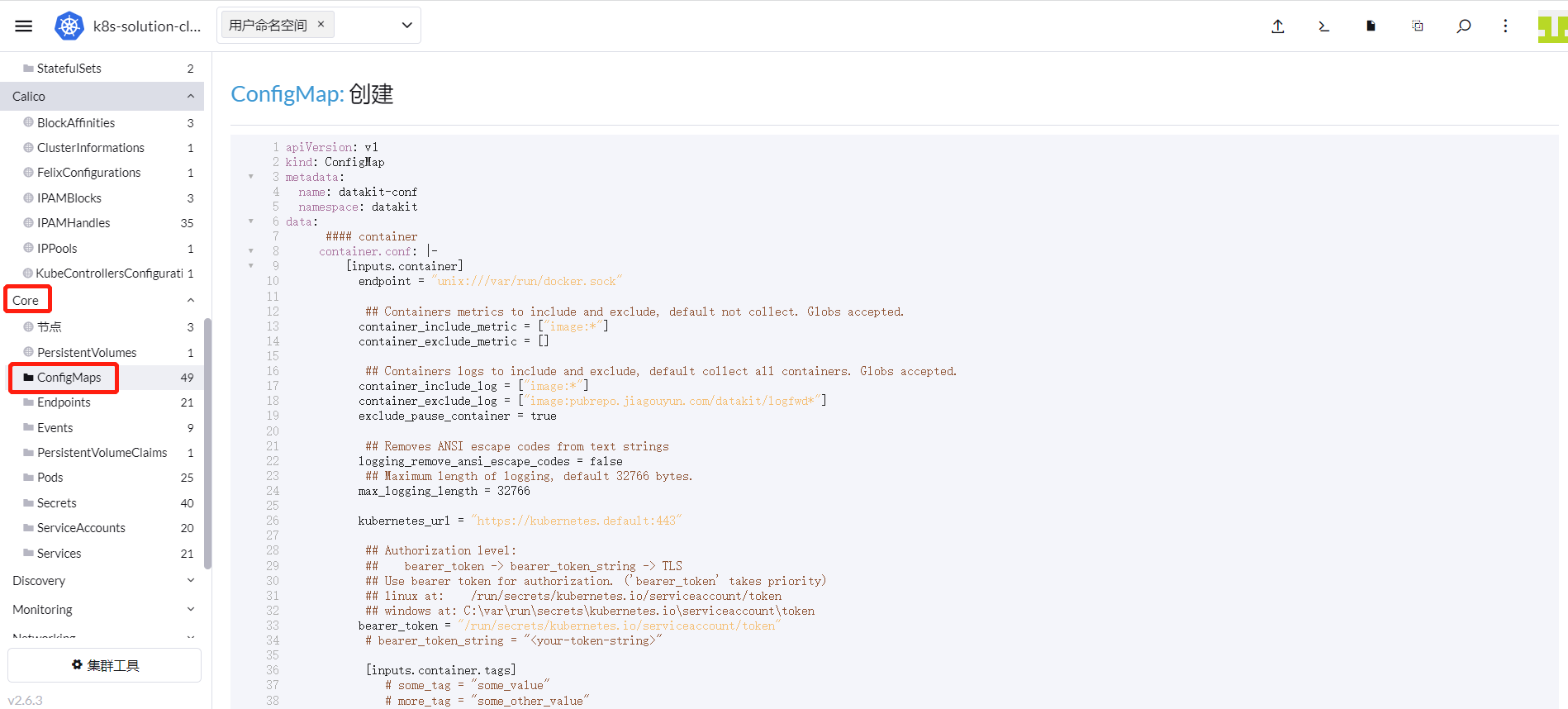
最後に DataKit と ConfigMap を関連付けます。『k8s-solution-cluster』クラスタで、『ワークロード』-> 『DaemonSets』に進み DataKit を見つけ、右側で『YAML を編集』を選択し、以下の内容を追加し、最後に『保存』をクリックします。
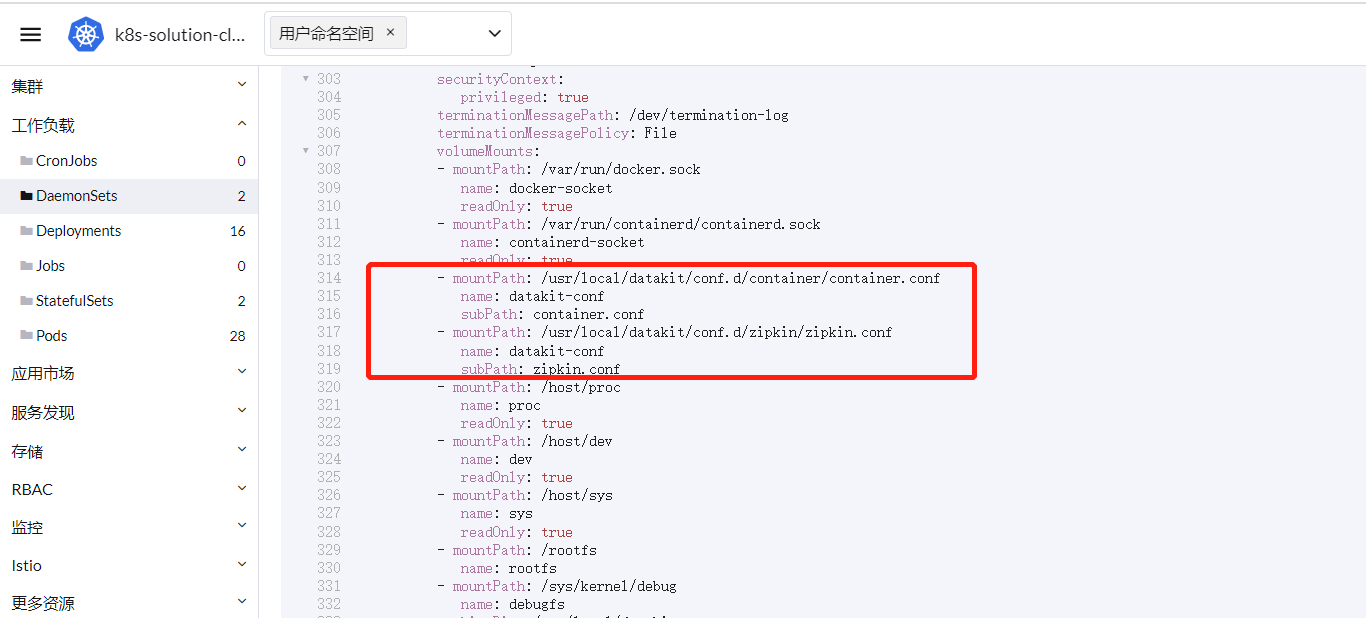
        - mountPath: /usr/local/datakit/conf.d/container/container.conf
          name: datakit-conf
          subPath: container.conf
        - mountPath: /usr/local/datakit/conf.d/zipkin/zipkin.conf
          name: datakit-conf
          subPath: zipkin.conf
kubectl コマンドで DataKit を作成する場合は、ConfigMap で定義した内容を datakit.yaml ファイルの最後に追加し、上記の設定をファイルの volumeMounts の下に追加します。
『注意』--- で区切ってください。
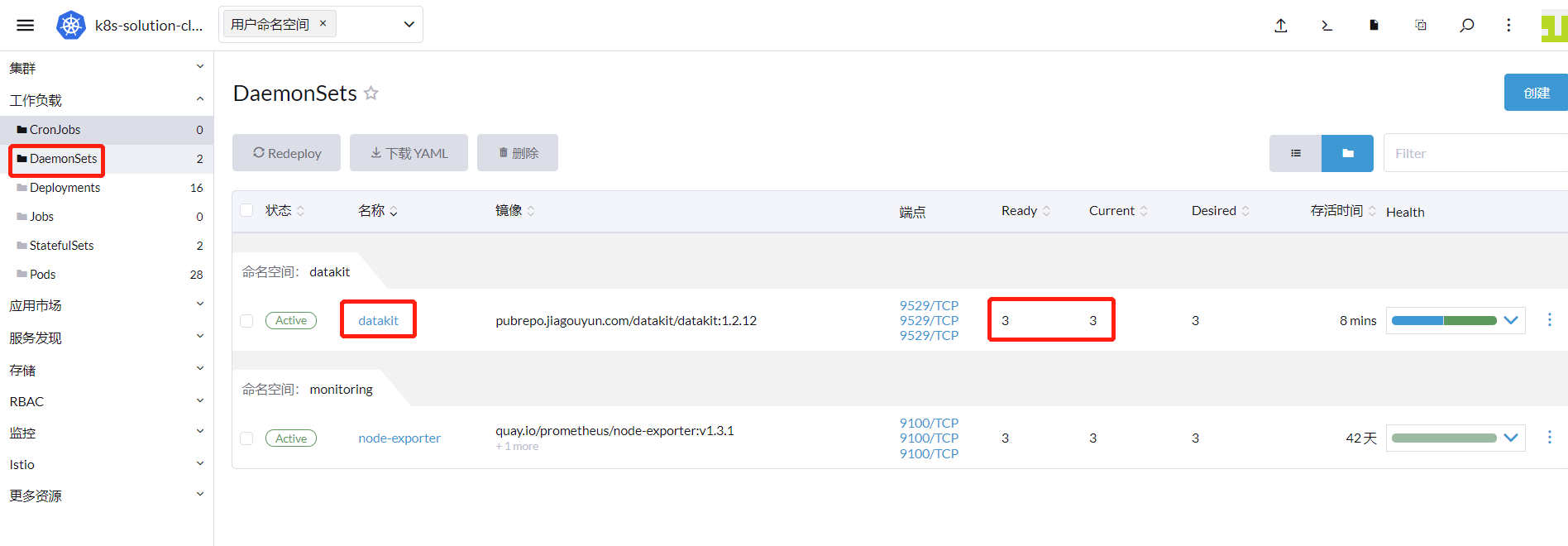
1.3 DataKit の実行状態の確認
DataKit のデプロイが成功すると、以下の図のような実行状態が表示されます。
ステップ 2:DataKit サービスのマッピング
Istio を使用して分散型トレーシングデータを報告する際、トレースデータは zipkin.istio-system の Service に送られ、その報告ポートは 9411 です。DataKit サービスの名前空間は datakit、ポートは 9529 であるため、ここで変換が必要です。詳細は Kubernetes クラスタで ExternalName を使用して DataKit サービスをマッピングする を参照してください。
ステップ 3:DataFlux Function での DataKit 設定
Gitlab-CI でマイクロサービスをデプロイする際に、Gitlab の実行データを収集するために、DataFlux Function をデプロイし、DataKit を設定する必要があります。詳細な手順は Gitlab-CI の可観測性のベストプラクティス を参照してください。
ステップ 4:Bookinfo のデプロイ
2.1 ソースコードのダウンロード
istio-1.13.2.zip をダウンロードします。以降で使用するデプロイファイルはすべてこの圧縮パッケージから取得します。操作を容易にするため、Rancher の GUI ではなく kubectl コマンドを使用してリソースを作成します。
2.2 RUM の有効化
Web サイトが呼び出される情報を監視するために、フロントエンドのデータ収集を有効にする必要があります。『Guance』にログインし、『リアルユーザーモニタリング(RUM)』に入り、新しいアプリケーション devops-bookinfo を作成し、下記の JS をコピーします。
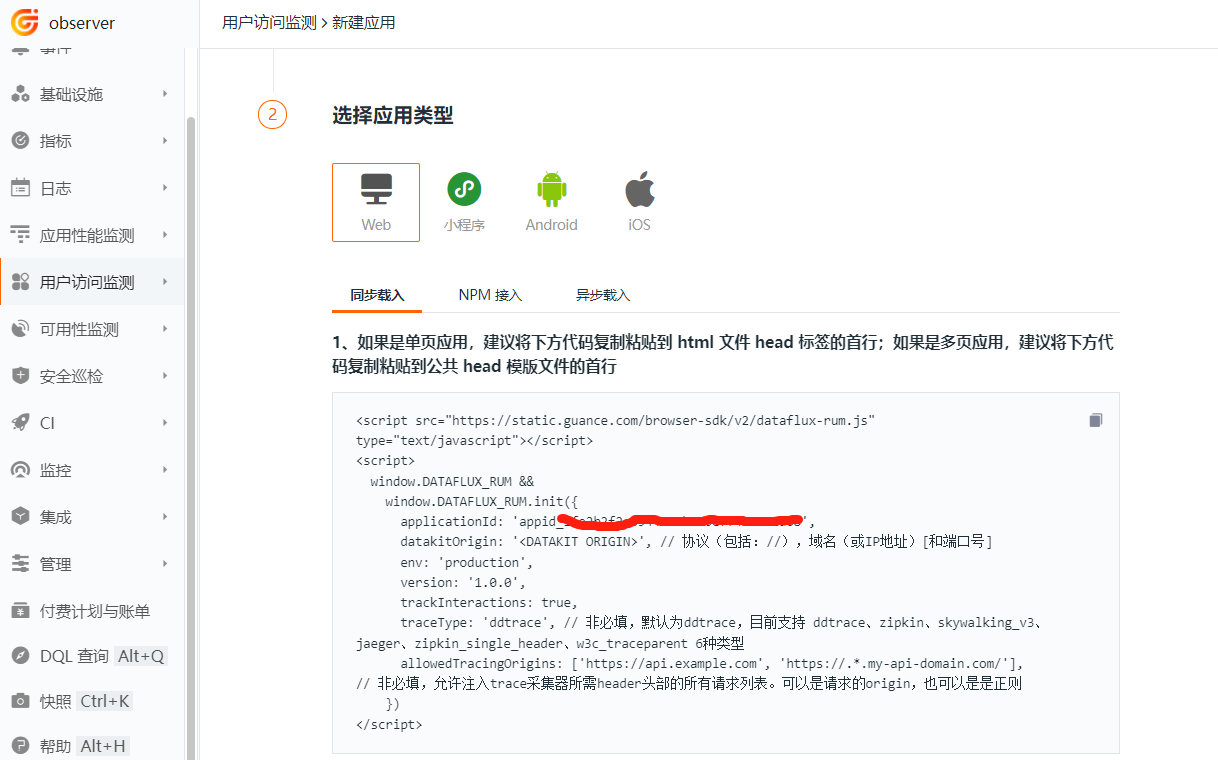
上記の JS は、productpage プロジェクトのすべてのインターフェースからアクセス可能な場所に配置する必要があります。本プロジェクトでは、上記の JS を istio-1.13.2\samples\bookinfo\src\productpage\templates\productpage.html ファイルにコピーします。 『注意』RUM データ報告先の DataKit アドレスについては、RUM データ報告先 DataKit クラスタのベストプラクティス を参照してください。
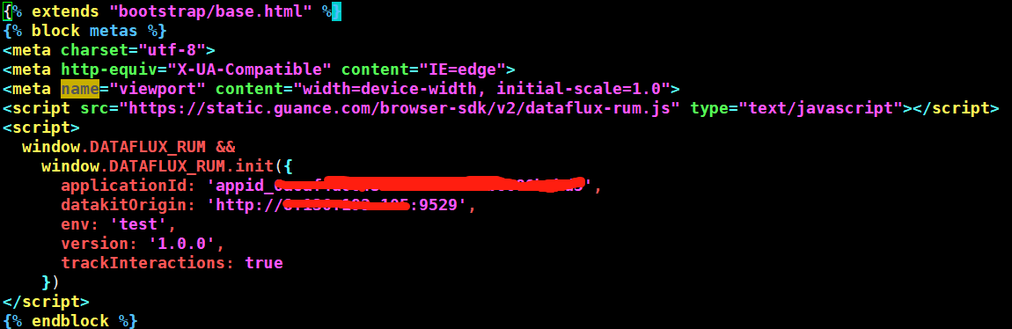
次に、productpage のイメージを再ビルドし、イメージレジストリにアップロードします。
cd istio-1.13.2\samples\bookinfo\src\productpage
docker build -t 172.16.0.238/df-demo/product-page:v1  .
docker push 172.16.0.238/df-demo/product-page:v1
2.3 Sidecar インジェクションの有効化
prod 名前空間を作成し、この名前空間で Pod 作成時に自動的に Sidecar をインジェクトするように設定し、Pod の出入力トラフィックをすべて Sidecar で処理するようにします。
2.4 productpage、details、ratings のデプロイ
istio-1.13.2\samples\bookinfo\platform\kube\bookinfo.yaml ファイルから、reviews マイクロサービスのデプロイに関する部分を削除し、Service と Deployment をすべて prod 名前空間にデプロイし、すべての Deployment コントローラの Pod テンプレートに annotations を追加して、Pod のカスタム収集を有効にします。productpage イメージは前の手順で作成したものに変更します。完全なファイルは以下の通りです。
# Copyright Istio Authors
#
#   Licensed under the Apache License, Version 2.0 (the "License");
#   you may not use this file except in compliance with the License.
#   You may obtain a copy of the License at
#
#       http://www.apache.org/licenses/LICENSE-2.0
#
#   Unless required by applicable law or agreed to in writing, software
#   distributed under the License is distributed on an "AS IS" BASIS,
#   WITHOUT WARRANTIES OR CONDITIONS OF ANY KIND, either express or implied.
#   See the License for the specific language governing permissions and
#   limitations under the License.

##################################################################################################
# This file defines the services, service accounts, and deployments for the Bookinfo sample.
#
# To apply all 4 Bookinfo services, their corresponding service accounts, and deployments:
#
#   kubectl apply -f samples/bookinfo/platform/kube/bookinfo.yaml
#
# Alternatively, you can deploy any resource separately:
#
#   kubectl apply -f samples/bookinfo/platform/kube/bookinfo.yaml -l service=reviews # reviews Service
#   kubectl apply -f samples/bookinfo/platform/kube/bookinfo.yaml -l account=reviews # reviews ServiceAccount
#   kubectl apply -f samples/bookinfo/platform/kube/bookinfo.yaml -l app=reviews,version=v3 # reviews-v3 Deployment
##################################################################################################

##################################################################################################
# Details service
##################################################################################################
apiVersion: v1
kind: Service
metadata:
  name: details
  namespace: prod
  labels:
    app: details
    service: details
spec:
  ports:
  - port: 9080
    name: http
  selector:
    app: details
---
apiVersion: v1
kind: ServiceAccount
metadata:
  name: bookinfo-details
  namespace: prod
  labels:
    account: details
---
apiVersion: apps/v1
kind: Deployment
metadata:
  name: details-v1
  namespace: prod
  labels:
    app: details
    version: v1
spec:
  replicas: 1
  selector:
    matchLabels:
      app: details
      version: v1
  template:
    metadata:
      labels:
        app: details
        version: v1
      annotations:
        datakit/prom.instances: |
          [[inputs.prom]]
            url = "http://$IP:15020/stats/prometheus"
            source = "bookinfo-istio-details"
            metric_types = ["counter", "gauge"]
            interval = "60s"
            tags_ignore = ["cache","cluster_type","component","destination_app","destination_canonical_revision","destination_canonical_service","destination_cluster","destination_principal","group","grpc_code","grpc_method","grpc_service","grpc_type","reason","request_protocol","request_type","resource","responce_code_class","response_flags","source_app","source_canonical_revision","source_canonical-service","source_cluster","source_principal","source_version","wasm_filter"]
            #measurement_prefix = ""
            metric_name_filter = ["istio_requests_total","pilot_k8s_cfg_events","istio_build","process_virtual_memory_bytes","process_resident_memory_bytes","process_cpu_seconds_total","envoy_cluster_assignment_stale","go_goroutines","pilot_xds_pushes","pilot_proxy_convergence_time_bucket","citadel_server_root_cert_expiry_timestamp","pilot_conflict_inbound_listener","pilot_conflict_outbound_listener_http_over_current_tcp","pilot_conflict_outbound_listener_tcp_over_current_tcp","pilot_conflict_outbound_listener_tcp_over_current_http","pilot_virt_services","galley_validation_failed","pilot_services","envoy_cluster_upstream_cx_total","envoy_cluster_upstream_cx_connect_fail","envoy_cluster_upstream_cx_active","envoy_cluster_upstream_cx_rx_bytes_total","envoy_cluster_upstream_cx_tx_bytes_total","istio_request_duration_milliseconds_bucket","istio_request_duration_seconds_bucket","istio_request_bytes_bucket","istio_response_bytes_bucket"]
            measurement_name = "istio_prom"
            #[[inputs.prom.measurements]]
            # prefix = "cpu_"
            # name = "cpu"
            [inputs.prom.tags]
            namespace = "$NAMESPACE"
    spec:
      serviceAccountName: bookinfo-details
      containers:
      - name: details
        image: docker.io/istio/examples-bookinfo-details-v1:1.16.2
        imagePullPolicy: IfNotPresent
        ports:
        - containerPort: 9080
        securityContext:
          runAsUser: 1000
---
##################################################################################################
# Ratings service
##################################################################################################
apiVersion: v1
kind: Service
metadata:
  name: ratings
  namespace: prod
  labels:
    app: ratings
    service: ratings
spec:
  ports:
  - port: 9080
    name: http
  selector:
    app: ratings
---
apiVersion: v1
kind: ServiceAccount
metadata:
  name: bookinfo-ratings
  namespace: prod
  labels:
    account: ratings
---
apiVersion: apps/v1
kind: Deployment
metadata:
  name: ratings-v1
  namespace: prod
  labels:
    app: ratings
    version: v1
spec:
  replicas: 1
  selector:
    matchLabels:
      app: ratings
      version: v1
  template:
    metadata:
      labels:
        app: ratings
        version: v1
      annotations:
        datakit/prom.instances: |
          [[inputs.prom]]
            url = "http://$IP:15020/stats/prometheus"
            source = "bookinfo-istio-ratings"
            metric_types = ["counter", "gauge"]
            interval = "60s"
            tags_ignore = ["cache","cluster_type","component","destination_app","destination_canonical_revision","destination_canonical_service","destination_cluster","destination_principal","group","grpc_code","grpc_method","grpc_service","grpc_type","reason","request_protocol","request_type","resource","responce_code_class","response_flags","source_app","source_canonical_revision","source_canonical-service","source_cluster","source_principal","source_version","wasm_filter"]
            #measurement_prefix = ""
            metric_name_filter = ["istio_requests_total","pilot_k8s_cfg_events","istio_build","process_virtual_memory_bytes","process_resident_memory_bytes","process_cpu_seconds_total","envoy_cluster_assignment_stale","go_goroutines","pilot_xds_pushes","pilot_proxy_convergence_time_bucket","citadel_server_root_cert_expiry_timestamp","pilot_conflict_inbound_listener","pilot_conflict_outbound_listener_http_over_current_tcp","pilot_conflict_outbound_listener_tcp_over_current_tcp","pilot_conflict_outbound_listener_tcp_over_current_http","pilot_virt_services","galley_validation_failed","pilot_services","envoy_cluster_upstream_cx_total","envoy_cluster_upstream_cx_connect_fail","envoy_cluster_upstream_cx_active","envoy_cluster_upstream_cx_rx_bytes_total","envoy_cluster_upstream_cx_tx_bytes_total","istio_request_duration_milliseconds_bucket","istio_request_duration_seconds_bucket","istio_request_bytes_bucket","istio_response_bytes_bucket"]
            measurement_name = "istio_prom"
            #[[inputs.prom.measurements]]
            # prefix = "cpu_"
            # name = "cpu"
            [inputs.prom.tags]
            namespace = "$NAMESPACE"
    spec:
      serviceAccountName: bookinfo-ratings
      containers:
      - name: ratings
        image: docker.io/istio/examples-bookinfo-ratings-v1:1.16.2
        imagePullPolicy: IfNotPresent
        ports:
        - containerPort: 9080
        securityContext:
          runAsUser: 1000
---
##################################################################################################
# Productpage services
##################################################################################################
apiVersion: v1
kind: Service
metadata:
  name: productpage
  namespace: prod
  labels:
    app: productpage
    service: productpage
spec:
  ports:
  - port: 9080
    name: http
  selector:
    app: productpage
---
apiVersion: v1
kind: ServiceAccount
metadata:
  name: bookinfo-productpage
  namespace: prod
  labels:
    account: productpage
---
apiVersion: apps/v1
kind: Deployment
metadata:
  name: productpage-v1
  namespace: prod
  labels:
    app: productpage
    version: v1
spec:
  replicas: 1
  selector:
    matchLabels:
      app: productpage
      version: v1
  template:
    metadata:
      labels:
        app: productpage
        version: v1
      annotations:
        datakit/prom.instances: |
          [[inputs.prom]]
            url = "http://$IP:15020/stats/prometheus"
            source = "bookinfo-istio-product"
            metric_types = ["counter", "gauge"]
            interval = "60s"
            tags_ignore = ["cache","cluster_type","component","destination_app","destination_canonical_revision","destination_canonical_service","destination_cluster","destination_principal","group","grpc_code","grpc_method","grpc_service","grpc_type","reason","request_protocol","request_type","resource","responce_code_class","response_flags","source_app","source_canonical_revision","source_canonical-service","source_cluster","source_principal","source_version","wasm_filter"]
            metric_name_filter = ["istio_requests_total","pilot_k8s_cfg_events","istio_build","process_virtual_memory_bytes","process_resident_memory_bytes","process_cpu_seconds_total","envoy_cluster_assignment_stale","go_goroutines","pilot_xds_pushes","pilot_proxy_convergence_time_bucket","citadel_server_root_cert_expiry_timestamp","pilot_conflict_inbound_listener","pilot_conflict_outbound_listener_http_over_current_tcp","pilot_conflict_outbound_listener_tcp_over_current_tcp","pilot_conflict_outbound_listener_tcp_over_current_http","pilot_virt_services","galley_validation_failed","pilot_services","envoy_cluster_upstream_cx_total","envoy_cluster_upstream_cx_connect_fail","envoy_cluster_upstream_cx_active","envoy_cluster_upstream_cx_rx_bytes_total","envoy_cluster_upstream_cx_tx_bytes_total","istio_request_duration_milliseconds_bucket","istio_request_duration_seconds_bucket","istio_request_bytes_bucket","istio_response_bytes_bucket"]
            #measurement_prefix = ""
            measurement_name = "istio_prom"
            #[[inputs.prom.measurements]]
            # prefix = "cpu_"
            # name = "cpu"
            [inputs.prom.tags]
            namespace = "$NAMESPACE"
    spec:
      serviceAccountName: bookinfo-productpage
      containers:
      - name: productpage
        #image: docker.io/istio/examples-bookinfo-productpage-v1:1.16.2
        image: 172.16.0.238/df-demo/product-page:v1
        imagePullPolicy: IfNotPresent
        ports:
        - containerPort: 9080
        volumeMounts:
        - name: tmp
          mountPath: /tmp
        securityContext:
          runAsUser: 1000
      volumes:
      - name: tmp
        emptyDir: {}
---
2.5 Gateway リソースと仮想サービスの作成
istio-1.13.2\samples\bookinfo\networking\bookinfo-gateway.yaml ファイルを編集し、prod 名前空間を追加します。
apiVersion: networking.istio.io/v1alpha3
kind: Gateway
metadata:
  name: bookinfo-gateway
  namespace: prod
spec:
  selector:
    istio: ingressgateway # use istio default controller
  servers:
  - port:
      number: 80
      name: http
      protocol: HTTP
    hosts:
    - "*"
---
apiVersion: networking.istio.io/v1alpha3
kind: VirtualService
metadata:
  name: bookinfo
  namespace: prod
spec:
  hosts:
  - "*"
  gateways:
  - bookinfo-gateway
  http:
  - match:
    - uri:
        exact: /productpage
    - uri:
        prefix: /static
    - uri:
        exact: /login
    - uri:
        exact: /logout
    - uri:
        prefix: /api/v1/products
    route:
    - destination:
        host: productpage
        port:
          number: 9080
2.6 productpage へのアクセス
ingressgateway が外部に公開しているポートを確認します。

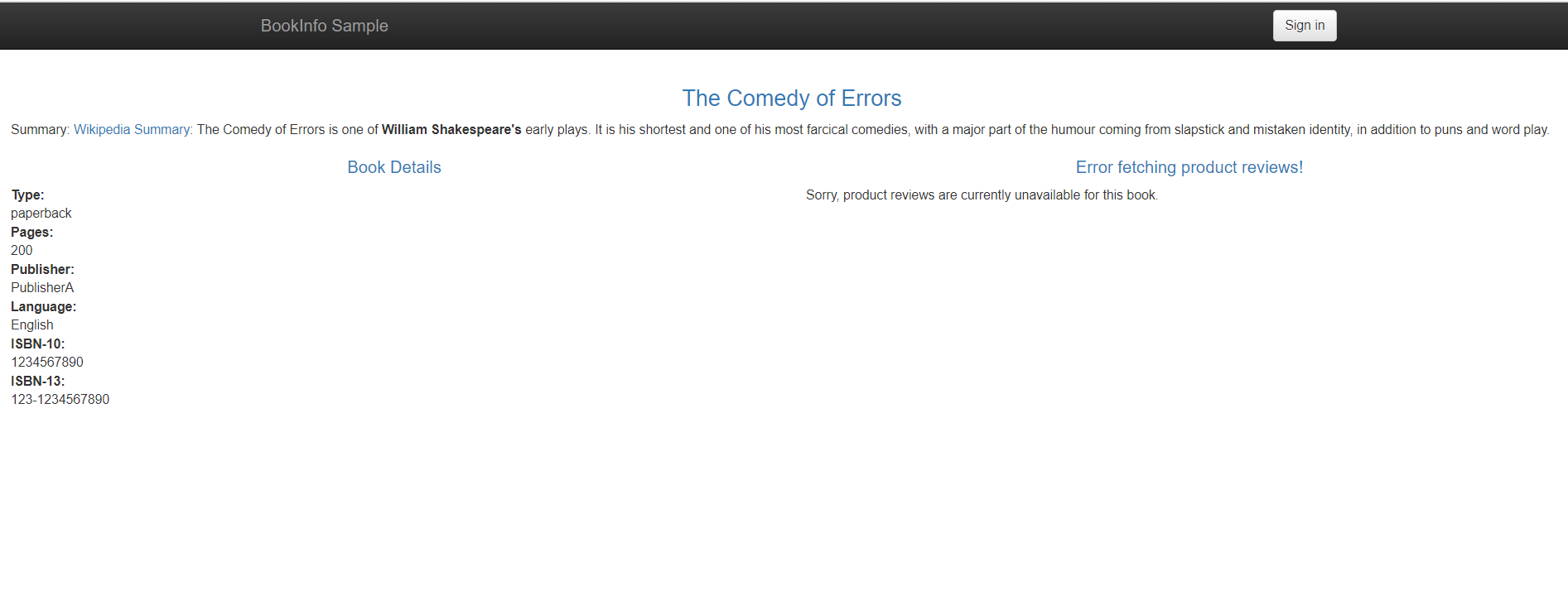
仮想サービスのルールに従い、ブラウザで http://8.136.193.105:32156/productpage にアクセスすると、productpage にアクセスできます。この時点では reviews サービスがまだデプロイされていないため、Sorry, product reviews are currently unavailable for this book というメッセージが表示されます。
ステップ 5:自動化デプロイ
5.1 Gitlab プロジェクトの作成
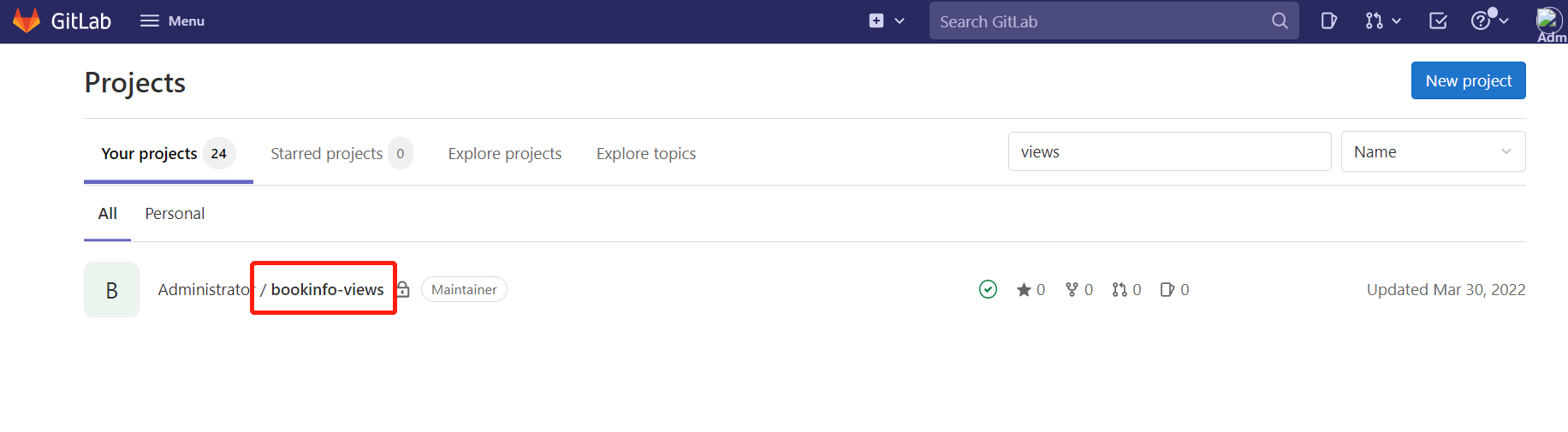
Gitlab にログインし、bookinfo-views プロジェクトを作成します。
5.2 Gitlab と DataKit の連携
gitlab 統合ドキュメント を参照して、Gitlab と DataKit を連携させます。ここでは Gitlab CI のみを設定します。
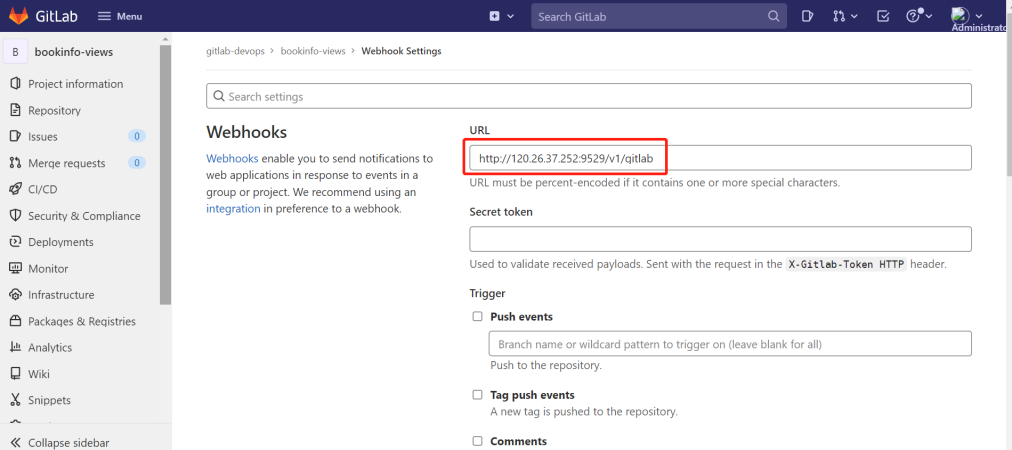
『Gitlab』にログインし、『bookinfo-views』-> 『Settings』-> 『Webhooks』と進み、URL 入力欄に DataKit が動作しているホストの IP アドレスと DataKit の 9529 ポート、さらに /v1/gitlab を入力します。以下の図の通りです。
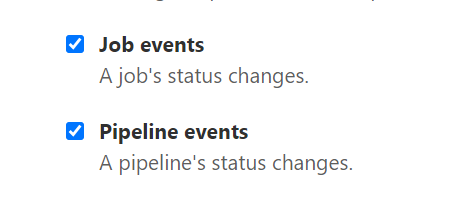
Job events と Pipeline events を選択し、『Add webhook』をクリックします。
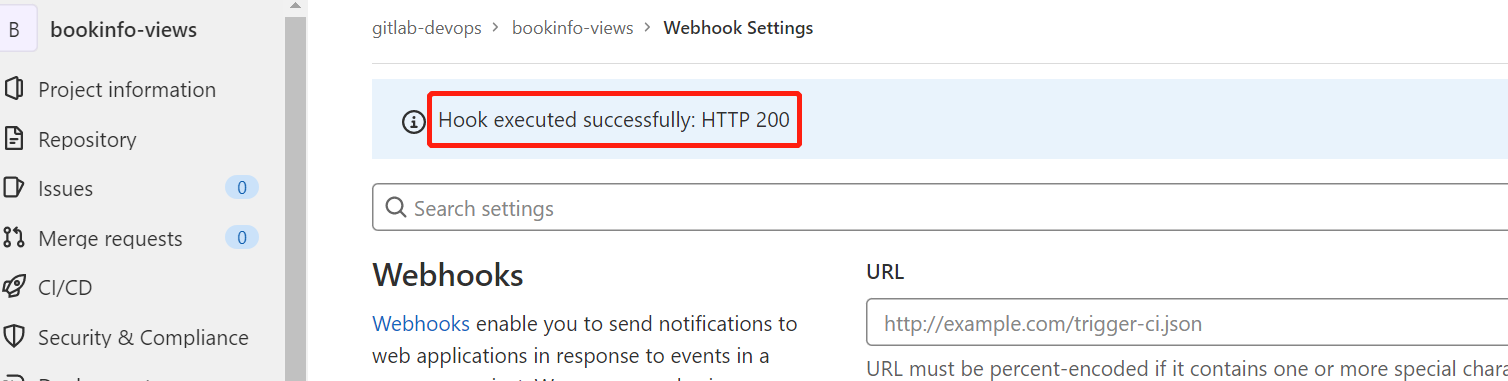
先ほど作成した Webhooks の右側にある Test をクリックし、Pipeline events を選択します。以下の図のように HTTP 200 が表示されれば、設定は成功です。
5.3 reviews マイクロサービスへの Gitlab-CI の設定
『Gitlab』にログインし、『bookinfo-views』のルートディレクトリに deployment.yaml と .gitlab-ci.yml ファイルを作成します。annotations には project、env、version タグを定義し、異なるプロジェクトやバージョンを区別するために使用します。
apiVersion: v1
kind: Service
metadata:
  name: reviews
  namespace: prod
  labels:
    app: reviews
    service: reviews
spec:
  ports:
  - port: 9080
    name: http
  selector:
    app: reviews
---
apiVersion: v1
kind: ServiceAccount
metadata:
  name: bookinfo-reviews
  namespace: prod
  labels:
    account: reviews
---
apiVersion: apps/v1
kind: Deployment
metadata:
  name: reviews-__version__
  namespace: prod
  labels:
    app: reviews
    version: __version__
spec:
  replicas: 1
  selector:
    matchLabels:
      app: reviews
      version: __version__
  template:
    metadata:
      labels:
        app: reviews
        version: __version__
      annotations:
        datakit/prom.instances: |
          [[inputs.prom]]
            url = "http://$IP:15020/stats/prometheus"
            source = "bookinfo-istio-review"
            metric_types = ["counter", "gauge"]
            interval = "60s"
            tags_ignore = ["cache","cluster_type","component","destination_app","destination_canonical_revision","destination_canonical_service","destination_cluster","destination_principal","group","grpc_code","grpc_method","grpc_service","grpc_type","reason","request_protocol","request_type","resource","responce_code_class","response_flags","source_app","source_canonical_revision","source_canonical-service","source_cluster","source_principal","source_version","wasm_filter"]
            metric_name_filter = ["istio_requests_total","pilot_k8s_cfg_events","istio_build","process_virtual_memory_bytes","process_resident_memory_bytes","process_cpu_seconds_total","envoy_cluster_assignment_stale","go_goroutines","pilot_xds_pushes","pilot_proxy_convergence_time_bucket","citadel_server_root_cert_expiry_timestamp","pilot_conflict_inbound_listener","pilot_conflict_outbound_listener_http_over_current_tcp","pilot_conflict_outbound_listener_tcp_over_current_tcp","pilot_conflict_outbound_listener_tcp_over_current_http","pilot_virt_services","galley_validation_failed","pilot_services","envoy_cluster_upstream_cx_total","envoy_cluster_upstream_cx_connect_fail","envoy_cluster_upstream_cx_active","envoy_cluster_upstream_cx_rx_bytes_total","envoy_cluster_upstream_cx_tx_bytes_total","istio_request_duration_milliseconds_bucket","istio_request_duration_seconds_bucket","istio_request_bytes_bucket","istio_response_bytes_bucket"]
            #measurement_prefix = ""
            measurement_name = "istio_prom"
            #[[inputs.prom.measurements]]
            # prefix = "cpu_"
            # name = "cpu"
            [inputs.prom.tags]
            namespace = "$NAMESPACE"
        proxy.istio.io/config: |
          tracing:
            zipkin:
              address: zipkin.istio-system:9411
            custom_tags:
              project:
                literal:
                  value: "reviews"
              version:
                literal:
                  value: __version__
              env:
                literal:
                  value: "test"
    spec:
      serviceAccountName: bookinfo-reviews
      containers:
      - name: reviews
        image: docker.io/istio/examples-bookinfo-reviews-__version__:1.16.2
        imagePullPolicy: IfNotPresent
        env:
        - name: LOG_DIR
          value: "/tmp/logs"
        ports:
        - containerPort: 9080
        volumeMounts:
        - name: tmp
          mountPath: /tmp
        - name: wlp-output
          mountPath: /opt/ibm/wlp/output
        securityContext:
          runAsUser: 1000
      volumes:
      - name: wlp-output
        emptyDir: {}
      - name: tmp
        emptyDir: {}
variables:
  APP_VERSION: "v1"

stages:
  - deploy

deploy_k8s:
  image: bitnami/kubectl:1.22.7
  stage: deploy
  tags:
    - kubernetes-runner
  script:
    - echo "deploy を実行"
    - ls
    - sed -i "s#__version__#${APP_VERSION}#g" deployment.yaml
    - cat deployment.yaml
    - kubectl apply -f deployment.yaml
  after_script:
    - sleep 10
    - kubectl get pod  -n prod
ステップ 6:Gitlab CI の可観測性
6.1 reviews マイクロサービスの公開
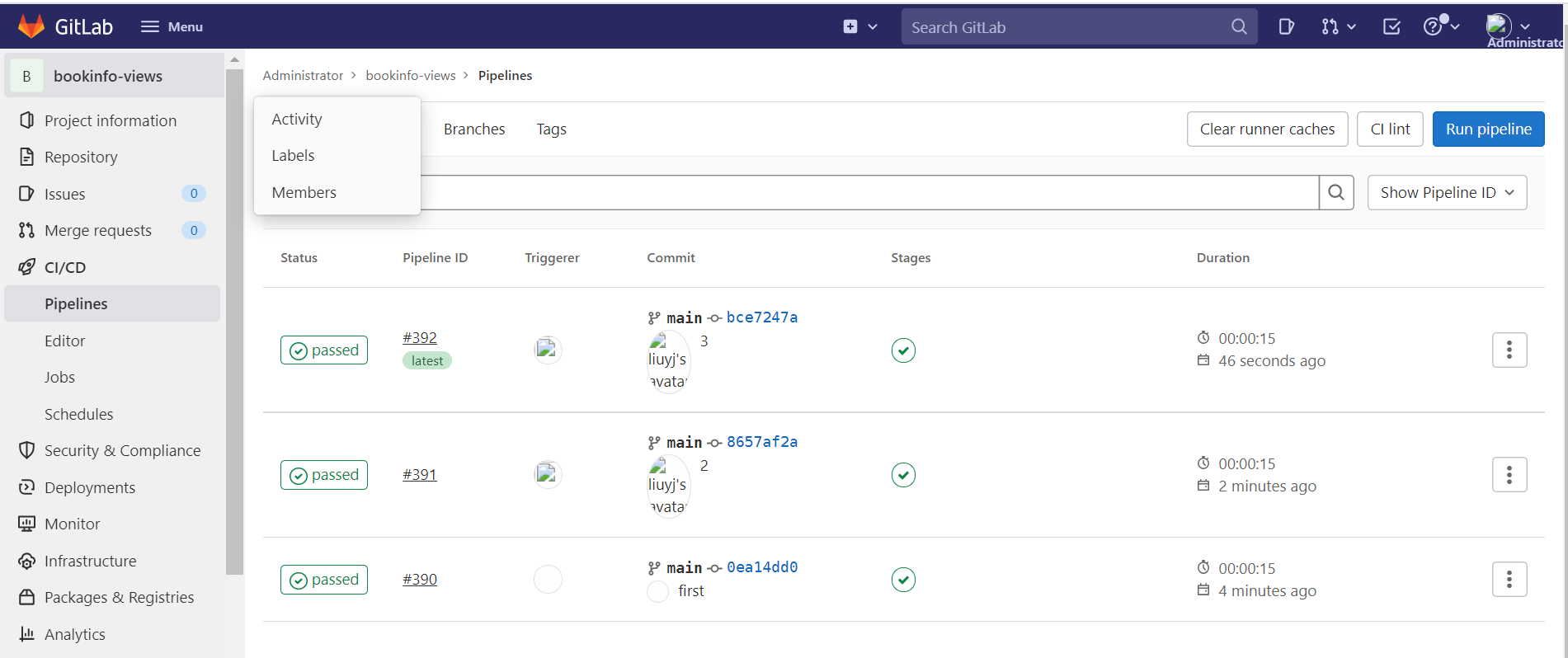
.gitlab-ci.yml ファイルの APP_VERSION の値を "v1" に変更し、コードを 1 回コミットし、"v2" に変更して 1 回コミットし、"v3" に変更して 1 回コミットします。
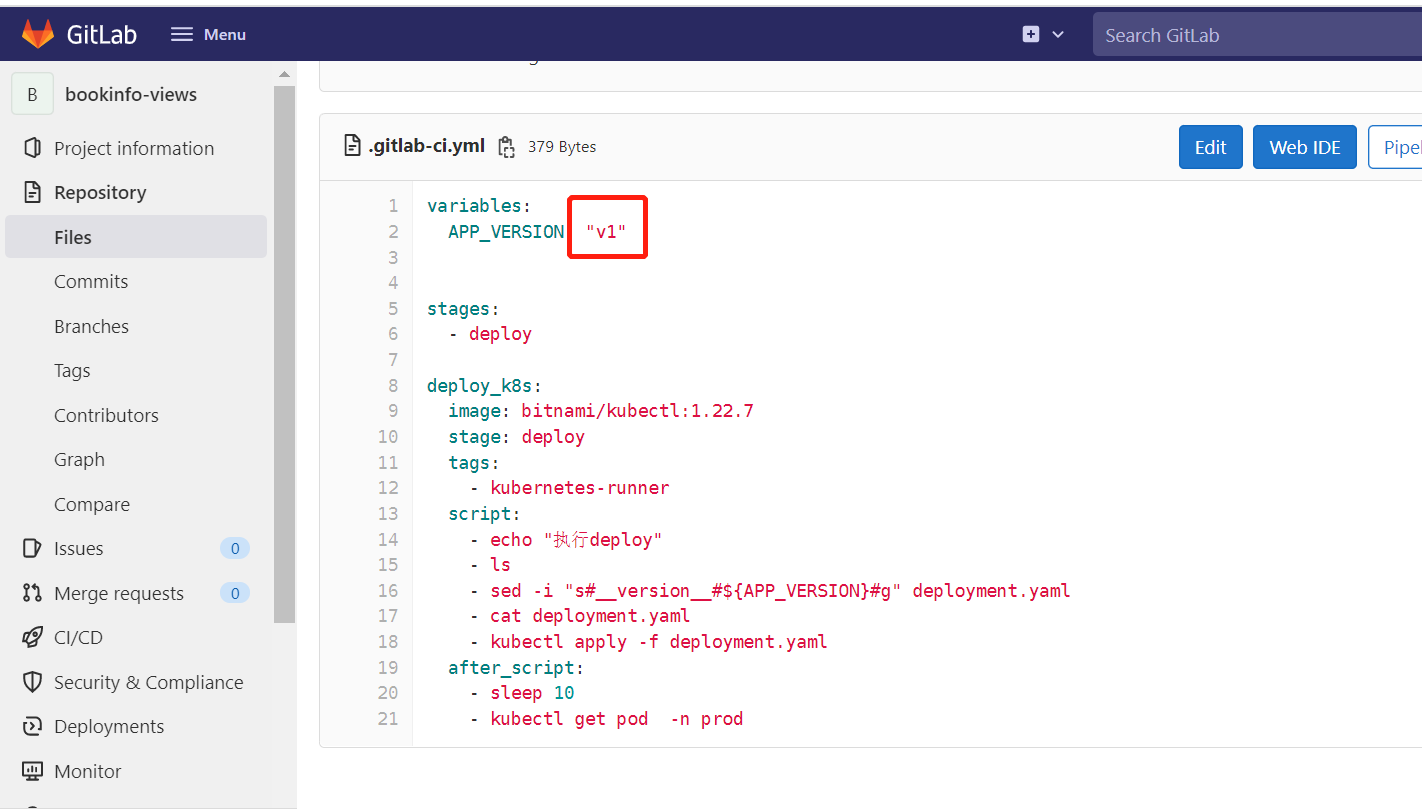
この時点で Pipeline が 3 回トリガーされます。
6.2 Gitlab CI パイプラインの可観測性
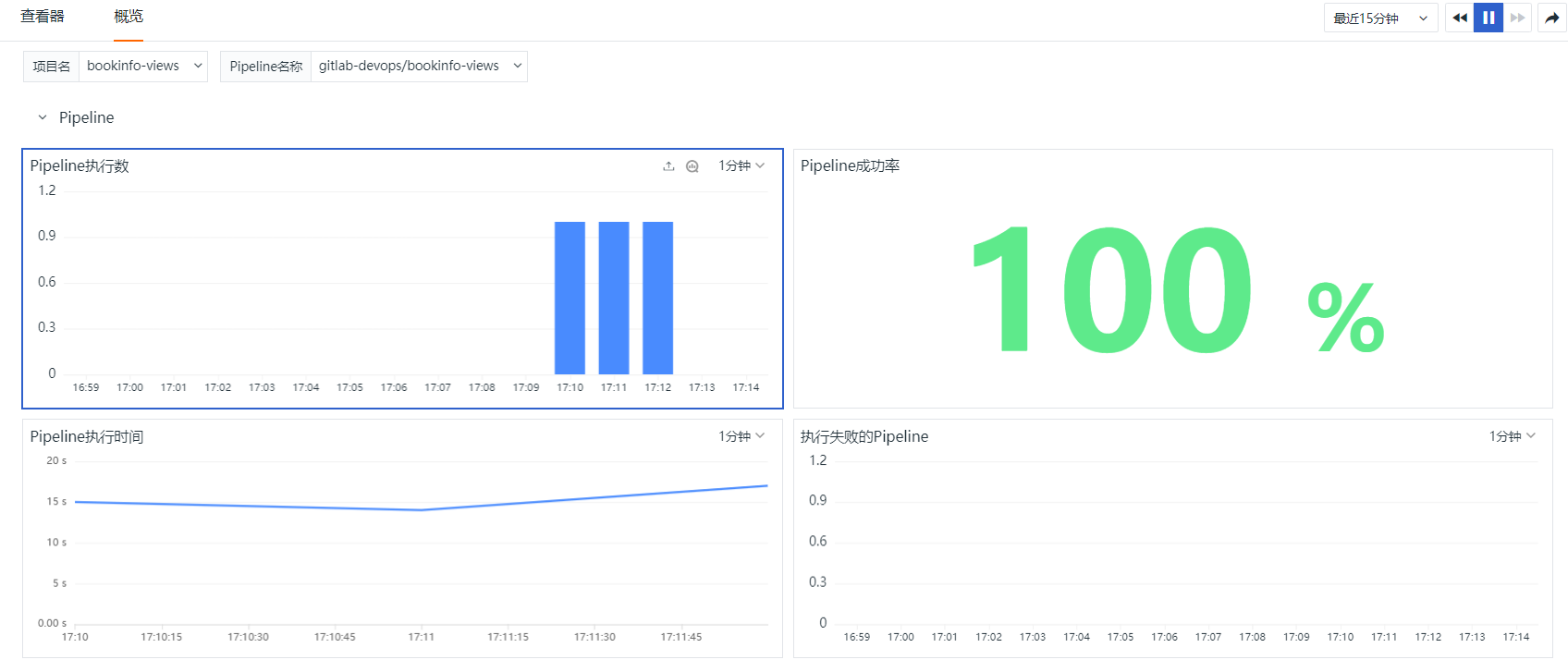
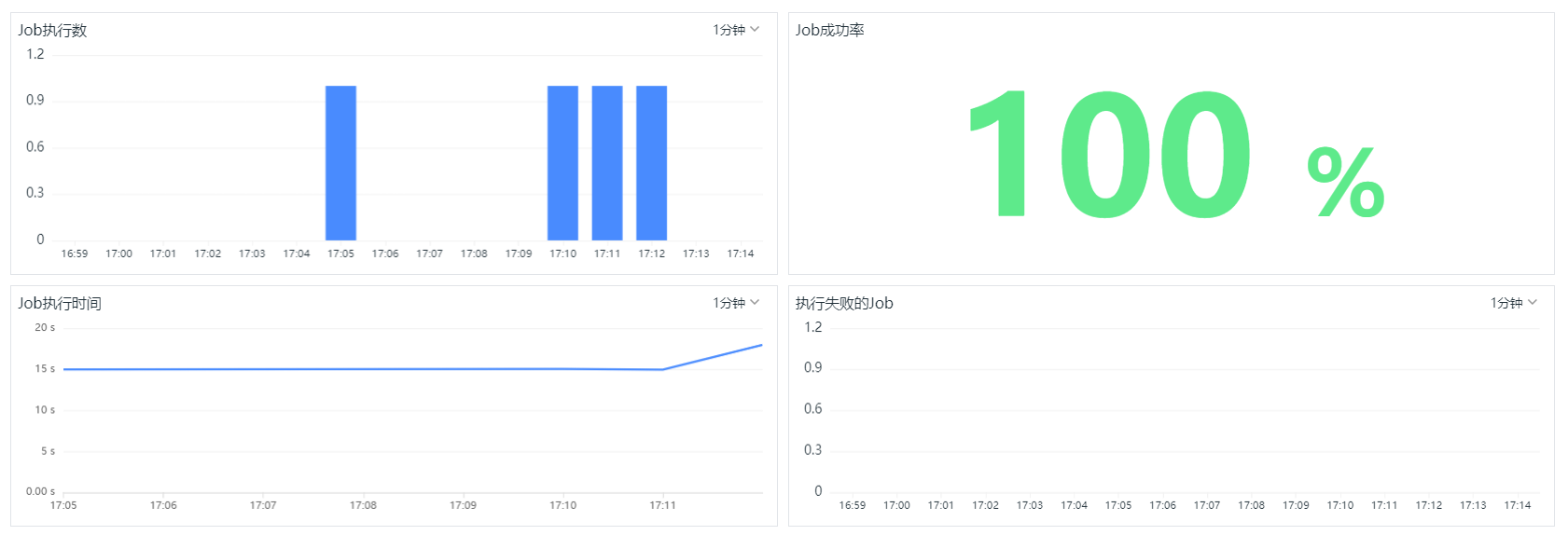
『Guance』にログインし、『CI』に入り、『概要』をクリックして bookinfo-views プロジェクトを選択し、Pipeline と Job の実行状況を確認します。
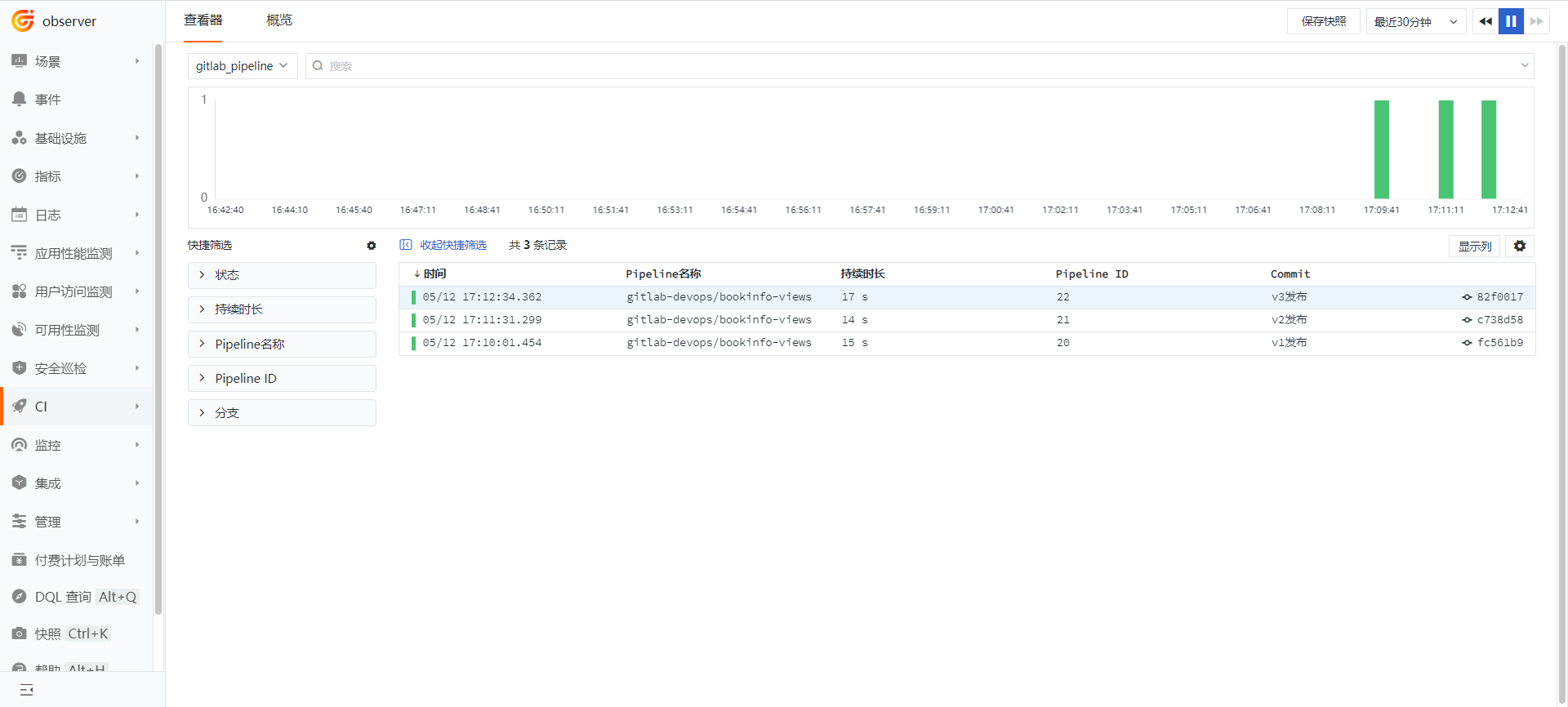
『Guance』にログインし、『CI』に入り、『エクスプローラー』をクリックし、gitlab_pipeline を選択します。
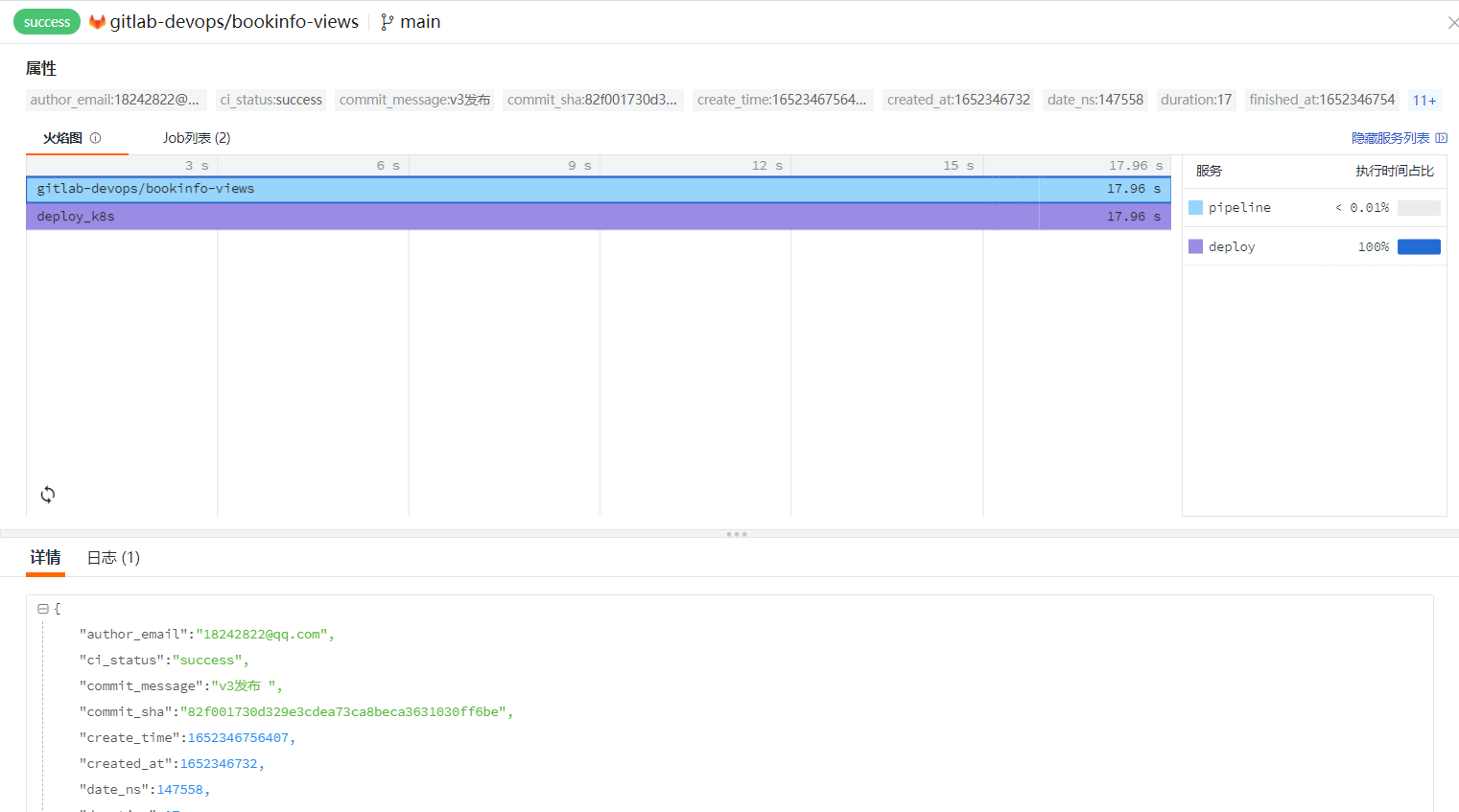
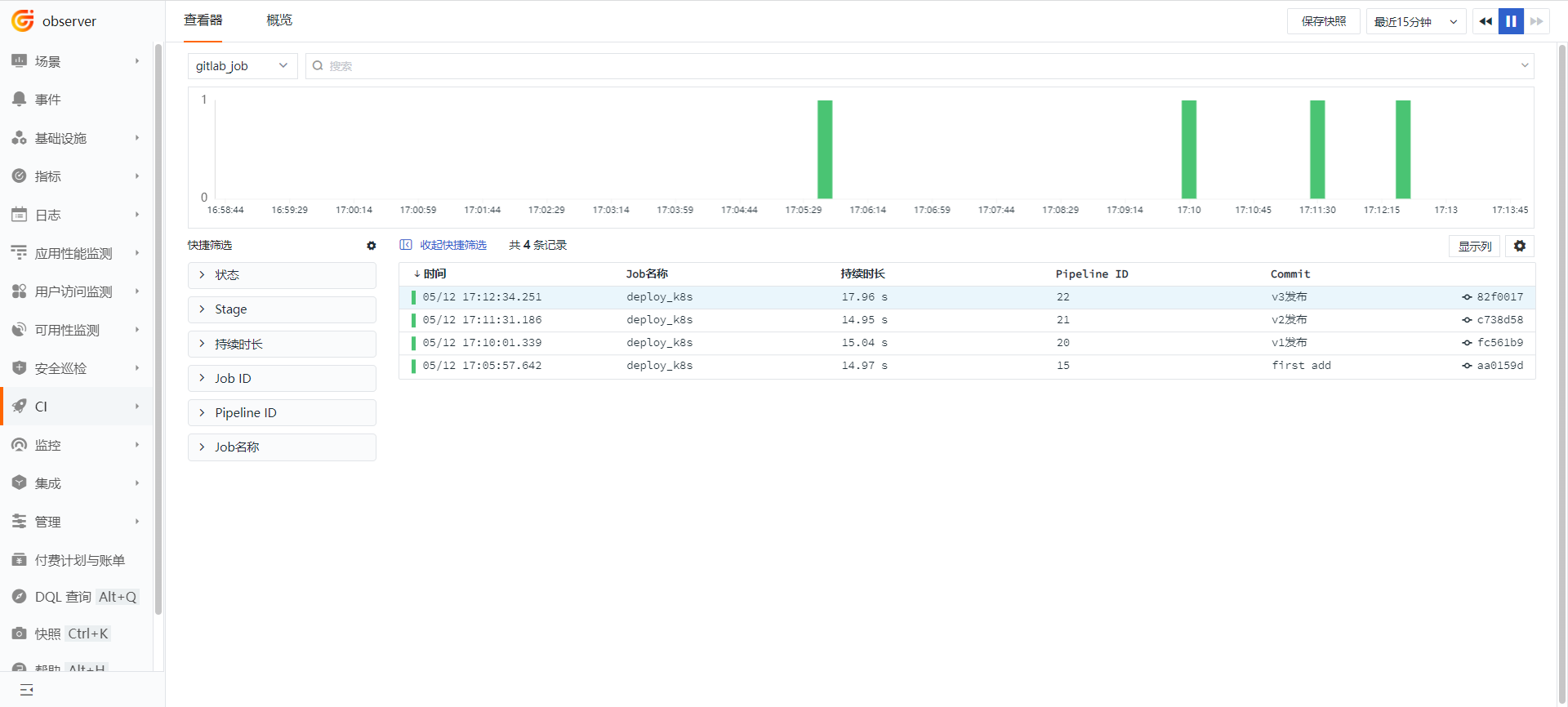
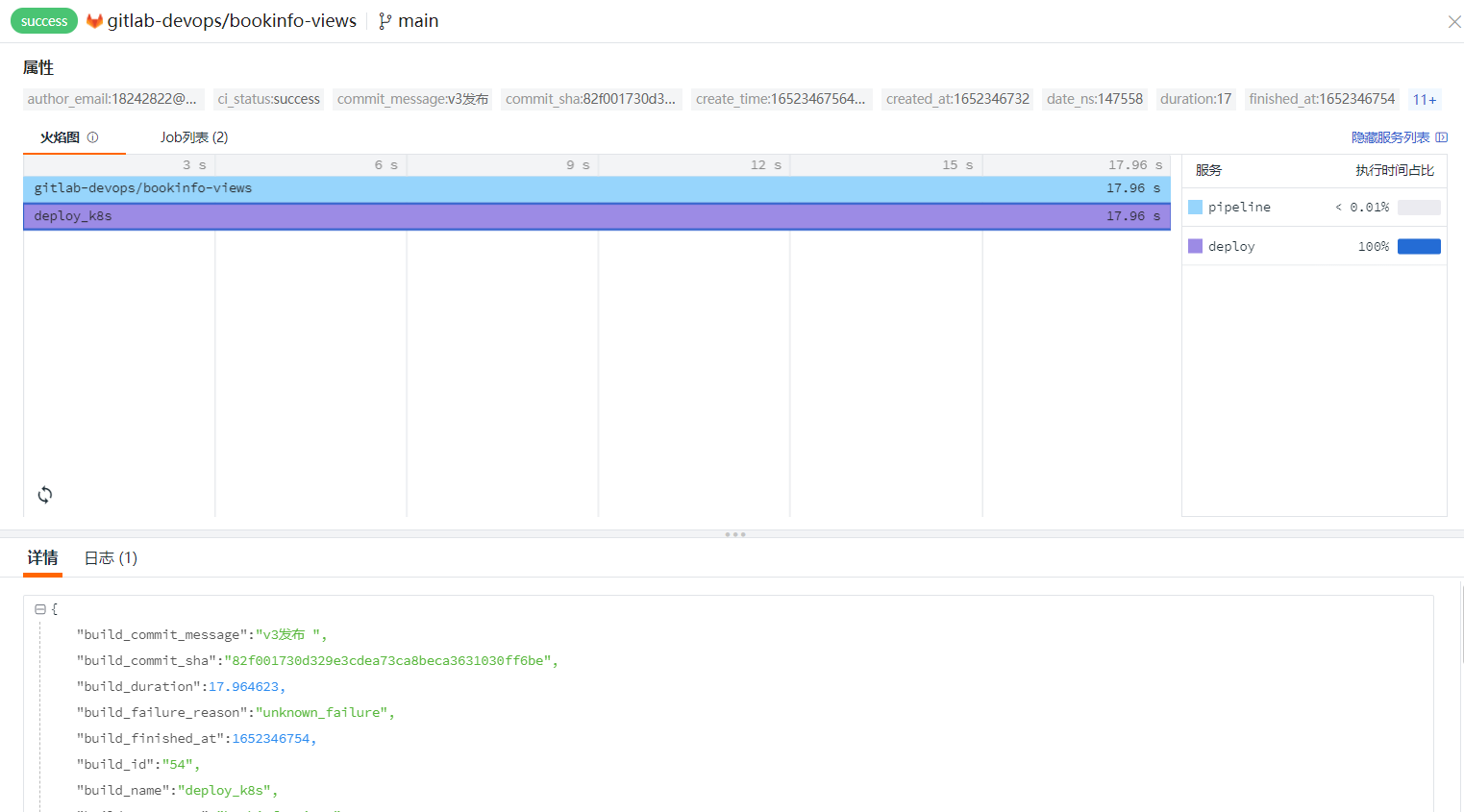
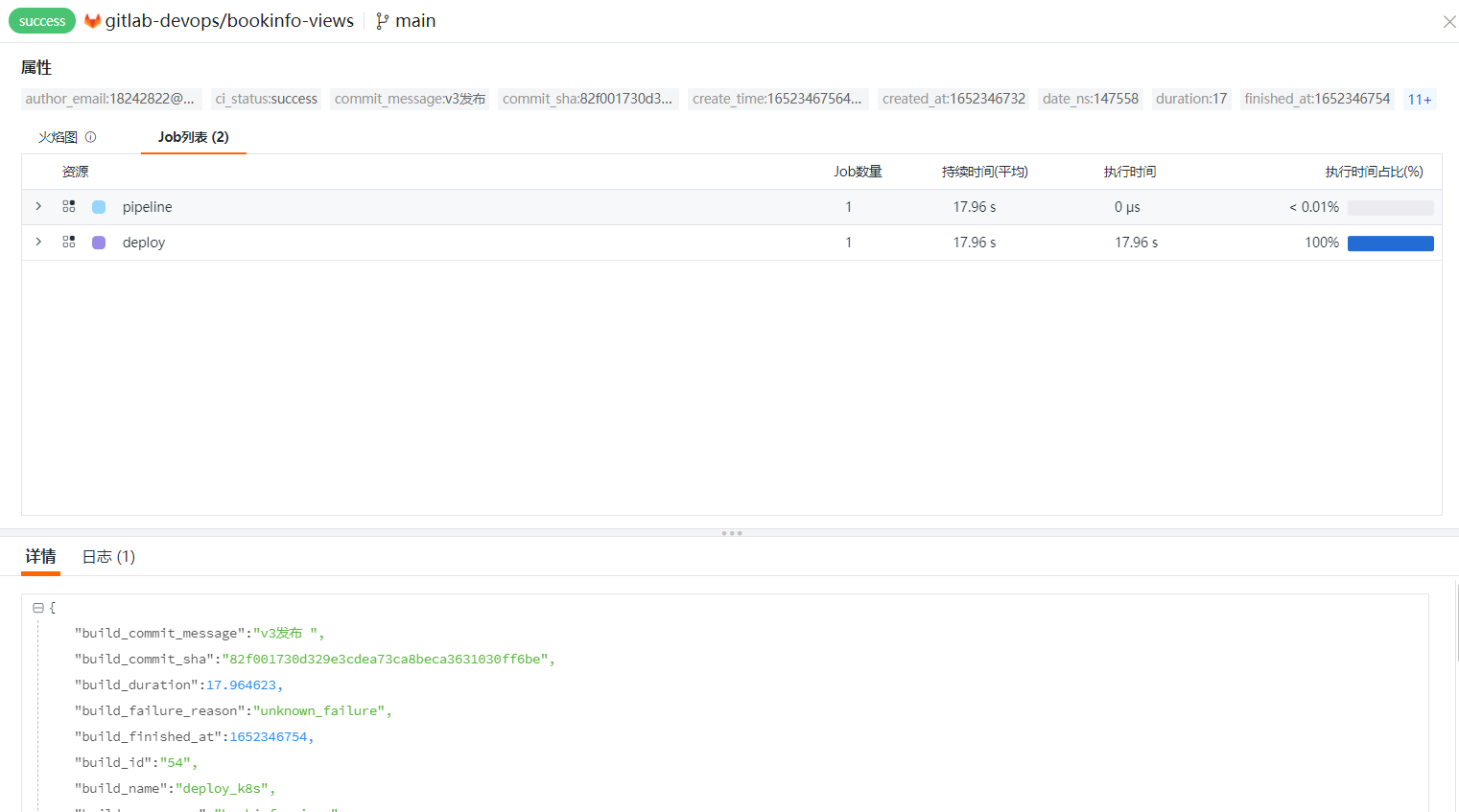
『Guance』にログインし、『CI』に入り、『エクスプローラー』をクリックし、gitlab_job を選択します。