Java Extension
Author: Song Longqi
SQL Obfuscation
The OpenTelemetry Java Agent performs SQL obfuscation by default: parameter values in db.statement are replaced with ? to reduce the risk of sensitive data leakage.
For official documentation, see:
DB statement sanitization
Default obfuscation behavior includes:
- Replacing values (strings, numbers) with placeholders
- Compressing whitespace (multiple spaces, line breaks) for consistent display
Example
ps = conn.prepareStatement("SELECT name,password,id FROM student where name=? and password=?");
ps.setString(1, username);   // set placeholder 1
ps.setString(2, password);   // set placeholder 2
The trace will show:
SELECT name,password,id FROM student where name=? and password=?
If inline SQL is used (not recommended in sensitive data scenarios):
ps = conn.prepareStatement("SELECT name,password,id FROM student where name='abc' and password='123456'");
The trace will retain the raw SQL text.
Enable Parameter Capture for Obfuscation (Extension)
To retrieve the SQL content after setXXX parameter injection, enable one of the following configurations:
In the V2 extension, you can also use the official parameter:
-Dotel.instrumentation.jdbc.experimental.capture-query-parameters=true
# or k8s
export OTEL_INSTRUMENTATION_JDBC_EXPERIMENTAL_CAPTURE_QUERY_PARAMETERS=true
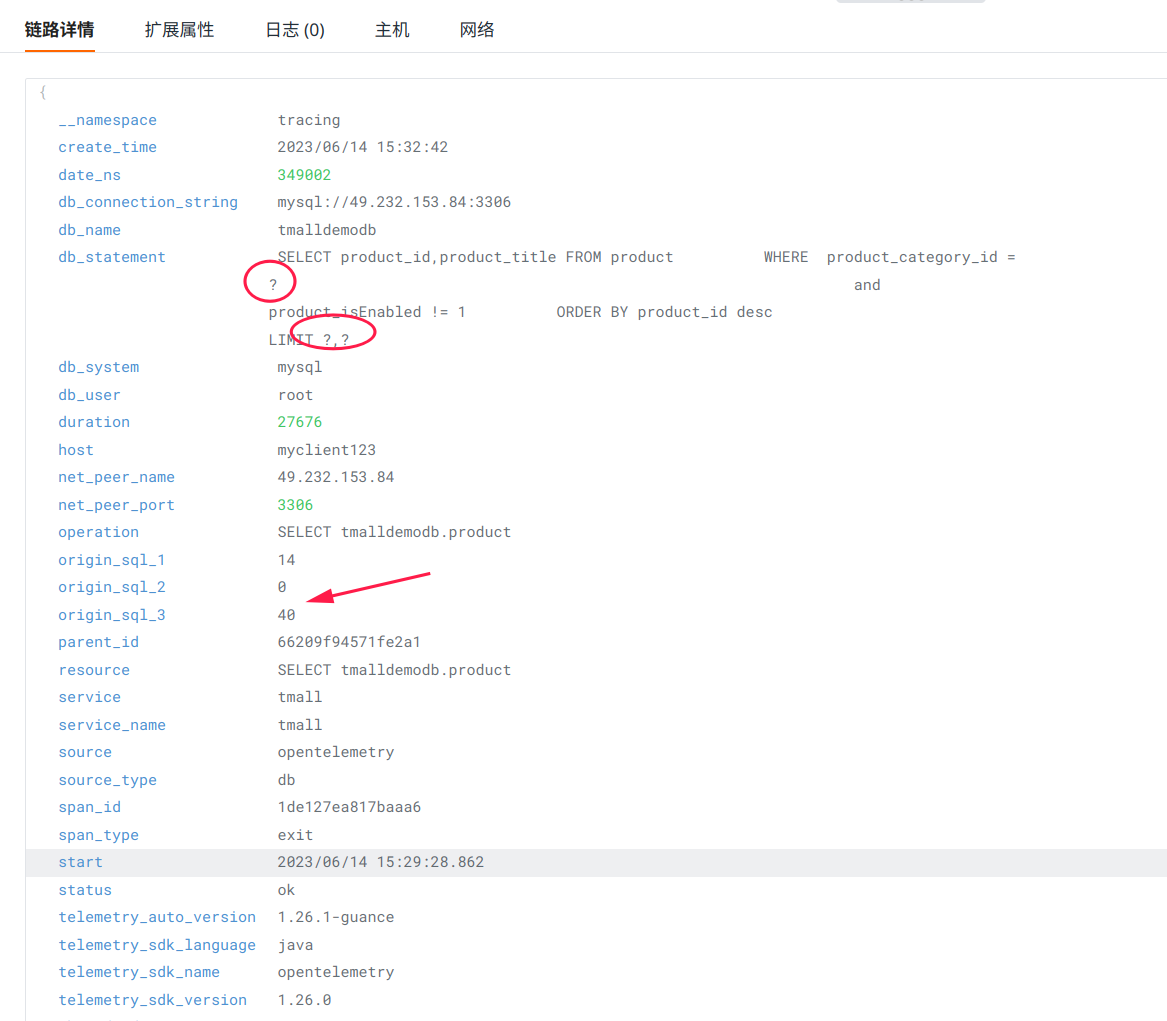
The trace details you see in Guance will be similar to:
Frequently Asked Questions
- After enabling
-Dotel.jdbc.sql.obfuscation=true, some parameters are still replaced.
Some parameters may have been replaced during the db.statement processing stage; it is normal for the number of placeholders to be inconsistent with the origin_sql_x fields.
- After enabling raw SQL, the content is long and contains many line breaks.
This increases the trace size. It is recommended to evaluate storage impact in conjunction with trace retention policies and field length policies.
For more information, see: