Interval Detection V2
About This Document
This document is the second step in the detection rule configuration workflow. After completing the configuration, return to the main document to continue with Step 3: Event Notification.
Data scope: Metrics (M), Application Performance Monitoring (APM) (T), Real User Monitoring (RUM) data (R)
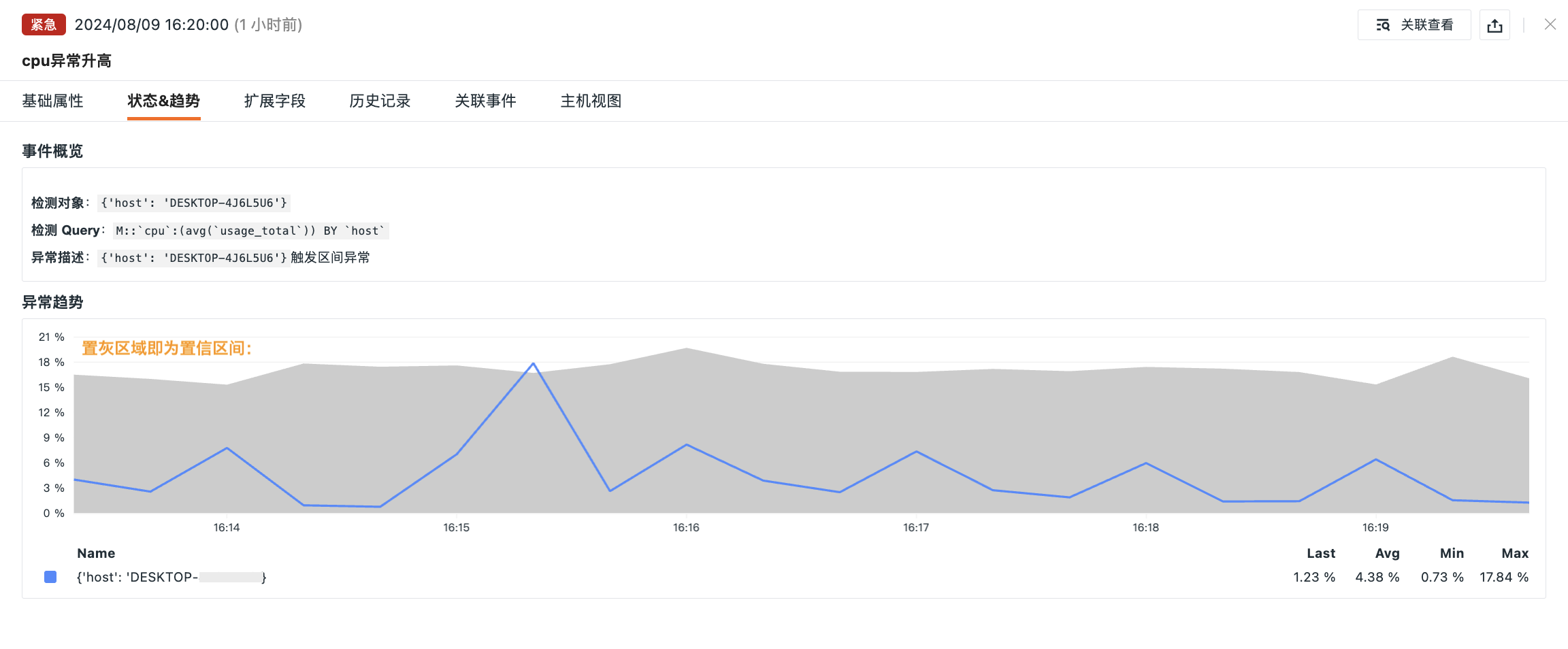
Interval Detection V2 uses historical data to build confidence intervals and predict the normal fluctuation range. The system compares current data characteristics with historical data to determine whether the data falls outside the confidence interval, thereby identifying anomalies and triggering alerts to ensure data stability and security.
Key Features:
- In-depth analysis: Builds confidence intervals based on historical data to predict normal fluctuations;
- Continuous updates: Continuously updated by the Guance algorithm team to enhance data processing capabilities.
Concepts
Confidence Interval Range (confidence_interval): A metric that measures the fluctuation tolerance of time-series data within a specific detection range, with values ranging from 1% to 100%.
- When data is highly volatile and random, you can increase this value appropriately;
- When data fluctuations are regular, you can decrease this value.
If:
- The confidence interval is too large, the upper and lower boundaries become wider, reducing the number of detected anomaly points;
- The confidence interval is too small, too many anomaly values may be detected;
- The confidence interval is too large, no anomalies may be detected at all.
Therefore, adjusting this parameter appropriately based on the fluctuation characteristics of the data is essential for balancing the sensitivity and accuracy of anomaly detection, effectively avoiding excessive false positives or missed anomalies.
Detection Configuration
Detection Frequency
Set the time period for executing the detection.
- Fixed frequency: 10 minutes (cannot be changed)
Detection Metrics
Define the detection data source and aggregation method based on DQL.
| Configuration Item | Description |
|---|---|
| Workspace | Defaults to the current workspace; you can switch to other authorized workspaces. After authorization, you can use detection metrics from other workspaces under the current account to create monitors |
| Data Type | The data type currently under detection, including Metrics, APM (Tracing), and RUM (User Access Data) |
| Measurement | The measurement to which the currently detected metric belongs |
| Metric | The metric targeted by the current detection |
| Aggregation Algorithm | Supports Avg by (average), Min by (minimum), Max by (maximum), Sum by (sum), Last (last value), First by (first value), Count by (data point count), Count_distinct by (distinct data point count), p50 (median), p75 (75th percentile), p90 (90th percentile), p99 (99th percentile) |
| Detection Dimensions | Any string type (keyword) field in the data can be selected as a detection dimension; up to three fields are supported. A combination of multiple detection dimension fields can identify a specific detection object (e.g., {host: host1, host_ip: 127.0.0.1}) |
| Filter Conditions | Filters the detection data based on metric labels to define the detection scope. Supports adding one or more label filters, as well as fuzzy match and fuzzy not-match filter conditions |
| Alias | Custom name for the detection metric |
| Query Method | Supports Simple Query and Expression Query |
Trigger Conditions
Configure trigger conditions for each alert level (Fatal, Critical, Major, Warning), as well as the normal recovery conditions.
| Configuration Item | Description |
|---|---|
| Change Direction | Select the direction of the data anomaly: |
| Confidence Interval Upper/Lower Bound Range | Set the confidence interval width (1–100%), which defines the width of the predicted confidence interval range. For metrics with large fluctuations, you can appropriately increase the confidence interval width to avoid false positives |
| Fatal/Critical/Major/Warning | Triggers when Result >= [value] %. Compares the proportion of anomalous data points; if it is not within the configured range, an event is triggered |
| Normal | No events are generated for [N] consecutive detections. After the detection rule takes effect, if the data detection result returns to normal from abnormal within the configured custom detection count, a recovery alert event is triggered |
Bulk Alert Protection
Enabled by default. When the number of alerts generated by a single detection exceeds the preset threshold (100), the system automatically enables the aggregation-by-status strategy, suspending the aggregation and muting process for individual objects, and generates and pushes summary events by status. This ensures timely notifications while significantly reducing noise and avoiding the risk of processing timeouts. When this toggle is enabled, the event details of such events generated after the monitor subsequently detects an anomaly will not display historical records or related events.
Note
Recovery alert events are not subject to Alert Muting. If the detection count for recovery alert events is not configured, the alert event will not recover and will continue to appear in Events > Unrecovered Events List.
Data Gap
Handling strategy when the query result of the detection metric is empty within the detection interval:
| Option | Description |
|---|---|
| Do Not Trigger Events | Linked to the time range of the detection interval; determines whether to generate an event based on the query results of the detection metric over the most recent few minutes |
| Treat Query Result as 0 | Linked to the time range of the detection interval; treats the query results of the detection metric over the most recent few minutes as 0 and re-compares them with the thresholds configured in the trigger conditions above to determine whether to trigger an anomaly event |
| Custom Fill and Trigger Events | Supports custom fill values for the detection interval and triggers the following event types respectively: data gap event, emergency event, major event, warning event, and recovery event. When this strategy is selected, we recommend configuring the custom data gap duration to be ≥ the detection interval; if the configured duration is ≤ the detection interval, both the data gap and anomaly conditions may be satisfied simultaneously, in which case the data gap handling result takes priority |
Info Event Generation
When this option is enabled, the system writes all detection results that do not match the trigger conditions above as "Info" events.
When trigger conditions, data gap handling, and info event generation are configured simultaneously, triggering is determined by the following priority: Data gap > Trigger conditions > Info event generation.
Subsequent Configuration
After completing the detection configuration above, continue with the following:
- Event Notification: Define the event title, content, notification members, data gap handling, and incident association;
- Alert Configuration: Select an alert policy, set the notification targets and mute period;
- Associate: Associate a dashboard for quick navigation to view data;
- Permissions: Set operation permissions to control who can edit or delete this monitor.