Application Service Configuration Reference
Overview
This document aims to modify relevant configurations through the "Modify Application Configuration" feature of launcher to better adapt to your own environment, achieve optimization of related configurations, and meet the purpose of personalized configuration.
Launcher Operation Steps
-
Access the launcher console via browser.
-
Select the top right corner to enter the Modify Application Configuration interface.
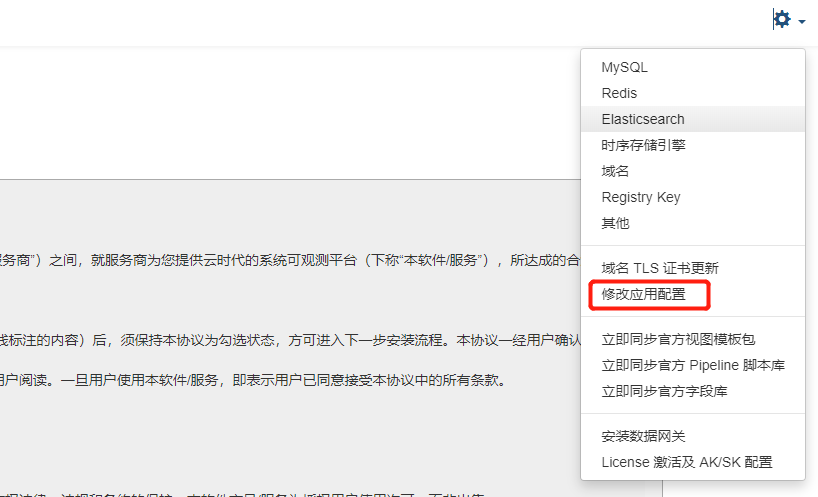
-
To modify the corresponding configuration file, you need to check the Modify Configuration option to make it modifiable.
-
After completing the configuration modifications, you need to check the Automatically restart related services after modifying configuration option at the bottom right corner of the page, and then click Confirm Modification.

Partial Common Configuration Descriptions for Services
Studio Backend Service
Configuration File Location
- Namespace: forethought-core
- Configuration Name in Launcher: Core
- Configmap Name in kubernetes: core
Configuration File Example
# Guance console address access protocol
protocol: "http"
# Guance console address
hostname: "console.cloudcare.cn"

# Management backend site access address
managementHostname: "management.cloudcare.cn"

# Current site name
envName: Guance Deployment Plan

# Whether the system debug mode is enabled, generally not enabled
debug: false
# System default language
defaultLanguage: "zh"

# Frontend access address prefix, the first two curly braces will be occupied by protocol and hostname. If you need to configure a unified secondary address, you can directly adjust this configuration.
frontServerUrlPrefixFormat: "{}://{}"

# ExternalAPI service configuration.
external:
  # Validity period for each request signature, unit seconds
  timeliness: 60
  # Legacy single account ak/sk configuration; retained for compatibility with historical environments, equivalent to a set of read-write accounts with privilege=w
  accessKey: ""
  secretKey: ""
  # Email name used as the account in interface operations
  email: ""
  # ExternalAPI multi-account configuration, supporting separation of read-write accounts and read-only accounts; when empty, only the legacy single account configuration above is used.
  # Field description:
  #   name: Account identifier, used only for logging, observation, and troubleshooting; do not use ambiguous names like default.
  #   accessKey: The AK used in the request header X-Df-Access-Key.
  #   secretKey: The signature SK corresponding to the current AK, not written to logs.
  #   privilege: Account permission, w indicates read-write account, can access privilege=r/w interfaces; r indicates read-only account, can only access privilege=r interfaces.
  #   email: The email displayed in the request context for this ExternalAPI account; falls back to external.email if empty.
  #   enabled: Whether this account is enabled, false means this account cannot be used for authentication.
  accounts: []
  # accounts:
  #   - name: "primary-write"
  #     accessKey: ""
  #     secretKey: ""
  #     privilege: "w"
  #     email: ""
  #     enabled: true
  #   - name: "security-readonly"
  #     accessKey: ""
  #     secretKey: ""
  #     privilege: "r"
  #     email: ""
  #     enabled: true

# Alert policy member type optional notification methods
alertPolicyFixedNotifyTypes:
  email:
    enable: true

# Token default expiration time settings
token_exp_set:
  # Web client default setting 4 hours
  front_web: 14400
  # Management backend token default expiration duration
  manage: 7200


# API documentation switch, default off, true means on. API documentation path defaults to /v1/doc; inner api default address is /v1/inner.doc
apiDocPageSwitch:
  # Management backend
  admin: false
  # Frontend
  front: false
  # Inner service
  inner: false
  # Openapi service
  openapi: false
  center: false
  # External service
  external: false


# Time range offset for links in query_view, unit seconds
BusinessQueryViewTimeOffset: 900

# Same organization cross-workspace Trace query configuration, default off
SameOrgTraceQuerySet:
  # Whether to allow querying Trace data from non-current workspaces under the same organization
  enable: false
  # Maximum number of workspace UUIDs allowed to be passed in a single query or workspace list filtering
  maxWorkspaceCount: 20
  # Maximum allowed value when limit is explicitly passed in a single Trace query
  maxLimit: 1000
  # Maximum time window allowed for a single Trace query, unit hours
  maxTimeRangeHours: 24
  # Maximum pagination size allowed for the simplified list interface of workspaces in the same organization
  workspaceListPageSizeMax: 100


# Guance database configuration
database:
  connection:
  pool_size: 20
  max_overflow: 100
  echo: false
  pool_timeout: 30
  # This setting causes the pool to recycle connections after the given number of seconds has passed. It defaults to -1, or no timeout. For example, setting it to 3600 means connections will be recycled after one hour. Note that MySQL will automatically disconnect connections if no activity is detected on them for eight hours (although this can be configured via the MySQLDB connection itself and server configuration).
  pool_recycle: 3600
  # Boolean, if True, enables the connection pool "pre-ping" feature, which tests the liveliness of connections on each checkout.
  pool_pre_ping: true
  # Use LIFO (Last In First Out) QueuePool instead of FIFO (First In First Out) when retrieving connections. Using LIFO, server-side timeout schemes can reduce the number of connections used during off-peak usage. When planning server-side timeouts, ensure to use recycling (pool_recycle) or pre-ping (pool_pre_ping) strategies to properly handle stale connections.
  pool_use_lifo: true


# Logger Configuration
logger:
  filename: /logdata/business.log
  level: info
  # Maximum size of each log file
  max_bytes: 52428800
  # Total number of log file rollovers
  backup_count: 3
  # Controls log output mode, default outputs to both file and stdout
  output_mode_switch:
    file: true
    stdout: true

# GunLogger-access, same as above
g_access_logger:
  filename: /logdata/g_access.log
  mode: a
  level: info
  max_bytes: 52428800
  backup_count: 3
  # Controls log output mode, default outputs to both file and stdout
  output_mode_switch:
    file: true
    stdou


# Default oversized log split unit when creating a new workspace, unit byte
workspaceLoggingCutSizeSet:
  es: 10240
  sls: 2048
  beaver: 2048
  doris: 10240

# Default data retention policy when creating a new workspace
workspaceVersionSet:
  unlimited:
    # Default policy configuration for creating new workspaces in Deployment Plan
    durationSet:
      rp: 30d
      logging: 14d
      keyevent: 14d
      tracing: 7d
      profiling: 7d
      rum: 7d
      # Only Deployment Plan will have separate configuration for session_replay
      session_replay: 7d
      network: 2d
      security: 90d
      backup_log: 180d

# Workspace default status settings
WorkspaceDefaultStatsConfig:
  isOpenLogMultipleIndex:  true     # Default when creating workspace, custom log index not enabled
  logMultipleIndexCount:  6         # Default when creating workspace, number of custom log indices
  loggingCutSize: 10240             # Default when creating workspace, oversized log counting unit 10KB
  maxSearchResultCount: 0           # Default when creating workspace, query count upper limit 0

# es/doris index configuration default information
WorkspaceDefaultesIndexSettings:
  number_of_shards: 1               # Default when creating workspace, number of primary shards es
  number_of_replicas: 1             # Default when creating workspace, whether to enable replicas es | doris
  rollover_max_size: 30             # Default when creating workspace, shard size    es
  hot_retention: 24                 # Default when creating workspace, hot data duration   es | doris


# openapi rate limiting settings
openapiCurrentLimitingSet:
  # Rate limiting switch, default off, can be set to true if needed
  isOpen: false
  crontabSet:
    # Rate limiting frequency executed per minute
    hour: "*"
    minute: "*/1"
  frequency:
    # ak-level call rate limit 100 times per minute
    ak: 100
    # workspace-level call rate limit 300 times per minute
    workspace: 300

# Studio backend CORS whitelist configuration
CorsAllowOriginSet:
  # Whether to enable CORS Origin whitelist, default off for compatibility; when enabled, Access-Control-Allow-Origin is only returned for browser Origins in the whitelist.
  enabled: false
  # Exact match frontend domain list, data format is string array, must include protocol, domain, and optional port.
  # Example: ["https://console.example.com", "https://uat-console.example.com:8443"]
  allowedOrigins: []
  # Controlled wildcard rule list, data format is string array, performs wildcard matching on Origin strings.
  # Example: ["https://*.example.com"]; configure only when necessary to open multiple subdomains, not recommended to use "*".
  allowedOriginPatterns: []
  # Whether to allow browsers to carry credentials for cross-origin access
  allowCredentials: true
  # Allowed cross-origin request methods
  allowMethods: "GET,POST,HEAD,PATCH,PUT,OPTIONS,DELETE"

# Deployment Plan login restrictions
LoginLimitSet:
  # Number of consecutive login error retries for the same username
  retry_times: 5
  # Time to restrict login after consecutive login failures retry_times times, default 15 minutes
  exp: 900

...
Configuration Item Detailed Description
| Configuration Item | Sub-item | Type | Default Value | Description |
|---|---|---|---|---|
| protocol | String | http | Guance console address access protocol | |
| hostname | String | console.cloudcare.cn | Guance console address | |
| managementHostname | String | management.cloudcare.cn | Management backend site access address | |
| envName | String | Guance | Current site name | |
| debug | Boolean | false | debug mode switch | |
| frontServerUrlPrefixFormat | String | {}://{} | Frontend access address prefix, the first two curly braces will be occupied by protocol and hostname. If you need to configure a unified secondary address, you can directly adjust this configuration. | |
| enableApmServiceTopology | Boolean | false | Whether to enable the cross-workspace query entry for "APM > Service > Service Map". When enabled in Deployment Plan, the frontend displays the workspace scope selector when permission and version conditions are met; this switch is independent of kodo-inner's servicemap.cross_workspace_on and can be used in combination according to scenarios. |
|
| external | timeliness | Number | 60 | Validity period for each request signature, unit seconds |
| accessKey | String | Legacy single account AK configuration; retained for compatibility with historical environments, equivalent to a set of read-write accounts with privilege=w. For new environments, it is recommended to prioritize using the accounts configuration. |
||
| secretKey | String | Legacy single account SK configuration; used together with accessKey, not written to logs. |
||
| String | Default email displayed in ExternalAPI request context; falls back to this configuration when accounts[].email is empty. |
|||
| accounts | List | [] | ExternalAPI multi-account configuration list, supporting separation of read-write accounts and read-only accounts; when empty, only the legacy accessKey/secretKey configuration is used. |
|
| accounts[].name | String | Account identifier, used only for logging, observation, and troubleshooting; mandatory in the new structure, cannot be default, recommended to use names that express purpose like primary-write, security-readonly. |
||
| accounts[].accessKey | String | The AK used in the request header X-Df-Access-Key for the current account. |
||
| accounts[].secretKey | String | The signature SK corresponding to the current account, used only for server-side signature verification, not written to logs. | ||
| accounts[].privilege | String | w | Current account permission. w indicates read-write account, can access privilege=r/w interfaces; r indicates read-only account, can only access privilege=r interfaces. |
|
| accounts[].email | String | The email displayed in the ExternalAPI request context for the current account; falls back to external.email when empty. |
||
| accounts[].enabled | Boolean | true | Whether the current account is enabled; set to false means this account cannot be used for authentication. |
|
| defaultLanguage | String | zh | System default language, newly created workspaces will use this configuration value by default if no language is specified. | |
| token_exp_set | front_web | Number | 14400 | Valid duration for Studio browser client user login, unit: seconds |
| manage | Number | 7200 | Valid duration for management backend browser client user login, unit: seconds | |
| apiDocPageSwitch | admin | Boolean | false | Management backend API interface documentation open switch. |
| front | Boolean | false | Studio backend API interface documentation open switch. | |
| inner | Boolean | false | Inner service API interface documentation open switch. | |
| openapi | Boolean | false | OpenAPI interface documentation open switch. | |
| external | Boolean | false | External API interface documentation open switch. | |
| BusinessQueryViewTimeOffset | Number | 900 | Time offset range before and after querying RUM Resource corresponding link data, unit: seconds | |
| SameOrgTraceQuerySet | enable | Boolean | false | Whether to allow same organization cross-workspace Trace query. When off, the simplified information list interface for workspaces in the same organization is still available, but the Trace query interface can only query the current workspace. |
| maxWorkspaceCount | Number | 20 | Maximum number of workspace UUIDs allowed to be passed in a single same organization Trace query and workspace list filtering. | |
| maxLimit | Number | 1000 | Maximum allowed value when limit is explicitly passed in a single same organization Trace query. |
|
| maxTimeRangeHours | Number | 24 | Maximum time window allowed for a single same organization Trace query, unit hours. | |
| workspaceListPageSizeMax | Number | 100 | Maximum pagination size allowed for the simplified information list interface of workspaces in the same organization. | |
| database | connection | String | Database connection string. | |
| pool_size | Number | 20 | Regular size of connection pool connections per worker. | |
| max_overflow | Number | 100 | Maximum overflow number of connections in the connection pool per worker. | |
| pool_timeout | Number | 30 | Database connection timeout time, unit: seconds. | |
| pool_recycle | Number | 3600 | Controls the recycling time of connection pool links, links will be recycled after the time specified by this value since creation. Unit: seconds. Generally should be used in conjunction with pool_pre_ping and pool_use_lifo, and pool_use_lifo should be true. Note, the link recycling mechanism is triggered only when the database link is used. | |
| pool_pre_ping | Boolean | true | Enables the connection pool "pre-ping" feature, which tests the liveliness of connections on each use. | |
| pool_use_lifo | Boolean | true | Use LIFO (Last In First Out) QueuePool instead of FIFO (First In First Out) when retrieving connections. | |
| logger | filename | String | /logdata/business.log | Log file. |
| level | String | info | Minimum log level. | |
| max_bytes | Number | 52428800 | Maximum size of each log file, unit: bytes. | |
| backup_count | Number | 3 | Total number of log file rollovers. | |
| output_mode_switch.file | true | Controls log output mode switch, supports output to file. | ||
| output_mode_switch.stdout | true | Controls log output mode switch, supports output to stdout. | ||
| g_access_logger | gunicon log configuration, related sub-configuration items are the same as logger. | |||
| workspaceLoggingCutSizeSet | es | Number | 10240 | Default oversized log split unit when creating a new workspace, unit byte, storage type: elasticsearch/OpenSearch. |
| sls | Number | 2048 | Default oversized log split unit when creating a new workspace, unit byte, storage type: SLS storage in Alibaba Cloud. | |
| beaver | Number | 2048 | Default oversized log split unit when creating a new workspace, unit byte, storage type: LogYi. | |
| doris | Number | 10240 | Default oversized log split unit when creating a new workspace, unit byte, storage type: doris. | |
| WorkspaceDefaultStatsConfig.unlimited.durationSet | json | Default data retention duration configuration when creating a new workspace. | ||
| rp | String | 30d | Default data retention duration for Measurements. | |
| logging | String | 14d | Default data retention duration for logs. | |
| keyevent | String | 14d | Default data retention duration for events. | |
| tracing | String | 7d | Default data retention duration for links. | |
| rum | String | 7d | Default data retention duration for RUM. | |
| network | String | 2d | Default data retention duration for network. | |
| security | String | 90d | Default data retention duration for Security Check. | |
| backup_log | String | 180d | Default data retention duration for backup logs. | |
| WorkspaceDefaultStatsConfig | isOpenLogMultipleIndex | Boolean | true | Whether to enable custom log index when creating a workspace. |
| logMultipleIndexCount | Number | 6 | Number of custom log indices when creating a workspace. | |
| loggingCutSize | Number | 6 | Oversized log counting unit 10KB when creating a workspace. | |
| maxSearchResultCount | Number | 0 | Query count upper limit 0. | |
| WorkspaceDefaultesIndexSettings | number_of_shards | Number | 1 | Number of primary shards when creating a workspace, effective when storage type is es. |
| number_of_shards | Number | 1 | Number of primary shards when creating a workspace, effective when storage type is es. | |
| number_of_replicas | Number | 1 | Whether to enable replicas when creating a workspace, effective when storage type is es/doris. | |
| rollover_max_size | Number | 30 | Shard size when creating a workspace, effective when storage type is es/doris. | |
| hot_retention | Number | 24 | Hot data duration when creating a workspace, effective when storage type is es/doris. | |
| openapiCurrentLimitingSet | json | openapi rate limiting settings. | ||
| isOpen | Boolean | false | openapi rate limiting switch, default off. | |
| openapiCurrentLimitingSet.crontabSet | json | Scheduled task configuration. | ||
| hour | String | "*" | Hour setting in crontab, default is every hour. | |
| minute | String | "*/1" | Minute setting in crontab, default is every minute. | |
| openapiCurrentLimitingSet.frequency | json | Limit configuration. | ||
| ak | Number | 100 | ak-level call rate limit 100 times per minute. | |
| workspace | Number | 300 | workspace-level call rate limit 300 times per minute. | |
| CorsAllowOriginSet | json | Studio backend CORS Origin whitelist configuration. When not enabled, maintains compatible behavior; when enabled, only returns Access-Control-Allow-Origin for browser Origins in the whitelist. Service-internal calls without Origin are not affected by CORS. |
||
| enabled | Boolean | false | Whether to enable CORS Origin whitelist. Set to true when exclusive environments need to restrict cross-origin sources. | |
| allowedOrigins | Array | [] | Exact match frontend domain list, data format is string array, must include protocol, domain, and optional port, e.g., ["https://console.example.com", "https://uat-console.example.com:8443"]. |
|
| allowedOriginPatterns | Array | [] | Controlled wildcard rule list, data format is string array, performs wildcard matching on Origin strings, e.g., ["https://*.example.com"]; not recommended to configure "*". |
|
| allowCredentials | Boolean | true | Whether to return Access-Control-Allow-Credentials: true when hitting the whitelist, allowing browsers to carry credentials like Cookie, authentication headers for cross-origin access. |
|
| allowMethods | String | GET,POST,HEAD,PATCH,PUT,OPTIONS,DELETE | List of allowed cross-origin request methods, multiple methods separated by English commas. | |
| LoginLimitSet | json | Deployment Plan login restrictions. | ||
| retry_times | Number | 5 | Number of consecutive login error retries for the same username. | |
| exp | Number | 900 | Time to restrict login after consecutive login failures retry_times times, default 15 minutes, note unit is seconds. |
Studio Frontend Site
Configuration File Location
- Namespace: forethought-webclient
- Configuration Name in Launcher: frontWeb
- Configmap Name in kubernetes: front-web-config
Configuration File Example
window.DEPLOYCONFIG = {
    ...
    "rumDatawayUrl": "https://rum-openway.guance.com",
    "datakitScriptUrl": "https://static.guance.com/datakit",
    "datakitHelmUrl": "https://pubrepo.guance.com",
    "passPublicNetwork": 1,
    "isOverseas": 0,
    "maxTraceSpanLimit": 10000,
    "maxProfileM": 5,
    "paasCustomLoginInfo": [{ "iconUrl":"xxx", "label": "xxx", "url": "xxxx" ,desc:"xxx"}],
    "paasCustomSiteList": [{"url": "xxxx", "label": "xxx"}],
    "paasCustomLoginUrl": "https://www.xxx",
    "maxMessageByte": 10 * 1024,
    "isDesensitizeUser": false,
    "webRumSdkUrl": "https://static.guance.com/browser-sdk/v3/dataflux-rum.js",
    "defaultTimeMap": {
        'log': [1732254771701,1732255671701],// Or relative time 5m
    }
    ...
}
Configuration Item Detailed Description
| Configuration Item | Sub-item | Type | Default Value | Description |
|---|---|---|---|---|
| rumDatawayUrl | String | "https://rum-openway.guance.com" | Dedicated DataWay address for reporting RUM data, will be displayed on the RUM access configuration page after configuration. | |
| datakitScriptUrl | String | "https://static.guance.com/datakit" | Default installation script download domain for the DataKit installation page, please modify this configuration if using self-built internal static resources. | |
| datakitHelmUrl | String | "https://pubrepo.guance.com" | DataKit Helm image repository address, please modify this configuration if using a self-built image repository. | |
| passPublicNetwork | Number | 1 | Configures whether client computers accessing the Studio site have public network, 0: no, 1: yes. | |
| isOverseas | Number | 0 | Configures whether this Guance site is deployed overseas, will affect the display of world map and China map components in RUM. | |
| maxTraceSpanLimit | Number | 10000 | Maximum number of Span entries in the flame graph of links, default value: 10000. | |
| maxProfileM | Number | 5 | Maximum MB number for obtaining profile display flame graph, if not configured, default value is: 5. | |
| paasCustomLoginInfo | Array | None | Deployment Plan Guance console login page single sign-on entry configuration, adds custom fields iconUrl, desc, iconUrl is the single sign-on icon address, defaults to default icon if not configured, desc is the single sign-on description text. | |
| paasCustomSiteList | Array | None | Deployment Plan Guance console login page adds multi-site selection configuration, label is the site display text, url is the site address, if multiple sites do not exist, this configuration item can be omitted. | |
rumEnable Self-observation |
Boolean | None | Whether to enable RUM, 1 means enabled, if not enabled, the following configuration values can be empty. | |
rumDatakitUrl Self-observation |
String | None | RUM DataKit address or public network openway address. | |
rumApplicationId Self-observation |
String | None | RUM application ID, used for reporting application data. | |
rumJsUrl Self-observation |
String | None | RUM SDK CDN address. | |
rumTrackInteractions Self-observation |
Boolean | None (not enabled) | Whether to enable user behavior data (Action) data collection. | |
rumClientToken Self-observation |
String | None | RUM Openway method for reporting data (needs to be used with rumOpenwayUrl), the clientToken generated on the Guance platform conflicts with the datakit reporting method, priority is higher than the datakit reporting method. |
|
rumOpenwayUrl Self-observation |
String | None | RUM Openway public network address (needs to be used with rumClientToken), used for self-observation data reporting of the Studio frontend site. |
|
isDesensitizeUser Self-observation |
Boolean | None | Whether to enable desensitization of self-observation user email and username data, true means enabled, false means disabled. | |
| paasCustomLoginUrl | String | None | Custom login url. | |
| maxMessageByte | String | None | Maximum display byte count for message in log Explorer list, defaults to 10 * 1024 if not filled. | |
| webRumSdkUrl | String | None | Rum web SDK CDN address, defaults to https://static.guance.com/browser-sdk/v3/dataflux-rum.js if not filled. | |
| defaultTimeMap | String or Object Structure | None | Explorer default initialization time configuration, format is {'log': '5m'} or {'log': [1732254771701,1732255671701]} object key is a fixed string, log Explorer is log, Security Check is security. |
|
| maxPipelineRulesCharacters | Number | 10240 | Maximum number of characters supported for Pipeline parsing rule input, defaults to 10240 if not configured. | |
| hideTesingOperator | Boolean | false | Whether to hide the Synthetic Tests button. |
kodo Component
Configuration File Location
- Namespace: forethought-kodo
- Configuration Name in Launcher: Kodo
- Configmap Name in kubernetes: kodo
Configuration File Example
...

global:
    workers: 8
    log_workers: 8
    tracing_workers: 8
    ...

redis:
    host: "r-xxx.redis.rds.xxx.com:6379"
    password: "..."
    db: 0

asynq_redis:
    host: "r-xxxx.redis.rds.xxx.com:6379"
    password: "..."
    db: 0

dql:
    metric_query_workers: 8 # Time series data worker count, default value 8
    log_query_workers: 8 # Log data worker count, default value 8
    ...

...
Configuration Item Detailed Description
| Configuration Item | Sub-item | Type | Default Value | Description |
|---|---|---|---|---|
| log | log_file | String | '/logdata/log' | Runtime log, storage location, optional values include stdout, meaning standard output, not saved to file. |
| level | String | 'info' | Minimum runtime log level. | |
| gin_log_file | String | '/logdata/log' | gin log, storage location, optional values include stdout, meaning standard output, not saved to file. | |
| database | db_dialect | String | 'mysql' | Database type, default is mysql. |
| addr | String | 'testsql.com:3306' | Database connection address. | |
| username | String | ' test_user' | Username. | |
| password | String | 'test_password' | Password. | |
| network | String | 'tcp' | Connection protocol. | |
| db_name | String | 'test_db_name' | Database name. | |
| nsq | lookupd | String | 'testnsq.com:4161' | nsq lookupd address. |
| discard_expire_interval | Number | 5 | Maximum redundancy time for time series data, unit is minutes, default time series metric data exceeding 5 minutes delay will not be written. | |
| redis | host | String | 'testredis.com:6379' | Redis address used for data processing, supports cluster version. Note: Redis configuration for all kodo related components must be consistent. |
| password | String | 'test_password' | Password. | |
| db | Number | 0 | redis db value. | |
| is_cluster | Boolean | false | When the Redis cluster is a cluster, and the connection does not support proxy connection, needs to be set to true. | |
| asynq_redis | host | String | '' | Redis address used for asynchronous tasks, defaults to using the redis configuration, does not support cluster version, if redis configuration is cluster version, must configure a non-cluster version asynq_redis. |
| password | String | 'test_password' | Password. | |
| db | Number | 0 | redis db value. |
kodo-inner Component
Configuration File Location
- Namespace: forethought-kodo
- Configuration Name in Launcher: KodoInner
- Configmap Name in kubernetes: kodo-inner
Configuration File Example
...

redis:
    host: "r-xxx.redis.rds.xxx.com:6379"
    password: "..."
    db: 0

asynq_redis:
    host: "r-xxxx.redis.rds.xxx.com:6379"
    password: "..."
    db: 0

dql:
    metric_query_workers: 8 # Time series data worker count, default value 8
    log_query_workers: 8    # Log data worker count, default value 8
    ...

...
Configuration Item Detailed Description
| Configuration Item | Sub-item | Type | Default Value | Description |
|---|---|---|---|---|
| log | log_file | String | '/logdata/log' | Runtime log, storage location, optional values include stdout, meaning standard output, not saved to file. |
| level | String | 'info' | Minimum runtime log level. | |
| gin_log_file | String | '/logdata/log' | gin log, storage location, optional values include stdout, meaning standard output, not saved to file. | |
| database | db_dialect | String | 'mysql' | Database type, default is mysql. |
| addr | String | 'testsql.com:3306' | Database connection address. | |
| username | String | ' test_user' | Username. | |
| password | String | 'test_password' | Password. | |
| network | String | 'tcp' | Connection protocol. | |
| db_name | String | 'test_db_name' | Database name. | |
| nsq | lookupd | String | 'testnsq.com:4161' | nsq lookupd address. |
| discard_expire_interval | Number | 5 | Maximum redundancy time for time series data, unit is minutes, default time series metric data exceeding 5 minutes delay will not be written. | |
| redis | host | String | 'testredis.com:6379' | Redis address used for data processing, supports cluster version. Note: Redis configuration for all kodo related components must be consistent. |
| password | String | 'test_password' | Password. | |
| db | Number | 0 | redis db value. | |
| is_cluster | Boolean | false | When the Redis cluster is a cluster, and the connection does not support proxy connection, needs to be set to true. | |
| asynq_redis | host | String | '' | Redis address used for asynchronous tasks, defaults to using the redis configuration, does not support cluster version, if redis configuration is cluster version, must configure a non-cluster version asynq_redis. |
| password | String | 'test_password' | Password. | |
| db | Number | 0 | redis db value. | |
| dql | metric_query_workers | Number | 32 | DQL metric data query worker count. |
| query_metric_channel_size | Number | 32 | Request queue size within each metric_query_worker. | |
| log_query_workers | Number | 32 | DQL text class (logs, links, RUM, and all text class data) data query worker count. | |
| query_log_channel_size | Number | 32 | Request queue size within each log_query_worker. | |
| general_query_workers | Number | 32 | Non-metric or log query worker count. | |
| query_general_channel_size | Number | 32 | Request queue size within each general_query_worker. | |
| profiling_parse | Boolean | true | Whether to enable metrics for DQL queries, statistics on query time consumption at each stage. | |
| influxdb | read_timeout | Number | 60 | Query timeout time for time series metric data, unit is s, i.e., default timeout time is 60s. |
| dial_timeout | Number | 30 | Connection establishment timeout time for querying time series metric data, unit is ms, i.e., default connection creation timeout time is 30ms. | |
| doris | read_timeout | Number | 60 | Query timeout time for log class data, unit is s, i.e., default timeout time is 60s. |
| dial_timeout | Number | 30 | Connection establishment timeout time for querying log class data, unit is ms, i.e., default connection creation timeout time is 30ms. | |
| global | datakit_usage_check_enabled | Boolean | false | Whether to check if the number of datakits exceeds the license limit during log queries, default is not checked. |
| servicemap | cross_workspace_on | Boolean | true | Whether to enable cross-workspace query capability for Service Map. When enabled, Kodo supports cross-workspace service call relationships when querying ServiceMap; this switch is independent of Studio backend enableApmServiceTopology and can be used in combination according to scenarios. |
kodo-x Component
Configuration File Location
- Namespace: forethought-kodo
- Configuration Name in Launcher: KodoX
- Configmap Name in kubernetes: kodo-x
Configuration File Example
...

global:
    workers: 8
    log_workers: 8
    tracing_workers: 8
    ...

redis:
    host: "r-xxx.redis.rds.xxx.com:6379"
    password: "..."
    db: 0

asynq_redis:
    host: "r-xxxx.redis.rds.xxx.com:6379"
    password: "..."
    db: 0

doris:
    dial_timeout: 10
    gzip_enable: false

dql:
    metric_query_workers: 8 # Time series data worker count, default value 8
    log_query_workers: 8 # Log data worker count, default value 8
    ...

pipeline:
    enable: false
    pull_duration: "1m"

...
Configuration Item Detailed Description
| Configuration Item | Sub-item | Type | Default Value | Description |
|---|---|---|---|---|
| log | log_file | String | '/logdata/log' | Runtime log, storage location, optional values include stdout, meaning standard output, not saved to file. |
| level | String | 'info' | Minimum runtime log level. | |
| gin_log_file | String | '/logdata/log' | gin log, storage location, optional values include stdout, meaning standard output, not saved to file. | |
| database | db_dialect | String | 'mysql' | Database type, default is mysql. |
| addr | String | 'testsql.com:3306' | Database connection address. | |
| username | String | ' test_user' | Username. | |
| password | String | 'test_password' | Password. | |
| network | String | 'tcp' | Connection protocol. | |
| db_name | String | 'test_db_name' | Database name. | |
| nsq | lookupd | String | 'testnsq.com:4161' | nsq lookupd address. |
| discard_expire_interval | Number | 5 | Maximum redundancy time for time series data, unit is minutes, default time series metric data exceeding 5 minutes delay will not be written. | |
| redis | host | String | 'testredis.com:6379' | Redis address used for data processing, supports cluster version. Note: Redis configuration for all kodo related components must be consistent. |
| password | String | 'test_password' | Password. | |
| db | Number | 0 | redis db value. | |
| is_cluster | Boolean | false | When the Redis cluster is a cluster, and the connection does not support proxy connection, needs to be set to true. | |
| asynq_redis | host | String | '' | Redis address used for asynchronous tasks, defaults to using the redis configuration, does not support cluster version, if redis configuration is cluster version, must configure a non-cluster version asynq_redis. |
| password | String | 'test_password' | Password. | |
| db | Number | 0 | redis db value. | |
| global | workers | Number | 8 | Default processing worker count for various data types. |
| metric_workers | Number | 8 | Processing worker count for time series metric data. | |
| log_workers | Number | 8 | Processing worker count for log data. | |
| tracing_workers | Number | 8 | Processing worker count for link data, defaults to using the value of the log_workers configuration item. | |
| sub_topic_max_expire_seconds | Object Structure | Optional values are df_audit_event (audit events), df_dialtesting (Synthetic Tests), df_event (events), df_logging (logs), df_network (network), df_object (infrastructure), df_profiling (profiling), df_rum (RUM), df_security (Security Check), df_tracing (APM). For example: df_logging: 3600, means logs older than 1 hour are directly discarded and no longer consumed. | ||
| influxdb | read_timeout | Number | 60 | Query timeout time for time series metric data, unit is s, i.e., default timeout time is 60s. |
| write_timeout | Number | 300 | Write timeout time for time series metric data, unit is s, i.e., default write timeout time is 5 min. | |
| enable_gz | Boolean | false | Whether to enable gzip compression for writing data. | |
| dial_timeout | Number | 30 | Connection establishment timeout time for querying time series metric data, unit is ms, i.e., default connection creation timeout time is 30ms. | |
| doris | read_timeout | Number | 60 | Query timeout time for log class data, unit is s, i.e., default timeout time is 60s. |
| write_timeout | Number | 300 | Write timeout time for log class data, unit is s, i.e., default write timeout time is 5 min. | |
| gzip_enable | Boolean | false | Whether to enable gzip compression for writing data. | |
| dial_timeout | Number | 30 | Connection establishment timeout time for querying log class data, unit is ms, i.e., default connection creation timeout time is 30ms. | |
| backup_kafka | async | Boolean | false | Data forwarding to kafka, write method, default is synchronous write. |
| write_timeout | Number | 30 | Write timeout time to kafka, unit is s, i.e., default write timeout time is 30s. | |
| max_bulk_docs | Number | 0 | Whether to write multiple logs into one kafka message and send to kafka, default is one log forms one kafka message. | |
| pipeline | enable | Boolean | false | Configure as true to enable central Pipeline functionality. |
| pull_duration | String | 1m | Synchronization time interval for central Pipeline scripts, default value 1m means synchronizing every 1 minute, supports time interval notation like s, m, h, e.g., 1m30s means synchronizing central Pipeline scripts every 1 minute 30 seconds. |
kodo-servicemap Component
Configuration File Location
- Namespace: forethought-kodo
- Configuration Name in Launcher: kodoServiceMap
- Configmap Name in kubernetes: kodo-servicemap
Configuration File Example
...

redis:
    host: "r-xxx.redis.rds.xxx.com:6379"
    password: "..."
    db: 0

asynq_redis:
    host: "r-xxxx.redis.rds.xxx.com:6379"
    password: "..."
    db: 0

...
Configuration Item Detailed Description
| Configuration Item | Sub-item | Type | Default Value | Description |
|---|---|---|---|---|
| redis | host | String | '' | Redis address used for data processing, supports cluster version. Note: Redis configuration for all kodo related components must be consistent. |
| asynq_redis | host | String | '' | Redis address used for asynchronous tasks, defaults to using the redis configuration, does not support cluster version, if redis configuration is cluster version, must configure a non-cluster version asynq_redis. |
kodo-x-scan Component
Configuration File Location
- Namespace: forethought-kodo
- Configuration Name in Launcher: kodoXScan
- Configmap Name in kubernetes: kodo-x-scan
Configuration File Example
...

redis:
    host: "r-xxx.redis.rds.xxx.com:6379"
    password: "..."
    db: 0

asynq_redis:
    host: "r-xxxx.redis.rds.xxx.com:6379"
    password: "..."
    db: 0

...
Configuration Item Detailed Description
| Configuration Item | Sub-item | Type | Default Value | Description |
|---|---|---|---|---|
| redis | host | String | '' | Redis address used for data processing, supports cluster version. Note: Redis configuration for all kodo related components must be consistent. |
| asynq_redis | host | String | '' | Redis address used for asynchronous tasks, defaults to using the redis configuration, does not support cluster version, if redis configuration is cluster version, must configure a non-cluster version asynq_redis. |
kodo-ws Component
Configuration File Location
- Namespace: forethought-kodo
- Configuration Name in Launcher: kodoWS
- Configmap Name in kubernetes: kodo-ws
Configuration File Example
...

redis:
    host: "r-xxx.redis.rds.xxx.com:6379"
    password: "..."
    db: 0

asynq_redis:
    host: "r-xxxx.redis.rds.xxx.com:6379"
    password: "..."
    db: 0

...
Configuration Item Detailed Description
| Configuration Item | Sub-item | Type | Default Value | Description |
|---|---|---|---|---|
| redis | host | String | '' | Redis address used for data processing, supports cluster version. Note: Redis configuration for all kodo related components must be consistent. |
| asynq_redis | host | String | '' | Redis address used for asynchronous tasks, defaults to using the redis configuration, does not support cluster version, if redis configuration is cluster version, must configure a non-cluster version asynq_redis. |