Data Storage Policy
As business applications grow, the scope of data monitoring requirements continues to expand, and storage duration requirements for different data types need to be adjusted accordingly.
Guance provides multiple data storage policies, allowing you to customize your data storage duration as needed, effectively controlling data storage costs and saving expenses.
Data Storage Duration
Metrics
| Storage Type | Available Duration |
|---|---|
| Standard storage duration | 3 / 7 / 14 / 30 / 60 / 90 days (stored at original precision) |
| Long-term storage duration | Disabled / 120 / 180 / 360 / 540 / 720 days |
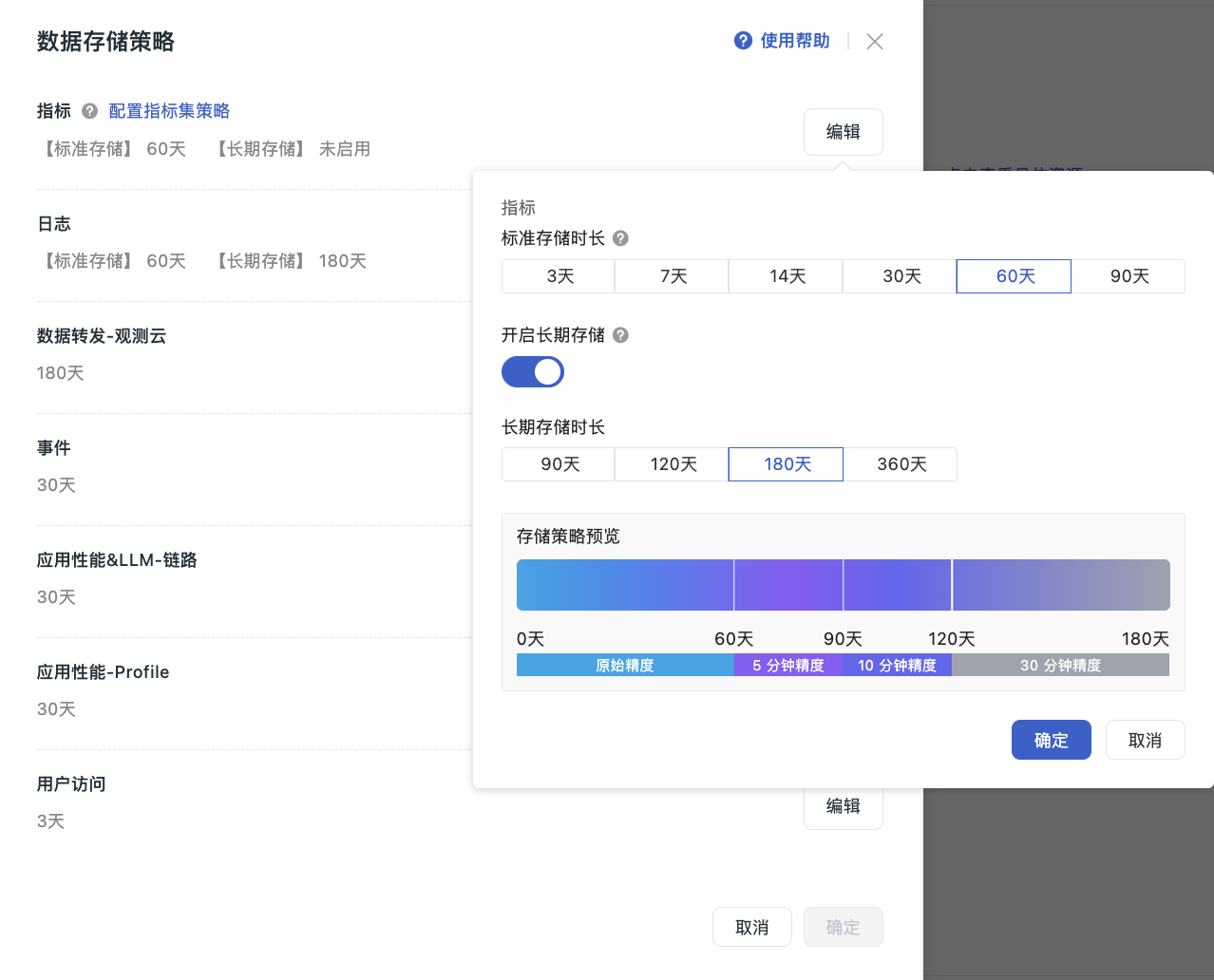
Notes
- Metrics retain their original precision during the standard storage period and support high-performance chart interactions;
- After long-term storage is enabled, the system automatically applies precision reduction rules based on data storage time, significantly saving storage space. The precision reduction algorithm retains the maximum value in each time period, ensuring critical data is not lost;
- The long-term storage duration must be longer than the standard storage duration.
Precision reduction rules are as follows:
| Data Storage Time | Precision |
|---|---|
| Within the standard storage duration | Original precision |
| Beyond the standard storage duration and within 90 days | 1 minute |
| Beyond 90 days and within 180 days | 5 minutes |
| Beyond 180 days and within the long-term storage duration | 10 minutes |
The long-term storage duration is the total retention period for metric data and is not added to the standard storage duration; precision stages without a corresponding time range do not take effect.
Note
Long-term storage for metrics only supports billing by data point count. If metrics in the current workspace are billed by time series, you must adjust the metric billing method before enabling long-term storage.
Adjust the Metric Billing Method
Existing workspaces where metrics are billed by time series support self-service switching to billing by data point count, with no application required.
- Only the workspace owner (Owner) can perform the switch;
- Workspaces under new Billing Center accounts do not display the Adjust Billing Method entry.
Steps:
- In Data Storage Policy, click Edit corresponding to Metrics;
- To the right of Enable Long-term Storage, click Adjust Billing Method;
- In the confirmation dialog, review the impact of the billing change and click Confirm Switch. After the switch, metrics in the current workspace will be billed by data point count instead of by time series, and related charges may change;
- After the switch succeeds, the Enable Long-term Storage toggle becomes operable again and remains off by default. To use it, manually enable it, configure the long-term storage duration, and click OK to save.
Logs
| Storage Type | Available Duration |
|---|---|
| Standard storage duration | 3 / 7 / 14 / 30 / 60 / 90 days |
| Long-term storage duration | Disabled / 90 / 120 / 180 / 360 days |
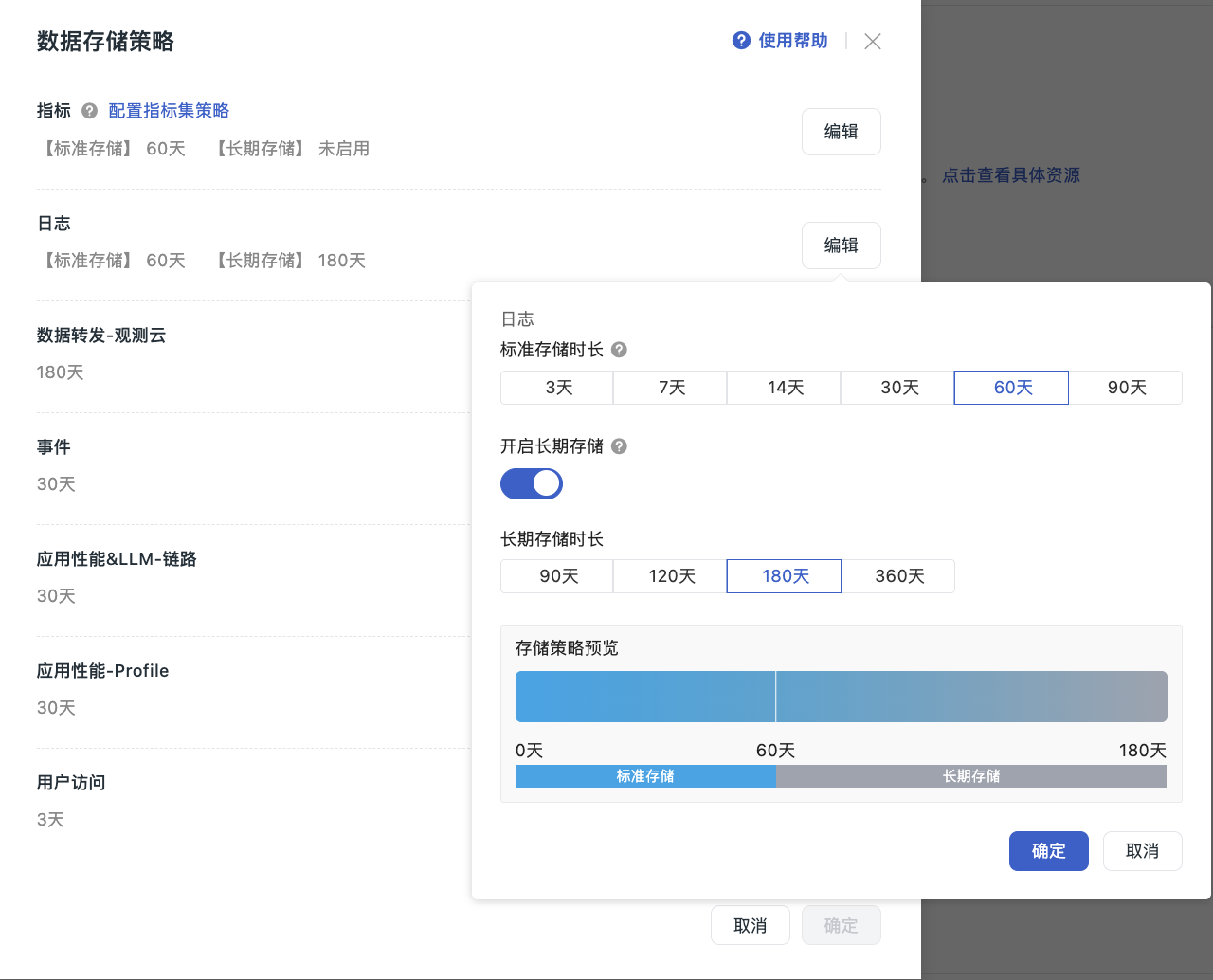
Notes
- Logs within the standard storage period support queries over any time range and are suitable for high-frequency query scenarios such as Explorer and dashboards;
- Logs within the long-term storage period are suitable for low-frequency queries, with a maximum time range of 24 hours per query;
- Long-term storage for logs is billed based on the volume of log data that exceeds the standard storage duration (per GB/day). The calculation scope covers all log data in the long-term storage period that exceeds the standard storage period; data within the standard storage period is not billed repeatedly.
Other Data Types
| Data Type | Available Duration |
|---|---|
| Data Forwarding - Guance | 180 / 360 / 720 days |
| Events | 14 / 30 / 60 days |
| APM & LLM - Trace | 3 / 7 / 14 / 30 / 60 / 90 days |
| APM - Profile | 3 / 7 / 14 / 30 / 60 / 90 days |
| RUM | 3 / 7 / 14 / 30 / 60 / 90 days |
| Synthetic Monitoring | 3 / 7 / 14 / 30 / 60 / 90 days |
| Data Observability | 3 / 7 / 14 / 30 / 60 / 90 days |
Change Storage Policy
Steps
- Go to Manage > Workspace Settings > Change Data Storage Policy;
- Click Change;
- Select the data type whose storage policy you want to modify, and click Edit;
- Select the storage duration;
- If you need to enable long-term storage, turn on the "Enable Long-term Storage" toggle and select the long-term storage duration. If metrics in the current workspace are billed by time series, you must first adjust the metric billing method. After configuration, a storage policy preview appears in the dialog, clearly showing precision changes across different stages;
- After making the changes, click OK to update the data storage duration in the current workspace.
Effective Rules
- First change on the same day: takes effect immediately;
- Multiple changes on the same day: the last modification prevails and takes effect the next day;
- After the policy change, the system determines the data expiration scope based on the latest configuration and performs purging at 00:00 the next day.
Important Notes
- Permission restriction: only workspace owners can perform this operation;
- After a metric storage policy change, data under the old policy will be deleted immediately. Proceed with caution;
-
After a log storage policy change:
- New data: immediately stored and billed according to the new policy;
- Old data: remains until rolled off and is billed according to the original policy;
-
For data types other than logs and metrics (Events, Trace, Profile, etc.) after a policy change:
- New data: immediately stored and billed according to the new policy;
- Old data: remains until rolled off and is billed according to the original policy.
Scenario Examples
- Metrics: shorten the standard storage duration (14 days → 7 days) — data generated before the adjustment will be deleted immediately;
- Logs: shorten the retention period (14 days → 7 days) — data generated before the adjustment is still billed under the 14-day policy until purged; data generated afterward is billed under the 7-day policy;
- Extend the retention period (7 days → 14 days) — data generated before the adjustment is still billed under the 7-day policy; data generated afterward is billed under the 14-day policy.
Log Query Mode Description
After enabling long-term log storage, the Log Explorer supports two query modes:
- Standard query: queries logs within the standard storage range, supporting any time range, quick switching, and real-time responses;
- Long-term query: queries logs within the long-term storage range; the status distribution chart is not displayed. Select a date first. The time range defaults to 00:00:00 - 23:59:59, and you can adjust it freely and click Query to run the query, or use the "Previous" and "Next" buttons to quickly switch dates.

When the query range exceeds the standard storage duration:
-
In standard query mode, if the selected time range exceeds the standard storage duration, the system returns only log data within the standard storage range and prompts you that the current query range has exceeded the standard log storage duration (X days). To view logs older than X days, switch to the long-term query.
-
In dashboards, Metrics Analysis, or query tools, if a chart contains a log query with a time range exceeding the standard storage limit:
-
If data exists within the standard storage range: the chart displays data in that range and shows "Incomplete query results." That is, the chart only displays log data within the standard storage range and does not include long-term storage logs. To query long-term storage logs, narrow each query to a time range within 24 hours and run them separately;
-
If no data exists within the standard storage range: the system automatically queries the long-term storage data for the end date of the selected time range and shows "Incomplete query results." That is, because long-term storage logs only support a single query within a 24-hour range, the system has automatically queried the data for the end date of the selected time range. To view more long-term storage logs, narrow each query to a time range within 24 hours and run them separately.
-
Read More
Next, you might want to learn about: