Kodo-X Split
Note
Please read this document carefully. Ensure that backup measures and rollback plans are in place during implementation to guarantee system security and stability.
Overview
When processing a large number of write requests, the resource consumption of kodo-x may be concentrated on specific types of processing tasks, especially metric data processing. This can cause other data to be consumed in a timely manner, leading to data accumulation.
Solution:
- Create a standalone kodo-x instance dedicated to processing metric data, reducing resource consumption on the existing instance.
- Modify the existing kodo-x instance so that it no longer processes metric data, focusing on other tasks.
Solution Architecture Diagram
Before the split:

After the split:
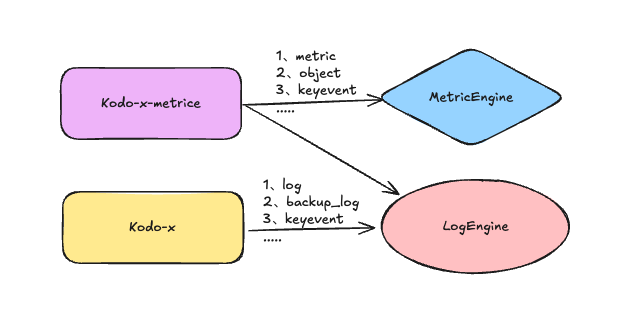
Prerequisites
- You have operation permissions for the Guance cluster.
- Plan the scheduling resources for kodo-x and the split kodo-x-metric in advance.
Implementation Plan
1. Service Backup
2. Create the kodo-x-metric Service
2.1 Create the kodo-x-metric ConfigMap
Modify the following information:
- Change
nameto kodo-x-metric. - Delete the
resourceVersionanduidfields.
2.2 Create the kodo-x-metric Deployment
Modify the following information:
- Change
metadata.nameto kodo-x-metric. - Delete
resourceVersionanduidfrommetadata. - Change the
nameundervolumeMountsandvolumesto kodo-x-metric.
...
metadata:
  name: kodo-x-metric    ##### Change to kodo-x-metric
  namespace: forethought-kodo
  resourceVersion: "129925433"   ##### Delete
  uid: e4f0c541-4d91-47d4-82c8-91eec2757cb2   ##### Delete
...
        volumeMounts:
        - mountPath: /kodo/config/config.yaml
          name: kodo-x-metric  ##### Change to kodo-x-metric
          subPath: config.yaml

      volumes:
      - configMap:
          defaultMode: 420
          name: kodo-x-metric ##### Change to kodo-x-metric
          optional: false
        name: kodo-x-metric ##### Change to kodo-x-metric
3. Create the kodo-x-metric Service
3.1 Modify kodo-x-metric Parameters
Configuration file: kodo-x-metric.yaml (other configurations remain the same as the existing kodo-x.yaml)
global:
    metric_workers: 32  # Increase metric data processing capacity
    object_workers: 8
    keyevent_workers: 8
    workers: 0  # Disable the default worker
    log_workers: 0  # Disable log processing
    backup_log_workers: 0  # Disable backup log processing
Refer to the Application Service Configuration Guide for more information.
Restart the service:
3.2 Modify kodo-x Parameters
The existing kodo-x instance will only handle non-metric tasks, further optimizing resource allocation.
Configuration file: kodo-x.yaml
global:
    metric_workers: -1  # Disable metric data processing
    object_workers: -1  # Disable object processing
    keyevent_workers: -1  # Disable key event processing
Restart the service:
4. Verification
Run the following commands to verify that the configuration has taken effect: