Analysis Dashboard
In Agent Monitoring > Analysis Dashboard, you can view metric information for the selected application in chart format and gain a comprehensive understanding of application performance and cost distribution.
You can also access the Analysis Dashboard from the application entry on the Agent Overview page. When you enter through a specific Agent, the system automatically applies the filter conditions for that Agent.
The top of the page supports switching between Agent / LLM status and defaults to Agent status.
Note
When there is no data within the selected time range, the chart area displays the "No Data" status. You can adjust the viewing range using the time widget in the upper-right corner.
LLM Monitoring
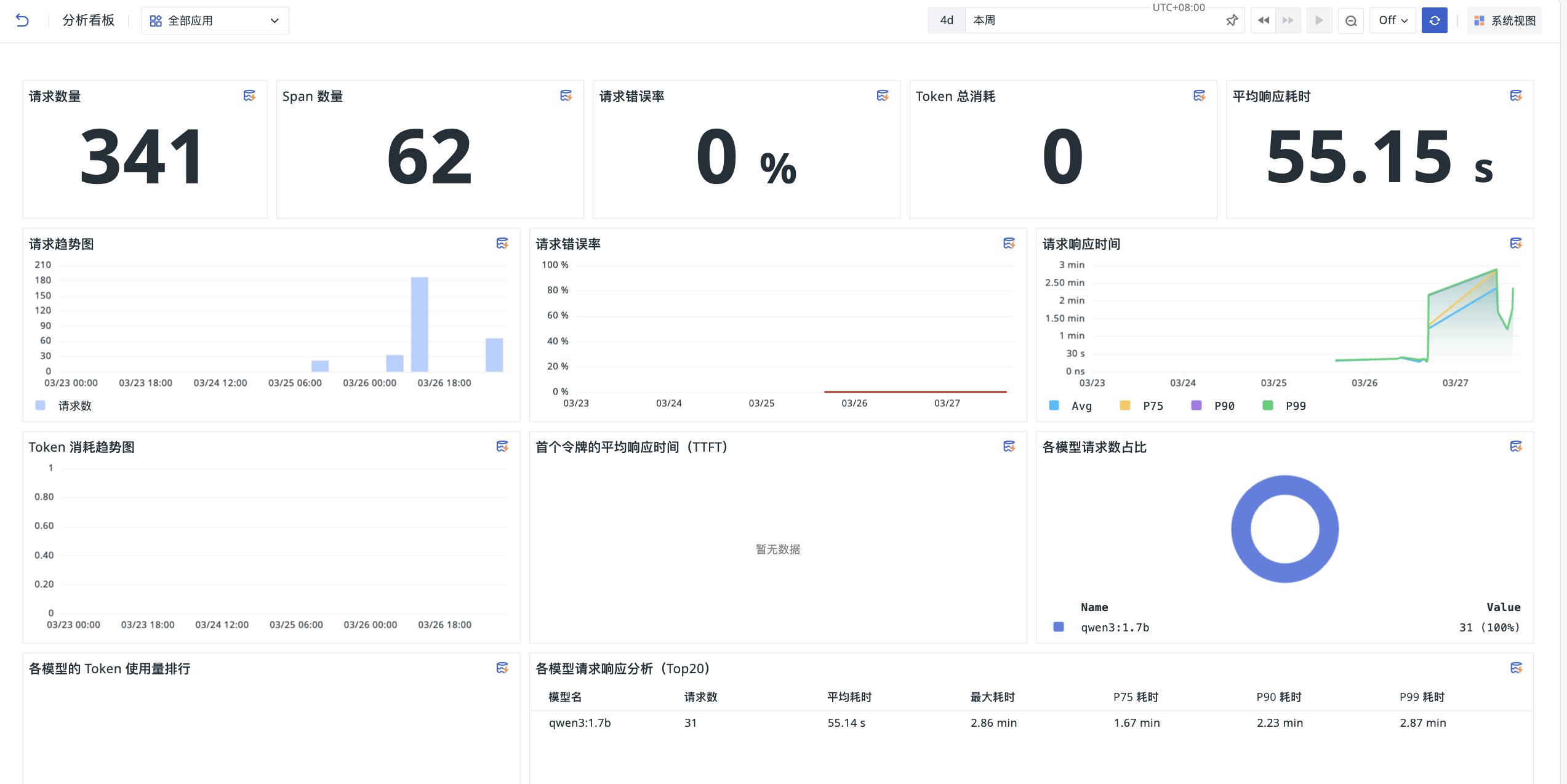
After selecting the LLM Monitoring application, the Analysis Dashboard displays the following content.
Core Metrics Overview
The top of the dashboard displays key metric statistics within the selected time range:
- Number of Requests: Total request count
- Span Count: Total number of associated Span calls
- Request Error Rate: Percentage of failed requests out of total requests
- Total Token Consumption: Total number of Tokens consumed by all requests
- Average Response Time: Average processing time across all requests
Trend Analysis Charts
With multi-dimensional trend charts, you can track changes in application performance and usage trends:
- Request Trend Chart: View request volume distribution across different time periods and identify usage peaks
- Request Error Rate: Display the error rate trend to quickly detect anomalous fluctuations
- Request Response Time: Display Avg, P75, P90, and P99 percentile latencies to identify long-tail latency issues
- Token Consumption Trend Chart: Display the time distribution of Token usage to support cost forecasting
- Average Time to First Token (TTFT): Measures first-token latency and reflects model response speed
Model and User Analysis
Analyze resource usage and performance from the model and user dimensions:
- Proportion of Requests per Model: Donut chart showing the call distribution across different models (e.g., qwen3:1.7b)
- Token Usage Ranking by Model: Compare resource consumption across different models
- Request Response Analysis by Model (Top 20): Table showing detailed performance metrics for each model, such as request count, average/maximum latency, and percentile latencies
- User Request Ranking (Top 10): Identify high-frequency users
- User Token Consumption Ranking (Top 10): Identify high-cost users to support cost allocation
Agent Monitoring
After selecting the Agent Monitoring application, the Analysis Dashboard displays Agent Runtime call, Token, and latency data in the Runtime Overview, Models & Tokens, Tool Module, and Skill Module modules.
Filter Conditions
The page supports filtering dashboard data by the following conditions:
- Agent type;
- Agent ID;
- Agent name;
- Model provider.
The available options for Agent ID and Agent name update dynamically based on the parent filter conditions. After you switch the time range or filter conditions, the overview, distribution, trend, and table data in the dashboard refresh simultaneously.
Runtime Overview
The Runtime Overview displays overall call and Token usage within the current time range:
- Total Operations: Sum of Tool, Skill, and LLM call counts;
- Total Tool Calls: Number of Tool operation calls;
- Total LLM Calls: Number of model conversation calls; a single business request may contain multiple LLM calls;
- Total Skill Calls: Number of Skill calls; displays
0when no Skill data is reported; - Total Tokens: Sum of Token usage across input, output, and other types;
- Average Tokens per LLM Call: Ratio of total Tokens to the total number of LLM calls;
- Model Provider Distribution: Displays the proportion of LLM calls by model provider;
- Model Call Distribution: Displays LLM call counts by model;
- Tool Call Distribution: Displays the call proportion by Tool name;
- Top 10 Skill Calls: Displays the 10 Skills with the highest call counts.
The overview cards and distribution charts are calculated based on Counter increments within the current time range, showing the calls or Token usage actually added during this period rather than the cumulative Counter value.
Models & Tokens
The Models & Tokens module is used to analyze model call volume, Token consumption, and call latency:
- LLM Call Trend: Displays LLM call volume trends by model;
- Input/Output Token Trend: Displays usage trends by Token type;
- Token Trend by Model: Displays Token usage trends by model;
- LLM Call Latency Percentile Table: Displays LLM call counts and P50, P75, P90, and P99 call latencies by Agent type.
- Average Time to First Token (TTFT): View the waiting time for the first Token returned after the Agent calls the model, used to analyze first-token response speed.
Trend charts use the dashboard's automatic time interval to calculate incremental data for each time period.
Tool Module
The Tool Module displays the active count, call trends, latency, and anomalies of Tools:
- Active Tool Count: Number of Tools with a call count greater than
0within the current time range; - Maximum Tool Latency: Maximum latency of Tool calls within the current time range;
- Tool Call Trend: Displays call volume trends by Tool name;
- Average Tool Latency: Displays the average call latency per time interval by Tool name;
- Top 10 Tool Anomalies: Displays the 10 Tools with the highest number of anomalous calls and their change trends.
Skill Module
The Skill Module displays the active count, call trends, latency, and anomalies of Skills:
- Active Skill Count: Number of Skills with a call count greater than
0within the current time range; displays0when no Skill data is reported; - Maximum Skill Latency: Maximum latency of Skill calls within the current time range; displays no data when there are no Skill calls;
- Skill Call Trend: Displays call volume trends by Skill name;
- Average Skill Latency: Displays the average call latency per time interval by Skill name;
- Top 10 Skill Anomalies: Displays the 10 Skills with the highest number of anomalous calls and their change trends.
Further Reading
You may also be interested in the following: