Subscribe to Guance Exclusive Plan on Alibaba Cloud Marketplace
This article describes how to purchase and activate the Guance Exclusive Plan on Alibaba Cloud Marketplace.
1. Purchase the Guance Exclusive Plan
-
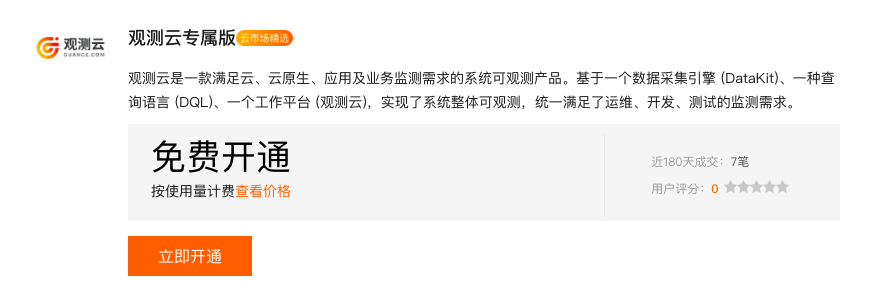
Log in to the Alibaba Cloud Marketplace Guance Exclusive Plan page and click Activate Now.
-
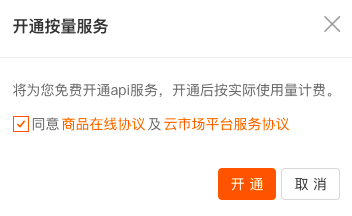
When prompted to activate a pay-as-you-go service, agree to the agreement and click Activate.
-
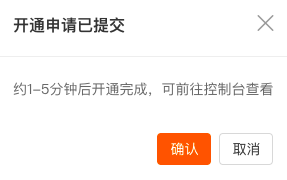
After the activation succeeds, go to the console.
2. Access Guance via SSO
After the subscription request is confirmed, you are directly redirected to the Alibaba Cloud purchased services list, where you can find the Guance Exclusive Plan instance you purchased.
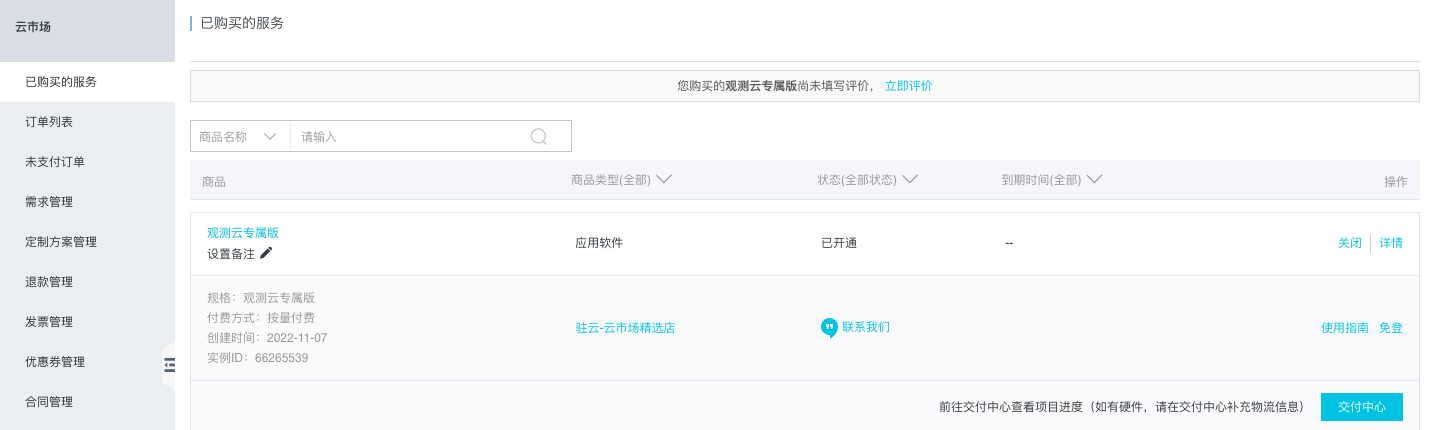
Click SSO on the right side of the instance. In the dialog box that appears, click OK.
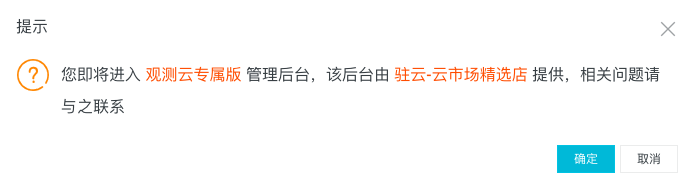
On the Guance side, if the current Alibaba Cloud account ID is not bound to a Guance Billing Center account, one of two scenarios applies:
No Billing Center account: You need to register a Guance account and a Billing Center account, and then bind the cloud account for settlement.
Has a Billing Center account: You can directly bind a Billing Center account for cloud account settlement.
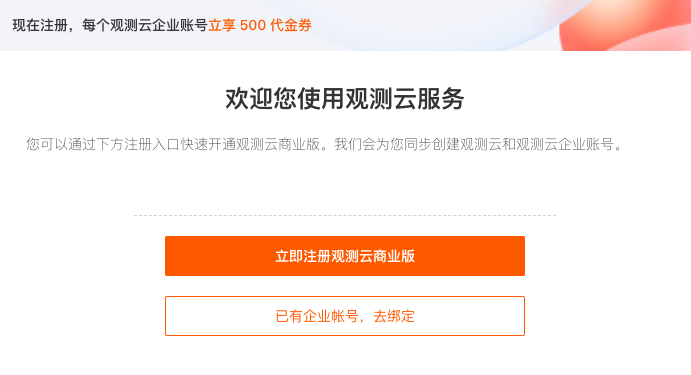
What is a Billing Center account?
A Billing Center account is an independent account within the Guance Billing Center platform used to manage Commercial Plan billing. It allows a single account to associate with multiple workspaces, so that billing for these workspaces can be handled centrally.
The overall process is as follows:
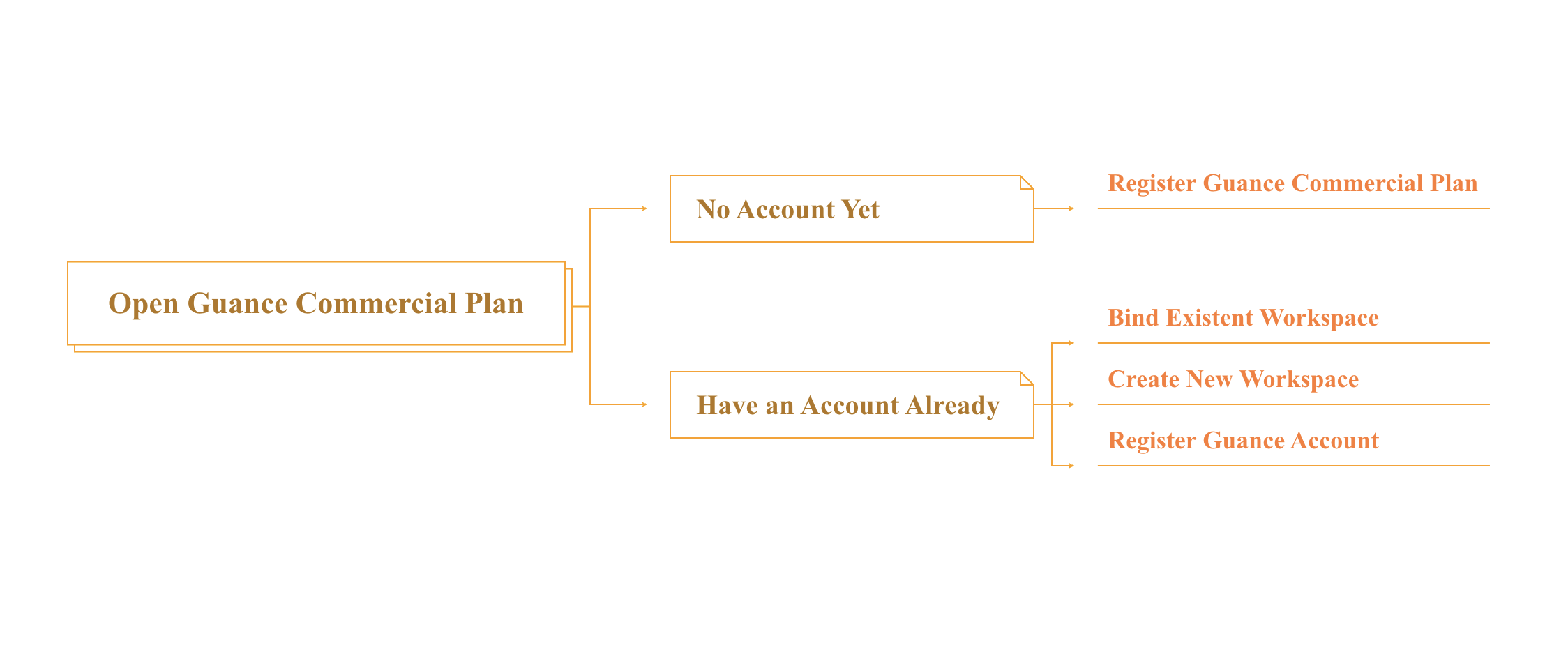
Register the Guance Commercial Plan
If you do not yet have a Billing Center account, click Next to be automatically redirected to the registration page. After completing the registration process, you will obtain a Guance account and a Billing Center account.
-
Fill in the basic information.
-
Fill in the enterprise information.
-
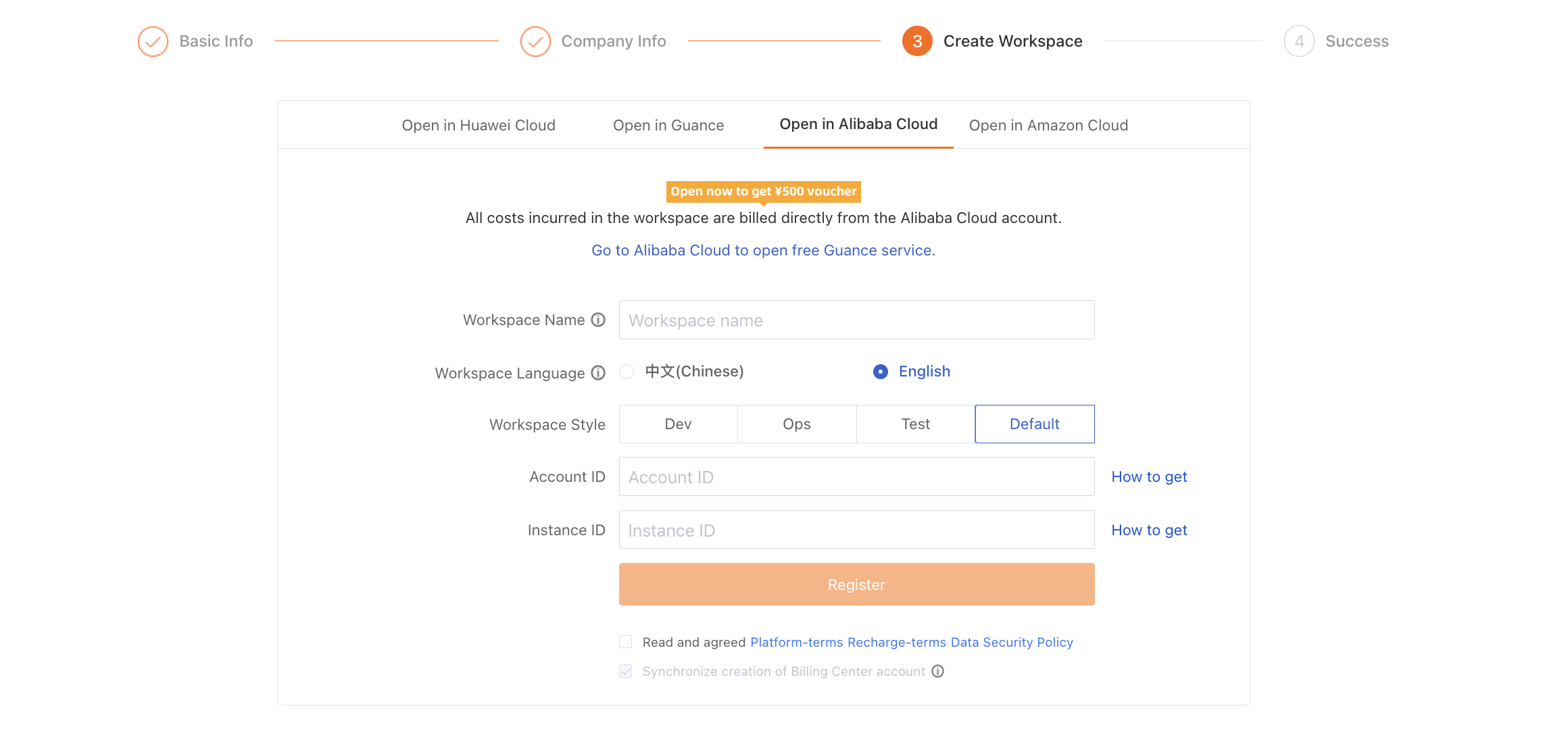
Select the activation method: enter the workspace name, select the workspace language, and enter the account ID and product instance ID.
-
Click OK.
-
Review and agree to the Guance Platform User Service Agreement, and then click Next.
Warning
-
The Guance and SLS joint solution supports only the China 1 (Hangzhou) and China 3 (Zhangjiakou) sites. Once the SLS data storage solution is selected, it cannot be changed.
-
The username you enter is also used to register the Guance Billing Center account. Billing Center usernames are checked for uniqueness and cannot be modified once registered.
Bind the Alibaba Cloud Account
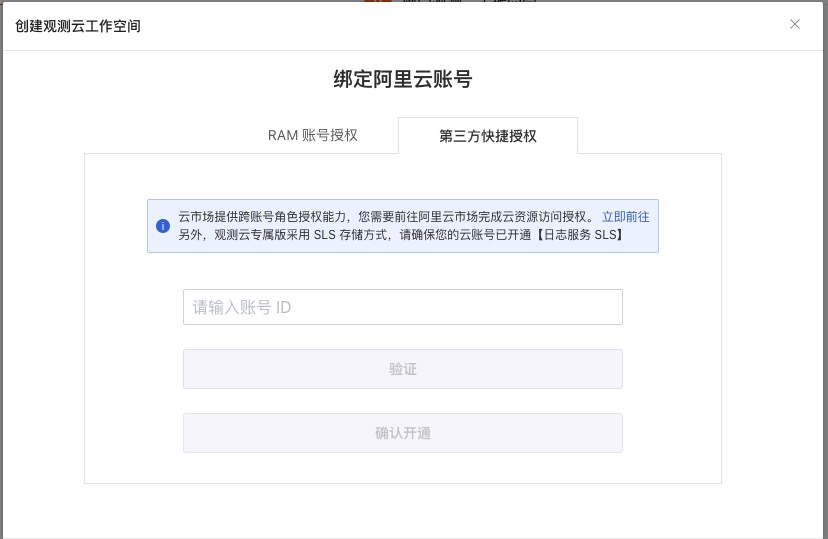
On the Bind Alibaba Cloud Account page, Guance provides two authorization methods to ensure the security of your data: RAM account authorization and third-party quick authorization.
RAM Account Authorization
Select RAM account authorization, download the SLS authorization file, create an Alibaba Cloud RAM account in the Alibaba Cloud console, and obtain the AccessKey ID and AccessKey Secret for that account.
For details about using the SLS authorization file to grant permissions to a RAM account, refer to RAM Account Authorization.
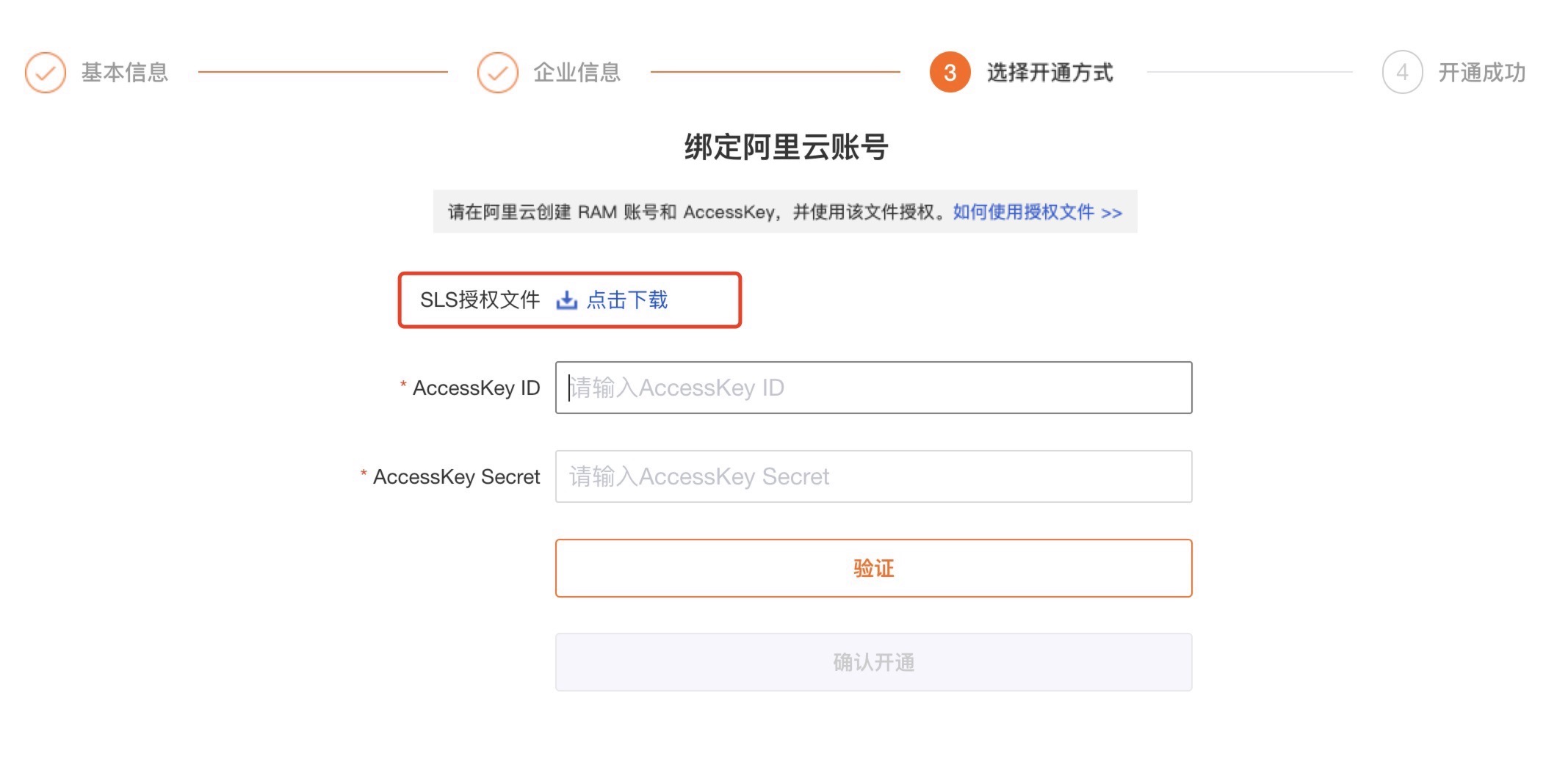
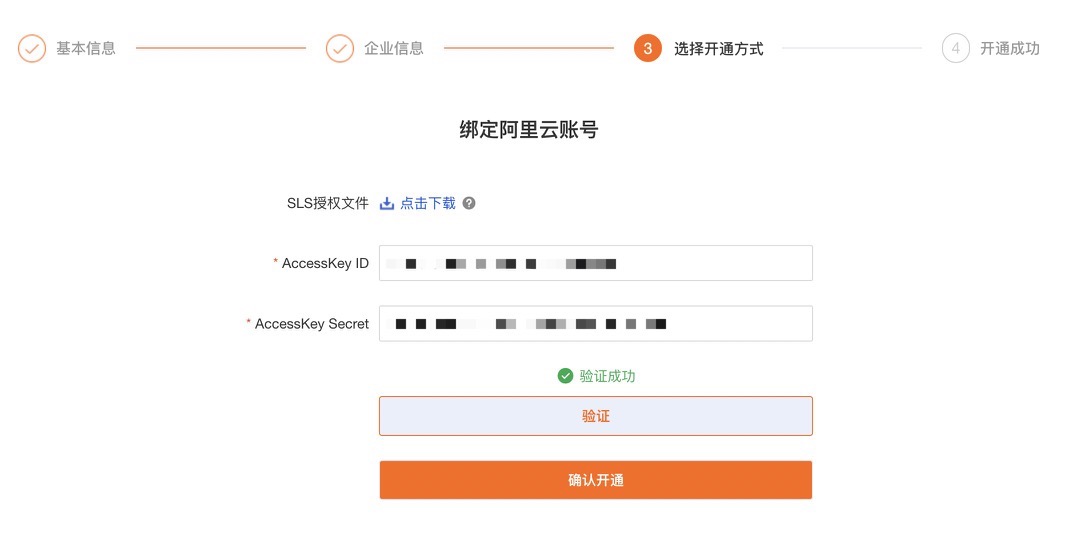
Enter the AccessKey ID and AccessKey Secret and verify them. If the verification passes, you can proceed to the next step.
Third-Party Quick Authorization
Select third-party quick authorization and click Go to Authorize Now. You will be redirected to Alibaba Cloud, where you can log in and complete the authorization.
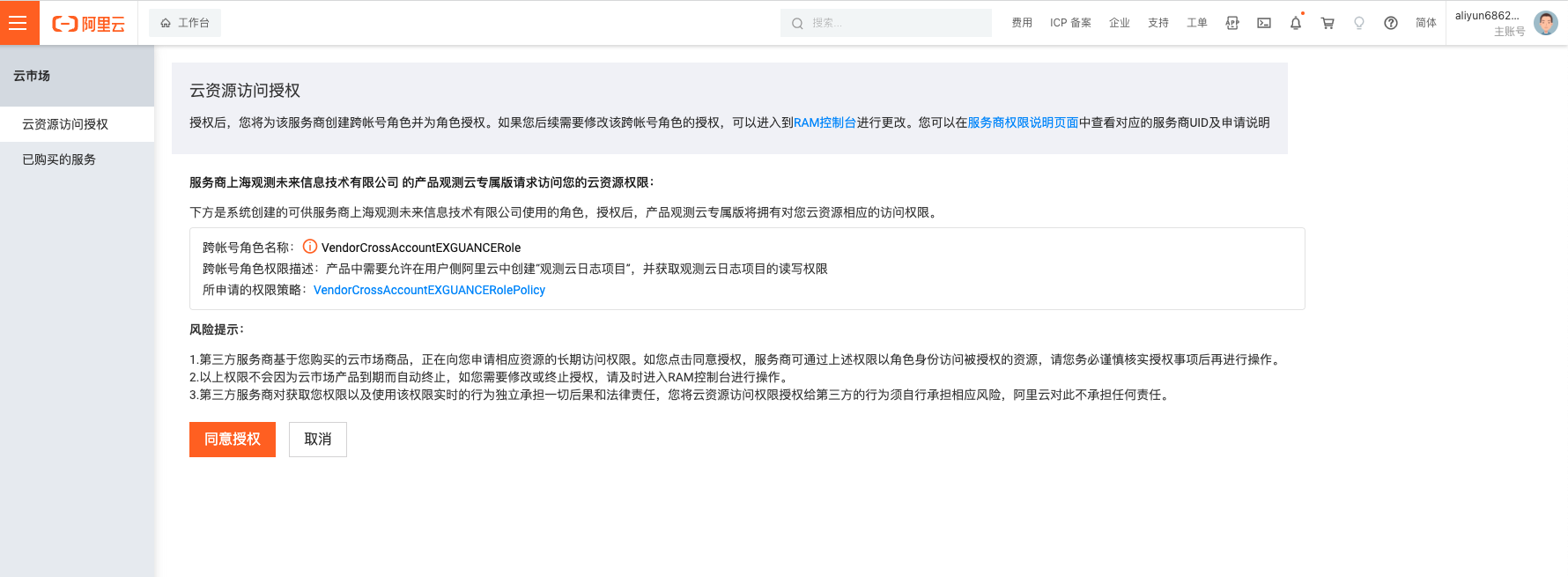
Click Agree to Authorization. The Vendor UID Verification window appears. To obtain the UID, click Service Provider Permissions page to view it.
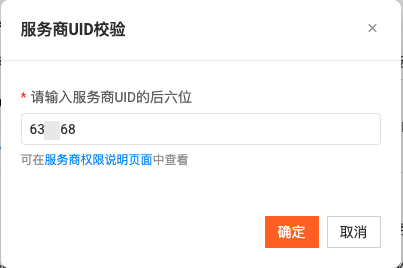
Enter the UID and click OK. You will be automatically redirected to Alibaba Cloud Marketplace > Purchased Services, and the authorization is complete.
Return to the Guance Bind Alibaba Cloud Account page and click Verify. After the verification passes, click Confirm Activation.
Some issues you may encounter
-
The Guance Exclusive Plan uses SLS storage. If your cloud account has not activated Alibaba Cloud Log Service (SLS), you will not be able to use the log storage service properly.
-
Cross-account role authorization requires the Alibaba Cloud primary account or a sub-account granted the GetRole, GetPolicy, CreatePolicy, CreatePolicyVersion, CreateRole, UpdateRole, and AttachPolicyToRole permissions for RAM Access Control.
-
During verification, if the account being verified is an authorized sub-account, the system automatically locates the primary account to which the sub-account belongs and pulls the projects and Logstores under the primary account.
-
If verification fails, check whether cloud resource access authorization has been completed. You can go to Alibaba Cloud RAM console > RAM Access Control > Roles/Authorizations to view it.

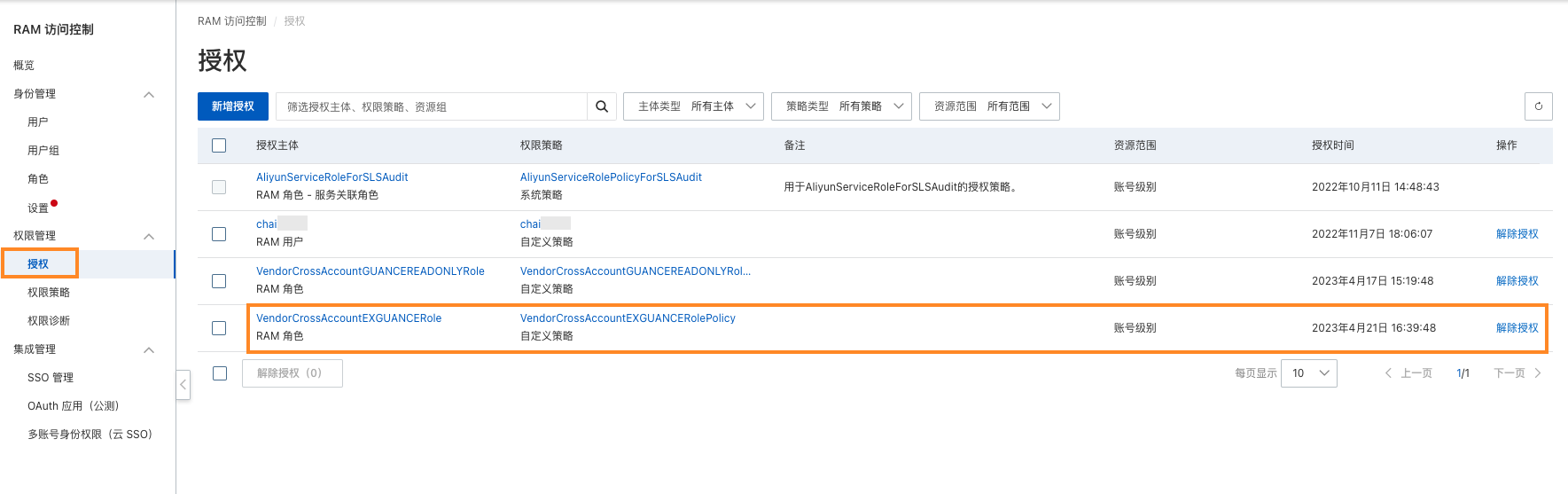
Step 4: Activation successful
After the verification passes, click Confirm Activation, and the message Guance Commercial Plan activated successfully is displayed.
Bind the Guance Workspace
If you already have a Guance account, click Already have a Billing Center account, bind it. The prompt How to quickly bind an Alibaba Cloud account for settlement is displayed.
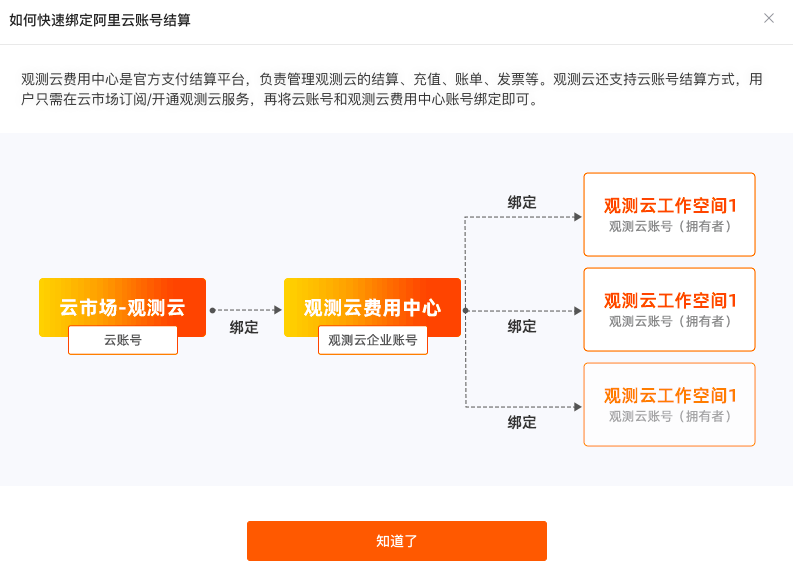
Click Got it to start binding the Guance workspace. Before binding the workspace, you need to bind the Guance Billing Center account first.
Bind the Guance Billing Center Account
- Site: Select the site for the workspace to be created later.
- Username: If you already have a Guance Billing Center account, you can directly enter the Billing Center account username and bind it through email verification.
- Register: If you do not yet have a Guance Billing Center account, you can register one first.
Bind the Guance Workspace
If there are bindable workspaces under your Guance Billing Center account, click Bind directly and confirm the binding in the dialog box that appears.
Note: All the workspaces listed here use SLS storage. If your account has never created a workspace with SLS storage, you can choose to create one.
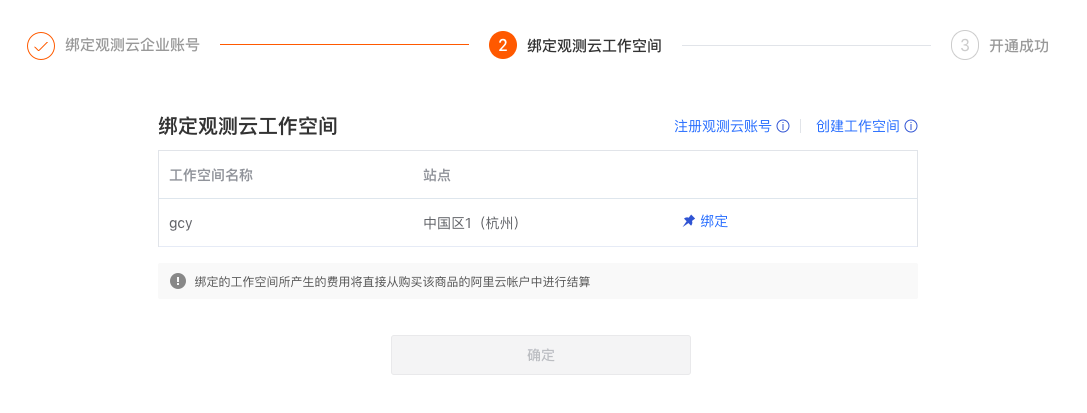
You are redirected to the Bind Guance Workspace page, which indicates that the workspace is bound.
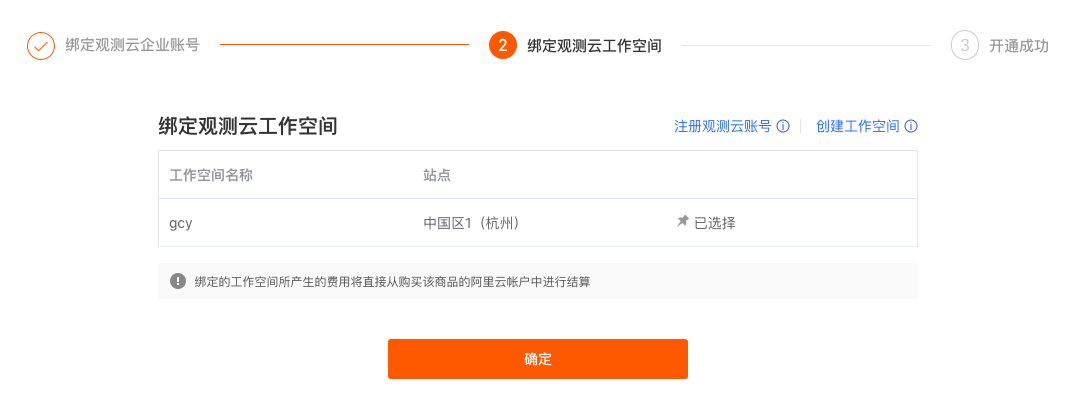
Click OK to view the activation success message.
If you have already registered a Guance account but have not yet created a workspace, click Create Workspace first.
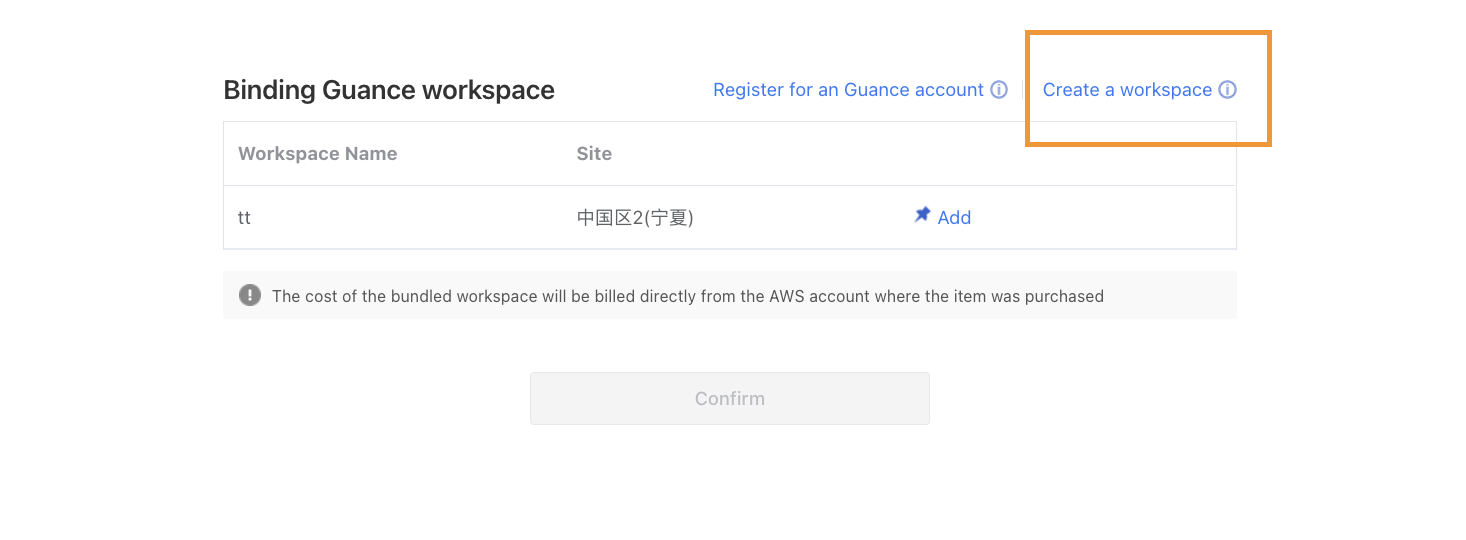
Enter the workspace name, select the workspace language, and enter the email address used to register the Guance account. Create the workspace through email verification.
Note: A workspace is a collaborative space for Guance data insights. The workspace language option affects templates such as events, alerts, and SMS messages within the workspace. If you select English, the corresponding templates will use English by default. Once created, the template language of this workspace cannot be modified. Please choose carefully.
After the workspace is created, you need to bind the Alibaba Cloud account. You can download the SLS authorization file, create AK/AKS in the Alibaba Cloud console and grant authorization, and then enter the AK/AKS information in the dialog below for verification.
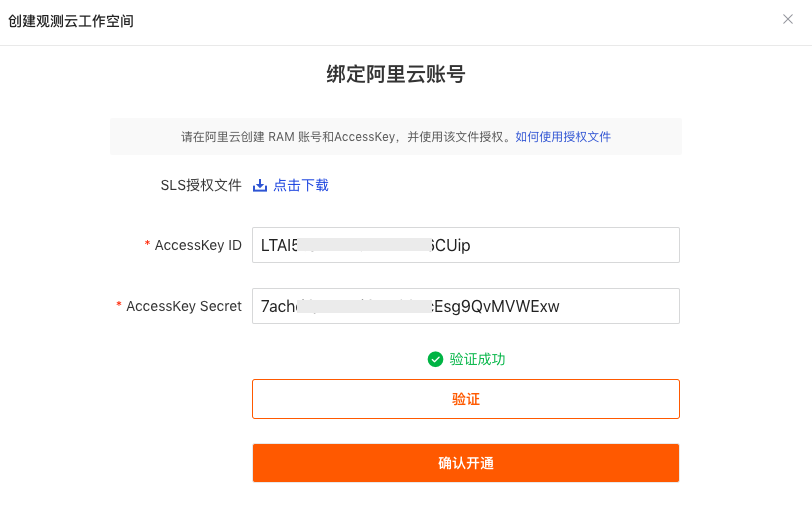
After the AK/AKS information is verified successfully and the activation is confirmed, you are automatically redirected to the Bind Guance Workspace page, which indicates that the workspace is bound.
Click OK to be redirected to the Successfully bound the following Guance workspace page.
If you have not used Guance services before, register a Guance account and create a workspace first.
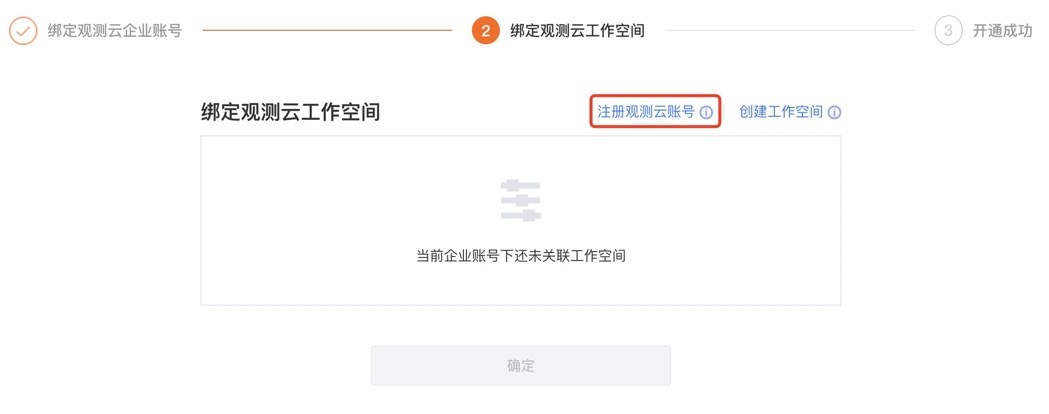
Click Register Guance Account, enter the relevant information, and complete the registration through email verification.
Note: A workspace is a collaborative space for Guance data insights. The workspace language option affects templates such as events, alerts, and SMS messages within the workspace. If you select English, the corresponding templates will use English by default. Once created, the template language of this workspace cannot be modified. Please choose carefully.
Start Using Guance
After the registration is complete, you can start using the Guance Exclusive Plan.
Sync SLS Data
Guance allows you to sync and view other SLS data under your Alibaba Cloud account by binding a Log Index.
How to Obtain the Account ID
Alibaba Cloud primary account
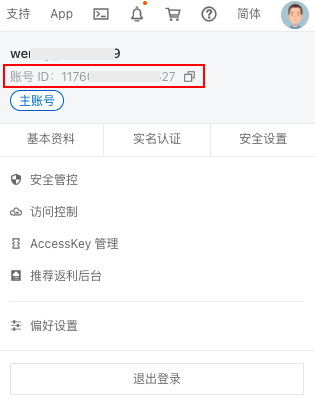
Log in to Alibaba Cloud with the primary account, enter the Alibaba Cloud console, and click the account avatar in the upper-right corner to find the account ID.
How to Obtain the Product Instance ID
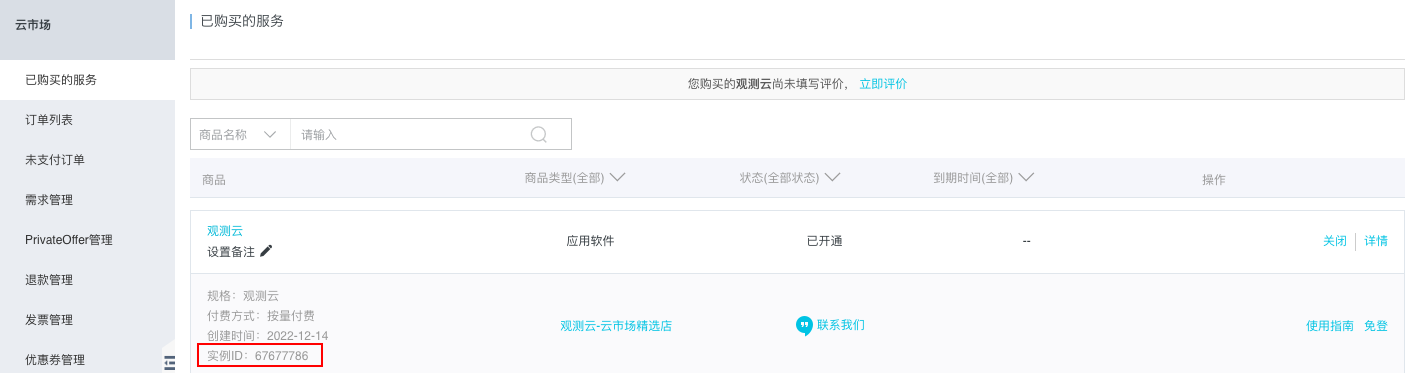
After Guance confirms the subscription request in Alibaba Cloud Marketplace, you are directly redirected to the Alibaba Cloud purchased services list. Under the purchased Guance service, you can find the product's instance ID. Copy this instance ID and enter it into the product instance ID field in the Change Settlement Method dialog.
FAQ
Versions
If I have already activated the Guance Commercial Plan in a workspace, can I also activate the Guance Exclusive Plan?
Yes. Activate it through the Alibaba Cloud Marketplace > Guance Exclusive Plan product entry and create a new SLS workspace.
Can a workspace where the Guance Commercial Plan is already activated be switched to the Guance Exclusive Plan?
No. The biggest difference between the Commercial Plan and the SLS Exclusive Plan lies in the location of the backend data storage. Once a workspace is activated, the storage ownership of its indexes cannot be changed. Therefore, no matter what settlement method the previously activated Commercial Plan used, it cannot be converted into an SLS Exclusive Plan workspace.
Can a Free Plan workspace created during registration be upgraded to the Guance Exclusive Plan?
No. Currently, SLS Exclusive Plan workspaces can only be activated through the Alibaba Cloud Marketplace - Guance Exclusive Plan product entry. The normal upgrade flow does not support activating SLS Exclusive Plan workspaces.
Data Viewing
Why are there logs in SLS, but they cannot be displayed in Guance?
The Default index must contain logs, that is, logs collected by the Guance DataKit, for the Guance Log Explorer to display SLS logs.
Why is the content displayed as empty after SLS log input is reported?
Because the content field in SLS is content, while Guance uses message, this needs to be resolved through field mapping.
How can I tell whether the data in the SLS console is the user's own data or data ingested by Guance?
You can determine this by the project name. If the project name is in the format guance-wksp-<workspace ID>, it can be considered resources and data indexes created when the Guance SLS Exclusive Plan was activated. If you need to view them, you can obtain the workspace ID from the Workspace > Management > Basic Settings page and then find the corresponding data in the SLS console.
Can users use Guance to view their own SLS stored data?
Users can view and analyze their own SLS stored data in the Guance workspace. Currently, only view and analysis of bound index data is supported; correlation analysis with data from other feature modules is not yet supported.
For information about binding indexes, refer to Binding a Log Index.
Data Storage
How does the Guance Exclusive Plan store data?
For the Guance Exclusive Plan, metrics, logs, backup logs, Synthetic Monitoring, CI, and event data are stored in SLS. In addition to the data mentioned above, infrastructure, Application Performance Monitoring (APM), and Real User Monitoring (RUM) data are currently stored in the Guance ES cluster.
- Metrics: SLS Metricstore;
- Logs, Synthetic Monitoring, CI visualization, and events: SLS Standard-type Logstore;
- Backup logs: SLS Query-type Logstore.
Note: Because the SLS data expiration policy only supports automatic deletion when the TTL expires, the Guance approach of reducing the number of time series by adjusting the data retention policy of a Measurement does not take effect in SLS Exclusive Plan workspaces.
Can the data storage region of the Guance Exclusive Plan be changed?
No. Guance creates Projects as well as Metricstore and Logstore data indexes in the same Region in SLS, based on the Region of the site the user currently selects for activation. Unless a new SLS Exclusive Plan workspace is created, the data storage Region cannot be changed. Currently, the Guance Exclusive Plan supports only the China 1 (Hangzhou) site and the China 3 (Zhangjiakou) site.
- If the SLS Exclusive Plan is activated at the China 1 (Hangzhou) site, data will be stored in the SLS "cn-hangzhou" Region;
- If the SLS Exclusive Plan is activated at the China 3 (Zhangjiakou) site, data will be stored in the SLS "cn-zhangjiakou" Region.
Billing
After activating the Guance Exclusive Plan, how are log data collected by the Guance collector DataKit billed?
Log data collected by DataKit is billed according to the Guance log billing method.
If log data in SLS is viewed, searched, and filtered in the Guance console through the Log Index binding feature provided by Guance, how is it billed?
SLS log data obtained through index binding is still billed according to SLS.
If you perform data processing, data delivery, or streaming read from public network endpoints, Log Service will charge processing compute fees, data delivery fees, and public network read traffic fees.
For more details, refer to Billing items.
Can prepaid cards previously purchased in the Billing Center be used to pay bills for the Guance Exclusive Plan? How does the Guance Exclusive Plan make payments?
Yes. The prerequisite for the Guance Exclusive Plan is settlement with an Alibaba Cloud account. For cloud account settlement, the deduction order for Guance pay-as-you-go bills is: regular vouchers, threshold vouchers, prepaid cards, and cloud account cash balance. Pay-as-you-go consumption for SMS and synthetic tests can only be paid with prepaid cards and cloud account cash balance.
Function Queries
Why are some query functions unavailable?
The language used for SLS storage is promql, so some functions may be unavailable.
For more information about SLS functions, refer to DQL functions.
show function and tag-related issues
The four functions show_tag_key, show_tag_value, show_tag_key_cardinality, and show_tag_value_cardinality only support querying data from the last 5 minutes. That is, if there is no data in the last 5 minutes, these show functions return 0. The following scenarios in the current Guance workspace use the show tag functions:
- View variables use functions such as
show_tag_keyandshow_tag_value; - The slide-out detail page of the Metrics Management page displays tag data;
- When configuring metric data queries for all charts, the dropdown list after
group by, or when adding filter conditions.
Do SLS metric queries support querying multiple metrics in one DQL query?
No. Querying * is also not supported.
If there are extra-large logs in the log data, why might the displayed data be incomplete?
Currently, only queries based on docid and the default list page are guaranteed to return the complete message. Under other complex filter conditions, the message may be truncated. This is determined by the internal implementation of SLS.
Field Filtering
Why can't I perform field filtering after activating the Guance Exclusive Plan?
Guance automatically creates field indexes for log data containing the same fields to support field filtering. However, if the data volume is small, automatic creation is not triggered. In this case, you cannot query data in Guance through field filtering. You can resolve this by reporting more log data containing the same fields.
Note: If the time interval between data reported before the field index was created and data reported after the field index was created is too long, the data reported before the field index was created may not be queryable through field filtering. For example, if 2 records with the same fields were reported yesterday and no field index was created, and 100 records with the same fields as yesterday are reported today and a field index is automatically created, the 2 records reported yesterday may not be found when performing field filtering.
Exclusive Plan vs. Commercial Plan
Why is there no highlighting in the log search of the SLS Exclusive Plan?
Because the SLS log search highlighting feature is not yet publicly available and is only supported in the SLS console, no highlighting effect is shown when logs are matched by searching for keywords in Guance.
Does an SLS Exclusive Plan workspace support deleting a single Measurement?
No. Currently, only deleting all Measurements is supported.
Why don't newly reported field data in an SLS Exclusive Plan workspace support filtering and sorting?
SLS field indexes currently have a 1-minute delay. For example, when a new field is extracted through a Pipeline, you must wait 1 minute before the new field can be searched, and data within that 1-minute delay still cannot be filtered or searched. With ES, newly extracted fields can be searched immediately. This issue also affects features such as Generate Metrics and other chart queries.
Does an SLS Exclusive Plan workspace support index merging?
No. SLS Exclusive Plan workspaces enable multi-index by default. Commercial Plan workspaces enable index merging by default to reduce the number of indexes generated.
For more information about multi-index, refer to Log Index.
Why is the log time order out of sequence in an SLS Exclusive Plan workspace?
Because the SLS date field is accurate to the second, while Guance log data timestamps are at the millisecond level, log sorting in an SLS workspace may appear in an abnormal ascending or descending order. By default, only data within a single page is guaranteed to be in order; global ordering across pages is not guaranteed.
Why do SLS time series data get written with duplicates?
SLS time series data with the same timestamp are written repeatedly. This is caused by a characteristic of SLS.