Unity Application Integration
Collect metrics data from Unity applications to visualize and analyze application performance.
Reading Path
- First-time integration: Start with Quick Start
- Full integration: Continue reading this article
- Parameter details: See SDK Initialization, RUM Configuration, Log Configuration, Trace Configuration
- Custom capabilities: See Custom Tags, RUM Manual Tracking, Data Collection Masking
- Advanced scenarios: See Native and Unity Hybrid Development
- Troubleshooting: See Troubleshooting
Prerequisites
Note
If the RUM Headless service is already enabled, the prerequisites are automatically configured and you can integrate the app directly.
- Install DataKit
- Configure the RUM Collector
- Configure DataKit to be publicly accessible and install the IP geolocation database
Application Integration
- Go to RUM > Create Application > Android/iOS
- Create two applications, one for Unity Android and one for Unity iOS, to receive RUM data from the Android and iOS platforms separately
- Enter the corresponding app name and application ID for each platform's application
-
Select the application integration method:
- Public DataWay: Receives RUM data directly; no DataKit collector installation required
- Local environment deployment: Receives RUM data after the prerequisites are met
Install


Source Code: https://github.com/GuanceCloud/datakit-unity
Demo: https://github.com/GuanceCloud/datakit-unity/blob/dev/Assets/Scenes
- Download the latest ft-sdk-unity.unitypackage
- Import
ft-sdk-unity.unitypackageviaAssets->Import Package->Custom Package... - Add the third-party JSON parsing library
"com.unity.nuget.newtonsoft-json", which can be done viaPackage Manager->Add Package by name ... - Drag
FTSDK.prefabinto the first scene and initialize the SDK in the_InitSDKmethod inFTSDK.cs - Drag
FTViewObserver.prefabinto other scenes to listen for pageViewlifecycle events, as well as application sleep and wake-up - Use
Application.logMessageReceivedto listen for and convert Unity crash data and regular log data. For examples, see Quick Start and RUM Manual Tracking
Assets/Plugins
├── Android
│   ├── FTUnityBridge.java                // Android bridge
│   ├── InnerClassProxy.java              // Android Inner Setting Proxy
│   ├── ft-sdk-release.aar                // Android SDK
│   ├── gson-2.8.5.jar                    // Android SDK third-party dependency
├── iOS
│   ├── FTMobileSDK.xcframework           // iOS SDK
│   ├── FTUnityBridge.mm                  // iOS bridge
├── FTSDK.cs                              // Script bound to FTSDK.prefab
├── FTSDK.prefab                          // SDK initialization prefab
├── FTUnityBridge.cs                      // Unity bridge bridging methods for iOS, Android and other platforms
├── FTViewObserver.cs                     // Script bound to FTViewObserver.prefab
├── FTViewObserver.prefab                 // View page lifecycle listener prefab
├── UnityMainThreadDispatcher.cs          // Script bound to UnityMainThreadDispatcher.prefab
├── UnityMainThreadDispatcher.prefab      // Main thread consumption queue prefab
- If the native Android and iOS projects have already integrated the native SDK, comment out the
_InitSDKmethod to avoid duplicate setup. See Native and Unity Hybrid Development for the specific scenario - iOS Plugin Inspector setting:
FTMobileSDK.xcframeworkis a dynamic library, so you need to selectAdd to Embedded Binaries. With this option selected, Unity will set the Xcode project option to copy the plugin file into the final application bundle.
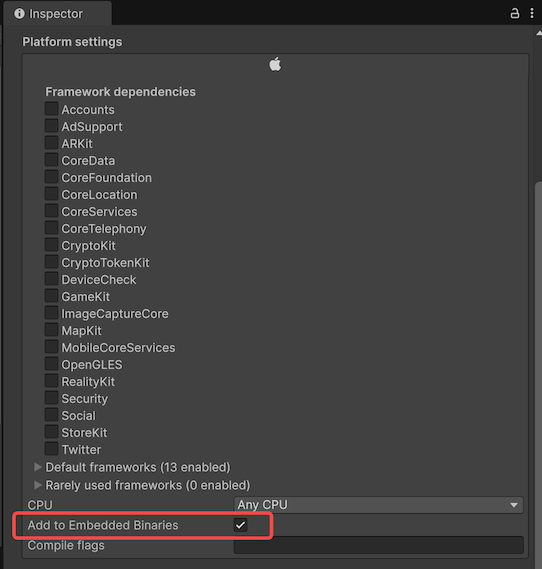
If the native SDK has already been integrated,
gson-2.8.5.jarandft-sdk-release.aarfor Android andFTMobileSDK.frameworkfor iOS can be removed from the Unity project.
The OkHttp request and app launch time features on Android requireft-plugin. See Android SDK for detailed configuration.
Initialization Notes
For the minimal initialization example, see Quick Start.
For the full SDKConfig parameter description, see SDK Initialization.
Detailed Configuration Entry Points
Advanced Scenarios
FAQ
Adding Global Variables to Avoid Field Conflicts
To avoid conflicts between custom fields and SDK data, it is recommended to prefix tag names with your project abbreviation, for example custom_tag_name. For the key values used in the project, see the source code. If any SDK global variable has the same name as a variable in RUM or Log, RUM and Log override the SDK global variable.