Registration and Versions
How can Alibaba Cloud users activate Guance?
Alibaba Cloud users can register Guance by selecting the China 1 (Hangzhou) site, or you can activate Guance by purchasing the Guance product from Alibaba Cloud Marketplace.
If you want to use Alibaba Cloud SLS Log Service to store data in Guance, you can activate Guance by purchasing the Guance Exclusive Plan from Alibaba Cloud Marketplace.
How can AWS users activate Guance?
AWS users can register Guance by selecting the China 2 (Ningxia) or International 1 (Oregon) site. After registration, you can settle payment with your AWS China account.
How can Huawei Cloud users activate Guance?
Huawei Cloud users can register Guance by selecting the China 4 (Guangzhou) site. After registration, you can settle payment with your Huawei Cloud account.
What should I do if the activation process is interrupted?
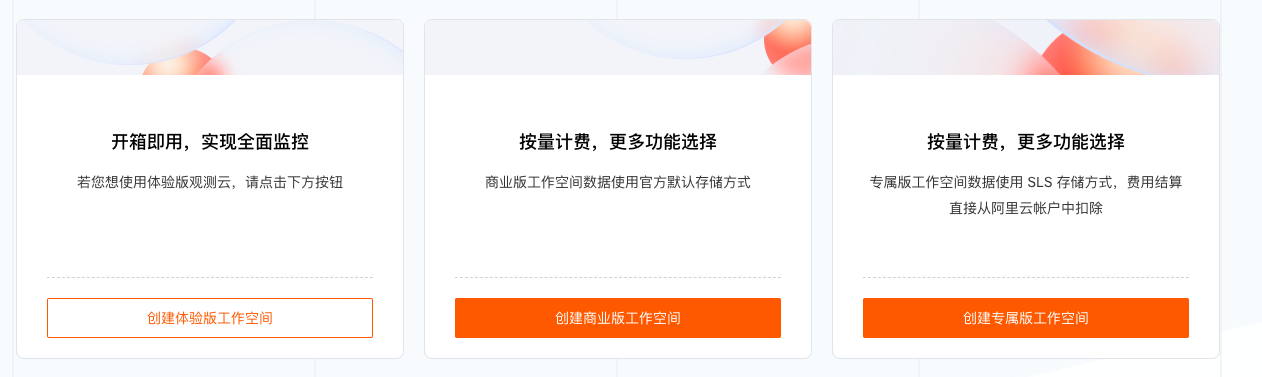
If you have already registered a Guance account but have not yet created a workspace, you can log in with your registered account. After logging in, the following page will be displayed, and you can choose the appropriate method to create a workspace based on your needs.
What is the difference between Guance Commercial Plan and Guance Exclusive Plan? Can they be switched?
They cannot be switched. Guance Commercial Plan uses the default ES storage, while Guance Exclusive Plan uses SLS storage.
For more details, see Data Storage Options.
Note: SLS storage is only available by purchasing the Guance Exclusive Plan from Alibaba Cloud Marketplace. Workspaces already using the default storage cannot be switched to SLS storage.
For more details, see Purchase the Guance Exclusive Plan from Alibaba Cloud Marketplace.
Why is my workspace locked?
If the Billing Center account is overdue, or if the Alibaba Cloud, AWS, or Huawei Cloud Marketplace subscription used for settlement is released, expired, deleted, or in any other abnormal state, the related workspace will be locked. Guance will send a notification email.
How can I restore a locked workspace?
Within the 14-day lock countdown, the workspace stops receiving new data, but you can still view and analyze existing data. The workspace owner can click Go to Billing Center on the lock notification page to handle billing issues such as overdue payments or abnormal Marketplace subscriptions. Non-owners cannot perform this action and must contact the workspace owner.
After 14 days, the workspace will be fully locked, inaccessible, and unable to receive or view any data. To restore it, contact your account manager.
For more details, see Workspace Lock, Unlock, and Dissolution.
If the above FAQs do not resolve the issue, how can I get online support?
Guance provides online ticket support.