Client Tokens Management
Client Token is the core authentication credential for the Guance Real User Monitoring (RUM) feature, used to securely send data from user devices (Web, mobile, mini-programs, etc.) to the Guance server.
When users interact with a website or application, the Client Token is sent along with performance data so that the server can verify and receive this data, ensuring its security and accuracy. This token mechanism not only simplifies the authentication process but also supports efficient cross-origin data transmission, providing Guance with a concise and effective way to collect and analyze real user usage.
Use Cases
Client Token is primarily used for the Public DataWay access method. When using this method, there is no need to install the DataKit collector; simply configure the site and clientToken parameters to quickly integrate RUM data.
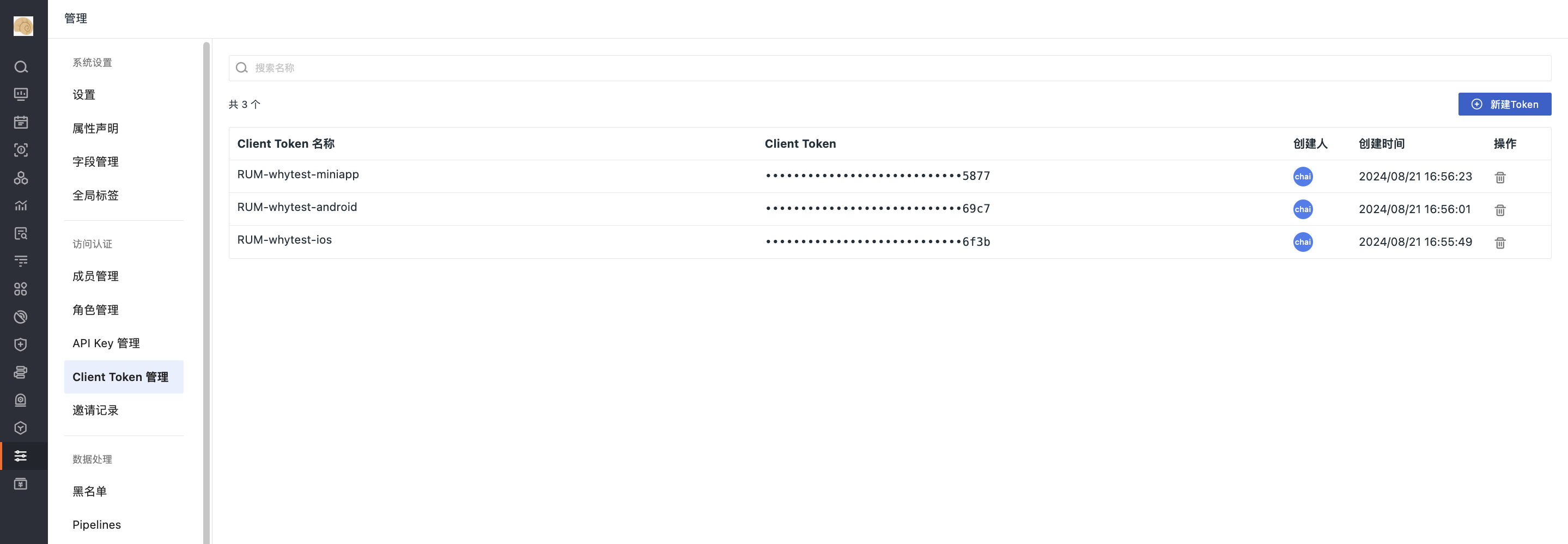
Create Client Token
Prerequisites
- Have Administrator or Owner permissions for the Guance workspace;
-
The Real User Monitoring (RUM) feature has been activated.
-
Enter the Client Token name;
- Click Confirm;
- Copy the automatically generated Client Token from Guance as needed.
Note
The full content of the Client Token is only displayed upon creation and cannot be viewed again later. If lost, please create a new one.
Using Client Token in RUM Applications
Public DataWay Access Configuration
When using Public DataWay access, you need to specify the site (DataWay address) and clientToken parameters in the SDK initialization configuration.
Web Application Access Example
1. NPM Access
import { datafluxRum } from "@cloudcare/browser-rum"
datafluxRum.init({
  applicationId: "<Application ID>",
  site: "http://172.16.212.186:9529",
  clientToken: "a993f53a8ea04bc6b9350e5e670a3a3b",
  env: "production",
  version: "1.0.0",
  service: "browser",
  sessionSampleRate: 100,
  sessionReplaySampleRate: 70,
  compressIntakeRequests: true,
  trackInteractions: true,
  traceType: "ddtrace", // Optional, defaults to ddtrace. Currently supports 6 types: ddtrace, zipkin, skywalking_v3, jaeger, zipkin_single_header, w3c_traceparent
  allowedTracingOrigins: ["https://api.example.com", /https:\/\/.*\.my-api-domain\.com/], // Optional, a list of all requests allowed to inject headers required by the trace collector. Can be request origins or regular expressions.
})
datafluxRum.startSessionReplayRecording()
2. CDN Synchronous Loading
<script
  src="https://static.guance.com/browser-sdk/v3/dataflux-rum.js"
  type="text/javascript"
></script>
<script>
  window.DATAFLUX_RUM &&
    window.DATAFLUX_RUM.init({
      applicationId: "<Application ID>",
      site: "http://172.16.212.186:9529",
      clientToken: "a993f53a8ea04bc6b9350e5e670a3a3b",
      env: "production",
      version: "1.0.0",
      service: "browser",
      sessionSampleRate: 100,
      sessionReplaySampleRate: 70,
      compressIntakeRequests: true,
      trackInteractions: true,
      traceType: "ddtrace", // Optional, defaults to ddtrace. Currently supports 6 types: ddtrace, zipkin, skywalking_v3, jaeger, zipkin_single_header, w3c_traceparent
      allowedTracingOrigins: ["https://api.example.com", /https:\/\/.*\.my-api-domain\.com/], // Optional, a list of all requests allowed to inject headers required by the trace collector. Can be request origins or regular expressions.
    })
  window.DATAFLUX_RUM && window.DATAFLUX_RUM.startSessionReplayRecording()
</script>
For more access configuration instructions and examples, please refer to Web Application Access.
Manage Client Tokens
All created Client Tokens are listed. You can directly view the Client Token name, Client Token, creator, and creation time through the list.
Delete Token
Click the delete button to delete the current Token. After deletion, if any agent is using this token, data reporting will stop immediately.
Note
If an application is deleted, the corresponding Client Token in the Client Token management list will also be deleted synchronously.
Automatic Cleanup Mechanism
When a RUM application is deleted, the system automatically synchronously deletes the associated Client Token. It is recommended to regularly clean up unused Tokens to reduce security risks.
FAQ
What is the difference between Client Token and DataKit Token?
Client Token is used for RUM Public DataWay access and only allows data reporting; DataKit Token (starting with tkn_) is used for DataKit collector authentication and has greater permissions. The two cannot be mixed.
Is DataKit installation required when using Public DataWay?
No. Public DataWay is a managed service provided by Guance, requiring no installation or maintenance of DataKit, making it suitable for quick integration scenarios.
What should I do if the Client Token is leaked?
The risk of Client Token leakage is relatively low (it only allows reporting, cannot query or modify data), but it is still recommended to:
- Immediately delete the Token in the console;
- Create a new Token and update the application configuration;
- Monitor for any abnormal reporting data.
Why is there no data after my application is integrated?
Please check:
- Whether the Client Token is correct (note case sensitivity);
- Whether the site address is correct (may differ by region);
- Whether the network allows access to Public DataWay;
- Whether the sampling rate configuration (sessionSampleRate) is too low.
Can one Token be used for multiple applications?
Technically possible, but not recommended. Sharing a Token across multiple applications leads to data confusion, making it difficult to distinguish sources, and prevents independent control of data reporting for individual applications.
Can local deployment and Public DataWay be used together?
No. An application can only choose one access method:
- Choose Public DataWay → Requires Client Token, does not require DataKit
- Choose local deployment → Does not require Client Token, requires DataKit