Doris Deployment
Note
Choose either OpenSearch or Doris.
Overview
Components
- Doris Manager: Used for deploying, upgrading, and modifying configuration of the Doris cluster
- Doris FE: Primarily handles user request access, query parsing and planning, metadata management, and node management
- Doris BE: Primarily handles data storage and query plan execution
- guance-insert: Receives data in line protocol format, buffers locally (typically uses tmpfs due to low space requirements), and writes to Doris BE in batches
- guance-select: Translates DQL queries into SQL; most queries use Doris FE, a few use the Doris BE Thrift interface
- VictoriaMetrics: Stores index-level write metrics to provide auxiliary information for features like sampling queries
Server Requirements
Typically, the following three groups of machines are used. Small clusters can also be co-located. Ubuntu is the recommended OS for the server systems.
- doris-fe: CPU to memory ratio 1:2, one 20 GB+ data disk for metadata. The first machine can be used to deploy Doris Manager.
- doris-be: CPU to memory ratio 1:8, configure disk (number of disks) to maximize disk throughput.
- guancedb-logs: CPU to memory ratio 1:2, can be deployed on hosts or containers. The first machine needs a data disk for VictoriaMetrics to store some Doris metadata metrics.
- CPU must support the AVX2 instruction set.
- Resources must not be preempted by other machines (CPU steal must not be high).
Network Requirements
- Doris Manager is typically deployed on the
doris-fe-01server. The machine must be able to SSH into all Doris machines and access the web UI on port 8004. - The
guancedb-logsmachines must install supervisor via the system package manager (APT). - Access to the FE machine's port 9030 via the MySQL protocol is required; typically, install the mysql-client on the Doris Manager machine.
guancedb-logsmachines need to access: port 8030 and 9030 on thedoris-femachines; port 8040 and 9060 on thedoris-bemachines; port 8428 on the firstguancedb-logsmachine.- The provided account must have full permissions on the S3 bucket.
Deployment Notes
- Once configured, the S3 bucket cannot be modified. To change it, you must clear the data and reinstall the Doris cluster.
- Doris is deployed on Hosts. Regardless of network connectivity, the material packages must be placed in the specified location.
- If using self-purchased disk hardware for RAID, RAID 0 is not allowed.
| Category | Description |
|---|---|
| Components Deployed on Hosts | be + fe + manager + guancedb-logs |
| Prerequisites | 1. Provide root password and support passwordless SSH login via root 2. CPU architecture supports AVX2 instruction set |
Default Deployment Configuration
| Category | Description |
|---|---|
| Host Deployment | Refer to Host Deployment Notes below |
Host Deployment Notes
If there is only one guancedb-logs machine, the address used by the Guance business services is host_ip:8480/8481.
If there are multiple guancedb-logs machines:
a. If an ELB capability is available, use the ELB to listen on the 8480/8481 ports of multiple guancedb-logs machines. The business service address will be ELB_ip:8480/8481.
b. If ELB capability is not available, you can create a Service in the business cluster. The business service addresses will be:
Write: internal-doris-insert.middleware:8480
Read: internal-doris-select.middleware:8481
Refer to the following YAML to create the Service.
doris-service.yaml (Click to expand)
---
apiVersion: v1
kind: Service
metadata:
  name: internal-doris-insert
  namespace: middleware
spec:
  ports:
    - protocol: TCP
      port: 8480
      targetPort: 8480
---
apiVersion: v1
kind: Endpoints
metadata:
  # The name here must match the Service name
  name: internal-doris-insert
  namespace: middleware
subsets:
  # Write one entry for each guancedb-logs machine
  - addresses:
      - ip: 10.7.17.250
    ports:
      - port: 8480
  - addresses:
      - ip: 10.7.17.251
    ports:
      - port: 8480

---
apiVersion: v1
kind: Service
metadata:
  name: internal-doris-select
  namespace: middleware
spec:
  ports:
    - protocol: TCP
      port: 8481
      targetPort: 8481
---
apiVersion: v1
kind: Endpoints
metadata:
  # The name here must match the Service name
  name: internal-doris-select
  namespace: middleware
subsets:
  # Write one entry for each guancedb-logs machine
  - addresses:
      - ip: 10.7.17.250
    ports:
      - port: 8481
  - addresses:
      - ip: 10.7.17.251
    ports:
      - port: 8481
Doris Deployment
Prerequisites
Download Packages
Install the tool package. The package is placed on the fe-01 machine.
After downloading and extracting, the package contains the SelectDB + manager installation packages. The packages are placed on the fe-01 machine, in the folder path configured in inventory/doris-manager.vars.yaml.
After downloading and extracting, the package is the GuanceDB installation package. The packages are placed on all guancedb-logs machines, in the folder path configured in inventory/guancedb-logs-doris.vars.yaml.
After downloading and extracting, the package contains the victoria-metrics + vmutils installation packages. The packages are placed on all guancedb-logs machines, in the folder path configured in inventory/guancedb-logs-doris.vars.yaml.
Configure Passwordless SSH Between Machines
On the jump host (typically fe-01), check if the current user's ~/.ssh directory already contains a public key. If not, generate one and copy it to the machines of other roles by executing the following commands:
Deployment Check Points
Verify that the BE and FE machines have the same specifications.
The network latency between BE and FE machines (ping) should not exceed 1ms.
Ensure the data disks provided by the servers are raw disks (not partitioned or formatted).
Prepare Host Files
The inventory directory requires 5 host files:
doris-be.hosts.yamldoris-fe.hosts.yamldoris-manager.hosts.yamlguancedb-logs-doris.hosts.yamlguancedb-logs-doris-vm.hosts.yaml
The format of each host file is as follows:
The name field must follow the format xxx-doris-fe-01 or xxx-doris-be-01.
clusters:
  - name: xxx
    hosts:
      - name: xxx-doris-be-01
        port: xxx
        host: xxx
        user: xxx
        vars:
          default_ipv4: xxx
      - name: xxx-doris-be-02
        port: xxx
        host: xxx
        user: xxx
        vars:
          default_ipv4: xxx

# name:          Cluster label, e.g., poc or prd
# hosts.name:    Server role label, e.g., xxx-doris-be-01 (xxx can be poc or prd)
# hosts.port:    SSH port, typically 22
# hosts.host:    IP address of the SSH target machine
# hosts.user:    SSH user for the target machine, typically root
# vars.default_ipv4: IP address of the be-01 machine
Note
The manager is typically deployed together with FE. The content of doris-manager.hosts.yaml should be the same as doris-fe.hosts.yaml. If doris-fe.hosts.yaml contains multiple FE hosts, only fe-01 needs to be listed in doris-manager.hosts.yaml.
The content of guancedb-logs-doris-vm.hosts.yaml should be the same as guancedb-logs-doris.hosts.yaml. If guancedb-logs-doris.hosts.yaml contains multiple hosts, only one needs to be listed in guancedb-logs-doris-vm.hosts.yaml.
Configure Variables
Modify the inventory/doris-manager.vars.yaml file:
clusters:
  - name: xxx
    vars:
      # Doris installation package path on the machine; e.g., /root/packages/xxx.tar.gz
      doris_local_path:
      # Doris Manager installation package path on the machine; e.g., /root/packages/xxx.tar.gz
      manager_local_path:

      # The following can be left blank if cold storage is not used
      oss_endpoint:
      oss_bucket:
      # Can be left blank
      oss_region:
      # Usually not required when using cloud vendor object storage; when using self-built object storage with an IP endpoint, set to "path"
      addressing_style:
inventory/doris.vars.yaml file:
clusters:
  - name: xxx
    vars:
      # Replication factor. Can be set to 1 for testing; 2 or more is recommended for production.
      replication_factor: 2
      # FE machine memory in GB
      fe_host_mem_gb:
      # Number of FE machines
      fe_num:
      # Number of BE machines
      be_num:
      # Number of BE machine cores
      be_host_core_num:
      # Number of BE data disks
      be_data_disk_num:
      # Size of a single BE data disk in GB
      be_data_disk_gb:
      # BE cgroup CPU path; check whether v1 or v2 is supported on the machine and fill in the corresponding path
      be_cgroup_cpu_path:
      # FE log retention period
      fe_log_retention: 3d
      # Internal network CIDR for FE and BE machines
      cidr:
inventory/guancedb-logs-doris.vars.yaml file:
  - name: xxx
    vars:
      # Version number is no longer used; leave empty
      version: ""
      # Directory where the installation packages are located on the machine; e.g., /root/packages
      local_dir:
inventory/secrets.yaml file:
clusters:
  - name: xxx
    vars:
      # Password for the OS zyadmin user; high-strength password is recommended for security compliance
      os_zyadmin_password:
      # Password for the OS doris user; high-strength password is recommended for security compliance
      os_doris_password:
      # Password for the root database user; high-strength password is recommended
      doris_root_password:
      # Password for the user_read database user; high-strength password is recommended
      doris_user_read_password:
      # Object storage access key; can be left blank if cold storage is not used
      oss_ak:
      # Object storage secret key; can be left blank if cold storage is not used
      oss_sk:
      # Used for self-observability data reporting; it is an array. Usually only one entry is needed; can be left blank
      dataway_urls: []
      # Whether to set the hostname; set to false for co-located deployments
      set_hostname: false
Install Python Dependencies
Deploy Doris Manager
Initialize the machines. After completion, check the disk mount.
python3 deployer.py -l clusrer_name -i 'inventory/doris-?e.*.yaml' -p playbooks/doris/initialize-machine.yaml
Deployment Check Points
Verify that the server disks are mounted correctly.
Verify that swap is permanently disabled on the server.
Verify that the vm.max_map_count parameter on the server is set to 2000000.
Update the DataKit configuration for self-observability data reporting.
python3 deployer.py -l cluster_name -i 'inventory/doris-?e.*.yaml' -p playbooks/doris/update-datakit.yaml
Download and start Doris Manager.
python3 deployer.py -l cluster_name -i 'inventory/doris-manager.*.yaml' -p playbooks/doris/initialize-manager.yaml
Configure cgroup for the BE nodes.
Determine whether the server supports cgroup v1 or v2.
# If this path exists, cgroup v1 is currently active
ls /sys/fs/cgroup/cpu/

# If this path exists, cgroup v2 is currently active
ls /sys/fs/cgroup/cgroup.controllers
# Create the service file
sudo vi /etc/systemd/system/doris-cgroup-v1.service

# File content
[Unit]
Description=Create Doris CGroup V1
After=remote-fs.target

[Service]
Type=oneshot
RemainAfterExit=yes
ExecStart=/bin/bash -c '\
    mkdir -p /sys/fs/cgroup/cpu/doris && \
    mkdir -p /sys/fs/cgroup/memory/doris && \
    chmod 770 /sys/fs/cgroup/cpu/doris && \
    chmod 770 /sys/fs/cgroup/memory/doris && \
    chown -R doris:doris /sys/fs/cgroup/cpu/doris && \
    chown -R doris:doris /sys/fs/cgroup/memory/doris'

[Install]
WantedBy=multi-user.target
# Reload systemd configuration
sudo systemctl daemon-reload
# Enable the service to start on boot
sudo systemctl enable doris-cgroup-v1.service
# Start the service
sudo systemctl start doris-cgroup-v1.service
# Check service status
sudo systemctl status doris-cgroup-v1.service
# Verify
ls -l /sys/fs/cgroup/cpu/doris
# Create the service file
sudo vi /etc/systemd/system/doris-cgroup-v2.service

# File content
[Unit]
Description=Create Doris CGroup V2
After=remote-fs.target

[Service]
Type=oneshot
RemainAfterExit=yes
ExecStart=/bin/bash -c '\
    mkdir -p /sys/fs/cgroup/doris && \
    chmod 770 /sys/fs/cgroup/doris && \
    chown -R doris:doris /sys/fs/cgroup/doris && \
    chmod a+w /sys/fs/cgroup/cgroup.procs'

[Install]
WantedBy=multi-user.target
# Reload systemd configuration
sudo systemctl daemon-reload
# Enable the service to start on boot
sudo systemctl enable doris-cgroup-v2.service
# Start the service
sudo systemctl start doris-cgroup-v2.service
# Check service status
sudo systemctl status doris-cgroup-v2.service

# Verify
ls -l /sys/fs/cgroup/doris
cat /sys/fs/cgroup/cgroup.subtree_control
Deploy Doris FE and BE
Create the Doris Cluster
Access URL: http://doris-fe-01:8004
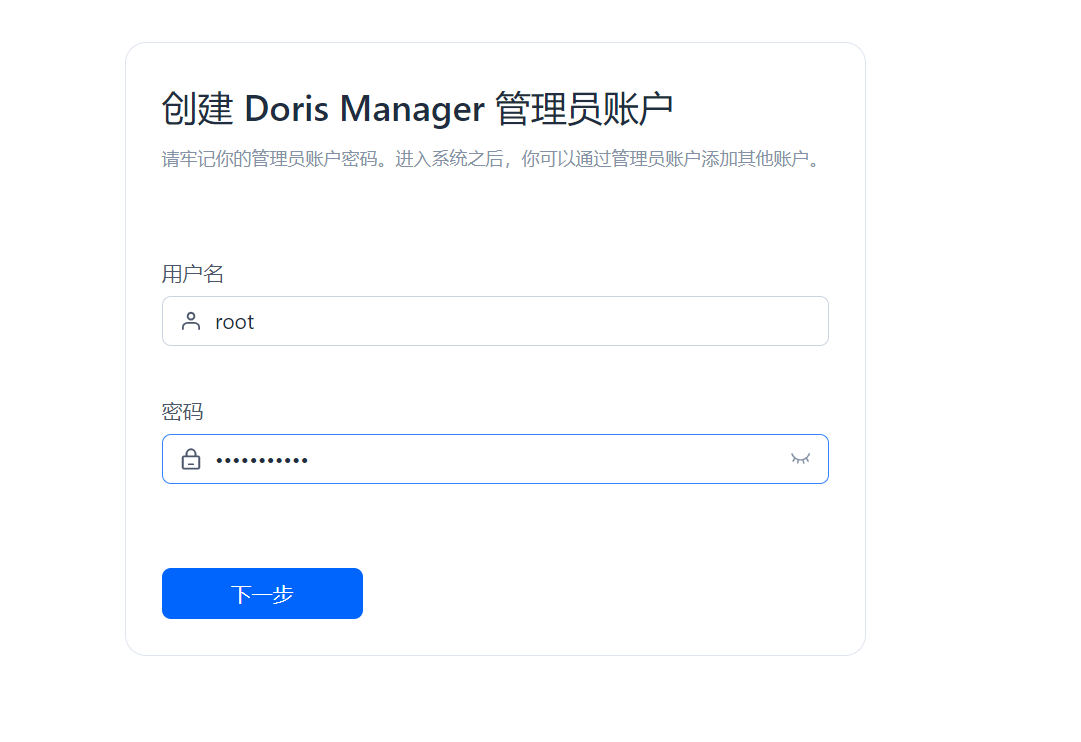
Create a Doris Manager Admin Account
 Service Configuration
- Disable monitoring and alerting services
- Doris local installation package path:
/data1/doris/manager/downloads/doris - Doris Manager local installation package path:
/data1/doris/manager/downloads/manager
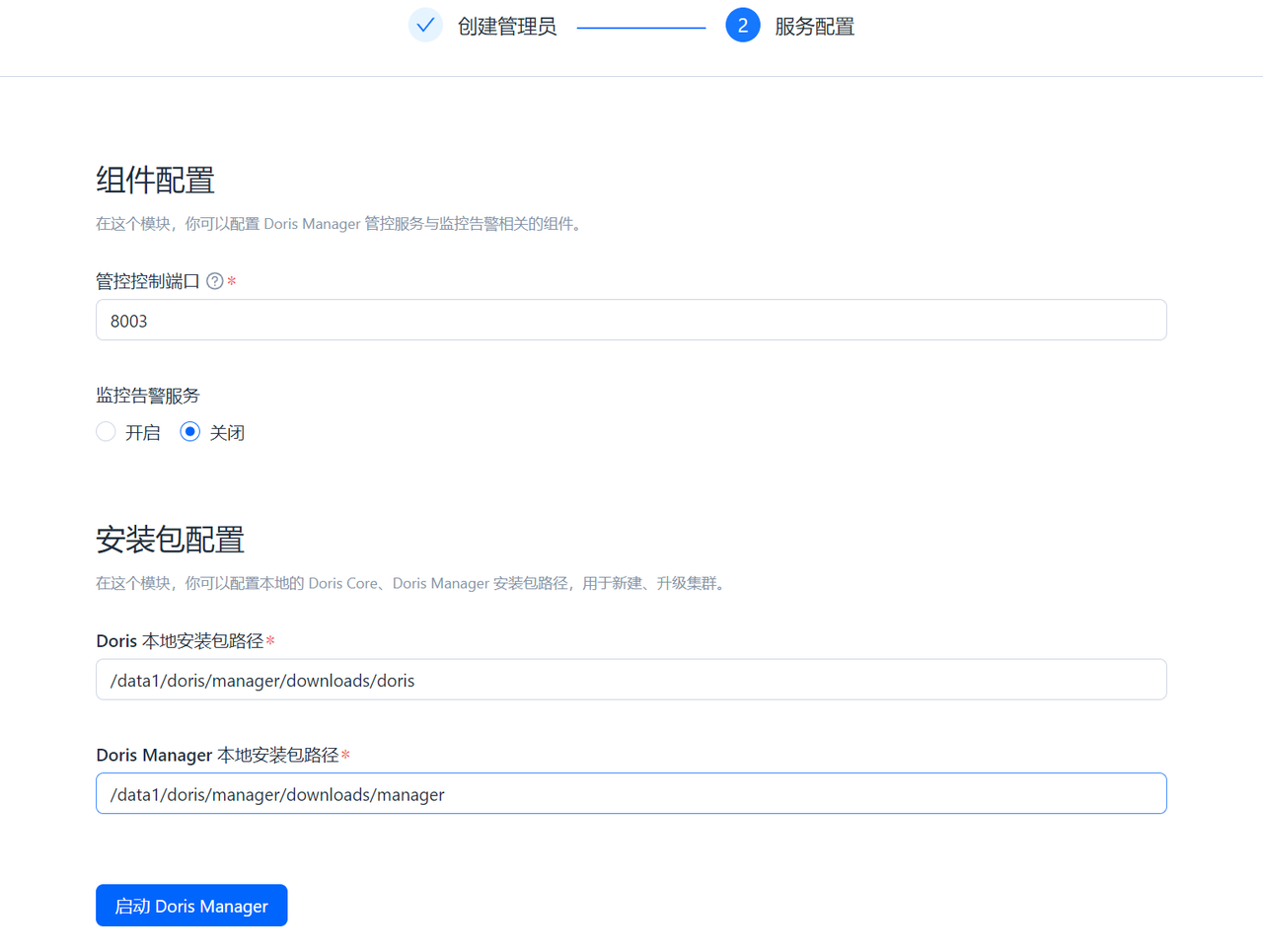
Start Doris Manager

Create a New Cluster
- Cluster Name:
customer_abbreviation_test/prdExample:guance_prd - Database root user password: Enter the
doris_root_passwordfrominventory/secrets.yaml

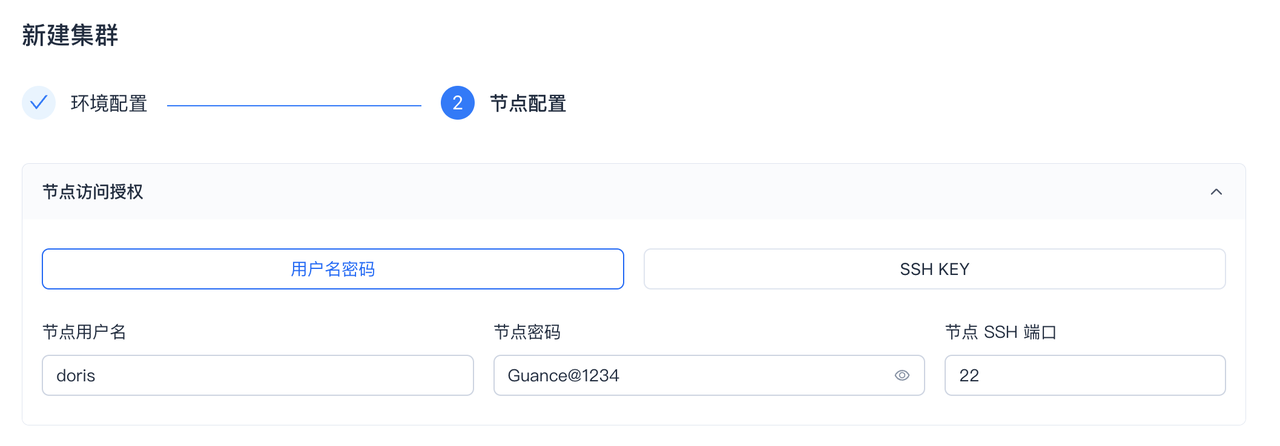
Node Configuration
- Node username:
doris - Node password: Enter the
os_doris_passwordfrominventory/secrets.yaml
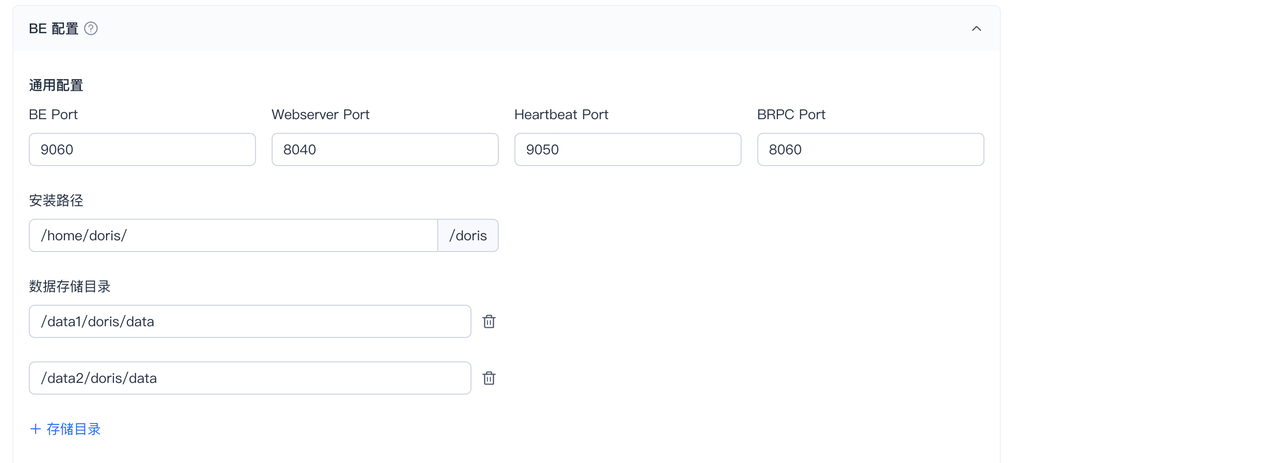
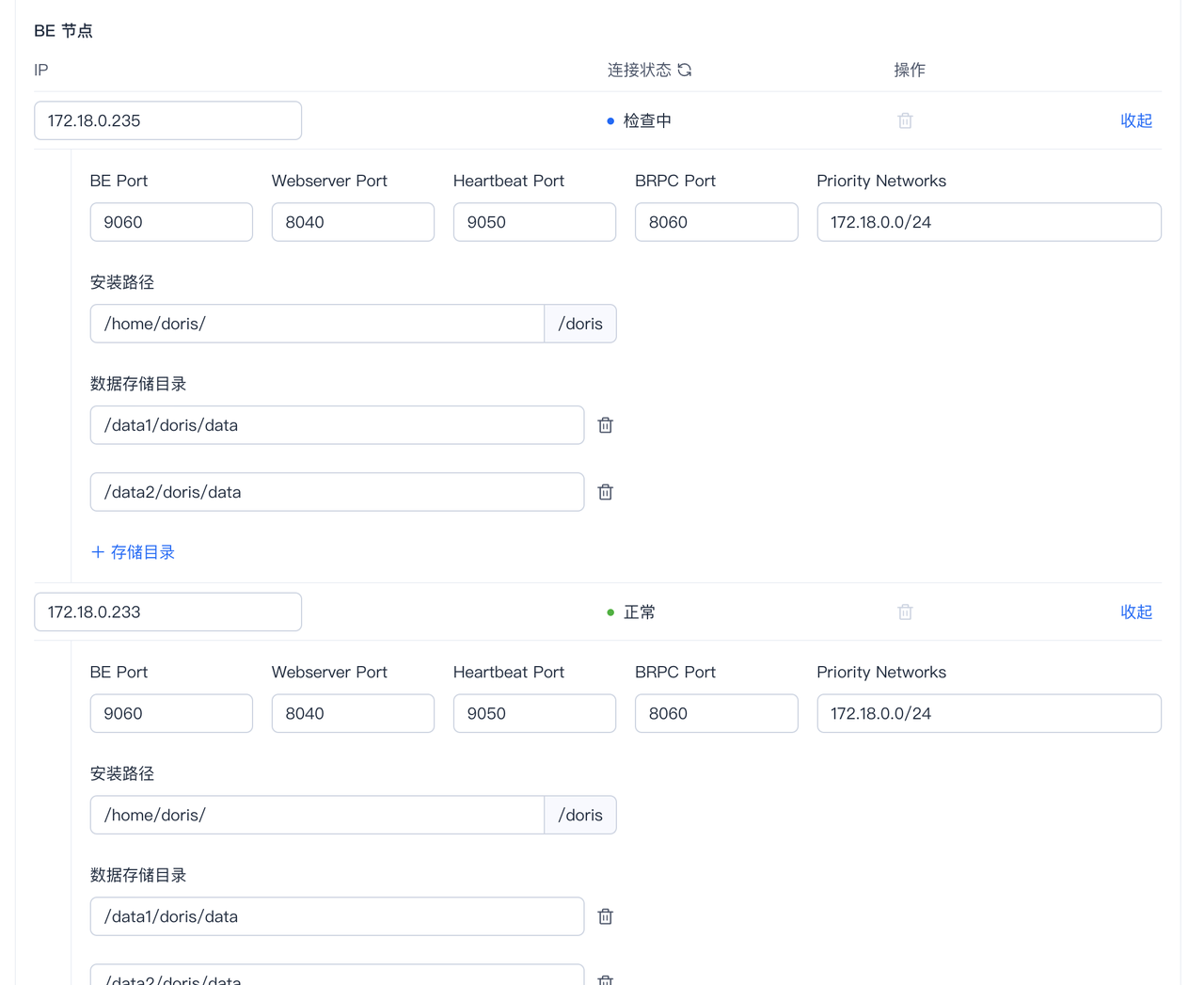
- FE installation path:
/home/doris/ - FE metadata storage directory:
/data1/doris/meta

- BE installation path:
/home/doris/ - BE data storage directories: Enter one input field per data disk, e.g.,
/data1/doris/data,/data2/doris/data, etc.
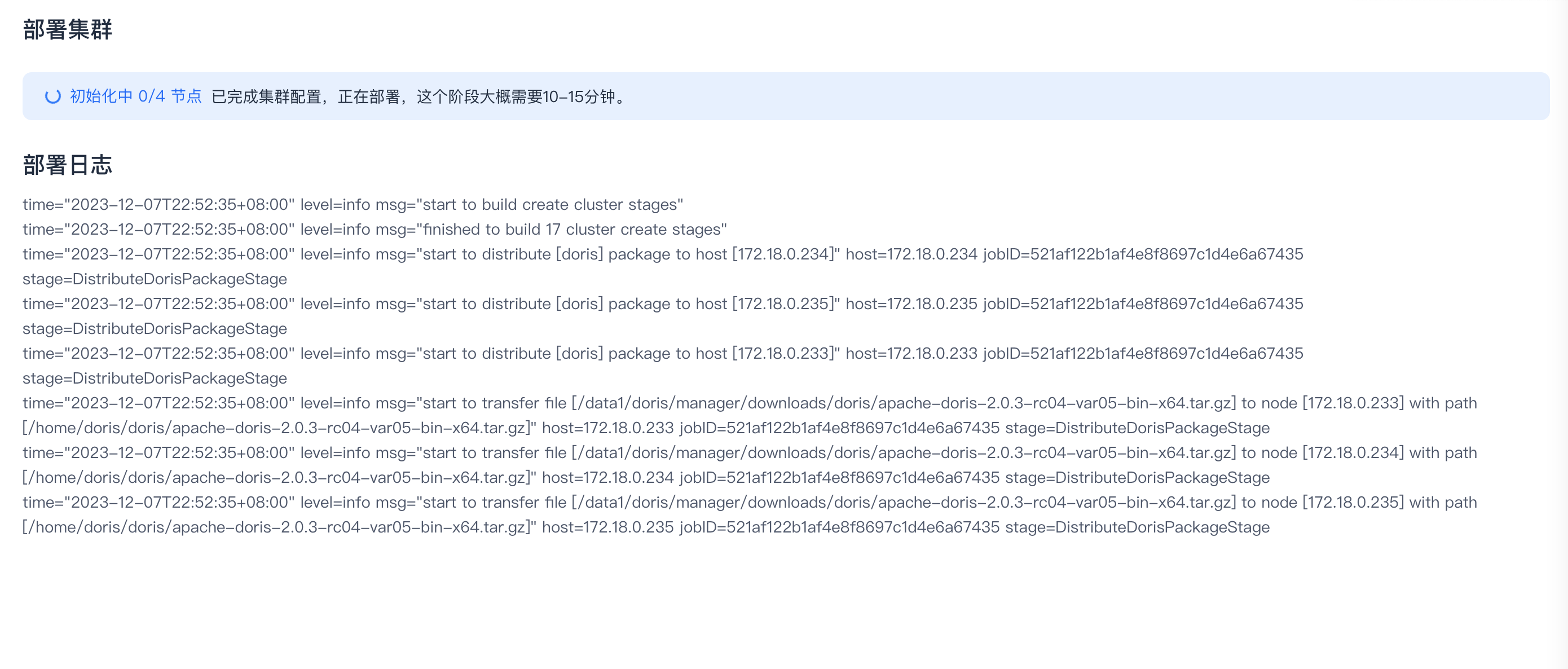
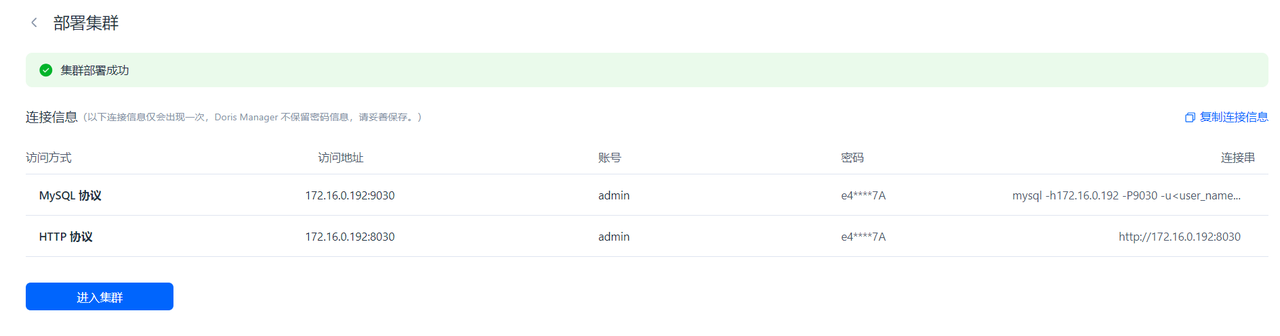
Deploy the Cluster
Configure the Doris Cluster
Modify the tokenization configuration. The parameter must be changed to the cluster name.
python3 deployer.py -l cluster_name -i 'inventory/doris-be.*.yaml' -p playbooks/doris/update-be.yaml
doris-conf directory. Check if cluster_name-be.conf and cluster_name-fe.conf are generated in the doris-conf folder.
python3 deployer.py -l cluster_name -i 'inventory/doris.vars.yaml' -p playbooks/doris/render-config.yaml
Deployment Check Points
Verify that storage_path in the configuration file is correct.
Verify that priority_networks in the configuration file is correct.
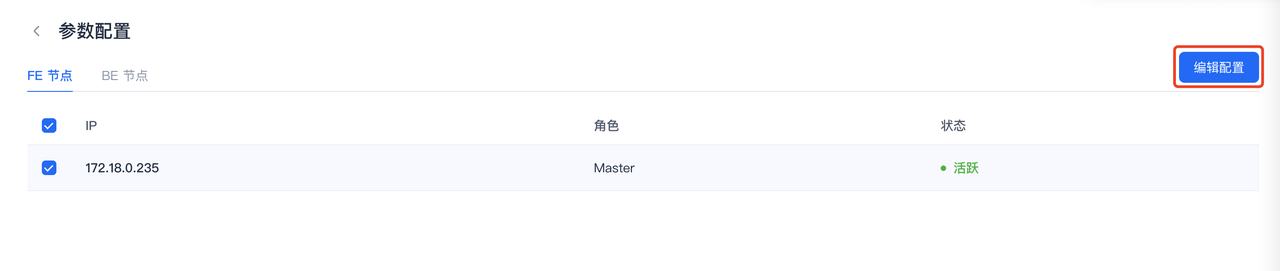
Modify the BE configuration: In the Doris Manager cluster page, click the "…" button in the top right corner -> "Parameter Configuration" -> Select all BE nodes -> Click "Edit Configuration" in the top right corner -> Paste the generated be.conf -> Check "I confirm…" -> Click "OK".
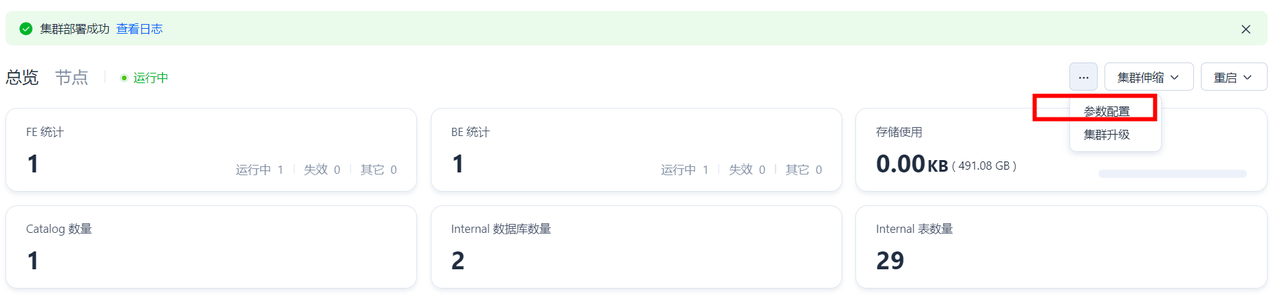

Modify the FE configuration: In the Doris Manager cluster page, click the "…" button in the top right corner -> "Parameter Configuration" -> Select all FE nodes -> Click "Edit Configuration" in the top right corner -> Paste the generated fe.conf -> Check "I confirm…" -> Click "OK".
Modify the database configuration.
python3 deployer.py -l cluster_name -i 'inventory/doris-manager.*.yaml' -p playbooks/doris/exec-init-sql.yaml
In this step, the S3 bucket is configured. You can verify whether files can be uploaded to the bucket using the following method.
On the FE machine, switch to the root user and log into the cluster.
Execute the following SQL. After execution, check the S3 bucket for files with the prefixresult_ in the default_resource folder. If no files are generated, check the permissions.
use information_schema;
SELECT * FROM files
INTO OUTFILE "s3://bucket_name/default_resource/result_"
FORMAT AS ORC
PROPERTIES(
    "s3.endpoint" = "https://xxx",
    "s3.access_key"= "your-ak",
    "s3.secret_key" = "your-sk"
);
Deployment Check Points
Verify that the S3 storage is usable and cannot be changed after configuration.
The S3 endpoint must be an internal network address.
Deploy guance-insert, guance-select, and VictoriaMetrics
Initialize the machines.
python3 deployer.py -l cluster_name -i 'inventory/guancedb-logs-doris.*.yaml' -p playbooks/guancedb/initialize-machine.yaml
python3 deployer.py -l cluster_name -i 'inventory/guancedb-logs-doris-vm.*.yaml' -p playbooks/doris/init-victoria-metrics.yaml
python3 deployer.py -l cluster_name -i 'inventory/guancedb-logs-doris.*.yaml' -p playbooks/guancedb/update-config.yaml
Check Cluster Status
Check the VictoriaMetrics status. The IP addresses are those of the machines where guance-select is deployed.
Check the Doris components.