Volcengine TLS Index Binding
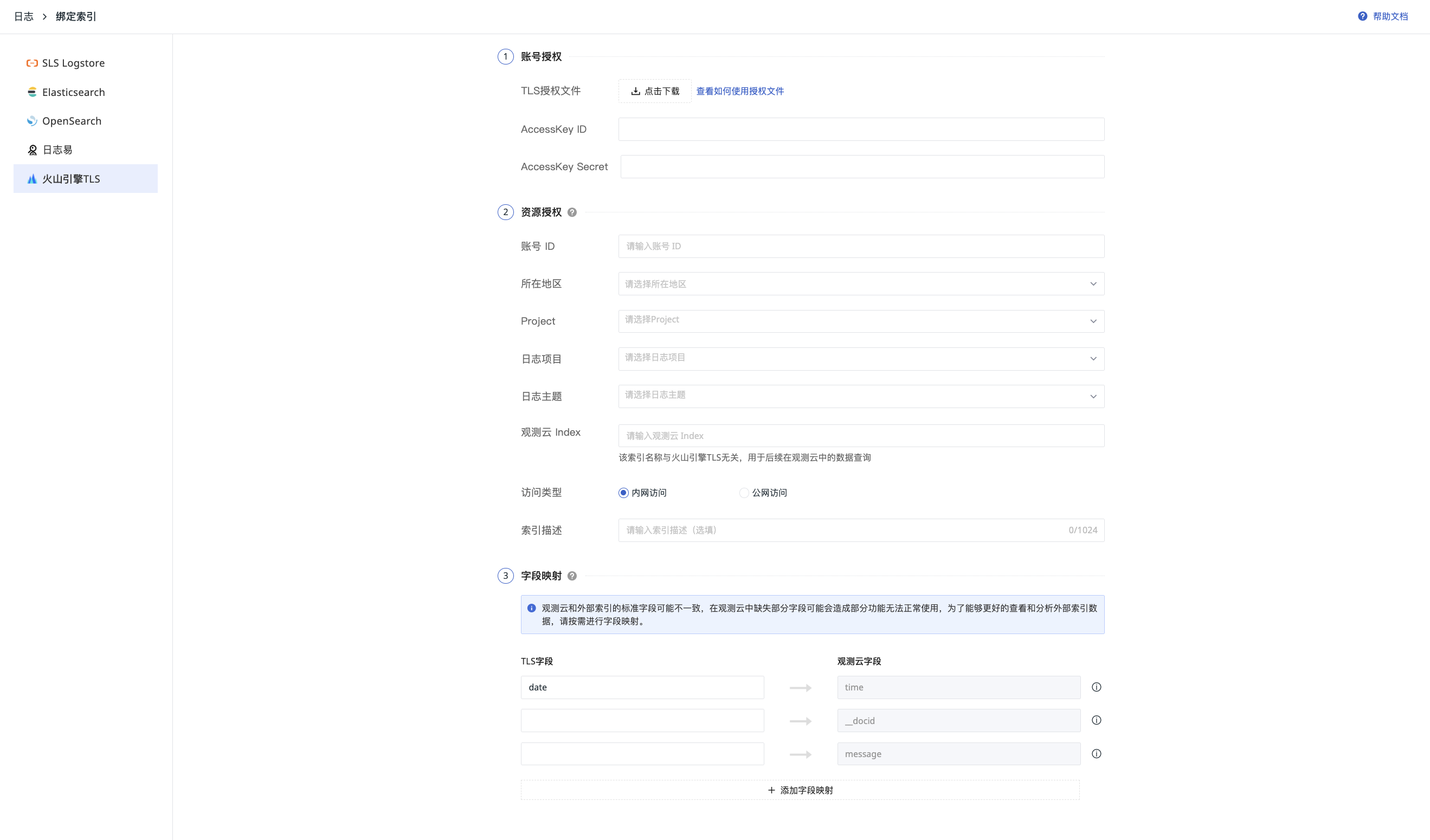
- Go to LOG > Index page, select "Bind External Index".
- Select Volcengine TLS.
- Perform Account Authorization.
- Perform Resource Authorization.
- Complete Field Mapping.
- After filling in, you can click Test to verify the correctness of the username and password.
Account Authorization
- Obtain TLS Authorization File.
- Fill in AccessKey ID / AccessKey Secret (AK/AKS).
Resource Authorization
- Select the region.
- Based on the AK/AKS filled above, Guance automatically retrieves the Project, Log Project, and Log Topic.
-
Guance Index: By default, it is consistent with the TLS name. You can also customize the name (❗️This index name is unrelated to TLS and is used for your subsequent data filtering in Guance).
-
Access Type: To avoid configuration path errors that may lead to failure in retrieving data, you can choose Internal Network Access or Public Network Access based on the actual situation.
- Enter the index description as needed.
After configuration, click Confirm to complete the index binding. You can view it by switching indexes in the Explorer.