Level Definition
Incident levels are used to indicate the severity and priority of incidents, affecting filtering, sorting in the incident list, and matching of on-call escalation policies. The system provides default levels and supports custom levels based on team needs.
Default Levels
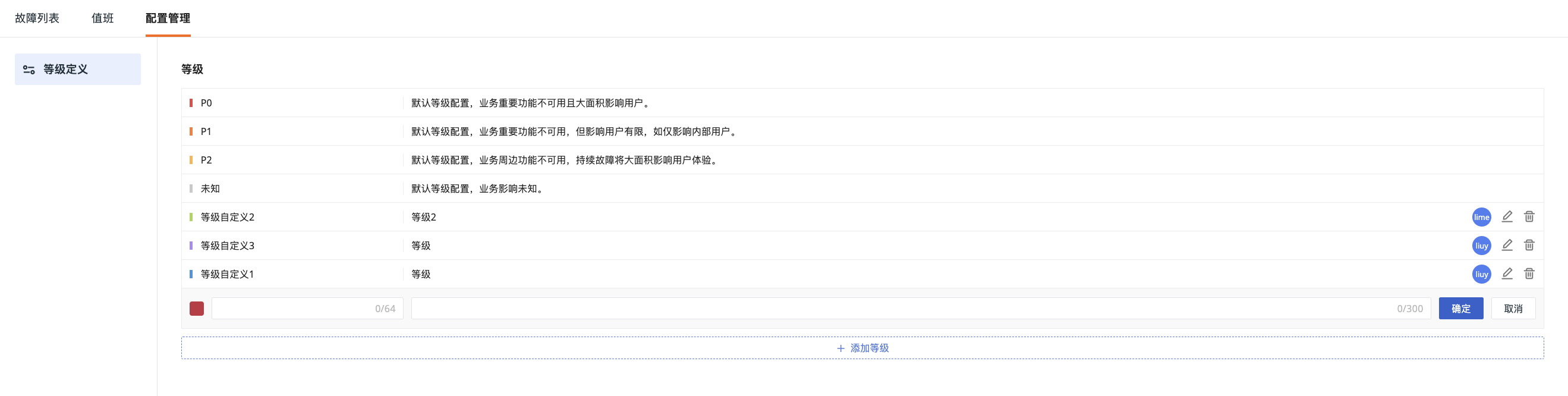
The system has 4 built-in default levels:
| Field | Description |
|---|---|
| P0 | Default level configuration, critical business functions are unavailable and affect a large number of users |
| P1 | Default level configuration, critical business functions are unavailable but affect a limited number of users, e.g., only internal users |
| P2 | Default level configuration, peripheral business functions are unavailable, and sustained failures will significantly affect user experience |
| P3 | Default level configuration, minimal business impact, can be observed and handled according to team rules |
Custom Levels
In addition to default levels, you can configure custom levels (up to 10 levels) to meet various needs.
Add Levels
- Click Add Level;
- Select a level color;
- Enter the level name and description;
- Confirm.
Manage Levels
For levels, you can perform the following operations:
-
Edit: Click the edit button to modify the color, name, and description of the current custom level;
-
Delete: Click to delete the current level.
Enable/Disable Default Configuration
-
Enable: If the default configuration is enabled and there are new custom levels in the current workspace, you can choose default and custom levels when creating or modifying incidents;
-
Disable: If the default configuration is disabled, you can only select custom level configurations when creating/modifying incidents.
- Custom levels must already exist to ensure there are selectable levels when creating/modifying incidents;
- If an abnormal event is automatically discovered by monitors or intelligent monitoring and an incident is generated synchronously, the incident level will be left empty;
- If there are still incidents using default levels in the workspace, their levels will be left empty.
Impact of Platform-Level Level Configuration
In addition to workspace-level level configuration, the system also supports unified management of incident levels at the platform level (i.e., the Deployment Plan management backend). Platform-level configuration overrides workspace-level configuration:
- The system supports managing incident level configuration at the platform level. After enabling global configuration, the incident level configuration at the workspace level will no longer apply;
- After global levels are enabled, if other level configurations are applied in rules such as monitors or intelligent monitoring in the workspace, the level of newly generated incidents will be left empty.