Switch Domain
Note
If HTTPS was previously enabled, you need to prepare the certificate for the new domain in advance. This domain switch assumes replacing dataflux.cn with guance.com
Introduction
This article describes how to switch the domain of Guance. The main steps are as follows:
- Modify the domain in Launcher
- Modify all domains in ConfigMaps
- Add a certificate Secret (optional)
- Modify the domain in all Ingresses
- Restart services
Scope of Impact
Guance Studio will be unavailable for approximately 15–30 minutes.
Steps
Step 1: Modify the Domain and Certificate Name in Launcher
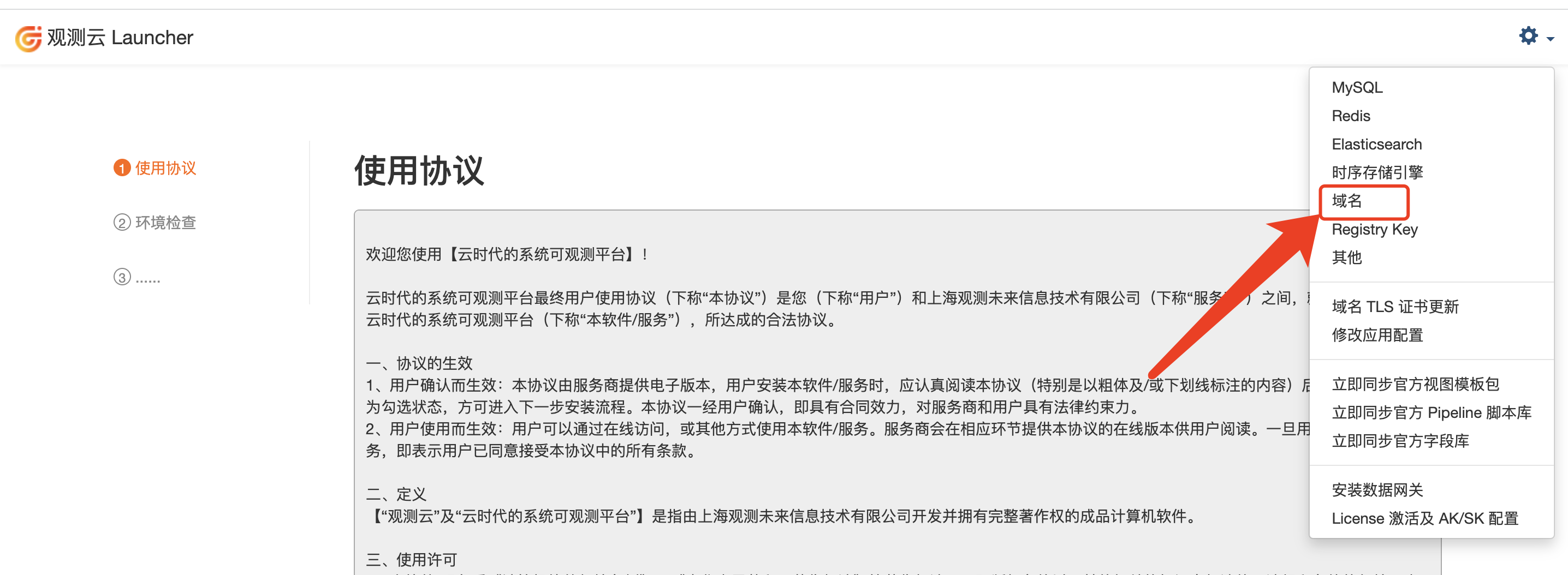
- Open the settings in the upper-right corner of Launcher.
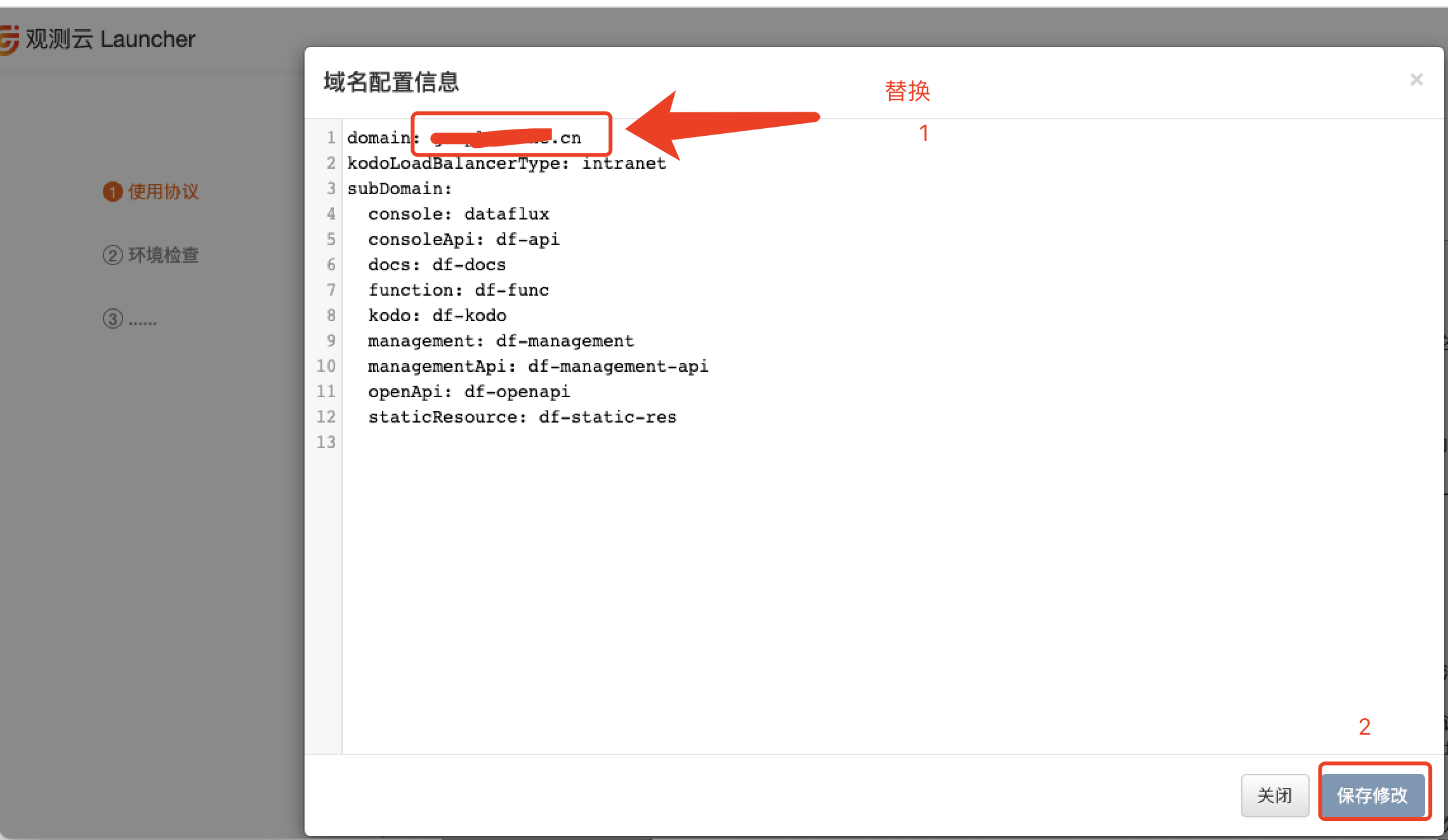
- Click Domain.
- Modify the domain and save.
Step 2: Modify All Domains in ConfigMaps
- You can run the following script to back up:
NAMESPACE="forethought-core forethought-kodo forethought-webclient func2 middleware utils launcher"

for i in $NAMESPACE;
do
  for o in $(kubectl get cm  -n $i --no-headers 2>/dev/null |awk {'print $1'});
  do
  filename=cm-$i-$o.yaml
  kubectl get cm $o -n $i -o yaml > $filename
  echo $i $o
  done
done
- Run the following script to modify the addresses:
Note
You need to replace the variables OLD_VALUE and NEW_VALUE.
# Set the key-value pair to replace
OLD_VALUE="dataflux.cn"
NEW_VALUE="guance.com"
NAMESPACE="forethought-core forethought-kodo forethought-webclient func2 middleware utils launcher"

for i in $NAMESPACE;
do
  for configmap in $(kubectl get configmaps -o name -n $i 2>/dev/null |awk {'print $1'});
  do
  #echo $configmap
  # kubectl get $configmap -n $i -o yaml |grep $OLD_VALUE
  if [[ `kubectl get $configmap -n $i -o yaml |grep $OLD_VALUE` ]]; then
     echo "$i $configmap 有$(kubectl get configmaps -n $i -o yaml |grep -c $OLD_VALUE) 处"
     kubectl get $configmap -n $i -o yaml | \
       sed "s/${OLD_VALUE}/${NEW_VALUE}/g" | \
       kubectl apply -f -
  fi
  done
done
Step 3: Add a Certificate Secret (Optional)
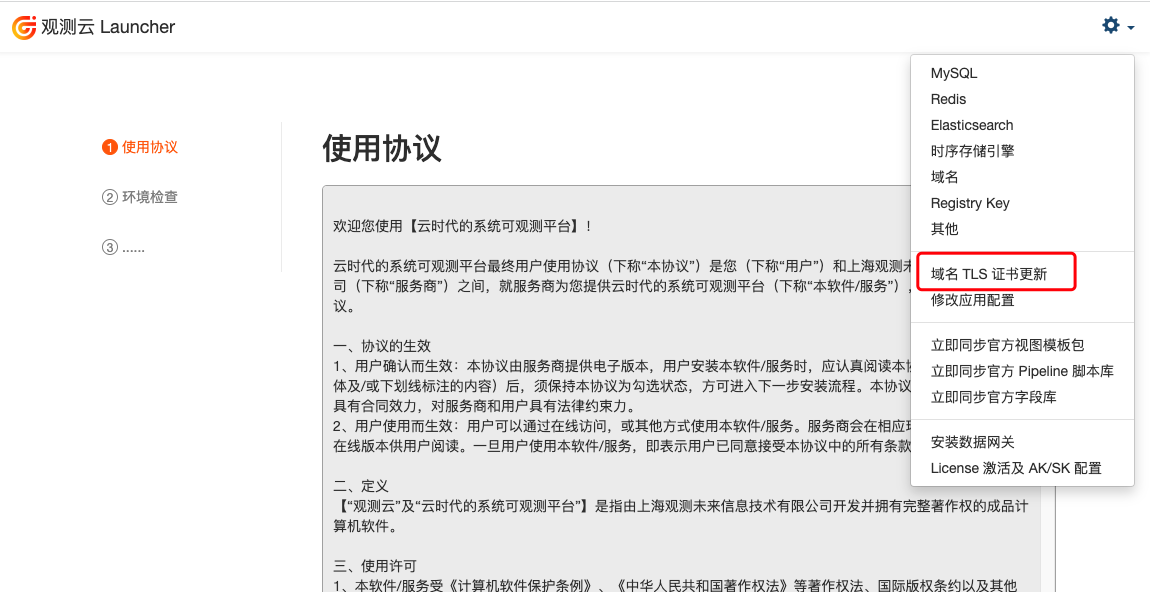
- Open the settings in the upper-right corner of Launcher.
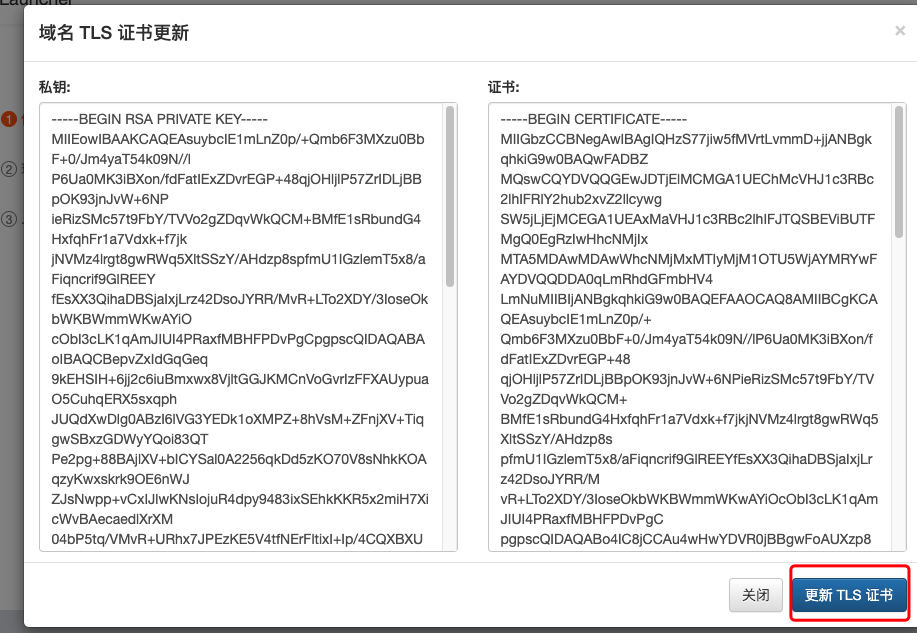
- Click Domain TLS Certificate Update.
- Modify the TLS certificate and save.
Step 4: Modify the Domain in All Ingresses
Note
If DataWay is installed in host mode, you need to modify the remote_host parameter of DataWay.
You can run the following script to back up:
NAMESPACE="forethought-core forethought-kodo forethought-webclient func2 middleware utils launcher"

for i in $NAMESPACE;
do
  for ing in $(kubectl get ing -n $i -o jsonpath='{.items[*].metadata.name}');
  do
  filename=ing-$i-$ing.yaml
  kubectl get ing $ing -n $i -o yaml > $filename
  done
done
Run the following script to modify the addresses:
OLD_VALUE="dataflux.cn"
NEW_VALUE="guance.com"
NAMESPACE="forethought-core forethought-kodo forethought-webclient func2 middleware utils launcher"

for i in $NAMESPACE;
do
  for ing in $(kubectl get ing -n $i -o jsonpath='{.items[*].metadata.name}');
  do
  if [[ `kubectl get ing $ing -n $i -o yaml |grep $OLD_VALUE` ]]; then
     echo "$i $ing 有$(kubectl get ing $ing -n $i -o yaml |grep -c $OLD_VALUE) 处"
     kubectl get ing $ing -n $i -o yaml | \
       sed "s/${OLD_VALUE}/${NEW_VALUE}/g" | \
       kubectl apply -f -
  fi
  done
done