Log Index
The system automatically archives log data to the corresponding index based on the configured filter conditions. By creating multiple log indexes, you can:
- Isolate log data by business line, environment, or project
- Configure different storage policies for different indexes
- Optimize query performance and reduce scanning of irrelevant data
Note
❗️ By default, log indexes cannot be created. Contact your Account Manager to request access to this feature.
Create
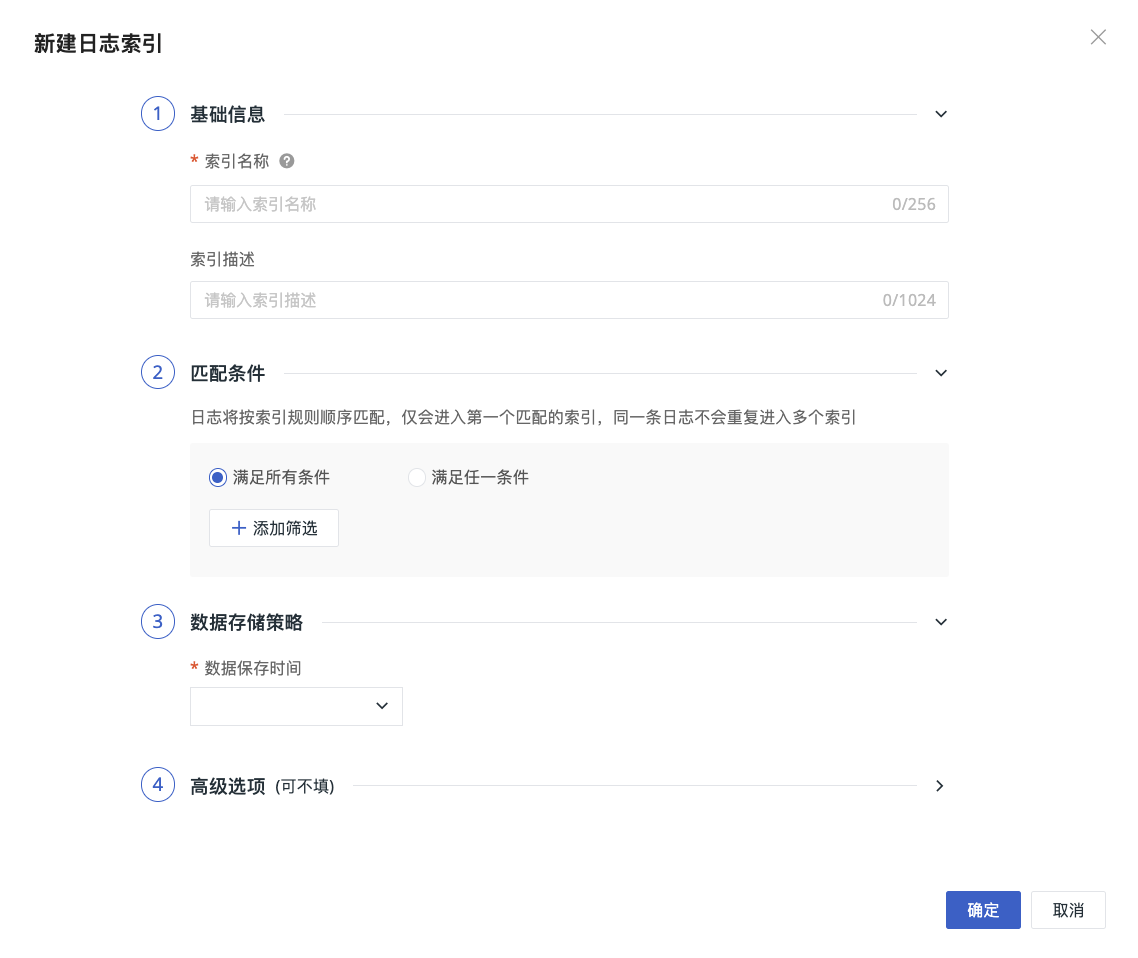
- Go to the Create > Log Index page;
- Enter a custom index name;
- Add a description as needed;
- Add matching conditions;
-
Configure the data storage policy: select the log retention period, after which logs are automatically cleaned up;
- Deployment Plan users can customize the storage duration, from 1d to 1,800d.
-
Configure a clone index as needed;
-
The clone configuration includes the name, retention period, and clone conditions.
-
Configure advanced options as needed;
- Confirm.
Matching Conditions
Matching conditions define the filter rules for log data to enter the current index. Two configuration modes are supported: Basic Matching and Advanced Matching.
Basic Matching
Basic Matching follows the original configuration method and is suitable for scenarios with relatively simple filter logic.
-
Select the condition relationship:
- Satisfy all conditions: the log must satisfy all filter conditions at the same time to enter the current index;
- Satisfy any condition: the log enters the current index if it satisfies any one filter condition.
-
Add filter conditions:
- Field name: select a log field, such as
source,service, orhost; - Operator: select a matching method;
- Match value: enter a field value. Separate multiple values with commas.
- Field name: select a log field, such as
Basic Matching is suitable for quickly configuring index routing by fixed fields.
Advanced Matching
Advanced Matching is suitable for scenarios that require more flexible combinations of matching rules. Once Advanced Matching is enabled, log data goes through the Pipeline for matching evaluation, and corresponding fees will be incurred.
In Advanced Matching, you can configure multiple filter conditions. Each condition includes:
- Field name: enter the log field to evaluate;
- Matching method: supports
=,!=,in,not in,match,not match,wildcard, andnot wildcard; - Match value: enter the value that corresponds to the field.
Click Add Filter to add more conditions; click Clear All Conditions to remove all currently configured conditions.
An Expression Preview is shown at the bottom of the page so you can confirm the matching expression generated from the current filter conditions. If the conditions are incomplete or the expression is invalid, the page prompts "Please complete or correct the filter conditions." In this case, complete the field name, matching method, or match value before saving.
Note
Logs are matched in the order of the index list. During the regular index matching stage, logs are written only to the first matching regular index. If this regular index has a clone rule configured and the log satisfies the clone conditions, the system asynchronously copies an additional copy to the corresponding clone index.
Advanced Options
Advanced options are expanded by default. Here you can view or select full-text index fields.
Full-Text Index Fields
-
Full-line Index (default for new indexes): Full-text search matches all business fields in the log, excluding system fields. The system writes all business fields into
variantand creates a full-text index only forvariant; -
Index only the
messagefield (legacy compatibility): Full-text search matches only the originalmessagefield, and the system creates a full-text index formessage.
New log indexes use the full-line index by default. Existing log indexes that already use the message index field can continue using it or switch to the full-line index. This switch is one-way: after switching to the full-line index, you cannot restore the message-only index.
When logs in the full-line index contain message, the system does not delete the field. Instead, it writes message into variant as a regular business field. The system does not create two full-text indexes for message and variant, avoiding the extra storage cost caused by duplicate indexing.
How the Full-Line Index Processes Data
No message:
Business fields → variant → Full-text index

Message exists:
message + other business fields → variant → Full-text index
Whether message exists depends on the actual processing result of the client or Pipeline. The same log index can contain both logs with message and logs without message.
To configure DataKit JSON field extraction, or to delete the original message after fields are extracted in a Pipeline, see Full-Line Index.
The original "Matching Service" capability has been migrated to Log Index Mapping.
Clone Index
A clone index further filters a regular log index and copies a subset of the log data. For logs that are queried frequently and have a clear data scope, you can copy them to a dedicated clone index to reduce the data volume scanned during queries and improve log retrieval efficiency.
Logs are first matched according to the order of regular indexes and written to the first matching regular index. After the write is complete, the system asynchronously determines whether the logs need to be copied to a clone index based on the clone conditions configured for that index.
Log submission
   ↓
Match regular indexes in order
   ↓
Write to the first matched regular index
   ↓
Check whether clone rules are configured
   ↓
Clone conditions met ──→ Asynchronously copy to clone index
Conditions not met   ──→ No clone operation
Clone tasks are executed asynchronously. Even if a clone operation fails, it does not affect the write of logs to the source index.
Use Cases
Clone indexes are suitable for the following scenarios:
- High-frequency queries only focus on a portion of the logs in a regular index;
- The query scope needs to be narrowed by conditions such as service, environment, status, or business type;
- The regular index contains a large amount of data, and you want to reduce the scan volume of commonly used queries;
- You want to configure a shorter retention period for high-frequency query data;
- You want to keep the complete logs in the source index while building a leaner dataset that is more suitable for daily troubleshooting.
For example, the regular index application stores all application logs, but daily troubleshooting focuses mainly on error logs in the production environment. In this case, you can configure a clone index application_error for application and set the following clone conditions:
New logs that meet the conditions are stored in both:
- Source index:
application - Clone index:
application_error
When querying production error logs, you can directly select application_error to reduce scanning the full dataset of application.
Configure Clone Indexes
When creating or editing a regular log index, you can configure a clone index as needed:
- Go to Logs > Indexes;
- Create a log index, or edit an existing regular log index;
- Find the Clone Index configuration;
- Enable Clone Index;
- Enter the clone index name;
- Set the data retention period for the clone index;
- Add clone conditions;
- Save the index configuration.
Each regular index can have at most one clone index.
Clone Index Name
The clone index name is used to identify the index in the index list and the Log Explorer.
When configuring the name, note the following:
- The clone index name must be unique within the current workspace;
- The clone index name cannot conflict with an existing regular index, native direct-write index, external index, or other clone index;
- After creation, the clone index is shown as a secondary row of the source index;
- A clone index cannot be the source of another clone index.
Retention Period
A clone index can have an independent data retention period, but it cannot exceed the retention period of the source index.
| Source index retention period | Clone index retention period limit |
|---|---|
| 7 days | No more than 7 days |
| 14 days | No more than 14 days |
| 30 days | No more than 30 days |
If you modify the retention period of the source index, ensure that the retention period of the clone index still meets the restrictions.
Logs in a clone index are automatically cleaned up when they reach the retention period, without affecting the original logs in the source index.
Clone Conditions
Clone conditions are used to determine whether logs in the source index need to be copied to the clone index.
You can set filter rules based on log fields, for example:
sourceserviceenvstatushost- Other log fields
Only logs that meet all of the following conditions at the same time enter the clone index:
- The log has been successfully written to the source regular index;
- The log satisfies the currently configured clone conditions;
- The clone rule was already in effect before the log was written.
Logs that do not meet the clone conditions remain in the source index as usual, but are not copied to the clone index.
Data Content
A clone index fully preserves the fields and tags of the source logs, not just the fields used in the clone conditions.
The copied log data includes:
- The business fields of the original logs;
- The tags of the original logs;
- The
messagefield, if present in the original logs; - Other related information required for querying and displaying logs.
The clone operation does not modify or delete logs in the source index.
Effective Scope
Clone rules process only logs newly written to the source index after the rules take effect.
After any of the following operations is completed, the system starts processing subsequent logs from the time the operation takes effect:
- Creating a clone rule;
- Enabling a clone rule;
- Modifying clone conditions;
- Modifying configurations related to the clone index.
The system does not automatically scan the source index or backfill historical data. Therefore, logs written to the source index before the rules take effect are not automatically copied to the clone index.
For example, if a clone rule is enabled at 2026-08-19 10:00:00:
- Logs newly written after
10:00:00that satisfy the conditions can enter the clone index; - Historical logs that existed before
10:00:00are not automatically backfilled.
View and Query Clone Indexes
A clone index is displayed as a child node of the source index. The source index is the parent node, and the clone index is the child node. When a clone index exists, the index tree is expanded by default.
A clone index displays a dedicated icon or marker to distinguish it from a regular index.
When searching indexes:
- Searching for a source index name displays the source index and its clone index together;
- Searching for a clone index name retains the corresponding source index as the parent node, making it easier to confirm the index relationship.
When querying, note the following:
- The source index and its clone index cannot be selected at the same time;
- Selecting the source index does not automatically query its clone index;
- Selecting a clone index queries only the data in that clone index;
- The wildcard
*includes the default index and all regular indexes, but does not include clone indexes; - To query a clone index, you need to explicitly select the corresponding clone index.
Clone indexes can be selected in the following query entry points:
- Log Explorer;
- Metrics Analysis;
- The log DQL editor in scene charts and dashboards;
- Dashboard log view variables;
- Log Monitor queries.
Clone indexes do not appear as independent indexes in the following configuration entry points:
- Index configuration;
- Pipeline;
- Field mapping;
- Data routing;
- Data access rules;
- Log ordering;
- Data source index selector.
Edit and Enable/Disable
When editing a regular index, you can modify the corresponding clone rules.
After modifying or re-enabling a clone rule:
- The new rule applies only to logs newly written after the effective time;
- Historical logs already written to the clone index are not reprocessed according to the new rule;
- Historical logs already written to the source index are not automatically backfilled;
- Modifying the rule does not change the original log data in the source index.
After a clone rule is disabled, subsequent logs are no longer copied to the clone index. Historical logs in the clone index that are still within the retention period can still be queried.
Limitations
| Restriction | Description |
|---|---|
| Source index | Only regular log indexes can be configured with a clone index |
| Number of clones | Each regular index can have at most one clone index |
| Clone hierarchy | A clone index cannot itself be configured with a clone index |
| Retention period | The clone index retention period cannot exceed that of the source index |
| Data scope | Only logs newly written after the clone rule takes effect are processed |
| Historical data | Historical logs in the source index are not automatically backfilled |
| Data content | All fields and tags of the original logs are fully preserved |
| Exception handling | A clone failure does not affect writes to the source index |
| List sorting | Clone indexes do not participate in regular index sorting or pagination |
| Explorer queries | "All logs" does not automatically include clone indexes; you must explicitly select them |
Note
- Clone indexes are used to narrow the data scope of high-frequency queries and do not replace the source regular index;
- The same log can exist in both the source index and the clone index;
- Modifying clone conditions does not reprocess historical logs that have already been written;
- When querying cloned data, explicitly select the corresponding clone index in the Log Explorer.
Index Limits
| Restriction | Description |
|---|---|
| Maximum total | 6, including the default index; that is, you can create up to 5 custom indexes |
| Matching mechanism | Indexes are matched in order; the first matching index takes effect and subsequent indexes are no longer matched |
| Storage duration | Deployment Plan supports 1d to 1,800d; for SaaS, refer to the range available on the page |
| Clone index | Each regular index can have at most 1 clone index; the clone hierarchy is limited to 1 level; the clone retention period cannot exceed that of the source index; changing matching conditions does not backfill historical data |