Nodes
Nodes are the fundamental compute units that host workloads. They can be physical servers, cloud virtual machines, or other entities with computing capabilities. Nodes are managed by the cluster control plane, responsible for running containerized applications (organized as Pods) and providing compute, storage, and network resources. Each node communicates with the cluster through core components, ensuring that applications are scheduled as expected and maintain high availability.
For more information, see Nodes.
List
Go to Infrastructure > Containers, then click Kubernetes > Nodes in the upper-left corner of the page to view information about all Nodes retained in the workspace, including node name, status, Kubelet version, uptime, and more.
Details
Click a row in the list to slide out its details page.
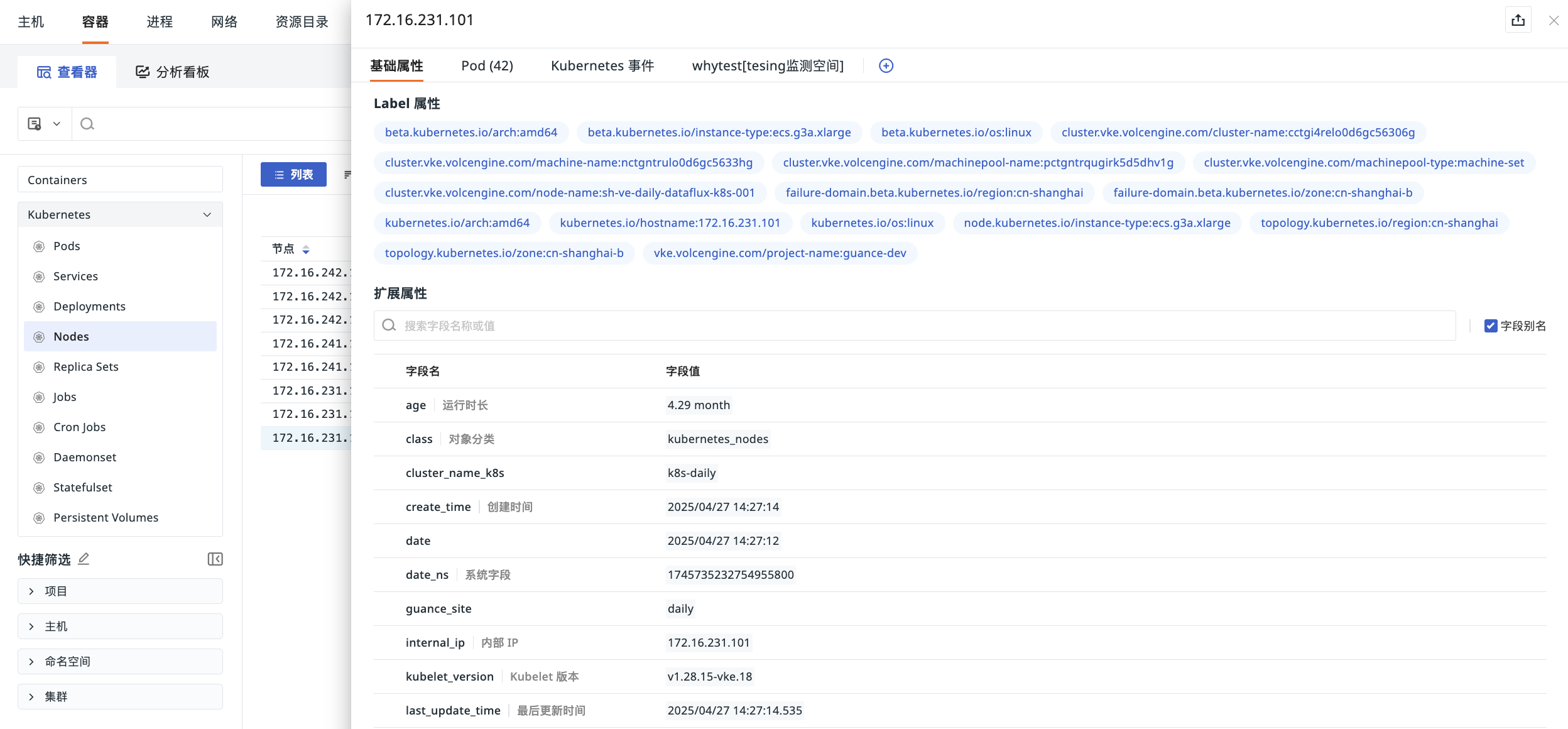
Basic Attributes
View the Label attributes and extended attributes of this Node.
- Label Attributes
They are automatically uploaded with the Nodes information by default. Existing labels can be used in the Nodes object list to quickly filter and display data with the same labels.
Pod
On the Pod page, you can view the relevant Pods under the current node (including name, ready status, restart count, and uptime). The system quickly correlates the real-time running relationship between the infrastructure (node) and the application (Pod).
In the associated Pod list, click any Pod to view its details, making it easy to directly understand the Pod's running status on the node without switching pages back and forth, ensuring a smooth workflow.
Kubernetes Events
You can view the corresponding event data associated with namespace, source, kind, and name.
For more details, see Explorer Configuration.