Troubleshooting
Compilation Troubleshooting
If an error occurs during the compilation process, you should first check the compilation environment.
Runnable Compilation Environment
✅ Runnable Environment
- AGP
com.android.tools.build:gradleversion3.5.0or higher - Gradle version
5.4.0or higher - Java version
8.0or higher - Android minSdkVersion 21
Note: As Android Studio versions update, the compatibility of these versions may also change. If your compilation environment meets the above conditions but you still encounter compilation errors, please contact our development team.
⚠️ Compatible Runtime Environment
- AGP
com.android.tools.build:gradleversion3.0.1or higher - Gradle version
4.8.1or higher - Java version
8.0or higher - Android minSdkVersion 21
In this environment,
ft-plugincannot be used. The automatic data capture part needs to be integrated manually. For more information on manual integration, refer to Manual Integration.
SDK Import Cannot Be Resolved
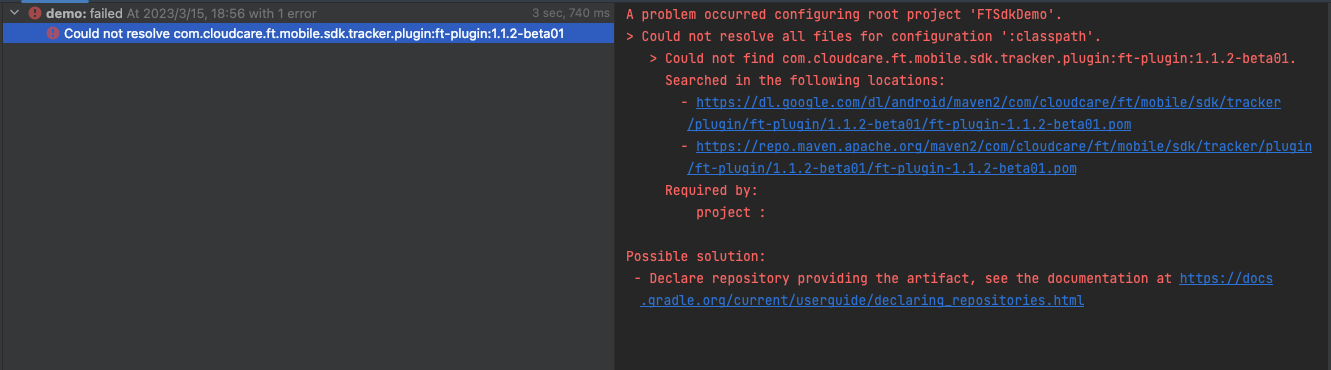
 The above errors occur because the maven repository is not set correctly. Please refer to the Configuration here.
Compilation Errors
Desugaring Error
>Task :app:transformClassesWithStackFramesFixerForDebug
    Exception in thread "main" java.lang.IllegalStateException: Expected a load for Ljava/lang/String; to set up parameter 0 for com/ft/sdk/FTRUMGlobalManager$$Lambda$11 but got 95
        at com.google.common.base.Preconditions.checkState (Preconditions.java:756)
        at com.google.devtools.build. android.desugar.LambdaDesugaring$InvokedynamicRewriter .attemptAllocationBeforeArgumentLoadsLambdaDesugaring.java:535)
        at com.google.devtools.build.android.desugar.LambdaDesugaring$InvokedynamicRewriter.visitInvokeDynamicInsn
        (LambdaDesugaring.java: 420)
        at org.objectweb.asm.ClassReader.a(Unknown Source)
        at org.objectweb.asm.ClassReader.b(Unknown Source)
        at org.objectweb.asm.ClassReader.accept(Unknown Source)
        at org.objectweb.asm.ClassReader.accept(Unknown Source)
        at com.google.devtools.build. android.desugar. Desugar.desugarClassesInInput (Desugar.java:401) at com.google.devtools.build.android.desugar.Desugar.desugar0neInput(Desugar.java:326) at com.google.devtools.build.android.desugar. Desugar.desugar (Desugar.java:280) at com.google.devtools.build.android.desugar. Desugar.main (Desugar.java:584)
3.0.0. This issue explains the problem. You can resolve this by upgrading to AGP 3.1.0 or higher, or by using a newer version of the SDK. Upgrade the version in app/build.gradle.
dependencies {
    implementation('com.cloudcare.ft.mobile.sdk.tracker.agent:ft-sdk:1.3.10.beta01')//Versions 1.3.10 and above are acceptable
    }
API 'android.registerTransform' is obsolete
Transform has been marked as Deprecated in AGP 7.0 and has been removed in AGP 8.0. ft-plugin:1.2.0 has been adapted accordingly. Please upgrade to the corresponding version to fix this error. For detailed instructions, see Integration Configuration.
AndroidComponentsExtension ClassNotFoundException
AndroidComponentsExtension is a method supported by AGP 7.4.2. Compilation environments below this version will generate this error. You can use the ft-plugin-legacy version to fix this error. For detailed instructions, see Integration Configuration.

java.lang.IllegalArgumentException:
- Invalid opcode 169
If this error occurs while using ft_plugin_legacy, it is a bug in the asm-commons:7.0 version. The original issue is here. Resolve this problem by depending on org.ow2.asm:asm-commons:7.2 or higher in the plugin configuration. You can verify the actual asm-commons version used by running ./gradlew buildEnvironment.
buildscript {
    dependencies {
        classpath 'com.cloudcare.ft.mobile.sdk.tracker.plugin:ft-plugin-legacy:[version]'
        // Add dependency
        classpath 'org.ow2.asm:asm-commons:7.2'
    }
}
- org.ow2.asm:asm version lower than 7.0
Currently, the plugin version only supports build environments using org.ow2.asm:asm7.x or higher. You can query the build environment via ./gradlew buildEnvironment to confirm. You can fix this by forcing a dependency on version 7.x or higher. It is recommended to use version 7.2 or higher.
buildscript {
    dependencies {
        classpath 'com.cloudcare.ft.mobile.sdk.tracker.plugin:ft-plugin-legacy:[version]'
        // Add dependency
        classpath 'org.ow2.asm:asm:7.2'
        classpath 'org.ow2.asm:asm-commons:7.2'
    }
}
SDK Initialization Exception Verification
Check Logcat to see if there are logs with Level as Error and Tag prefixed with [FT-SDK].
[FT-SDK] com.demo E Please install the SDK first (call FTSdk.install(FTSDKConfig ftSdkConfig) when the application starts)
Enable Debug Mode
ft-sdk Debug Mode
You can enable the SDK's debug function through the following configuration. After enabling, the console Logcat will output SDK debug logs. You can filter for the [FT-SDK] string to locate Guance SDK logs.
Log Examples
Data Synchronization
//Check if the upload address is correctly entered into the SDK configuration
[FT-SDK]FTHttpConfigManager com.demo D  serverUrl ==>
                                    Datakit Url:http://10.0.0.1:9529
//The following are connection error logs
[FT-SDK]SyncTaskManager com.demo   E  Network not available Stop poll
[FT-SDK]SyncTaskManager com.demo   E  ↵
            1:Sync Fail-[code:10003,response:failed to connect to 10.0.0.1 (port 9529) from ↵
            10.0.2.16 (port 47968) after 10000ms,Check if the local network connection is normal]

//The following are normal synchronization logs
[FT-SDK]SyncTaskManager com.demo   D  Sync Success-[code:200,response:]
It is recommended to turn off this configuration when releasing the Release version
ft-plugin Debug Mode
You can enable Plugin debug logs through the following configuration. After enabling, you can find output logs prefixed with [FT-Plugin] in the Build output logs. Use this to check the ASM write status of the Plugin.
It is recommended to turn off this configuration when releasing the Release version
Convert SDK Internal Logs to Cache Files
// >= 1.4.6
// Default path: /data/data/{package_name}/files/LogInner.log
LogUtils.registerInnerLogCacheToFile()

// >= 1.4.5+
val cacheFile = File(filesDir, "LogCache.log")
LogUtils.registerInnerLogCacheToFile(cacheFile)
To ensure the integrity of internal logs, this configuration must be set before SDK initialization
Session Replay Compose Background Color Missing in Replay
When using Jetpack Compose Session Replay, if a page contains containers like Row, Column, Box that are only used for layout and background drawing, for example, only Modifier.background(...) is set but there is no text, click, semantics, or other accessibility information, this container may not appear in the Compose semantic node tree. Session Replay currently maps based on semantic nodes, so background colors may be missing in the replay, and Toolbars or block backgrounds may appear as default white.
If this background is important for replay display, you can add an empty semantic marker to the container to include it in the semantic node tree:
Row(
    modifier = Modifier
        .fillMaxWidth()
        .height(56.dp)
        .semantics { }
        .background(Color(0xFFFF6600))
)
This method does not change the interface display effect and is only used to help Session Replay capture this Compose container node. Subsequent SDK versions will continue to enhance the automatic collection capability for containers without semantics.
SDK Runs Normally But No Data
-
Check if Datakit is running normally
-
Confirm that the SDK upload address
datakitUrlordatawayUrlis configured correctly and initialized correctly. In debug mode, check the logs to determine upload issues. -
Check if datakit is uploading data to the corresponding workspace and if it is offline. You can confirm this by logging into Guance and checking "Infrastructure".

Compatibility Issue with OkHttp 3.12.+
In ft-sdk < 1.6.13 versions, if data compression FTSDKConfig.setCompressIntakeRequests(true) is enabled, SDK data collection is normal, but no error prompts or HTTP status code logs are output during the data synchronization phase.
Solution: Using ft-sdk >= 1.6.13 or OkHttp 4.5.0 or higher can resolve this issue.
Data Loss
Partial Data Loss
- If RUM data for a particular Session or a few pieces of data in Log or Trace are lost, first exclude whether
sampleRate < 1is set in FTRUMConfig, FTLoggerConfig, FTTraceConfig. - Check the network of the device uploading data, as well as the network and load of the device where datakit is installed.
- Confirm that
FTSdk.shutDownis called correctly. This method releases the SDK data processing objects, including cached data.
Resource Data Loss
Automatic Collection, ft-plugin Not Integrated Correctly
Automatic Resource collection relies on Plugin ASM bytecode writing to automatically set up OkHttpClient Interceptor and EventListener, writing FTTraceInterceptor, FTResourceInterceptor, FTResourceEventListener.FTFactory. If Plugin is not used, please refer to here.
Custom WebView Automatic Collection Not Taking Effect
If native WebView page collection is normal, but custom WebView pages do not trigger the expected automatic collection, it is recommended to first locate whether it is a WebView identification issue through Plugin logs.
Location Method:
- First, refer to Integration Configuration to enable logs in
FTExt:
- After recompiling, search for
[FT-Plugin]andWEBVIEWrelated output in theBuildlogs, focusing on whether logs similar to the following appear:
[FT-Plugin]:TARGET_CUSTOM_WEBVIEW_METHOD-> owner:com/example/CustomWebView, class:com/example/WebViewActivity$2, super:java/lang/Object, method:loadUrl(Ljava/lang/String;)V | onItemSelected(Landroid/widget/AdapterView;Landroid/view/View;IJ)V
If such TARGET_CUSTOM_WEBVIEW_METHOD logs appear, it means Plugin has identified the current owner as a custom WebView and processed the corresponding calls.
If such logs are never hit, but the actual calls are from business custom WebViews, it usually requires checking whether the class has been added to knownWebViewClasses. This not only affects automatic collection identification but also whether Plugin will treat internal methods of custom WebViews as ordinary methods for continued ASM writing; if not correctly identified, runtime may experience circular calls to methods like loadUrl, ultimately manifesting as WebView white screen. During troubleshooting, you can also continue to watch for logs like:
This usually indicates that the current class has not been recognized as a WebView by Plugin.
Solution:
Add knownWebViewClasses in FTExt, including the actual custom WebView classes used in the configuration. It is recommended to add the base WebView class in the business first; if the inheritance hierarchy is deep, you can add both the base class and the currently used class. This allows Plugin to correctly identify WebView calls and also avoids repeated ASM writing of internal methods of custom WebViews.
FTExt {
    showLog = true
    verboseLog = true
    knownWebViewClasses = [
        'com.example.web.BaseWebView',
        'com.example.web.CustomWebView'
    ]
}
The role of knownWebViewClasses is to add business custom WebViews to Plugin's known WebView list in advance. This can solve the identification problem of custom WebViews and also cooperate with Plugin to skip repeated writing of internal WebView methods, avoiding runtime circular calls and white screens.
OkHttpClient.build() Setup Issue
Plugin ASM automatically injects network collection functionality when the application calls OkHttpClient.Builder().build(). The following two situations may cause network collection to fail:
- Timing Issue - SDK Initialization Not Completed. If
OkHttpClient.Builder().build()is called before SDK initialization is complete, it will lead to loading empty configuration, losing Resource-related data. You can confirm the initialization order is correct by checking debug logs. - Creation Method Issue. Not using the standard
OkHttpClient.Builder().build()method to create the OkHttpClient object, for example, directly instantiating OkHttpClient or using other construction methods.
//SDK initialization logs
[FT-SDK]FTSdk   com.ft  D  initFTConfig complete
[FT-SDK]FTSdk   com.ft  D  initLogWithConfig complete
[FT-SDK]FTSdk   com.ft  D  initRUMWithConfig complete
[FT-SDK]FTSdk   com.ft  D  initTraceWithConfig complete

//Logs printed when SDK OkHttpClient.Builder.build() is called
//(Needs to be called after SDK initialization)
[FT-SDK]AutoTrack   com.ft  D  trackOkHttpBuilder
If the initialization call order cannot be adjusted, you can choose the manual method for integration.
Using Interceptor or EventListener for Secondary Data Processing
After Plugin ASM insertion, it will add addInterceptor to OkHttpClient.Builder() in the original project code, adding FTTraceInterceptor and FTResourceInterceptor respectively. Among them, the HTTP request's body contentLength is used to participate in unique ID calculation. Resource data at various stages is contextually linked through this ID. Therefore, if the integrator also adds addInterceptor when using OkHttp and performs secondary processing on the data causing its size to change, it may lead to inconsistent ID calculation across stages, resulting in data loss.
Solution:
ft-sdk < 1.4.1
By customizing the order of addInterceptor, let the SDK method calculate the ID first to solve this problem. To avoid duplicate settings, the custom method needs to turn off FTRUMConfig's enableTraceUserResource and FTTraceConfig's enableAutoTrace configurations.
ft-sdk >= 1.4.1
In non-manual setup scenarios, the SDK adapts to this issue by itself. If manual setup has already been performed, ensure that Interceptor is placed in a forward position.
OkHttp 3.12.+ Compatibility Issue
ft-sdk < 1.6.13 If the Interceptor used reads the response body content for reading, it may cause failure to collect the current Resource data.
Solution:
ft-sdk < 1.6.13
-
Without changing the OkHttp version, perform manual setup to solve this problem.
OkHttpClient.Builder builder = new OkHttpClient.Builder() .addInterceptor(new CustomReadReponseInterceptor())//Reads response body .addInterceptor(new FTTraceInterceptor()) .addInterceptor(new FTResourceInterceptor()) .addInterceptor(new CustomRequestBodyFixInterceptor())//Has encryption or modifies body .eventListenerFactory(new FTResourceEventListener.FTFactory()); OkHttpClient client = builder.build(); -
Upgrading OkHttp to version 4.5.0 or higher can also solve this problem.
ft-sdk >= 1.6.13
In non-manual setup scenarios, the SDK adapts to this issue by itself.
Error Data Loss Crash Type Data
- Confirm whether other third-party SDKs with Crash capture functionality are also being used simultaneously. If so, the SDK initialization method needs to be placed after other SDKs.
Data Missing Certain Field Information
User Data Fields
-
Confirm that the user data binding method is called correctly. In debug mode, you can track this issue through logs.
Missing Custom Parameters or Incorrect Values
- Confirm that
FTRUMConfig.addGlobalContextandFTLoggerConfig.addGlobalContextare called in the correct scenarios. They are suitable for data that does not change within an application cycle, such as application channel, different Flavor attributes, etc. If dynamic scenarios require real-time response, manual calls to the RUM and Log interfaces should be used. - In debug mode, check the
[FT-SDK]SyncTaskManagerlogs. You can use these logs to verify the correctness of custom field parameters.
Lag Issue When enableConsoleLog is Enabled
If lag occurs, the possible reason is that the log collection data is too large. The principle of FTLoggerConfig.enableConsoleLog is to capture android.util.Log compilation, Java and Kotlin println. It is recommended to adjust the FTLoggerConfig configuration parameters such as sampleRate, logPrefix, logLevelFilters as needed to eliminate or alleviate this issue.
OkHttp EventListener Integration with SDK Becomes Ineffective
After Plugin AOP ASM insertion, eventListenerFactory will be added to OkHttpClient.Builder() in the original project code, which will overwrite the original eventListener or eventListenerFactory.
Solution:
ft-sdk < 1.4.1
Turn off automatic Plugin AOP automatic setting FTRUMConfig setEnableTraceUserResource(false), and simultaneously customize a CustomEventListenerFactory inheriting FTResourceEventListener.FTFactory, using the custom method for integration.
ft-sdk >= 1.4.1
Customize a CustomEventListenerFactory inheriting FTResourceEventListener.FTFactory, and customize the ASM-written eventListenerFactory by setting FTRUMConfig.setOkHttpEventListenerHandler.
ft-sdk >= 1.6.7
In non-manual setup scenarios, the SDK adapts to this issue by itself.
TraceID Missing or Not Corresponding with Trace Propagation Header
When performing complete request data collection, information usually needs to be obtained from both Interceptor and EventListener. To effectively correlate these two parts of data, the SDK needs to rely on a unique ID to link the same network request. However, before version 1.6.10, this ID was the same for identical requests, which could lead to data confusion or loss in high-concurrency scenarios. Starting from version 1.6.10, you can call FTSDKConfig.setEnableOkhttpRequestTag(true) or explicitly add a ResourceID on the Request to distinguish unique identifiers for each request, thereby avoiding interference issues between identical requests. For setup instructions, please refer to here.