Troubleshooting
SDK Initialization Exception Verification
Check Logcat to confirm if there are logs with Level as Error and Tag prefixed with [FT-SDK].
In the Debug environment, after you configure the Guance SDK and run the application for the first time, please check your debugger console in Xcode. The SDK uses assertions to check the correctness of multiple configurations and will crash and output relevant warnings if the configuration is incorrect.
eg: When configuring the SDK, if the datakit metrics write address is not set, the program will crash and output a warning ⚠️ in the console.
Enable Debug Mode
You can enable the SDK's debug function through the following configuration.
 let config: FTMobileConfig = {
    serverUrl: Config.SERVER_URL,
    debug: true
 };
 FTMobileReactNative.sdkConfig(config);
It is recommended to turn off this configuration when releasing the Release version.
Check Logcat logs with Tag prefixed with [FT-SDK].
The SDK's debug logs are identified with the prefix [FTLog].
-
When running with xcode, you can directly view the SDK's debug logs in the xcode debug console.
-
When running with terminal commands
yarn iosoryarn react-native run-ios, you can view the SDK debug logs in the "Console" on the mac.
Using the "Console":
Select Action, check Include Info Messages and Include Debug Messages.
Select the debugging device, click the Start button, and enter the search condition [FTLog] in the search condition box on the right. You can then view the SDK's debug logs.
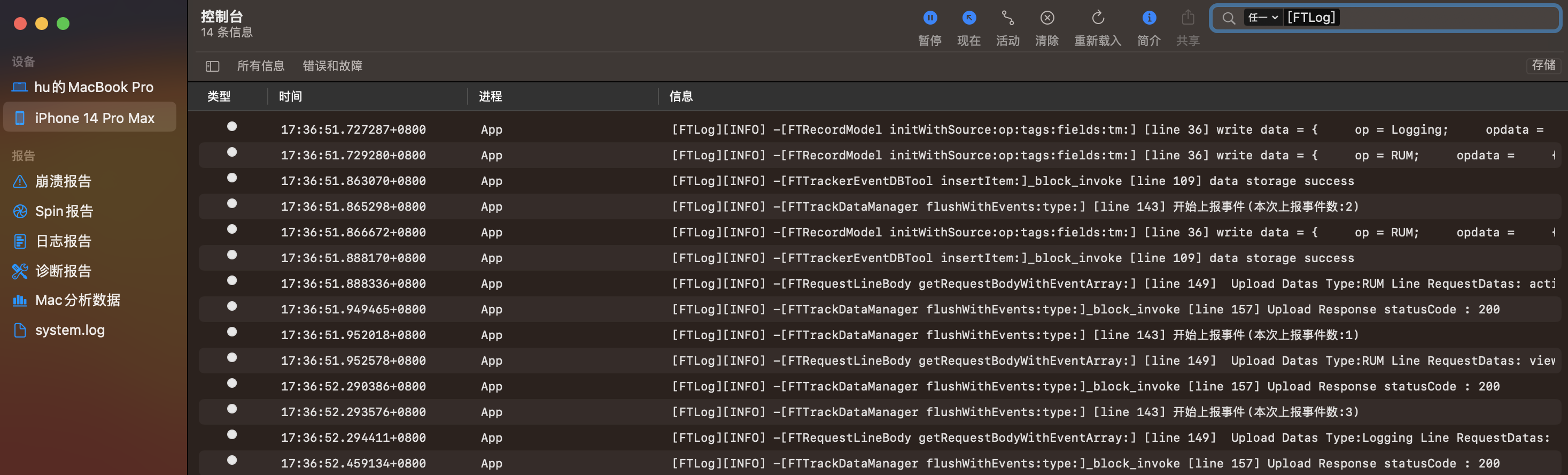
Android Logcat and iOS Xcode Console Log Samples
SDK Runs Normally But No Data
-
Check if Datakit is running normally.
-
Confirm that the SDK upload address
datakitUrlordatawayUrlis configured correctly and initialized correctly. In debug mode, check the synchronization logs in Android Logcat or iOS Xcode Console. -
Check if datakit is uploading data to the corresponding workspace and if it is offline. This can be confirmed by logging into Guance and checking the "Infrastructure".

Data Loss
Partial Data Loss
-
If RUM Session data or a few pieces of Log or Trace data are lost, first exclude whether
sampleRate < 1is set in FTRUMConfig, FTLoggerConfig, or FTTraceConfig. -
Incomplete RUM data collection, missing Resource or Action data?
Resource and Action data are bound to Views. Ensure there is an
FTReactNativeRUM.startViewoperation. Refer to the RUM View documentation to implement View event collection. -
Investigate network issues on the device uploading data and network/load issues on the device where datakit is installed.
Compatibility Issues
react-native-navigation Runtime Compatibility Issue
ReactTextShadowNode.UNSET Symbol Not Found
This is caused by a react-native-navigation version compatibility issue. For the related issue, see here. Fix this issue by modifying or downloading and replacing ReactTypefaceUtils.java.
Module react/jsx-runtime Not Found
Affected Scope: SDK version 0.3.0 && React version < 16.14.0
Reason: The SDK internally uses react/jsx-runtime, which is only supported in React >= 16.14.0.
Fix Suggestions:
- Upgrade SDK version to >= 0.3.1
Note: It is not recommended to add the @cloudcare/react-native-mobile dependency library using a local path, as it may cause errors that cannot be fixed.
Native and React Native Hybrid Development
Error: Cannot read properties of undefined (reading 'addError')
Reason: RN SDK version is incompatible with the Native SDK version, or the installation is incomplete.
Problem Verification Method:
In the Android project root directory, execute the command ./gradlew app:dependencies in the terminal, and check if the output contains cloudcare_react-native-mobile.
cloudcare_react-native-mobile is the dependency library installed on the Android side after adding the Guance RN SDK dependency to the RN project.
Check the Podfile.lock file to confirm the existence of the FTMobileReactNativeSDK dependency.
FTMobileReactNativeSDK is the dependency library installed on the iOS side after integrating the Guance RN SDK into the RN project.
Fix Suggestions:
-
Version Compatibility Check
- Ensure the RN SDK version matches the native SDK version.
- View the corresponding native SDK version information for the RN SDK at:
node_modules/@cloudcare/react-native-mobile/android/build.gradlenode_modules/@cloudcare/react-native-mobile/FTMobileReactNativeSDK.podspec -
Reinstall Dependencies
- Clean project cache:
- Reinstall dependencies:
By following the above steps, you can effectively resolve this error caused by version incompatibility or incomplete installation.