MCP Server (Legacy Version)
Legacy Documentation
This document is the legacy MCP Server integration guide, maintained for historical compatibility only. For new integrations, please refer to MCP Server Quick Start.
What is MCP Server?
MCP Server, Model Context Protocol (MCP), is an open protocol designed to standardize secure connections and data source access between applications and AI models. Its core goal is to enable developers to easily provide context information (such as data, content, operations) to models through unified "tools" and "resources", thereby enhancing model capabilities without retraining the models.
Services built based on MCP Server ultimately provide a unified multi-model callable interface. This service supports multi-client access and employs an API Key authentication mechanism to securely access the core functionalities of Guance, including monitors, logs, dashboards, and DQL queries.
Getting Started
Clarification: The legacy composite request header
Authorization=DF-API-KEY;Endpoint=SITE_KEYmentioned in the "Configuring Guance MCP Service" section below is the historical integration method; currently,Authorization: Bearer <API Key>is used uniformly.
- The MCP Server service provides capability integration using the MCP standard protocol.
- The service uses the Guance API Key for authentication. The workspace to which the request belongs is determined by the workspace associated with the
DF-API-KEY. - The service uniformly exposes tool capabilities to AI clients, with consistent calling methods, facilitating reuse across different models and clients.
- The service's return structure and tool capabilities are designed around the actual business scenarios of Guance, suitable for querying, analysis, retrieval, and management tasks.
Integration Methods
More integration methods are under development. Stay tuned!
Download Version
-
Download the MCP Server client Cherry Studio and select the corresponding version.
-
Open Cherry Studio and start configuring the basic services for the large model.
Here, using Volcengine as an example, configure the API key.
Configuring Guance MCP Service
- Custom input service name and description.
- Select type as streamableHttp.
- Define URL: https://obsy-ai.guance.com/obsy_ai_mcp/mcp.
- Request header format:
Authorization=DF-API-KEY;Endpoint=SITE_KEY. - After configuring the MCP service, save and enable it, then return to the homepage and select the MCP service.
Configuration Notes
-
The interface uses API KEY as the authentication method. Each request uses the value of DF-API-KEY in the request header for validity verification and as the basis for limiting the workspace for this request (taking the workspace to which this DF-API-KEY belongs).
-
All interfaces currently exposed by the MCP service only require providing the API KEY (Header: DF-API-KEY) as the credential. If the credential exists and is valid, authentication is considered passed.
-
The MCP Endpoint configuration parameter is SITE_KEY, for example:
cn1. The specific corresponding MAP is as follows:
SITE_KEY_MAP = {
    # === China SaaS Deployment ===
    "cn1": "https://openapi.guance.com",        # China Region 1 (Hangzhou) — Default
    "cn2": "https://aws-openapi.guance.com",    # China Region 2 (Ningxia)
    "cn3": "https://cn3-openapi.guance.com",    # Free Zone (Beijing)
    "cn4": "https://cn4-openapi.guance.com",    # China Region 4 (Guangzhou)
    "cn6": "https://cn6-openapi.guance.one",    # China Region 6 (Hong Kong)
    "us1": "https://us1-openapi.guance.com",    # Global Region 1 (Oregon)
    "eu1": "https://eu1-openapi.guance.one",    # Europe Region 1 (Frankfurt)
    "ap1": "https://ap1-openapi.guance.one",    # Asia-Pacific Region 1 (Singapore)
    "za1": "https://za1-openapi.guance.com",    # Africa Region 1 (South Africa)
    "id1": "https://id1-openapi.guance.com",    # Indonesia Region 1 (Jakarta)
}
Calling MCP Service
mcp_servers:
  guance:
    type: streamableHttp
    url: https://owl-mcp.guance.com/mcp
    headers:
      Authorization: Bearer Guance API Key>
    enabled: true
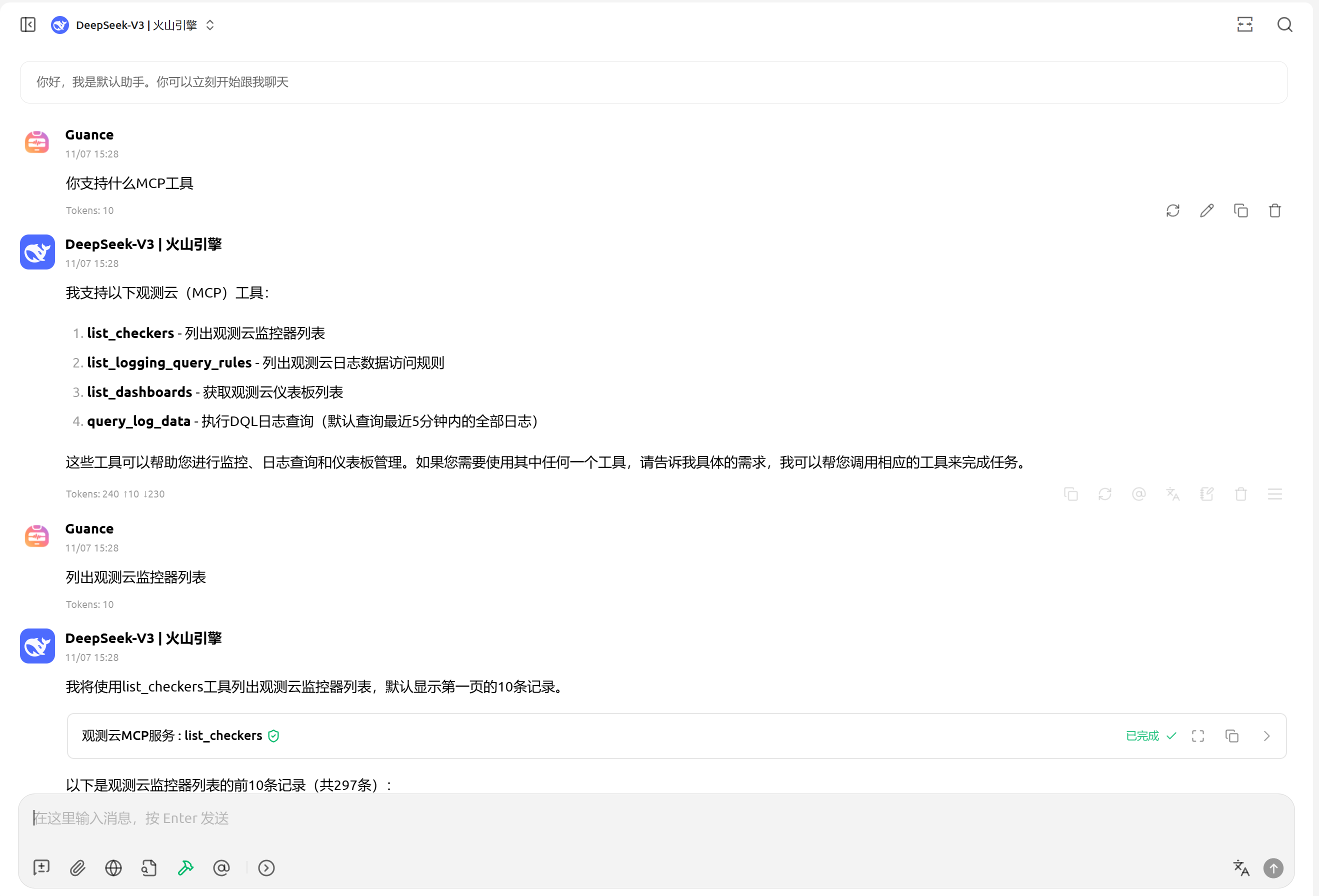
Verification:
Tool Overview
Currently, 37 business tools are provided, covering Dashboard, Data, Errors, Event, Field Schema, Incident, Infrastructure, LLM, Log Index, Member, Metric, Monitor, Pipeline, APM, RUM, Network, Profile, Catalog, and other domains.
Dashboard
owl.dashboard.create
Toolset: dashboard
Function: Create a dashboard
Parameters:
name(Required, string): Dashboard namedashboard_json(Required, object): Dashboard template content, must at least containtitleandmain.charts
Example prompts:
- Help me create a dashboard named "APM Overview" with the same title, start with empty charts.
- Create a new Nginx monitoring dashboard according to the
dashboard_jsonI provide.
owl.dashboard.replace
Toolset: dashboard
Function: Replace the content of an existing dashboard
Parameters:
dashboard_uuid(Required, string): Target dashboard UUIDdashboard_json(Required, object): New dashboard template content
Example prompts:
- Replace the dashboard
dsbd_xxxwith the new configuration I give you. - Update the title and chart layout of the specified dashboard using this
dashboard_json.
owl.dashboard.get
Toolset: dashboard
Function: Get dashboard details
Parameters:
dashboard_uuid(Required, string): Dashboard UUID
Example prompts:
- Query the detailed content of dashboard
dsbd_xxx. - Retrieve the complete configuration corresponding to this dashboard UUID.
Data
owl.data.show_dql_namespace
Toolset: data
Function: View the currently supported DQL namespaces, and whether each namespace supports the index parameter
Parameters:
- None
Example prompts:
- List the currently supported DQL namespaces.
- Which data namespaces support passing
index?
owl.data.query
Toolset: data
Function: Execute Guance's DQL or PromQL queries, suitable for data domains such as logs, metrics, RUM, APM, Network, Profile, etc. If unsure about dql_namespace, call owl.data.show_dql_namespace first. When full expressive power is needed, prioritize using query_text, as it is suitable for writing official DQL syntax directly, such as filtering, time windows, BY grouping, HAVING, ORDER BY, aliases, and aggregate functions. Note that DQL grouping syntax is BY ..., not SQL-style GROUP BY.
Parameters:
dql_namespace(Required, string): Query namespace, common ones likeL(Log),M(Metric)start_time(Required, int): Start time, 13-digit millisecond timestampend_time(Required, int): End time, 13-digit millisecond timestampquery_mode(Optional, string): Query mode, supportsdqlorpromql, wherepromqlis only applicable to metric queriesquery_text(Optional, string): Complete query statement. When writing DQL, follow the official syntax, e.g.,L::nginx:(count(*)) [1h] BY source, status, do not writeGROUP BY.source(Optional, string): Data source name used to construct a simple query whenquery_textis not provided.select(Optional, string[]): List of select expressions used to construct a simple query whenquery_textis not provided.index(Optional, string): Index name used for the log namespace, corresponding tonamespace[index]in DQL.
Recommended writing style:
- For simple queries, prioritize using
source + select. - When needing
WHERE,BY,HAVING,ORDER BY, complex functions, aliases, or more complete semantics, prioritize usingquery_text. - For log statistics, do not write
COUNT(L::*) GROUP BY ..., but write in DQL form likeL::source:(count(*)) ... BY ....
Example prompts:
- Query 500 errors in Nginx logs from the last hour.
- Use PromQL to query CPU usage trends for the last 30 minutes.
- Query detailed data for the
nginxsource in thedefaultindex under the log namespace. - Count the number of nginx logs grouped by
sourceandstatusin the last hour.
Errors
owl.errors.list
Toolset: errors
Function: Query the Errors center list
Parameters:
start_time(Required, int): Start time, 13-digit millisecond timestampend_time(Required, int): End time, 13-digit millisecond timestamppage_size(Optional, int): Number of items per pagepage_index(Optional, int): Page numberconditions(Optional, string): Filter expressionassigner(Optional, string): Assignee filter conditionissue_status(Optional, string): Error status filter condition
Example prompts:
- Query the Errors center list for the last 24 hours.
- Check the high-priority error issues currently assigned to Alice.
- Filter Java exception issues from the last week based on conditions.
owl.errors.comment.add
Toolset: errors
Function: Add a comment to an error issue
Parameters:
issue_id(Required, string): Error issue IDcomment(Required, string): Comment contentattachment_uuids(Optional, string[]): List of attachment UUIDsextend(Optional, object): Extension fields
Example prompts:
- Add a comment to
issue_xxx: Please check the latest release first. - Append a handling note to this error issue, along with a list of attachment IDs.
owl.errors.comment.list
Toolset: errors
Function: Query the comment list of an error issue
Parameters:
issue_id(Required, string): Error issue IDpage_size(Optional, int): Number of items per pagepage_index(Optional, int): Page number
Example prompts:
- List all comments for
issue_xxx. - View the most recent page of comment records for this error issue.
owl.errors.comment.update
Toolset: errors
Function: Update an existing error comment
Parameters:
comment_uuid(Required, string): Comment UUIDcomment(Required, string): Updated comment contentattachment_uuids(Optional, string[]): List of attachment UUIDsextend(Optional, object): Extension fields
Example prompts:
- Update comment
comment_xxxto "Root cause confirmed, fixing." - Update the body of this error comment and supplement the attachment list.
Event
owl.event.list
Toolset: event
Function: Query event list
Parameters:
start_time(Required, int): Start time, 13-digit millisecond timestampend_time(Required, int): End time, 13-digit millisecond timestampstatus(Optional, string): Event statuslimit(Optional, int): Maximum number of returned items, up to 100
Example prompts:
- Query the event list for the last 6 hours.
- List events with status "Alerting" from the last day, returning up to 50 items.
owl.event.get
Toolset: event
Function: Get event details
Parameters:
doc_id(Required, string): Event document ID
Example prompts:
- View detailed information for event
doc_xxx. - Fully display the original event content corresponding to this event ID.
Field Schema
owl.field_schema.get
Toolset: field_schema
Function: Get a simplified field catalog, suitable for viewing available fields before constructing query conditions or selecting fields
Parameters:
- None
Example prompts:
- List the currently available field catalog.
- I want to write a data query, first show me the field list.
Incident
owl.incident.list
Toolset: incident
Function: Query Incident list
Parameters:
search(Optional, string): Keyword searchpage_size(Optional, int): Number of items per pagepage_index(Optional, int): Page number
Example prompts:
- Query the current Incident list.
- Search for Incidents whose names contain "Redis".
Incident Comment
owl.incident_comment.list
Toolset: incident_comment
Function: Query the comment list for a specified Incident
Parameters:
incident_uuid(Required, string): Incident UUID
Example prompts:
- View the comment list for Incident
inc_xxx. - List all comments under this Incident chronologically.
owl.incident_comment.add
Toolset: incident_comment
Function: Add a comment to a specified Incident
Parameters:
incident_uuid(Required, string): Incident UUIDcomment(Required, string): Comment content
Example prompts:
- Add a comment to
inc_xxx: Contacting the on-duty colleague for handling. - Append a latest progress note under this Incident.
Incident Operation
owl.incident_operation.list
Toolset: incident_operation
Function: Query Incident operation records
Parameters:
incident_uuid(Required, string): Incident UUIDpage_size(Optional, int): Number of items per pagepage_index(Optional, int): Page number
Example prompts:
- View the operation records for
inc_xxx. - List the recent two pages of operation history for this Incident.
Incident Schedule
owl.incident_schedule.list
Toolset: incident_schedule
Function: Query Incident schedule list
Parameters:
search(Optional, string): Schedule name keywordpage_size(Optional, int): Number of items per pagepage_index(Optional, int): Page number
Example prompts:
- List all current Incident schedules.
- Search for schedules whose names contain "SRE".
owl.incident_schedule.get
Toolset: incident_schedule
Function: Get Incident schedule details
Parameters:
schedule_uuid(Required, string): Schedule UUID
Example prompts:
- View the detailed configuration of schedule
schedule_xxx. - Display the timezone, time periods, and notification targets for this on-duty schedule.
Infrastructure
owl.infrastructure.list
Toolset: infrastructure
Function: Query infrastructure object list, supporting three resource types: host, container, process
Parameters:
resource_type(Required, string): Resource type, supportshost,container,processlimit(Optional, int): Maximum number of returned items, up to 100filters(Optional, object[]): List of filter conditions. Each item containsfield,op,value
Example prompts:
- List recently visible host objects.
- Query containers whose names contain
prod, returning up to 20 items. - Filter process object list based on field conditions.
owl.infrastructure.get
Toolset: infrastructure
Function: Get details of a single infrastructure object
Parameters:
resource_type(Required, string): Resource type, supportshost,container,processidentity_value(Required, string): Object identifier value
Example prompts:
- View detailed information for host
host-01. - Get the complete object details for container
container_xxx.
LLM
owl.llm.list
Toolset: llm
Function: Query LLM application list
Parameters:
search(Optional, string): Keyword searchtype(Optional, string): Application type filterpage_size(Optional, int): Number of items per pagepage_index(Optional, int): Page number
Example prompts:
- List all current LLM applications.
- Search for LLM applications whose names contain "chat".
- Filter by type and return the first page of the application list.
Log Index
owl.log_index.list
Toolset: log_index
Function: Query log index list, suitable for determining available indexes before log queries
Parameters:
- None
Example prompts:
- List all current log indexes.
- I'm preparing to query logs, first show me the available indexes.
owl.log_index.get
Toolset: log_index
Function: Get log index details
Parameters:
index_uuid(Required, string): Log index UUID
Example prompts:
- View the detailed configuration of log index
index_xxx. - Display the index details corresponding to this index UUID.
Member
owl.member.list
Toolset: member
Function: Query member list
Parameters:
search(Optional, string): Member name or email keyword
Example prompts:
- List all members in the current workspace.
- Search for members whose emails contain
alice.
Metric
owl.metric.list
Toolset: metric
Function: Query source or field discovery results in the metric domain, for subsequent data queries
Parameters:
mode(Optional, string):sourceorfield, defaultsource
Example prompts:
- List currently available metric sources.
- View which fields in the metric domain can be used for queries.
Monitor
owl.monitor.list
Toolset: monitor
Function: Query monitor list
Parameters:
search(Optional, string): Monitor name keywordstatus_list(Optional, int[]): Status list, supports0,2
Example prompts:
- List all current monitors.
- Query enabled monitors whose names contain "CPU".
owl.monitor.get
Toolset: monitor
Function: Get monitor details
Parameters:
rule_uuid(Required, string): Monitor rule UUID
Example prompts:
- View the detailed configuration of monitor
rul_xxx. - Retrieve the complete definition of this monitor rule.
owl.monitor.upsert
Toolset: monitor
Function: Create a monitor, or update an existing monitor when rule_uuid is provided
Parameters:
json_script(Required, object): Monitor configuration objectrule_uuid(Optional, string): Existing monitor rule UUID, perform update if providedstatus(Optional, int): Monitor status, supports0,2secret(Optional, string): Used whenjson_script.typeisOuterEventCheckeralert_policy_uuids(Optional, string[]): List of alert policy UUIDsextend(Optional, object): Extension fieldstags(Optional, array): List of tags
Example prompts:
- Create a monitor for high CPU usage.
- Update the title and alert message of monitor
rul_xxx. - Create a monitor of type
OuterEventCheckerand bind it to specified alert policies.
owl.monitor.receive
Toolset: monitor
Function: Receive external events. Supports direct delivery to an existing target, or creating an OuterEventChecker first and then delivering the event.
Parameters:
event(Required, object): Event object, must containstatus,title,message,dimension_tags,check_valuetarget(Optional, object): Existing event receiving target, containssecret,sub_urimonitor(Optional, object): Monitor configuration for creating a receiving target, containssecret,sub_uri,status,title,message_template,alert_policy_uuidsextra_data(Optional, object): Additional data
Example prompts:
- Send this external alert event to the specified target.
- First create an event receiving monitor, then push the CPU alert event into it.
- Report a critical event using the existing
secretandsub_uri.
Network
owl.network.list
Toolset: network
Function: Query source or field discovery results in the network domain, for subsequent data queries
Parameters:
mode(Optional, string):sourceorfield, defaultsource
Example prompts:
- List currently available network sources.
- View which fields in the network domain can be directly queried.
Pipeline
owl.pipeline.list
Toolset: pipeline
Function: Query Pipeline list and return Pipeline content that can be directly read
Parameters:
search(Optional, string): Pipeline name keywordscope(Optional, string): Pipeline scopecategories(Optional, string[]): Category filter list
Example prompts:
- List all current Pipelines.
- Search for Pipelines whose names contain
nginx. - Query Pipelines under the
localscope with specified categories.
owl.pipeline.validate
Toolset: pipeline
Function: Validate Pipeline. This capability is being gradually opened up. Stay tuned.
Parameters:
- None
Example prompts:
- Validate a Pipeline rule.
- Try executing the Pipeline validation tool.
Profile
owl.profile.list
Toolset: profile
Function: Query source or field discovery results in the performance profiling domain, for subsequent data queries
Parameters:
mode(Optional, string):sourceorfield, defaultsource
Example prompts:
- List currently available profile sources.
- View which fields are in the profile domain.
RUM
owl.rum.list
Toolset: rum
Function: Query source or field discovery results in the RUM domain, for subsequent data queries
Parameters:
mode(Optional, string):sourceorfield, defaultsource
Example prompts:
- List currently available RUM sources.
- View which fields are in the RUM domain.
APM
owl.apm.list
Toolset: apm
Function: Query source or field discovery results in the APM domain, for subsequent data queries
Parameters:
mode(Optional, string):sourceorfield, defaultsource
Example prompts:
- List currently available APM sources.
- View which fields are in the APM domain.
Catalog
owl.catalog.query
Toolset: catalog
Function: Query Catalog. This capability is being gradually opened up. Stay tuned.
Parameters:
- None
Example prompts:
- Query Catalog content.
- Try executing the Catalog query tool.
owl.catalog.update
Toolset: catalog
Function: Update Catalog. This capability is being gradually opened up. Stay tuned.
Parameters:
- None
Example prompts:
- Update an object in the Catalog.
- Try executing the Catalog update tool.
Typical Usage Paths
Data Analysis Questions
- First call
owl.data.show_dql_namespaceto confirm the namespace. - As needed, call
owl.metric.list,owl.rum.list,owl.apm.list,owl.network.list,owl.profile.list,owl.log_index.list,owl.field_schema.getto obtain the source, field, index required for the query. - Finally call
owl.data.queryto execute the formal query.
Alert and Fault Handling Questions
- Use
owl.monitor.list,owl.monitor.getto view monitors. - Use
owl.event.list,owl.event.getto view events. - Use
owl.incident.list,owl.incident_comment.list,owl.incident_operation.listto view Incident progress. - Use
owl.errors.listand comment tools to track error issue handling process.
Configuration Management Questions
- Use
owl.dashboard.create,owl.dashboard.replace,owl.dashboard.getto manage dashboards. - Use
owl.pipeline.listto view Pipelines. - Use
owl.monitor.upsertto create or update monitors.