Create Custom Rule Files and lib Libraries
- Version: 1.0.7-7-g251eead
- Release Date: 2023-04-06 11:17:57
- Supported OS: windows/amd64, windows/386, linux/arm, linux/arm64, linux/386, linux/amd64
Introduction to scheck Rules
Introduction to lua rules:
A rule script consists of two files: a lua file and a manifest file. Both files must exist simultaneously, and the file prefix must be the same!
-
<rule-name>.lua: This is the rule judgment script, implemented based on lua syntax. However, it cannot reference or use the standard lua library; only built-in lua libraries and built-in functions can be used. -
<rule-name>.manifest: This is the rule manifest file. When the corresponding lua script detects a problem (result == true), the manifest file contains a set of corresponding behavior definitions.
Manifest File Field Descriptions
| manifest field | field description | configuration description |
|---|---|---|
| id | Name | Name according to the id rule combined with the function of the script |
| category | system | Multiple types can be used: system, os, net, file, db, docker... |
| level | Alert level | Optional types: debug, info, warn, error |
| title | Rule title | Generally named after the function of the rule |
| desc | Description | Use text to display and explain the rule execution result |
| cron | Custom run interval | Reference: Write cron example |
| disabled | Switch | Optional field: true or false |
| os_arch | Supported operating systems | Array type. Options: "windows" "linux" |
The built-in rules of scheck are located in the rules.d directory under the installation directory.
Create Custom Rules and lua Libraries
This example uses a rule that periodically checks the hostname:
- Write a lua file
Create a file named
10001-hostname.luain the user directorycustom.rules.d. The code is as follows:local function check() local cache_key = "hostname" local old = get_cache(cache_key) --get_cache(key) is a built-in Go function for lua script caching, used together with set_cache(cache_key, current) if old == nil then local current = hostname() -- built-in Go function to get the hostname set_cache(cache_key, current) return end local current = hostname() if old ~= current then trigger({Content=current}) -- built-in Go function to send a message to DataKit or the local log set_cache(cache_key, current) end end check()
Note: scheck expects custom rule names to also follow this naming convention.
- Write a manifest file
Create a file named
10001-hostname.manifestin the user directorycustom.rules.d. The content is as follows:
id="10001-hostname"
category="system"
level="info"
title="Hostname modified"
desc="Hostname modified to: {{.Content}}"
cron="0 */1 * * *"
# switch
disabled=false
os_arch=["Linux"]
The current rule manifest file is configured to run every minute.
- Restart the server
- Send the message
After restarting the server, the script will run every minute. You can modify the hostname after one minute.
The static hostname is stored in the /etc/hostname file and can be modified via the command.
- Observation
Log in to the Guance console → Navigation bar → Security Check: View the inspection information. You will see a message indicating that the hostname has been modified.
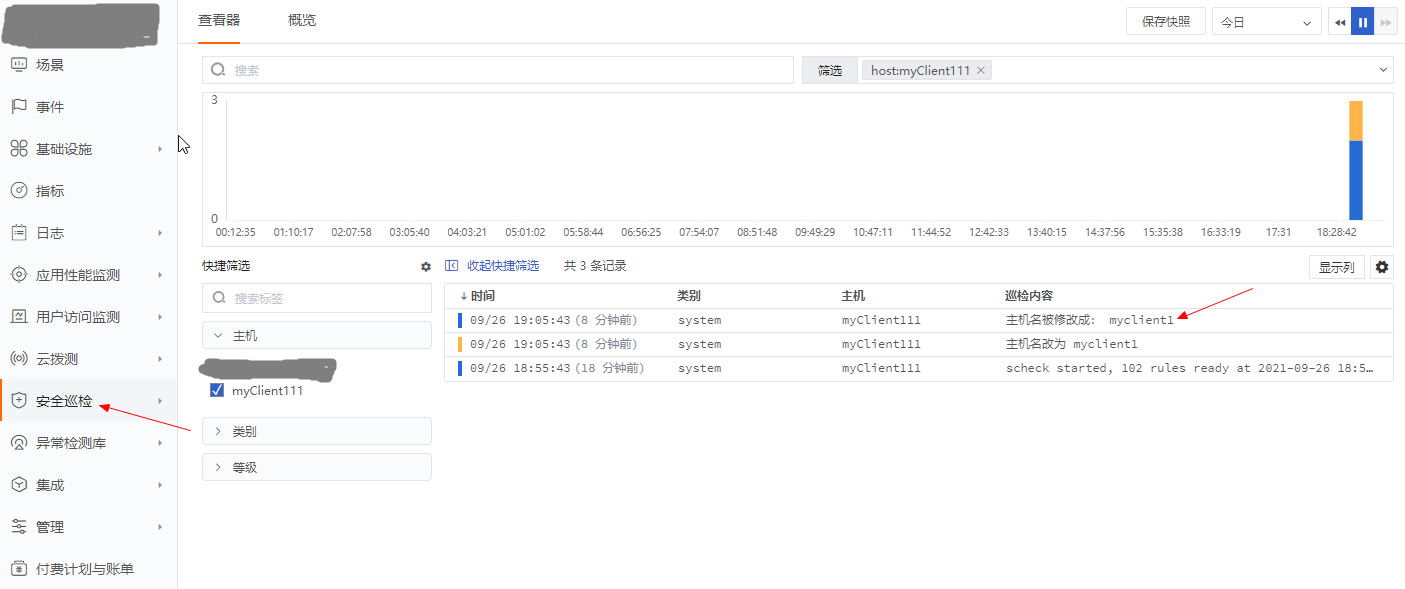
Rule Library
lua library files and custom libraries:
The built-in lua reference library files of scheck are located in the rules.d/libs directory under the installation directory. The function list and interface documentation can be viewed online.
lib library files do not require a manifest file. They need to be declared once when referenced in lua. For example, to reference directorymonitor in libs, you need to declare it once:
local directorymonitor = require("directorymonitor")

local function check()

directorymonitor.add("/usr/bin")
end
check()
Note: Users must not modify the built-in lib library and lua rule files of scheck. Each installation update and service restart will overwrite the rule files.
Custom rule and library files can be placed in the custom.rules.d directory. If there are custom lua reference library files, they can be placed in the custom.rules.d/libs directory.
To point to a different path, simply modify the configuration file scheck.conf:
[system]
  # ##(Required) Directory where the system stores detection scripts
  rule_dir = "/usr/local/scheck/rules.d"
  # ##Custom directory
  custom_dir = "/usr/local/scheck/custom.rules.d"
  # Optional: custom lua library directory. Do not use rule_dir. Default is libs under the user directory.
  custom_rule_lib_dir = "/usr/local/scheck/custom.rules.d/libs"
Appendix
lua Rule Naming Convention
The built-in lua rules of scheck are named by type. The ID before the name indicates a specific rule type.
User rule names should start with a number and must not be less than 10000. For example: 10001-xxx.lua
The naming convention for built-in scheck rules:
| ID Range | Rule Type |
|---|---|
| 0000 | System Cache |
| 0001~0199 | system |
| 0200~0299 | Network |
| 0300~0310 | Container |
| 0500~0510 | Database |
| 10000 and above | User-defined |
If a user-defined lua does not follow the naming convention, the rule will fail to load.
Setting the cron Field in the Manifest File
Scheck supports two execution modes: interval execution and long-running type. Fixed-time execution is not supported!
Interval Execution cron
cron="* */1 * * *"  # Run every minute
cron="* * */1 * *"  # Run every hour
cron="* * * */1 *"  # Run every day
Long-Running Rule
A long-running rule will execute continuously. When triggered, it will report a message within 1 second. For example: file changes.