External Data Sources
Through DataFlux Func, you can connect various types of external data sources such as MySQL and Prometheus to Guance; direct connection to TiDB Cloud Lake is also supported, enabling unified querying and visualization of data.
Features
- Native Querying: Use the native query language of the data source directly in charts, without any additional conversion;
- Data Protection: Connection information for Func data sources is stored locally in Func; the Lake DSN for TiDB Cloud Lake is encrypted and stored by the platform, and the password and complete DSN are not displayed in lists, details, or queries;
- Custom Management: Easily add and manage various external data sources based on actual needs;
- Real-time Data: Connect directly to external data sources to obtain data in real time, allowing immediate response and decision-making.
Connection Methods
| Connection Method | Applicable Data Sources | Description |
|---|---|---|
| Via DataFlux Func | MySQL, Prometheus, etc. | Reuse an already deployed DataFlux Func and its Connector; existing configurations such as ID must remain unchanged |
| TiDB Cloud Lake Direct Connection | TiDB Cloud Lake | Connected by the Guance server through the TiDB Cloud Lake Driver, independent of DataFlux Func, and no data source ID is required |
If you need to directly connect to TiDB Cloud Lake, refer to Connect and Query TiDB Cloud Lake.
Connecting via DataFlux Func
Add a Data Source in Guance
Add or view the connected DataFlux Func directly under Extensions to further manage all connected external data sources.
Note
This method is more beginner-friendly than the second path and is recommended.
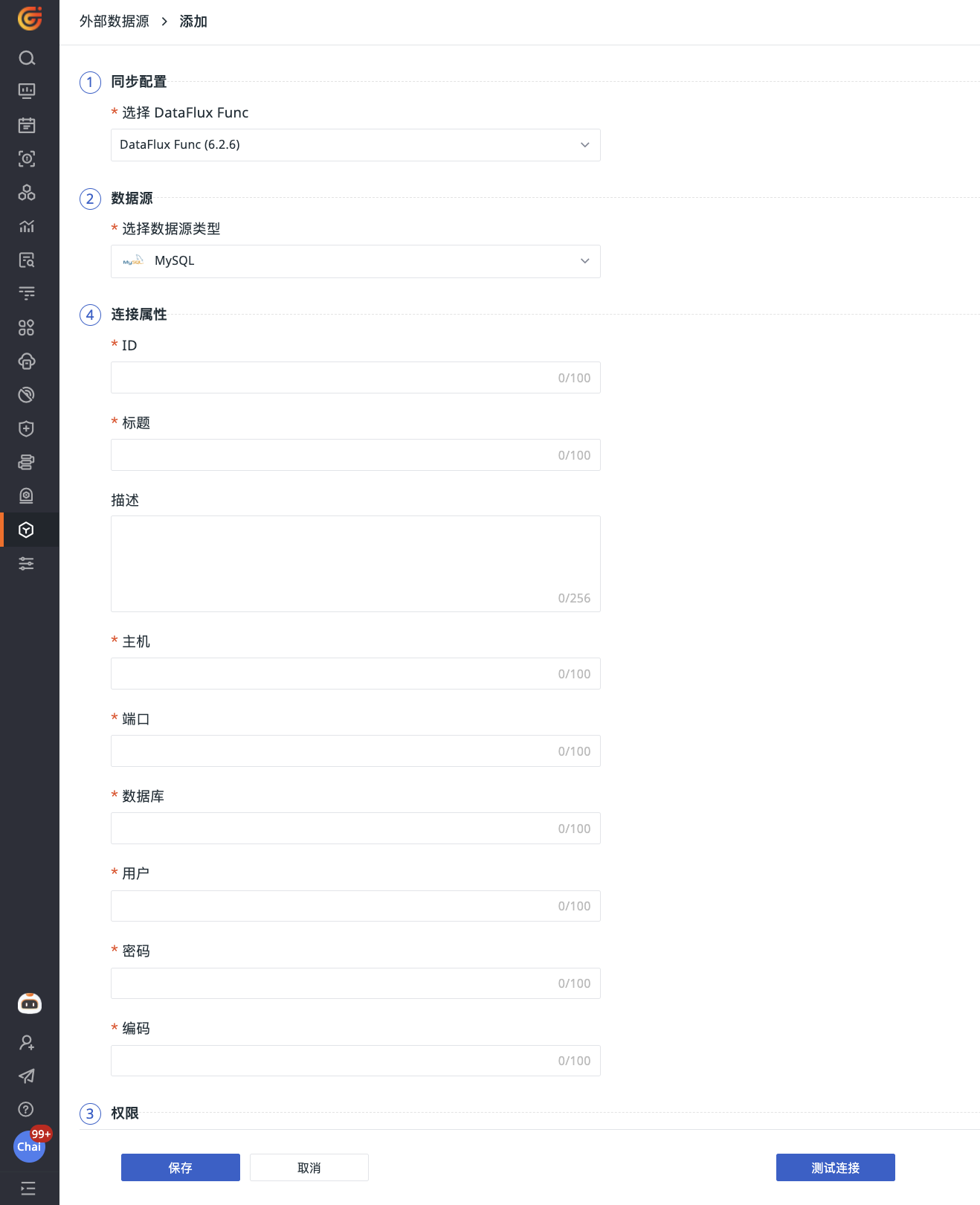
- Select DataFlux Func from the dropdown;
- Choose the supported data source type;
- Define connection properties, including ID, data source title, associated host, port, database, user, and password;
- Optionally test the connection;
- Save.
Query External Data Sources Using Func
Note
"External data sources" here have a broad definition, including common external data storage systems (such as MySQL, Redis, etc.) and third-party systems (e.g., the Guance console).
Prerequisites
You need to select and download the corresponding installation package and quickly start deploying the Func platform.
After deployment, wait for initialization to complete and log in to the platform.
Associate Func with Guance
Through the Connector, developers can connect to the Guance system.
Go to Development > Connector > Add Connector page:
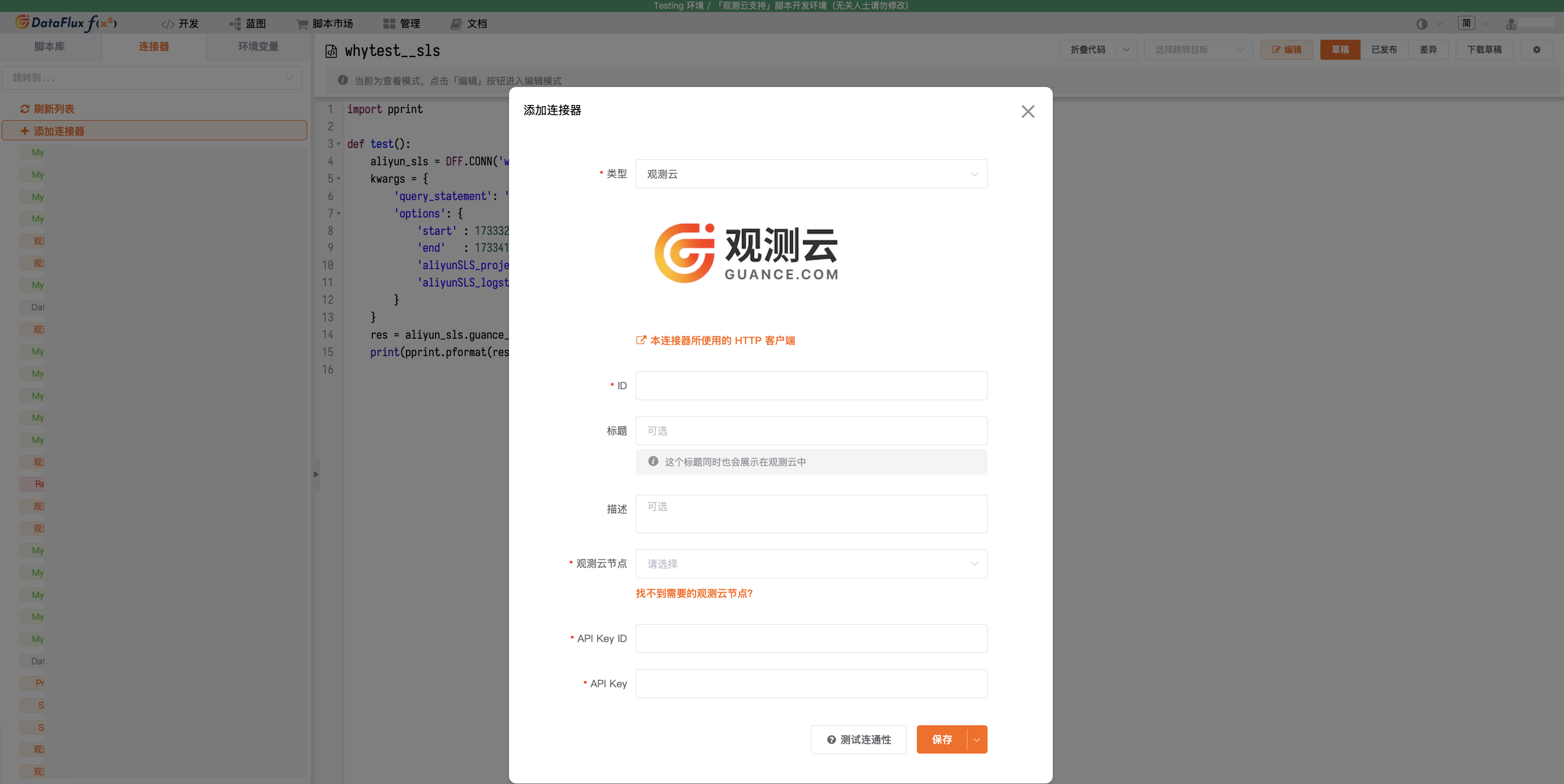
- Select the connector type;
- Customize the connector ID;
- Add a title. This title will be displayed in the Guance workspace;
- Optionally enter a description for the connector;
- Select the Guance node;
- Add the API Key ID and API Key;
- Optionally test connectivity;
- Save.
After the association, you can query data sources in the Func platform in the following two ways:
How to Obtain an API Key
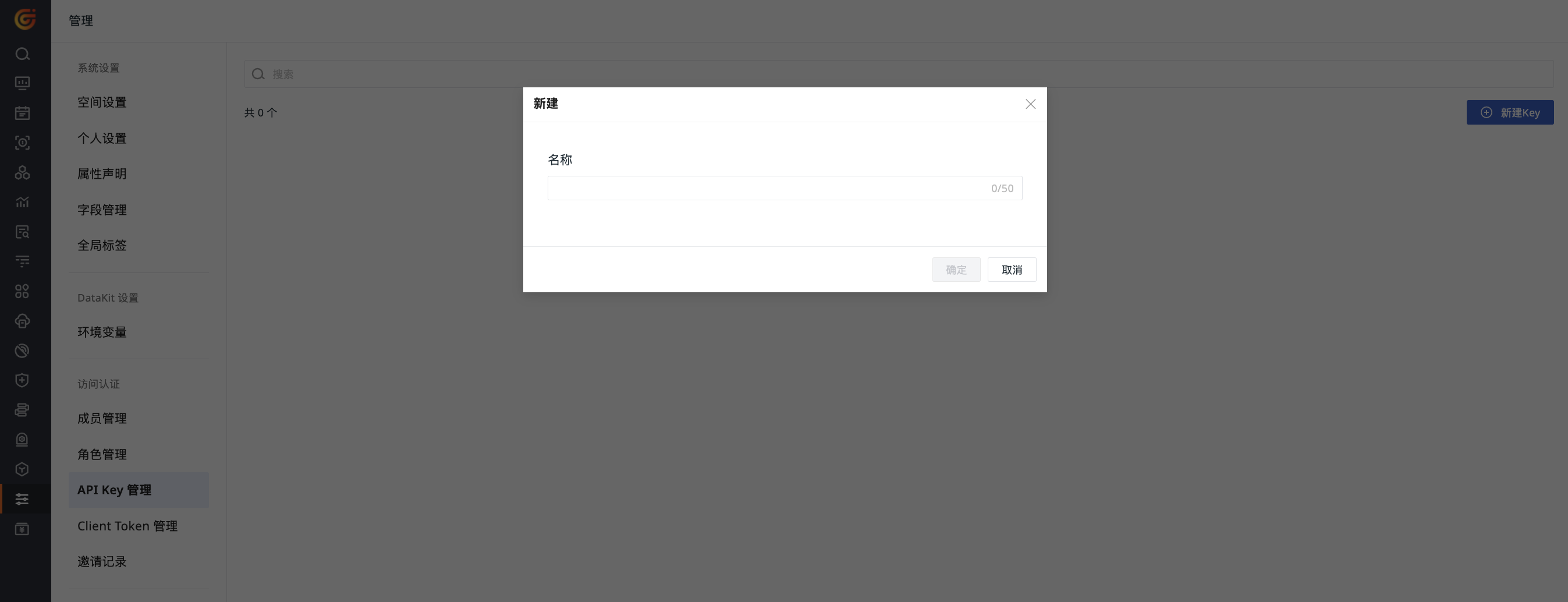
- Go to the Guance workspace > Manage > API Key Management;
- Click Create on the right side of the page.
- Enter a name;
- Click OK. The system will automatically create an API Key for you, which you can view in the API Key list.
For more details, refer to API Key Management.
Using the Connector
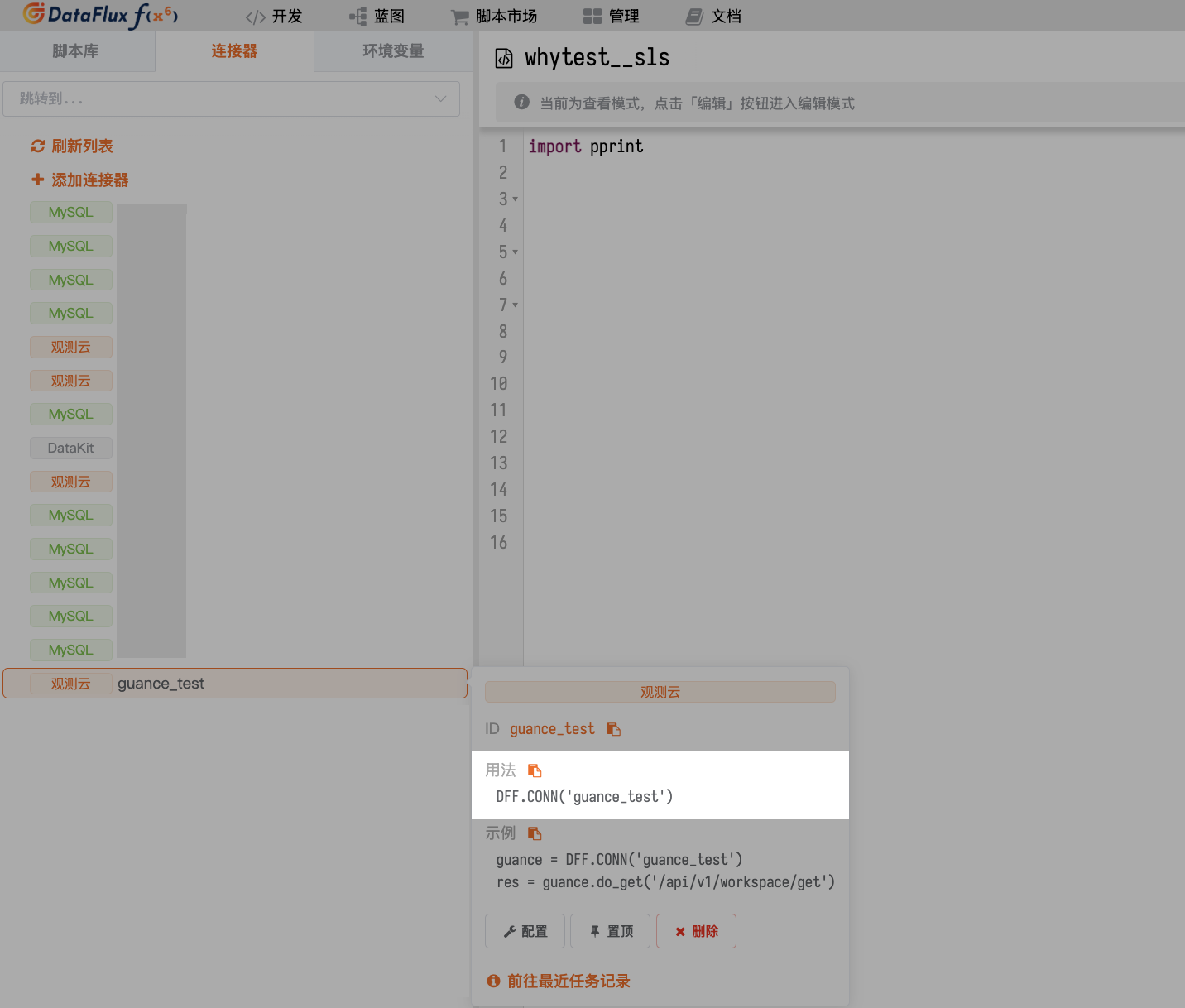
After adding the connector normally, you can use the connector ID in scripts to obtain the corresponding connector operation object.
Taking the connector above as an example, the code to obtain the connector operation object is:
Writing Scripts Manually
In addition to using the connector, you can also write functions manually to query data.
Assume that you have correctly created a MySQL connector (with the ID defined as mysql), and there is a table named my_table in this MySQL containing the following data:
id |
userId |
username |
reqMethod |
reqRoute |
reqCost |
createTime |
|---|---|---|---|---|---|---|
| 1 | u-001 | admin | POST | /api/v1/scripts/:id/do/modify | 23 | 1730840906 |
| 2 | u-002 | admin | POST | /api/v1/scripts/:id/do/publish | 99 | 1730840906 |
| 3 | u-003 | zhang3 | POST | /api/v1/scripts/:id/do/publish | 3941 | 1730863223 |
| 4 | u-004 | zhang3 | POST | /api/v1/scripts/:id/do/publish | 159 | 1730863244 |
| 5 | u-005 | li4 | POST | /api/v1/scripts/:id/do/publish | 44 | 1730863335 |
| ... |
Assume that you now need to query this table using a data query function, with the field extraction rules as follows:
| Original Field | Extracted As |
|---|---|
createTime |
Time time |
reqCost |
Column req_cost |
reqMethod |
Column req_method |
reqRoute |
Column req_route |
userId |
Tag user_id |
username |
Tag username |
The complete reference code is as follows:
- Data Query Function Example
import json

@DFF.API('Query data from my_table', category='dataPlatform.dataQueryFunc')
def query_from_my_table(time_range):
    # Get the connector operation object
    mysql = DFF.CONN('mysql')

    # MySQL query statement
    sql = '''
      SELECT
        createTime, userId, username, reqMethod, reqRoute, reqCost
      FROM
        my_table
      WHERE
        createTime     > ?
        AND createTime < ?
      LIMIT 5
    '''

    # Since the incoming time_range is in milliseconds,
    # but the createTime field in MySQL is in seconds, we need to convert
    sql_params = [
      int(time_range[0] / 1000),
      int(time_range[1] / 1000),
    ]

    # Execute the query
    db_res = mysql.query(sql, sql_params)

    # Convert to DQL-like return result

    # Depending on different tags, multiple data series may need to be generated
    # Use the data series tag as the key to create a mapping table
    series_map = {}

    # Iterate over the raw data, transform the structure, and store in the mapping table
    for d in db_res:
        # Collect tags
        tags = {
            'user_id' : d.get('userId'),
            'username': d.get('username'),
        }

        # Serialize the tags (tag keys need to be sorted to ensure consistent output)
        tags_dump = json.dumps(tags, sort_keys=True, ensure_ascii=True)

        # If the data series for this tag has not been created yet, create one
        if tags_dump not in series_map:
            # Basic structure of a data series
            series_map[tags_dump] = {
                'columns': [ 'time', 'req_cost', 'req_method', 'req_route' ], # Columns (first column fixed as time)
                'tags'   : tags,                                              # Tags
                'values' : [],                                                # List of values
            }

        # Extract time, columns, and append the value
        series = series_map[tags_dump]
        value = [
            d.get('createTime') * 1000, # Time (output unit must be milliseconds; convert based on actual scenario)
            d.get('reqCost'),           # Column req_cost
            d.get('reqMethod'),         # Column req_method
            d.get('reqRoute'),          # Column req_route
        ]
        series['values'].append(value)

    # Add the outer DQL structure
    dql_like_res = {
        # Data series
        'series': [ list(series_map.values()) ] # Note that an extra array layer is required here
    }
    return dql_like_res
If you only want to understand the data transformation process and are not concerned with the query process (or do not have an actual database to query yet), you can refer to the following code:
- Data Query Function Example (without MySQL query part)
import json

@DFF.API('Query data from somewhere', category='dataPlatform.dataQueryFunc')
def query_from_somewhere(time_range):
    # Assume raw data has already been obtained through some method
    db_res = [
        {'createTime': 1730840906, 'reqCost': 23,   'reqMethod': 'POST', 'reqRoute': '/api/v1/scripts/:id/do/modify',  'username': 'admin',  'userId': 'u-001'},
        {'createTime': 1730840906, 'reqCost': 99,   'reqMethod': 'POST', 'reqRoute': '/api/v1/scripts/:id/do/publish', 'username': 'admin',  'userId': 'u-001'},
        {'createTime': 1730863223, 'reqCost': 3941, 'reqMethod': 'POST', 'reqRoute': '/api/v1/scripts/:id/do/publish', 'username': 'zhang3', 'userId': 'u-002'},
        {'createTime': 1730863244, 'reqCost': 159,  'reqMethod': 'POST', 'reqRoute': '/api/v1/scripts/:id/do/publish', 'username': 'zhang3', 'userId': 'u-002'},
        {'createTime': 1730863335, 'reqCost': 44,   'reqMethod': 'POST', 'reqRoute': '/api/v1/scripts/:id/do/publish', 'username': 'li4',    'userId': 'u-003'}
    ]

    # Convert to DQL-like return result

    # Depending on different tags, multiple data series may need to be generated
    # Use the data series tag as the key to create a mapping table
    series_map = {}

    # Iterate over the raw data, transform the structure, and store in the mapping table
    for d in db_res:
        # Collect tags
        tags = {
            'user_id' : d.get('userId'),
            'username': d.get('username'),
        }

        # Serialize the tags (tag keys need to be sorted to ensure consistent output)
        tags_dump = json.dumps(tags, sort_keys=True, ensure_ascii=True)

        # If the data series for this tag has not been created yet, create one
        if tags_dump not in series_map:
            # Basic structure of a data series
            series_map[tags_dump] = {
                'columns': [ 'time', 'req_cost', 'req_method', 'req_route' ], # Columns (first column fixed as time)
                'tags'   : tags,                                              # Tags
                'values' : [],                                                # List of values
            }

        # Extract time, columns, and append the value
        series = series_map[tags_dump]
        value = [
            d.get('createTime') * 1000, # Time (output unit must be milliseconds; convert based on actual scenario)
            d.get('reqCost'),           # Column req_cost
            d.get('reqMethod'),         # Column req_method
            d.get('reqRoute'),          # Column req_route
        ]
        series['values'].append(value)

    # Add the outer DQL structure
    dql_like_res = {
        # Data series
        'series': [ list(series_map.values()) ] # Note that an extra array layer is required here
    }
    return dql_like_res
- Example Return Result
{
  "series": [
    [
      {
        "columns": ["time", "req_cost", "req_method", "req_route"],
        "tags": {"user_id": "u-001", "username": "admin"},
        "values": [
          [1730840906000, 23, "POST", "/api/v1/scripts/:id/do/modify" ],
          [1730840906000, 99, "POST", "/api/v1/scripts/:id/do/publish"]
        ]
      },
      {
        "columns": ["time", "req_cost", "req_method", "req_route"],
        "tags": {"user_id": "u-002", "username": "zhang3"},
        "values": [
          [1730863223000, 3941, "POST", "/api/v1/scripts/:id/do/publish"],
          [1730863244000,  159, "POST", "/api/v1/scripts/:id/do/publish"]
        ]
      },
      {
        "columns": ["time", "req_cost", "req_method", "req_route"],
        "tags": {"user_id": "u-003", "username": "li4"},
        "values": [
          [1730863335000, 44, "POST", "/api/v1/scripts/:id/do/publish"]
        ]
      }
    ]
  ]
}
Management List
All connected data sources are visible under Integrations > External Data Sources > Connected Data Sources.
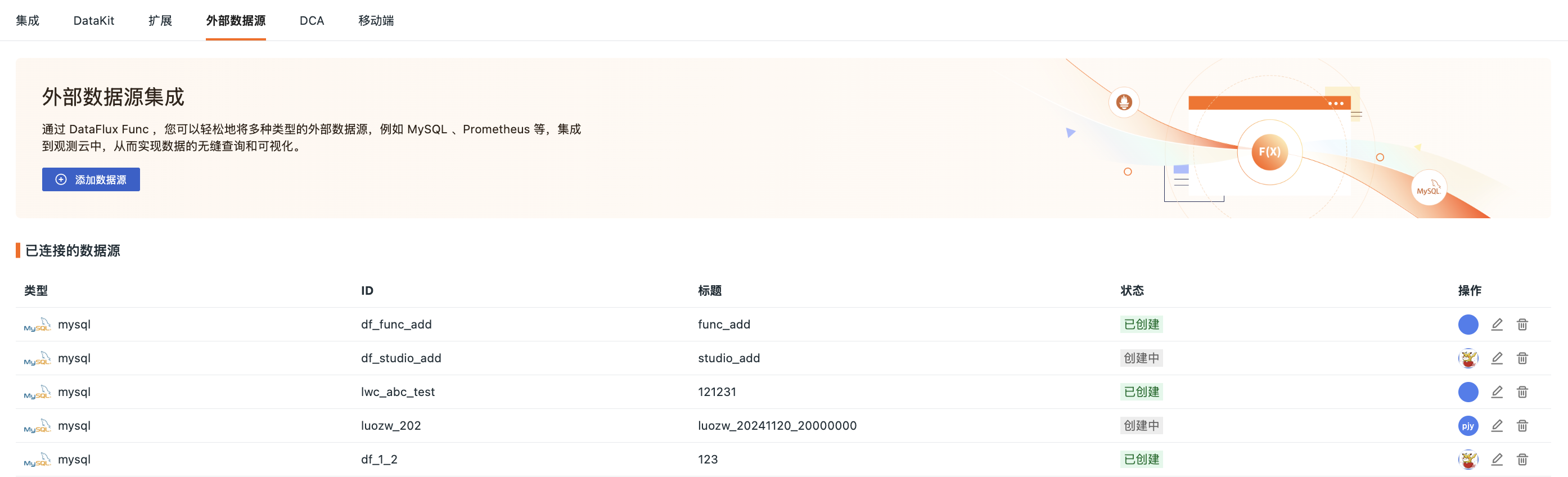
In the list, you can perform the following operations:
- View the type, ID, status, creation information, and update information of the data source;
- Edit a data source to modify configurations other than DataFlux Func, data source type, and ID;
- Delete a data source.
Use Cases
One typical scenario for using external data sources in Guance is Chart > Chart Query.
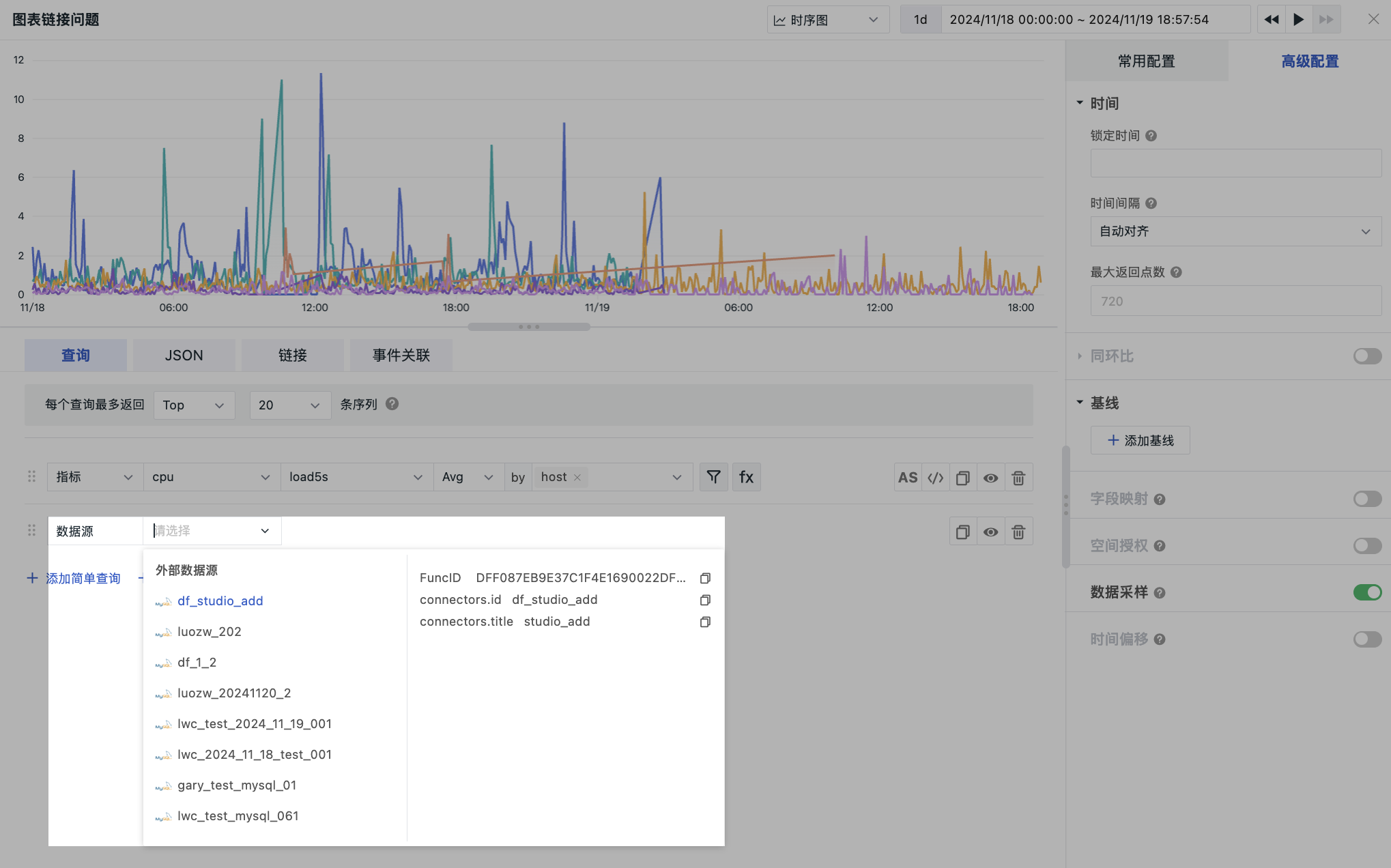
| Data Returned by Different Charts | ||
|---|---|---|
| Line Chart | Pie Chart | Table Chart |