Best Practices for StdOut Log Allowlists in Kubernetes
Environment Preparation
A Kubernetes environment (K8s) is required. This practice is based on a self-built Kubernetes v1.23.1, Guance Datakit version 1.2.13, and Nginx 1.17.
Datakit has been deployed, and its configuration file container.conf is managed via ConfigMap.
Note: The configuration principles are similar for Alibaba Cloud Container Service for Kubernetes or other cloud providers' Kubernetes clusters.
Prerequisites
Nginx logs are output to StdOut in the K8s environment, not to files. After Guance Datakit is deployed as a DaemonSet, it collects all StdOut log output within the K8s cluster by default, including StdOut output from cluster components such as CoreDNS (if logging is enabled). All logs covered in this article are output via StdOut.
Note: StdOut is the output method developers choose when writing code to log to the console, for example:
Allowlist Requirements
After Datakit is deployed, you need to selectively collect logs from specified business Pods and K8s cluster components. Logs from newly added unspecified business Pods should not be collected. Additionally, for multi-container Pods, you may want to collect logs from only one or more specific containers.
This article implements the allowlist using different log filtering methods in the Guance Datakit collector, combining Annotation annotations on logs (including filtering logs from other containers within the same Pod) and the container_include_log = [] setting in container.conf.
For more detailed log processing principles, see <Datakit Log Processing Overview>
Implementation Methods
Method 1: Using container_include_log = []
Only collect logs from the cluster components coredns and nginx. Use regular expressions in container_include_log to specify the image names.
See <Configure Metric and Log Collection Based on Container Image>
      [inputs.container]
        docker_endpoint = "unix:///var/run/docker.sock"
        containerd_address = "/var/run/containerd/containerd.sock"

        enable_container_metric = true
        enable_k8s_metric = true
        enable_pod_metric = true

        ## Containers logs to include and exclude, default collect all containers. Globs accepted.
        container_include_log = ["image:*coredns*","image:*nginx*"]
        container_exclude_log = ["image:pubrepo.guance.com/datakit/logfwd*", "image:pubrepo.guance.com/datakit/datakit*"]

        exclude_pause_container = true

        ## Removes ANSI escape codes from text strings
        logging_remove_ansi_escape_codes = false

        kubernetes_url = "https://kubernetes.default:443"

        ## Authorization level:
        ##   bearer_token -> bearer_token_string -> TLS
        ## Use bearer token for authorization. ('bearer_token' takes priority)
        ## linux at:   /run/secrets/kubernetes.io/serviceaccount/token
        ## windows at: C:\var\run\secrets\kubernetes.io\serviceaccount\token
        bearer_token = "/run/secrets/kubernetes.io/serviceaccount/token"
        # bearer_token_string = "<your-token-string>"

        [inputs.container.tags]
          # some_tag = "some_value"
          # more_tag = "some_other_value"
Result
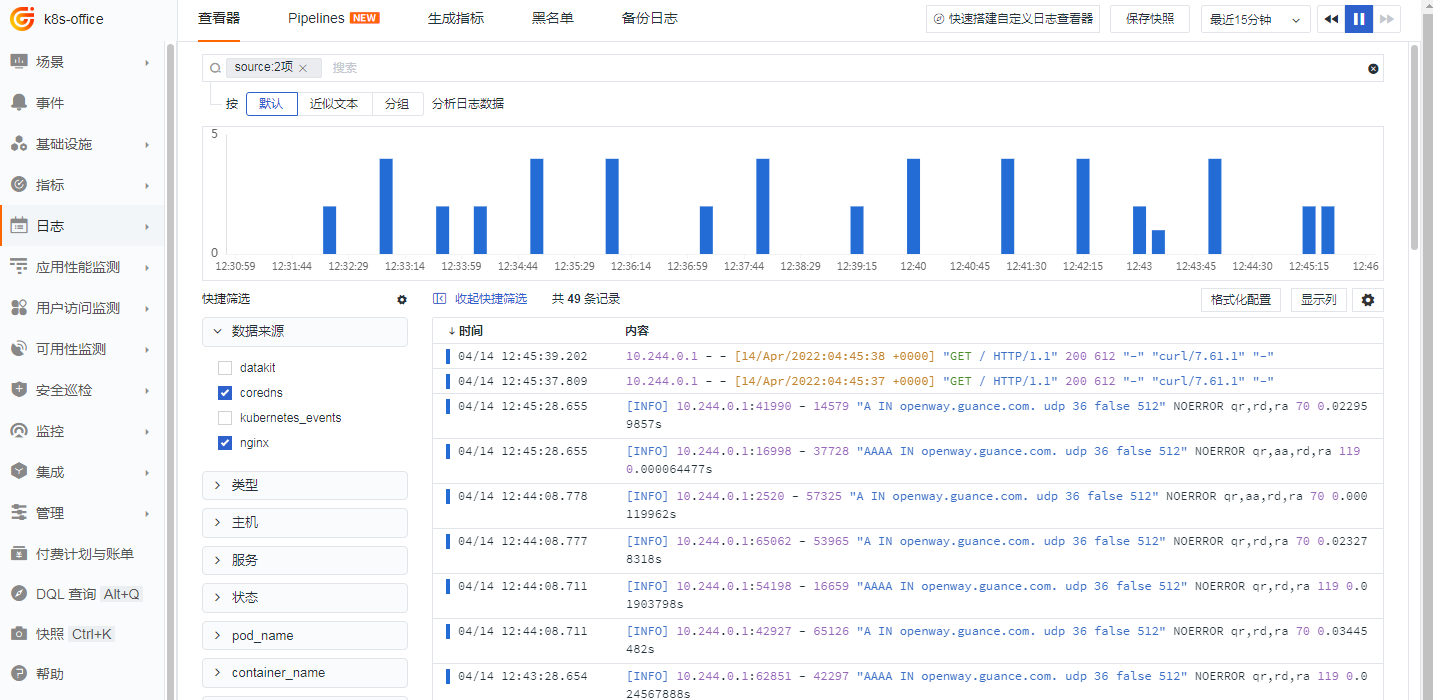
This selectively collects logs from Pods with the specified image names, as shown below:
Method 2: Combining container_include_log = [] and Annotation Markers
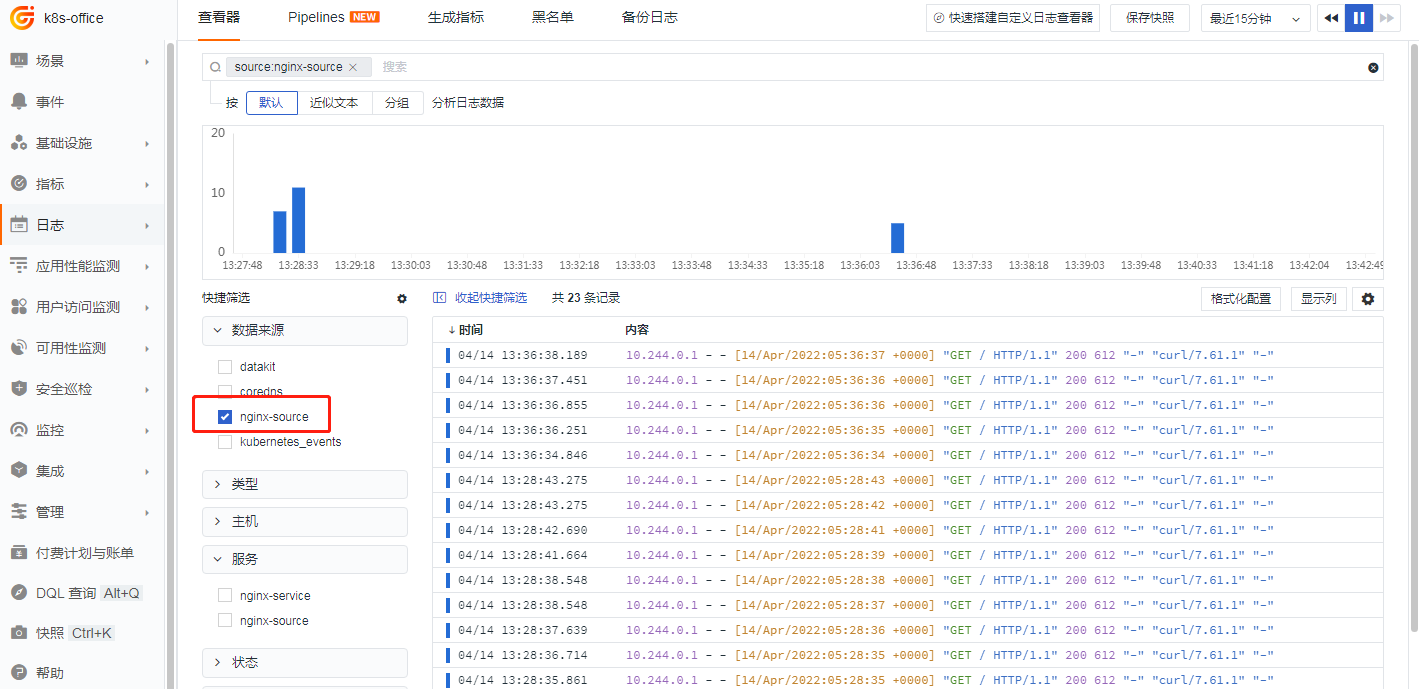
Only collect logs from the cluster components coredns and nginx, and annotate nginx with Annotations. Even images not included in the container_include_log allowlist, such as another image busybox, can be collected by adding Annotations. This is because Annotation markers have higher priority.
For more detailed log processing principles, see <Datakit Log Processing Overview>
Nginx Annotation marker:
      labels:
         app: nginx-pod
      annotations:
        datakit/logs: |
          [
            {
              "disable": false,
              "source": "nginx-source",
              "service": "nginx-source",
              "pipeline": "",
              "multiline_match": ""
            }
          ]
    spec:
[inputs.container]
  docker_endpoint = "unix:///var/run/docker.sock"
  containerd_address = "/var/run/containerd/containerd.sock"

  ## Containers metrics to include and exclude, default not collect. Globs accepted.
  container_include_metric = []
  container_exclude_metric = ["image:*"]

  ## Containers logs to include and exclude, default collect all containers. Globs accepted.
  container_include_log = ["image:*coredns*","image:*nginx*"]
  container_exclude_log = []

  exclude_pause_container = true

  ## Removes ANSI escape codes from text strings
  logging_remove_ansi_escape_codes = false
  ## Maximum length of logging, default 32766 bytes.
  max_logging_length = 32766

  kubernetes_url = "https://kubernetes.default:443"

  ## Authorization level:
  ##   bearer_token -> bearer_token_string -> TLS
  ## Use bearer token for authorization. ('bearer_token' takes priority)
  ## linux at:   /run/secrets/kubernetes.io/serviceaccount/token
  ## windows at: C:\var\run\secrets\kubernetes.io\serviceaccount\token
  bearer_token = "/run/secrets/kubernetes.io/serviceaccount/token"
  # bearer_token_string = "<your-token-string>"

  [inputs.container.tags]
    # some_tag = "some_value"
    # more_tag = "some_other_value"
Result
Method 3: Filtering Logs from Specific Containers in a Pod
Only collect logs from the cluster components coredns and nginx, and use the "only_images" field in the Annotation on nginx to specify which container images to collect. This creates an allowlist inside the Pod.
Before Enabling the Pod Internal Allowlist
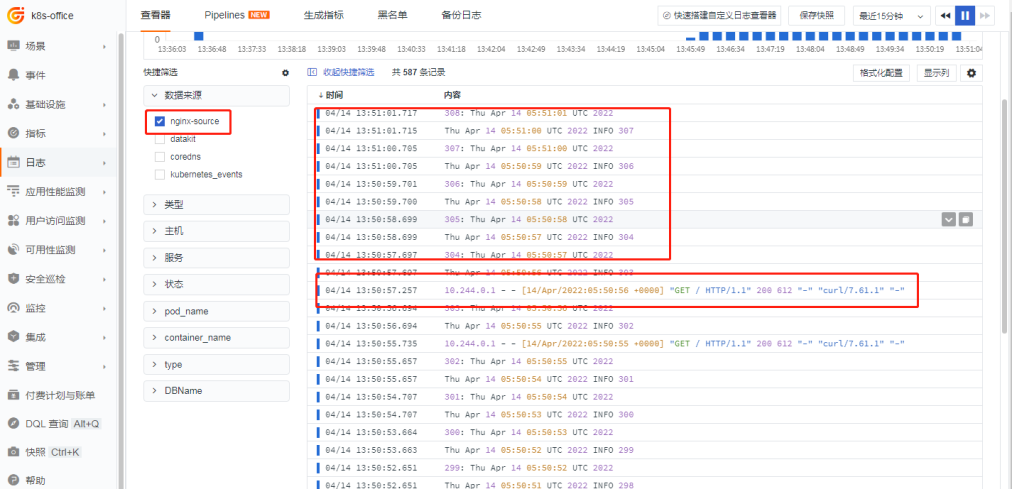
As shown below, both nginx and busybox logs are collected:
After Enabling the Pod Internal Allowlist
      labels:
         app: nginx-pod
      annotations:
        datakit/logs: |
          [
            {
              "disable": false,
              "source": "nginx-source",
              "service": "nginx-source",
              "pipeline": "",
              "only_images": ["image:*nginx*"],
              "multiline_match": ""
            }
          ]
    spec:
Result
Only the Nginx logs inside the Pod are retained.

Summary
In general, enabling an allowlist policy is not recommended. Allowlists can cause many issues, are difficult to debug, and may have unexpected effects—for example, developers might not see their logs simply because a certain tag was not added. To filter log sources, the worst case scenario for a denylist is that data is collected; the denylist filters it, for example, in the Datakit collector container.conf:
Method 1 does not use Annotation markers but relies on the built-in filtering mechanism in the container.conf collector, which is more low-level. However, this method is less preferred than Method 2 because markers allow better tagging of log sources, making it easier to analyze issues and filter in the future. Additionally, markers are more flexible—they are placed on the business Pod, so you can achieve fine-grained log filtering and control for the same set of business images.
Method 3 is suitable for specific business scenarios, such as filtering out unnecessary Sidecar logs, thereby reducing noise in log collection.