DataKit Bulk Deployment Best Practices
Environment Information
| Name | Environment |
|---|---|
| Centos | 7.6 |
| Ansible | 2.10.4 |
| Host IP | 10.200.14.56; 10.200.14.57; 10.200.14.63 |
Note: Only Linux hosts are supported.
Deploying Ansible
Installing Ansible
Log in to the server 10.200.14.56 and run the installation command:
Configuring Ansible
Edit the Ansible hosts file:
Add the host list and username/password:
[all]
10.200.14.56 ansible_ssh_user=root ansible_ssh_pass=xxx
10.200.14.57 ansible_ssh_user=root ansible_ssh_pass=xxx
10.200.14.63 ansible_ssh_user=root ansible_ssh_pass=xxx
Disabling Connection Prompt
Verifying the Configuration
| 10.200.14.57 | SUCCESS => { "ansible_facts": { "discovered_interpreter_python": "/usr/bin/python" }, "changed": false, "ping": "pong" } 10.200.14.56 | SUCCESS => { "ansible_facts": { "discovered_interpreter_python": "/usr/bin/python" }, "changed": false, "ping": "pong" } 10.200.14.63 | SUCCESS => { "ansible_facts": { "discovered_interpreter_python": "/usr/bin/python" }, "changed": false, "ping": "pong" } |
|---|
Bulk Deployment
Configuring the Playbook
Obtaining the Command
Click the [Integration] module, then in the upper-right corner click [Quickly Get DataKit Installation Command]. Select the appropriate [Datakit Installation Command] based on your operating system and system type.

Creating a YAML File
Navigate to the Ansible directory:
Create a new file:
Add the following content (copy the [Datakit Installation Command] from earlier):
- hosts: all
  remote_user: root
  tasks:
   - name: judge datakit is exits
     shell: ls /usr/local/datakit/conf.d
     ignore_errors: True
     register: result
   - name: install datakit
     shell: [Datakit Installation Command]
     when: result.rc != 0
Running the YAML File
The server must have internet access.
| PLAY [all] ************************************************************************ ************************************************************************ ************************************************************************ ******************************************* TASK [Gathering Facts] ************************************************************************ ************************************************************************ ************************************************************************ ******************************* ok: [10.200.14.57] ok: [10.200.14.56] ok: [10.200.14.63] PLAY RECAP ************************************************************************ ************************************************************************ ************************************************************************ ******************************************* 10.200.14.56 : ok=2 changed=1 unreachable=0 failed=0 skipped=1 rescued=0 ignored=0 10.200.14.57 : ok=3 changed=2 unreachable=0 failed=0 skipped=0 rescued=0 ignored=1 10.200.14.63 : ok=3 changed=2 unreachable=0 failed=0 skipped=0 rescued=0 ignored=1 |
|---|
Verifying the Information
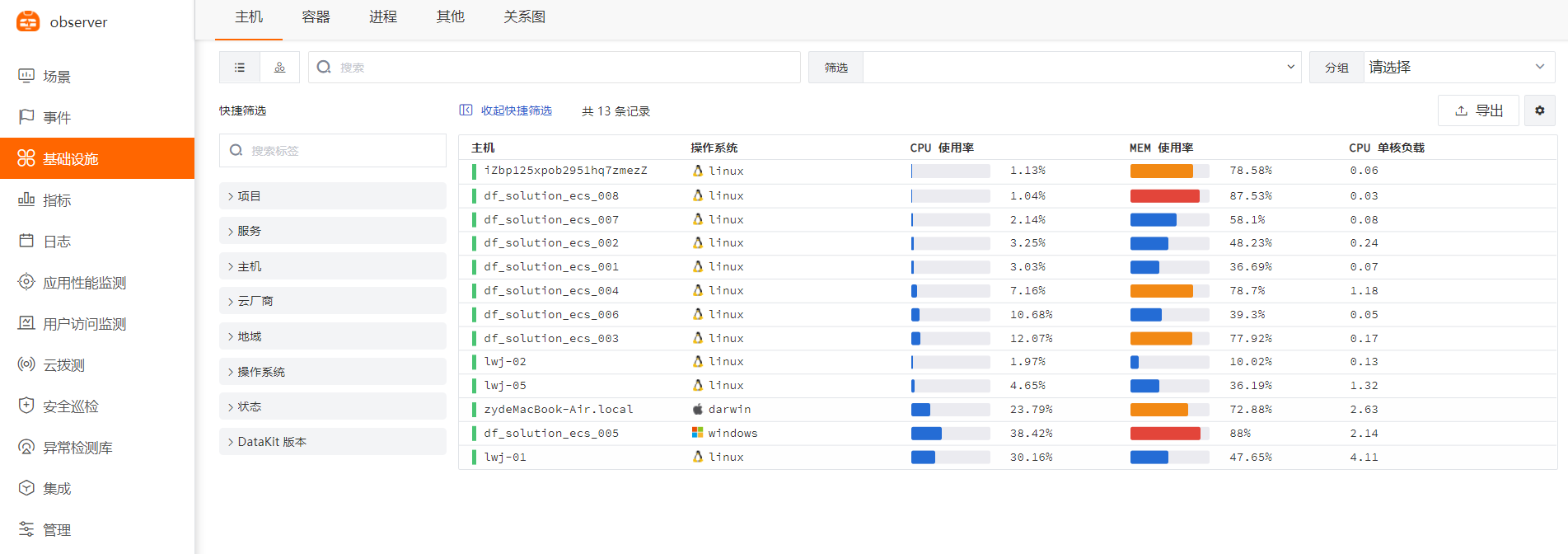
Click the [Infrastructure] module, then select [Host] to view the list of all hosts with DataKit installed and their basic information.
Bulk Upgrade
Creating a YAML File
Navigate to the Ansible directory:
Create a new file:
Add the following content:
- hosts: all
  remote_user: root
  tasks:
   - name: judge datakit is exits
     shell: ls /usr/local/datakit/conf.d
     ignore_errors: True
     register: result
   - name: install datakit
     shell: sudo -- sh -c "curl https://static.guance.com/datakit/installer-linux-amd64 -o dk-installer && chmod +x ./dk-installer && ./dk-installer -upgrade && rm -rf ./dk installer"
     when: result.rc == 0
Running the YAML File
Verifying the Information
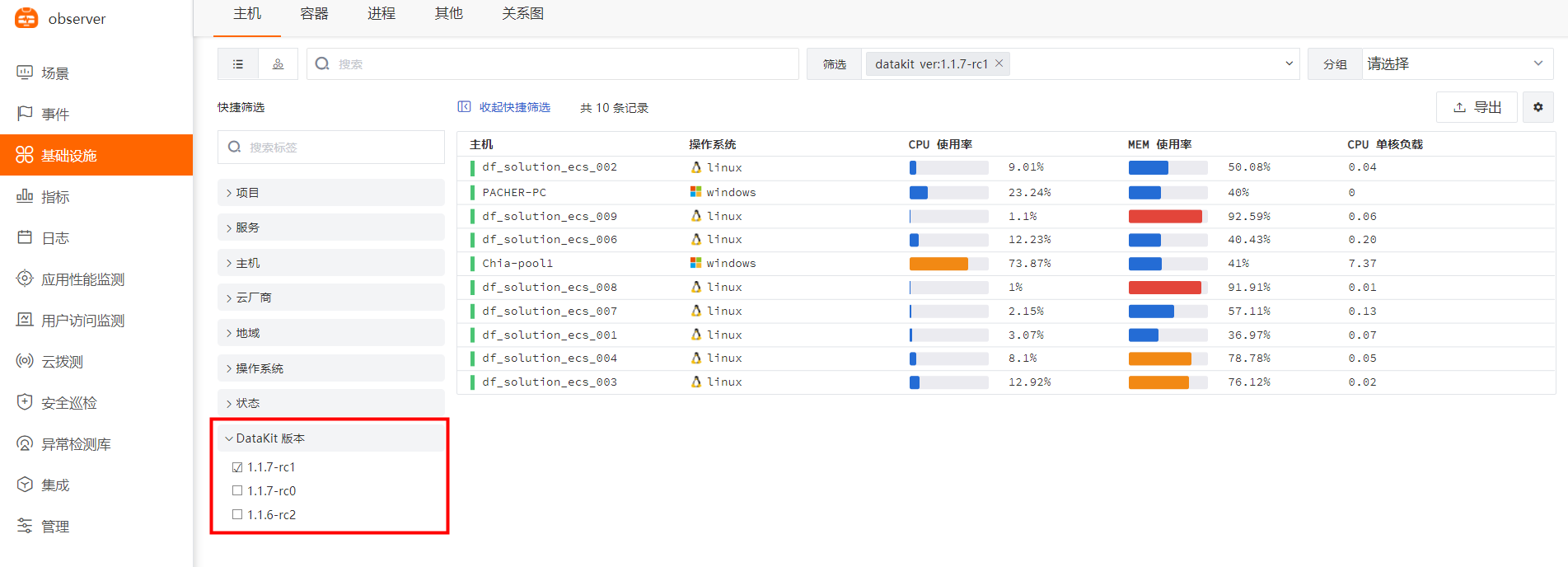
Click the [Infrastructure] module, then use the quick filter to select the latest [DataKit Version].
Bulk Configuration Synchronization
Creating a YAML File
Navigate to the Ansible directory:
Create a new file:
Add the following content:
- hosts: all
  remote_user: root
  tasks:
   - name: judge datakit is exit
     shell: ls /usr/local/datakit/conf.d
     ignore_errors: True
     register: result
   - name: judge /usr/bin/rsync is exits
     shell: ls /usr/bin/rsync
     ignore_errors: True
     register: result
   - name: install rsync
     shell: yum -y install rsync
     when: result.rc != 0
   - name: Synchronize passing in extra rsync options
     synchronize:
       src: /usr/local/datakit/conf.d/
       dest: /usr/local/datakit/conf.d/
       rsync_opts:
        - "--exclude=datakit.conf"
       checksum: true
     register: res
   - debug: var=res.stdout_lines
   - debug: var=res.changed
   - name: reload datakit
     shell: systemctl restart datakit
     when: res.changed == true
Running the YAML File
Verifying the Information
All hosts will apply the same DataKit configuration (the conf.d directory). If you need custom configurations for specific servers, you can use the DataKit allowlist feature.