Best Practices for Bidirectional Integration Between Incident and JIRA
Authors: Su Tongtong, Liu Rui
Incident is a communication management tool launched by Guance, based on effective internal incident coordination.
JIRA is an enterprise project management tool.
Info
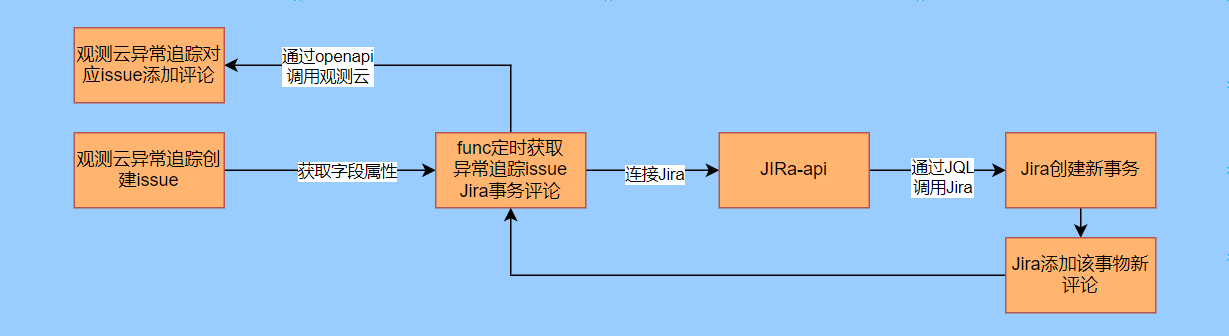
When an application or system encounters an incident, it must be handled promptly to ensure normal system operation. Through the bidirectional integration between Incident and JIRA, relevant internal personnel can quickly understand and analyze the root cause of the failure, trace and record the handling process, effectively improving communication efficiency and significantly reducing incident handling costs.
Prerequisites
- Jira platform (requires admin permissions)
- Guance workspace account
- Dataflux Func Guance Special Edition
Jira
Retrieve the project key, project URL, API token, and username for the corresponding project on the Jira platform. These are required for the Guance script.
Only administrators have permission to perform the above operations.
Guance
Create an API Key
For API Key details, refer to the document API Key.
Set the key name to Jira System to help distinguish that the comment information originates from Guance or Jira. The key name will be displayed as the user in Guance issue.
Func Script Writing
- Log in to Func
Log in to the deployed Dataflux Func Guance Special Edition.
-
Add Python Dependencies
-
Click the Manage menu.
- Click Experimental Features, toggle on Enable PIP Tool. If it is already enabled, skip this step.
-
Click PIP Tool, install the Python package, enter jira, select the default data source. If the default data source does not have this dependency, switch to another data source. Click the Install button to complete the dependency installation.
-
Write the Script
-
Click the Develop menu.
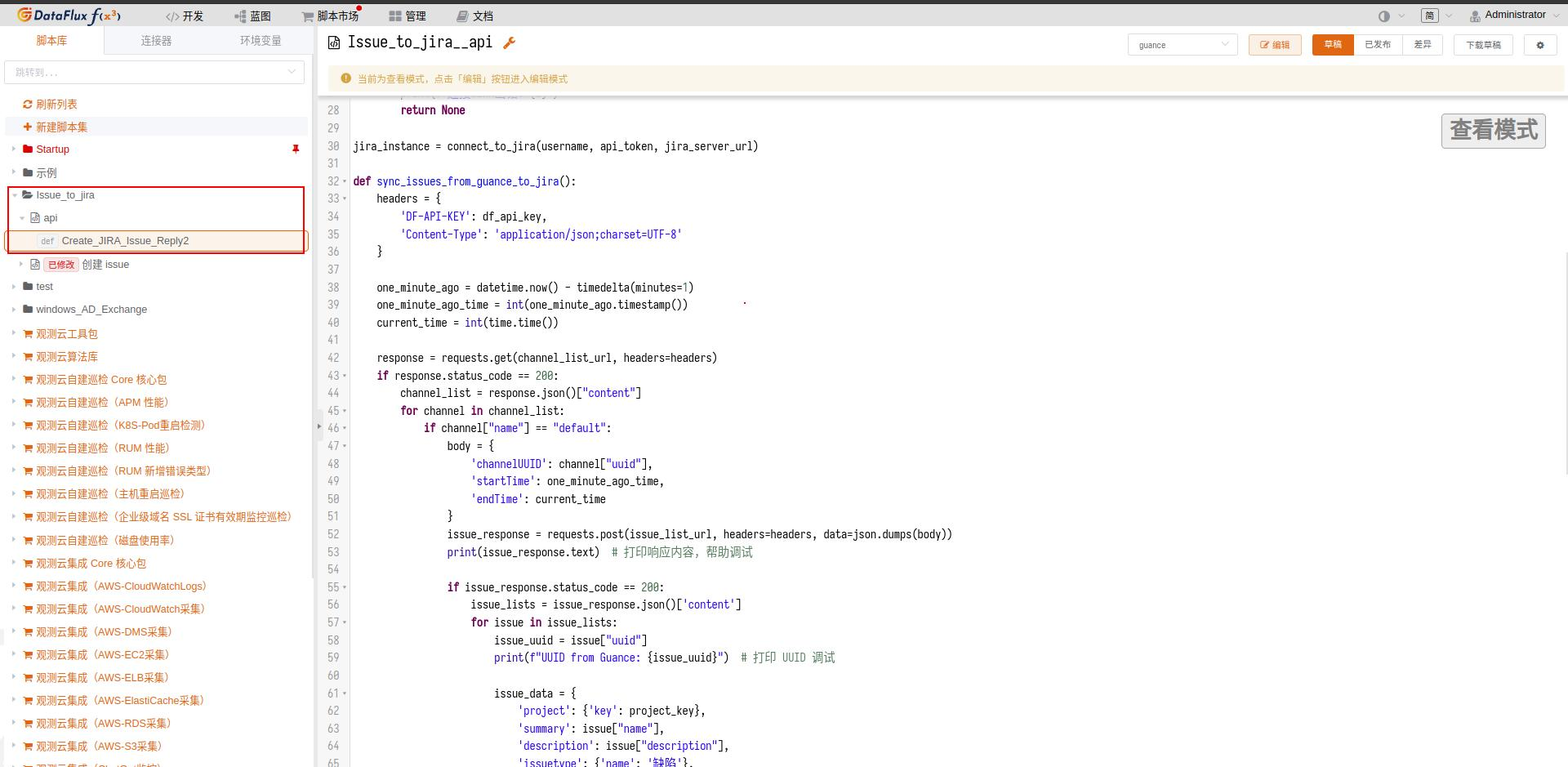
- Click the Create Script Set button, fill in the script set ID (can be customized; here we use
Issue_to_jira), and click Save. - Select
Issue_to_jira, click Create Script (the ID can be arbitrary). - Paste the following script content and adjust the configuration information.
import requests
import json
import time
from datetime import datetime, timedelta
from jira import JIRA

# Guance configuration, remember to modify df_api_key
base_url = 'https://openapi.guance.com'
channel_list_url = base_url + '/api/v1/channel/quick_list'
issue_list_url = base_url + '/api/v1/issue/list'
create_issue_reply_url = base_url + '/api/v1/issue/reply/create'
df_api_key = 'vy2EV......fuTtn'

# JIRA configuration, all of the following are required; modify to your own environment
username = 'sutt'
api_token = 'ATATT3xFfGF0eVvhZUkO0tTas8JnNYEsxGIJqWGinVyQL0ME......B6E'
jira_server_url = 'https://***.net/'
project_key = 'projectName'

# Connect to JIRA
def connect_to_jira(username, api_token, jira_server_url):
    try:
        jira_connection = JIRA(basic_auth=(username, api_token), server=jira_server_url)
        print("Successfully connected to JIRA!")
        return jira_connection
    except Exception as e:
        print(f"Error connecting to JIRA: {e}")
        return None

jira_instance = connect_to_jira(username, api_token, jira_server_url)

def sync_issues_from_guance_to_jira():
    headers = {
        'DF-API-KEY': df_api_key,
        'Content-Type': 'application/json;charset=UTF-8'
    }

    one_minute_ago = datetime.now() - timedelta(minutes=1)
    one_minute_ago_time = int(one_minute_ago.timestamp())
    current_time = int(time.time())

    response = requests.get(channel_list_url, headers=headers)
    if response.status_code == 200:
        channel_list = response.json()["content"]
        for channel in channel_list:
            if channel["name"] == "default":
                body = {
                    'channelUUID': channel["uuid"],
                    'startTime': one_minute_ago_time,
                    'endTime': current_time
                }
                issue_response = requests.post(issue_list_url, headers=headers, data=json.dumps(body))
                print(issue_response.text)  # Print response content for debugging

                if issue_response.status_code == 200:
                    issue_lists = issue_response.json()['content']
                    for issue in issue_lists:
                        issue_uuid = issue["uuid"]
                        print(f"UUID from Guance: {issue_uuid}")  # Print UUID for debugging

                        issue_data = {
                            'project': {'key': project_key},
                            'summary': issue["name"],
                            'description': issue["description"],
                            'issuetype': {'name': 'Bug'},
                            'priority': {'name': 'Medium'},
                            'labels': [issue_uuid]  # Use label to store issue_id
                        }
                        created_issue = jira_instance.create_issue(fields=issue_data)
                        print(f"Created JIRA issue: {created_issue.key}")

def create_issue_reply(issue_uuid, content):
    headers = {
        'DF-API-KEY': df_api_key,
        'Content-Type': 'application/json;charset=UTF-8'
    }
    body = {
        'issueUUID': issue_uuid,
        'content': content,
        'extend': {}
    }
    response = requests.post(create_issue_reply_url, headers=headers, data=json.dumps(body))
    if response.status_code == 200:
        print(f"Successfully created a reply for issueUUID: {issue_uuid}")
    else:
        print(f"Failed to create a reply for issueUUID: {issue_uuid}. Status code: {response.status_code}")

def sync_comments_from_jira_to_guance():
    end_time = datetime.now()
    start_time = end_time - timedelta(minutes=1)
    start_time_str = start_time.strftime('%Y-%m-%d %H:%M')
    end_time_str = end_time.strftime('%Y-%m-%d %H:%M')

    jql_str = f'project = {project_key} AND updated >= "{start_time_str}" AND updated <= "{end_time_str}"'
    recently_updated_issues = jira_instance.search_issues(jql_str)

    has_updates = False
    for issue in recently_updated_issues:
        comments = jira_instance.comments(issue)
        new_comments = [comment for comment in comments if start_time_str <= comment.created.split('.')[0].replace("T", " ") <= end_time_str]

        issue_labels = issue.fields.labels
        guance_issue_id = None
        for label in issue_labels:
            if label.startswith("issue"):
                guance_issue_id = label
                break

        if guance_issue_id and new_comments:
            has_updates = True
            for comment in new_comments:
                create_issue_reply(guance_issue_id, comment.body)

    if not has_updates:
        print("No updated issues or new comments in the past minute.")

@DFF.API('Create_JIRA_Issue_Reply2')
def guance():
    print("do start")
    sync_issues_from_guance_to_jira()
    sync_comments_from_jira_to_guance()
Publish the Script
Click the Publish button to complete the publishing. Once published, the API is successfully deployed and ready to serve external requests.
Auto-Trigger Configuration
Auto-Trigger Configuration allows you to schedule the API execution.
- Enter from the Manage menu and click the Auto-Trigger Configuration button.
- Click the Create button in the top-right corner to create a new trigger.
- Select the script to execute; parameters can be left unspecified. Check the desired execution frequency; here we set it to Repeat every minute, then click Save.

Create an Issue
Guance provides two ways to create an issue:
- Direct creation
- Creation via monitor
Direct Creation
- Log in to the Guance console.
- Click the Incident menu, click the Create Issue button in the top-right corner, fill in the issue information, and save.
Creation via Monitor
Creation via Monitor means creating an issue from event information generated by a monitor.
- Log in to the Guance console.
- Click the Monitor menu on the left.
- You can add a new monitor or modify an existing one. Edit the corresponding monitor, enable the Sync Create Issue toggle, and save.
Result
Jira Result:
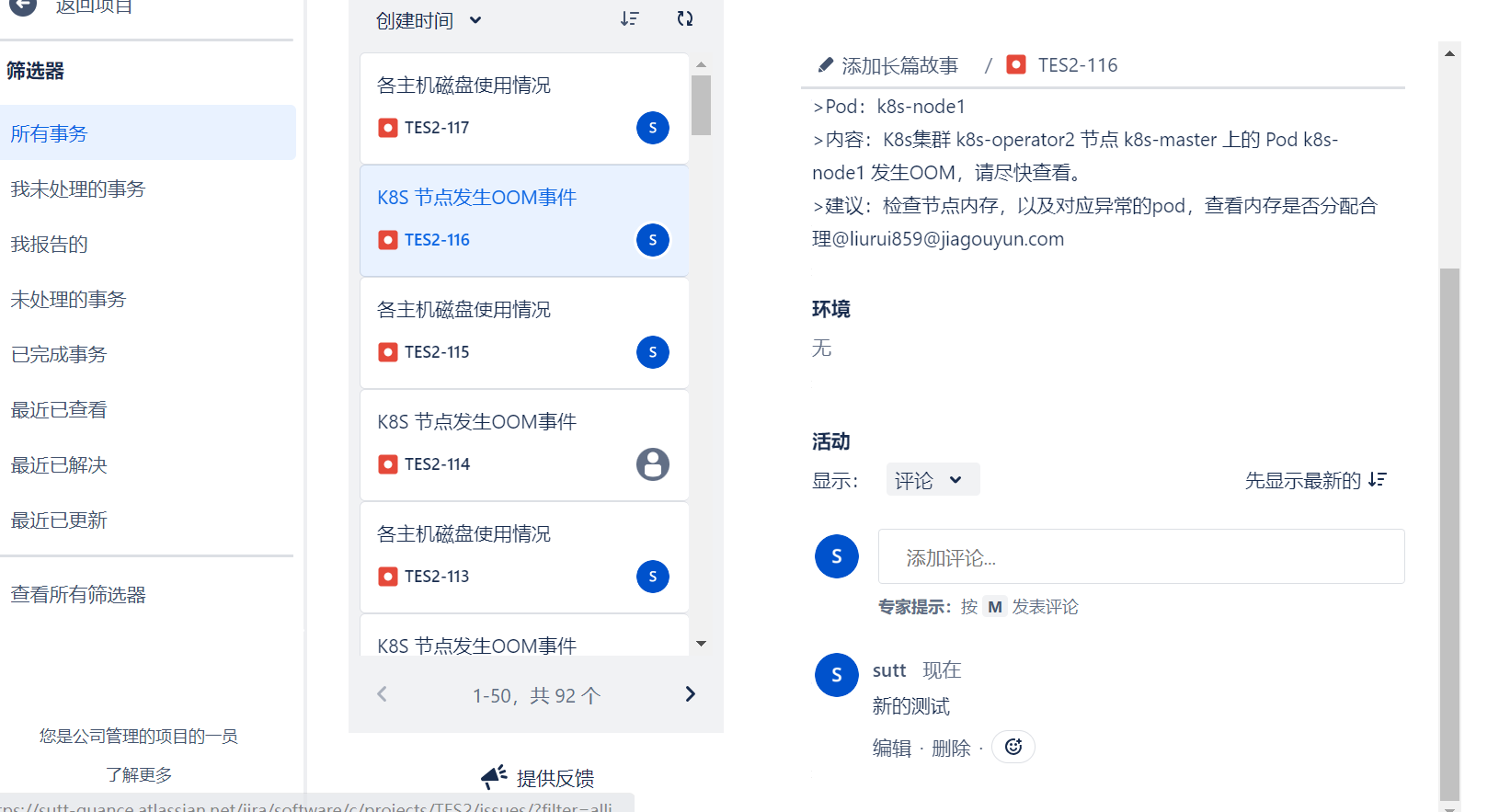 A Jira issue is automatically created. When comments are added, the handling process of the
 issue can be displayed in Guance.
Guance Result
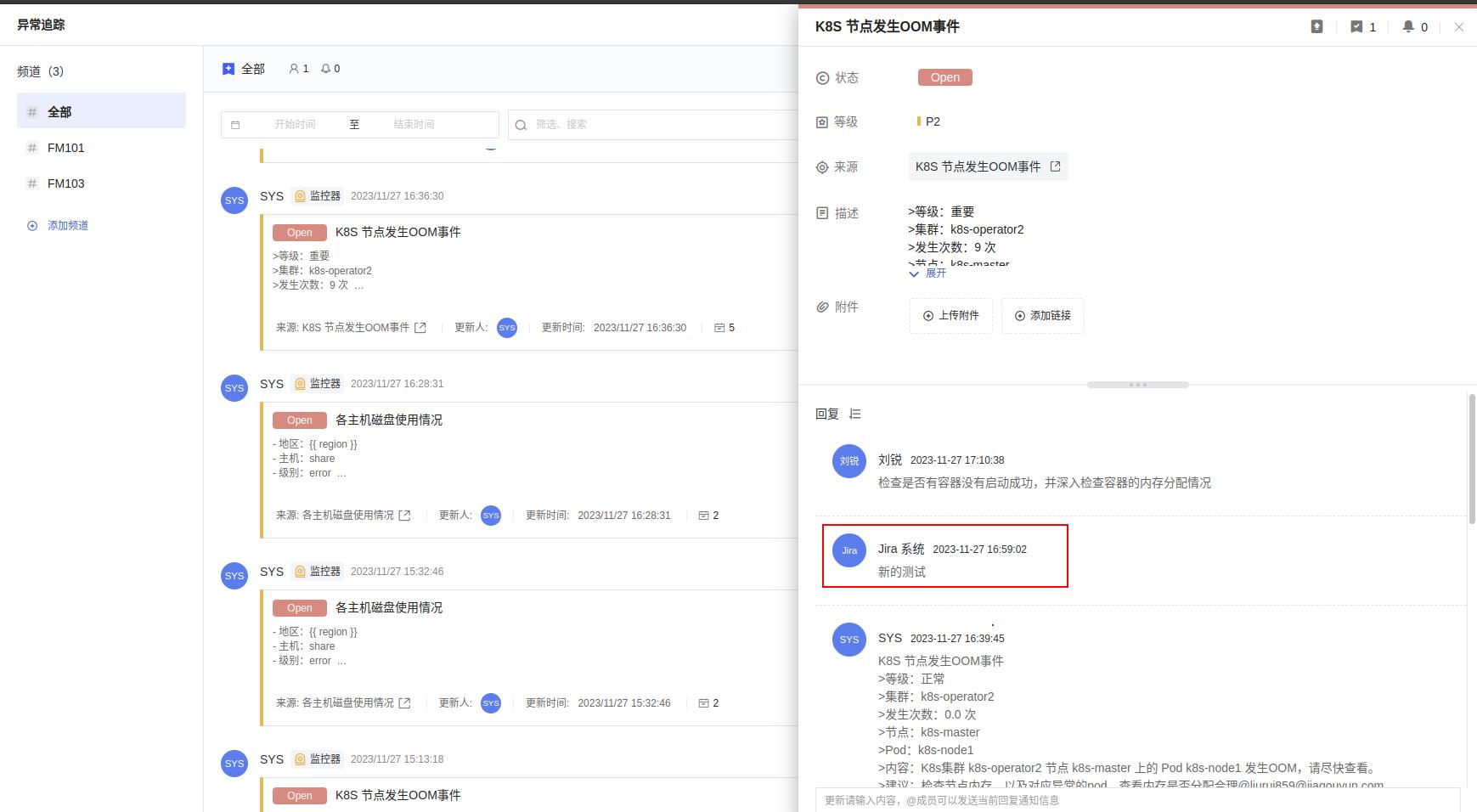
Guance will also synchronize the Jira issue handling process.