Best Practices for Reporting Kubernetes Cluster Logs to DataKit on the Same Node
Introduction
In a Kubernetes cluster, when using DataKit deployed as a DaemonSet to collect metrics, traces, and log data, the best way to improve the performance of Pod-to-DataKit interaction is to have the DataKit running on the same node as the Pod collect that data. With DataKit deployed as a DaemonSet, a DataKit instance runs on each node in the cluster. By routing traffic to the DataKit on the same node, you can achieve node-local data collection.
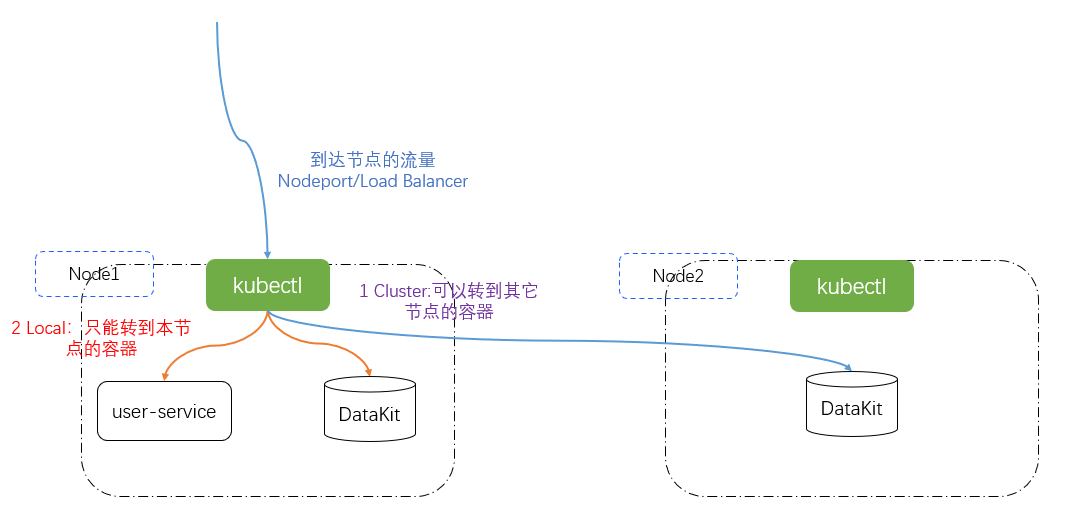
In Kubernetes Service resources, there is a field called externalTrafficPolicy that can be set to Cluster or Local. This external traffic policy requires the Service type to be NodePort or LoadBalancer.
- Cluster: Traffic can be forwarded to Pods on other nodes. This is the default mode.
- Local: Traffic is only forwarded to Pods on the local node.
In the default Cluster mode, when kube-proxy receives request traffic, it performs SNAT (Source Network Address Translation) during forwarding, changing the source IP to the node's IP. This ensures that requests are returned along the original path. After switching to Local mode, kube-proxy preserves the source IP when forwarding requests and only forwards to Pods on the local node. It never forwards across nodes.
Installation and Deployment
Deploying DataKit
1.1.1 Download the Deployment File
Log in to Guance, click the Integrations module, then click DataKit in the upper left corner, select Kubernetes, and download datakit.yaml.
1.1.2 Configure the Token
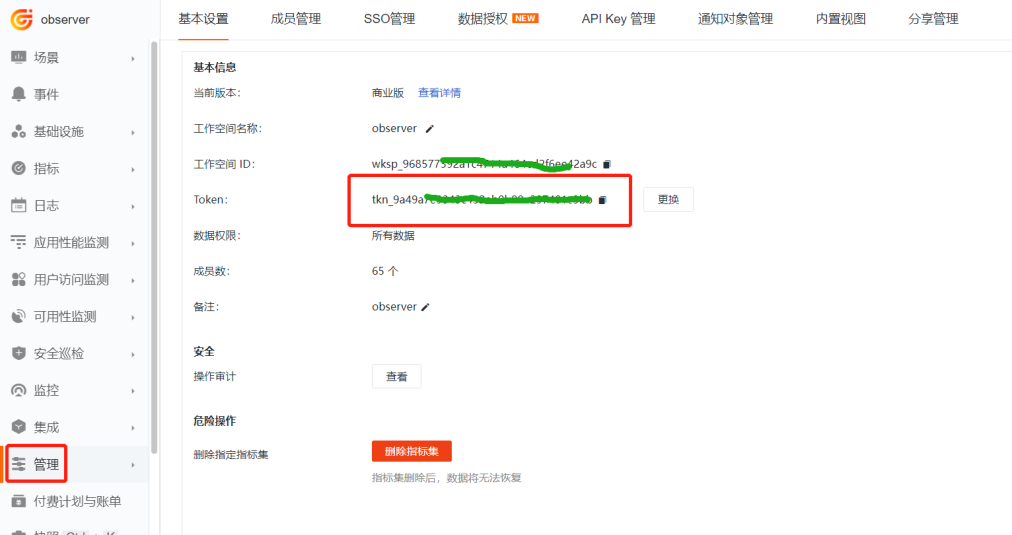
Log in to Guance, go to the Management module, find the token shown in the image below, and replace <your-token> in the ENV_DATAWAY environment variable value in the datakit.yaml file.
1.1.3 Set Global Tags
At the end of the ENV_GLOBAL_HOST_TAGS environment variable value in the datakit.yaml file, append cluster_name_k8s=k8s-istio, where k8s-istio is the global tag.
- name: ENV_GLOBAL_HOST_TAGS
value: host=__datakit_hostname,host_ip=__datakit_ip,cluster_name_k8s=k8s-prod
1.1.4 Set the Namespace
To distinguish between different clusters during DataKit leader election, set the ENV_NAMESPACE environment variable. The value must be different for each cluster. Add the following content to the environment variables section of the datakit.yaml file.
1.1.5 Enable the Input Plugin
This example uses logfwd to collect logs, so you need to enable logfwd and mount the pipeline.
volumeMounts:
# The following are new additions
- mountPath: /usr/local/datakit/conf.d/log/logfwdserver.conf
name: datakit-conf
subPath: logfwdserver.conf
- mountPath: /usr/local/datakit/pipeline/pod-logging-demo.p
name: datakit-conf
subPath: pod-logging-demo.p
apiVersion: v1
kind: ConfigMap
metadata:
name: datakit-conf
namespace: datakit
data:
# ... The following are new additions
#### logfwdserver
logfwdserver.conf: |-
[inputs.logfwdserver]
## Listening address and port for the logfwd receiver
address = "0.0.0.0:9531"
[inputs.logfwdserver.tags]
# some_tag = "some_value"
# more_tag = "some_other_value"
pod-logging-demo.p: |-
# Log format
grok(_, "%{TIMESTAMP_ISO8601:time} %{NOTSPACE:thread_name} %{LOGLEVEL:status}%{SPACE}%{NOTSPACE:class_name} - \\[%{NOTSPACE:method_name},%{NUMBER:line}\\] - - %{GREEDYDATA:msg}")
default_time(time,"Asia/Shanghai")
1.1.6 Deploy DataKit
apiVersion: v1
kind: Namespace
metadata:
name: datakit
---
apiVersion: rbac.authorization.k8s.io/v1
kind: ClusterRole
metadata:
name: datakit
rules:
- apiGroups:
- rbac.authorization.k8s.io
resources:
- clusterroles
verbs:
- get
- list
- watch
- apiGroups:
- ""
resources:
- nodes
- nodes/proxy
- namespaces
- pods
- pods/log
- events
- services
- endpoints
verbs:
- get
- list
- watch
- apiGroups:
- apps
resources:
- deployments
- daemonsets
- statefulsets
- replicasets
verbs:
- get
- list
- watch
- apiGroups:
- batch
resources:
- jobs
- cronjobs
verbs:
- get
- list
- watch
- apiGroups:
- metrics.k8s.io
resources:
- pods
- nodes
verbs:
- get
- list
- nonResourceURLs: ["/metrics"]
verbs: ["get"]
---
apiVersion: v1
kind: ServiceAccount
metadata:
name: datakit
namespace: datakit
---
apiVersion: v1
kind: Service
metadata:
name: datakit-service
namespace: datakit
spec:
selector:
app: daemonset-datakit
ports:
- protocol: TCP
port: 9529
targetPort: 9529
---
apiVersion: rbac.authorization.k8s.io/v1
kind: ClusterRoleBinding
metadata:
name: datakit
roleRef:
apiGroup: rbac.authorization.k8s.io
kind: ClusterRole
name: datakit
subjects:
- kind: ServiceAccount
name: datakit
namespace: datakit
---
apiVersion: apps/v1
kind: DaemonSet
metadata:
labels:
app: daemonset-datakit
name: datakit
namespace: datakit
spec:
revisionHistoryLimit: 10
selector:
matchLabels:
app: daemonset-datakit
template:
metadata:
labels:
app: daemonset-datakit
annotations:
datakit/logs: |
[
{
"disable": true
}
]
spec:
hostNetwork: true
dnsPolicy: ClusterFirstWithHostNet
containers:
- env:
- name: HOST_IP
valueFrom:
fieldRef:
apiVersion: v1
fieldPath: status.hostIP
- name: NODE_NAME
valueFrom:
fieldRef:
apiVersion: v1
fieldPath: spec.nodeName
        - name: ENV_DATAWAY
value: https://openway.guance.com?token=<your-token> # Fill in the actual DataWay address here
- name: ENV_GLOBAL_HOST_TAGS
value: host=__datakit_hostname,host_ip=__datakit_ip
- name: ENV_DEFAULT_ENABLED_INPUTS
value: cpu,disk,diskio,mem,swap,system,hostobject,net,host_processes,container
- name: ENV_ENABLE_ELECTION
value: enable
- name: ENV_LOG
value: stdout
- name: ENV_HTTP_LISTEN
value: 0.0.0.0:9529
- name: ENV_K8S_CLUSTER_NAME
value: k8s-prod
        - name: ENV_NAMESPACE
          value: guance-k8s
image: pubrepo.guance.com/datakit/datakit:1.2.16
imagePullPolicy: Always
name: datakit
ports:
- containerPort: 9529
hostPort: 9529
name: port
protocol: TCP
securityContext:
privileged: true
volumeMounts:
- mountPath: /var/run/docker.sock
name: docker-socket
readOnly: true
- mountPath: /var/run/containerd/containerd.sock
name: containerd-socket
readOnly: true
- mountPath: /usr/local/datakit/conf.d/log/logfwdserver.conf
name: datakit-conf
subPath: logfwdserver.conf
- mountPath: /usr/local/datakit/pipeline/pod-logging-demo.p
name: datakit-conf
subPath: pod-logging-demo.p
- mountPath: /host/proc
name: proc
readOnly: true
- mountPath: /host/dev
name: dev
readOnly: true
- mountPath: /host/sys
name: sys
readOnly: true
- mountPath: /rootfs
name: rootfs
- mountPath: /sys/kernel/debug
name: debugfs
#- mountPath: /usr/local/datakit/conf.d/db/mysql.conf
# name: datakit-conf
# subPath: mysql.conf
# readOnly: true
#- mountPath: /usr/local/datakit/conf.d/db/redis.conf
# name: datakit-conf
# subPath: redis.conf
# readOnly: true
workingDir: /usr/local/datakit
hostIPC: true
hostPID: true
restartPolicy: Always
serviceAccount: datakit
serviceAccountName: datakit
tolerations:
- operator: Exists
volumes:
- configMap:
name: datakit-conf
name: datakit-conf
- hostPath:
path: /var/run/docker.sock
name: docker-socket
- hostPath:
path: /var/run/containerd/containerd.sock
name: containerd-socket
- hostPath:
path: /proc
type: ""
name: proc
- hostPath:
path: /dev
type: ""
name: dev
- hostPath:
path: /sys
type: ""
name: sys
- hostPath:
path: /
type: ""
name: rootfs
- hostPath:
path: /sys/kernel/debug
type: ""
name: debugfs
updateStrategy:
rollingUpdate:
maxUnavailable: 1
type: RollingUpdate
---
apiVersion: v1
kind: ConfigMap
metadata:
name: datakit-conf
namespace: datakit
data:
#mysql.conf: |-
# [inputs.mysql]
# ...
#redis.conf: |-
# [inputs.redis]
# ...
#### logfwdserver
logfwdserver.conf: |-
[inputs.logfwdserver]
## Listening address and port for the logfwd receiver
address = "0.0.0.0:9531"
[inputs.logfwdserver.tags]
# some_tag = "some_value"
# more_tag = "some_other_value"
pod-logging-demo.p: |-
# Log format
grok(_, "%{TIMESTAMP_ISO8601:time} %{NOTSPACE:thread_name} %{LOGLEVEL:status}%{SPACE}%{NOTSPACE:class_name} - \\[%{NOTSPACE:method_name},%{NUMBER:line}\\] - - %{GREEDYDATA:msg}")
default_time(time,"Asia/Shanghai")
Deploying the Application
Writing the Microservice
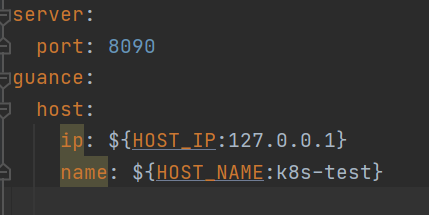
To easily see on which node the logs are output, the code prints the node server name when outputting logs. The node IP comes from the environment variable HOST_IP, and the node server name comes from the environment variable HOST_NAME. The complete project is available at datakit-springboot-demo.

Building the Image
Write the Dockerfile:
FROM openjdk:8u292

RUN /bin/cp /usr/share/zoneinfo/Asia/Shanghai /etc/localtime
RUN echo 'Asia/Shanghai' >/etc/timezone
ENV jar service-demo-1.0-SNAPSHOT.jar

ENV workdir /data/app/
RUN mkdir -p ${workdir}
COPY ${jar} ${workdir}
WORKDIR ${workdir}
ENTRYPOINT ["sh", "-ec", "exec java ${JAVA_OPTS} -jar ${jar} ${PARAMS} "]
Place the project's JAR file and the Dockerfile in the same directory. Run the following commands to build the image and push it to a private registry.
docker build -t 172.16.0.238/df-demo/service-demo:v1  .
docker push 172.16.0.238/df-demo/service-demo:v1
Writing the Deployment File
Write the demo-service.yaml deployment file. Add externalTrafficPolicy: Local to the Service resource to enable the Local mode of the external traffic policy. Add the HOST_IP and HOST_NAME environment variables to output the IP and server name.
For instructions on using logfwd, refer to Pod Log Collection Best Practices. In the environment variable that specifies the DataKit host for logfwd, use the DataKit Service domain name datakit-service.datakit.svc.cluster.local.
The complete contents of demo-service.yaml are as follows.
apiVersion: v1
kind: Service
metadata:
name: guance-service
labels:
app: guance-service
spec:
selector:
app: guance-pod
externalTrafficPolicy: Local
ports:
- protocol: TCP
port: 8090
targetPort: 8090
nodePort: 30090
type: NodePort
---
apiVersion: apps/v1
kind: Deployment
metadata:
name: guance-deployment
spec:
replicas: 1
selector:
matchLabels:
app: guance-pod
template:
metadata:
labels:
app: guance-pod
annotations:
spec:
containers:
- name: guance-demo-container
image: 172.16.0.238/df-demo/service-demo:v1
env:
- name: HOST_IP
valueFrom:
fieldRef:
apiVersion: v1
fieldPath: status.hostIP
- name: HOST_NAME
valueFrom:
fieldRef:
apiVersion: v1
fieldPath: spec.nodeName
- name: POD_NAME
valueFrom:
fieldRef:
fieldPath: metadata.name
- name: DD_AGENT_HOST
value: $(HOST_IP)
- name: JAVA_OPTS
value: |-
-javaagent:/usr/dd-java-agent/agent/dd-java-agent.jar -Ddd.service.name=k8s-guance-service -Ddd.tags=container_host:$(PODE_NAME) -Ddd.tags=node_ip:$(DD_AGENT_HOST) -Ddd.env=dev -Ddd.agent.port=9529
ports:
- containerPort: 8090
protocol: TCP
volumeMounts:
- mountPath: /data/app/logs
name: varlog
- name: logfwd
image: pubrepo.guance.com/datakit/logfwd:1.2.12
env:
        - name: LOGFWD_DATAKIT_HOST
          value: "datakit-service.datakit.svc.cluster.local"
- name: LOGFWD_DATAKIT_PORT
value: "9531"
- name: LOGFWD_ANNOTATION_DATAKIT_LOGS
valueFrom:
fieldRef:
apiVersion: v1
fieldPath: metadata.annotations['datakit/logs']
- name: LOGFWD_POD_NAME
valueFrom:
fieldRef:
apiVersion: v1
fieldPath: metadata.name
- name: LOGFWD_POD_NAMESPACE
valueFrom:
fieldRef:
apiVersion: v1
fieldPath: metadata.namespace
volumeMounts:
- mountPath: /var/log
name: varlog
- mountPath: /opt/logfwd/config
name: logfwd-config
subPath: config
restartPolicy: Always
volumes:
- name: varlog
emptyDir: {}
- configMap:
name: guance-logfwd-conf
name: logfwd-config
---
apiVersion: v1
kind: ConfigMap
metadata:
name: guance-logfwd-conf
data:
config: |
[
{
"loggings": [
{
"logfiles": ["/var/log/log.log"],
"source": "log_fwd_demo",
"pipeline": "pod-logging-demo.p",
"multiline_match": "^\\d{4}-\\d{2}-\\d{2}",
"tags": {
"flag": "tag1"
}
}
]
}
]
Traffic Verification
Log in to the cluster's master node and run the following command to generate logs.

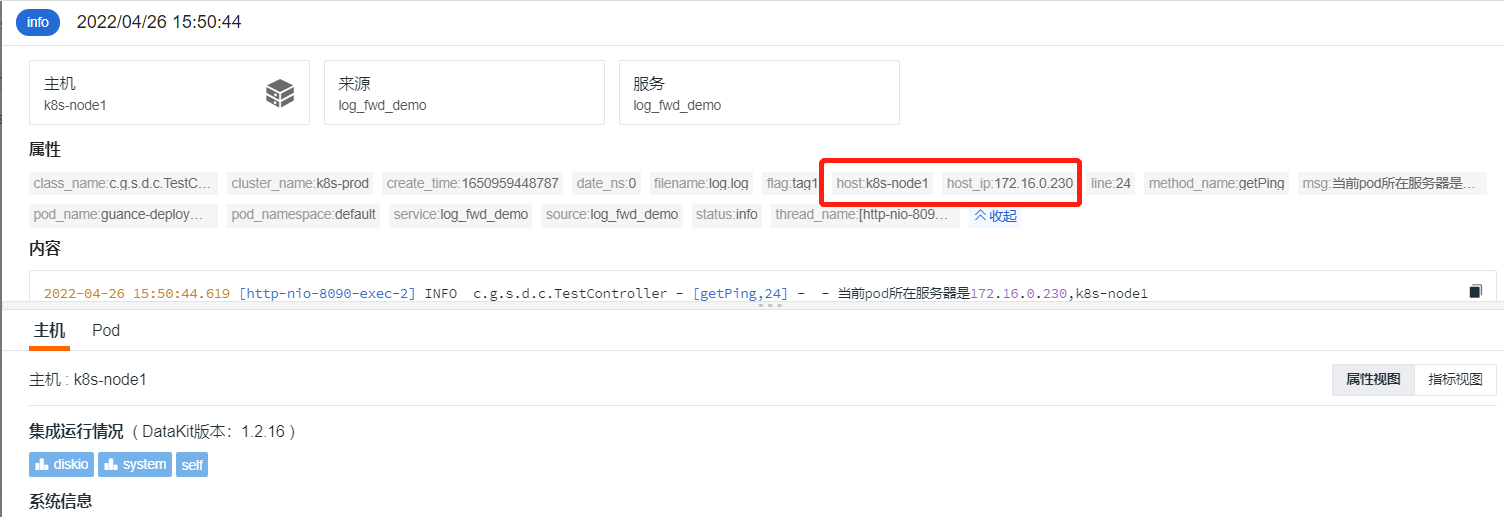
Log in to Guance, go to the Logs module, search for log_fwd_demo by data source, find the log, and click to view details.
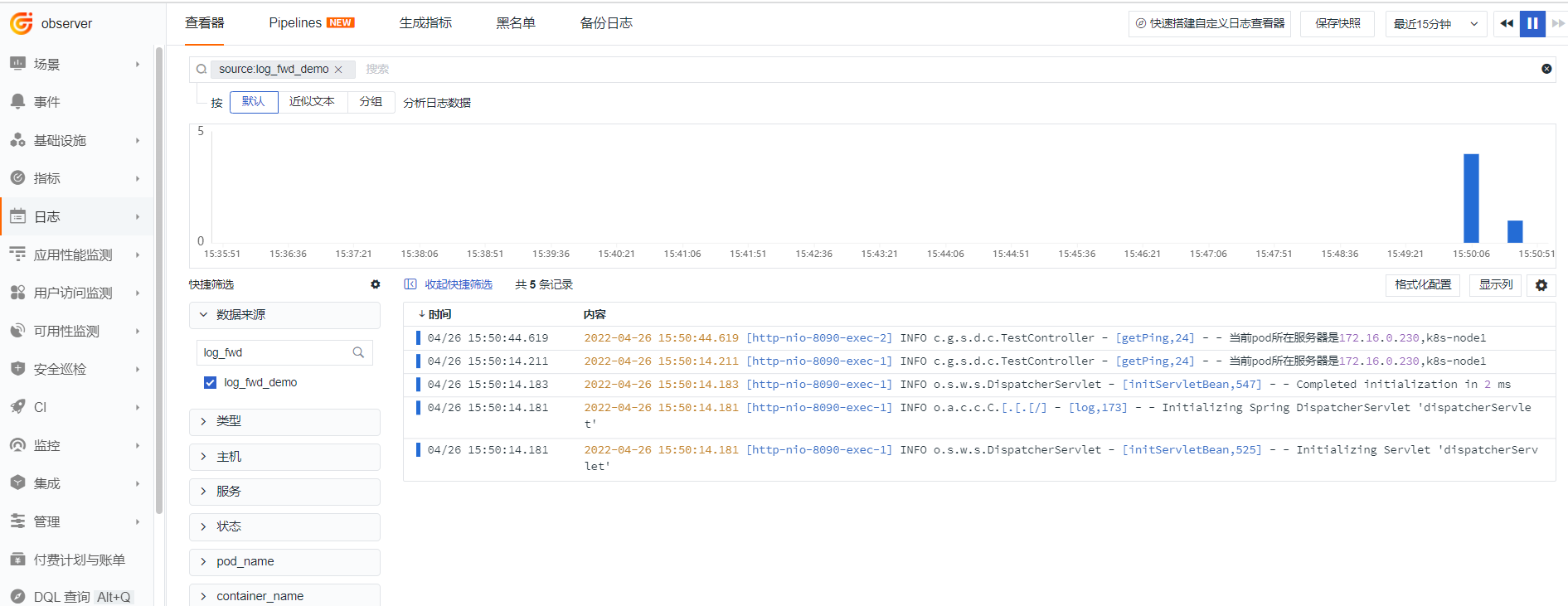
You can see that the host field is exactly the same as the server name output in the logs. After multiple requests, the reported host remains the same.