Best Practices for DataKit Version Update
1: Manual Update (2 Steps)
Step 1: Run datakit --version
(Purpose: to compare versions before and after update) Example output:
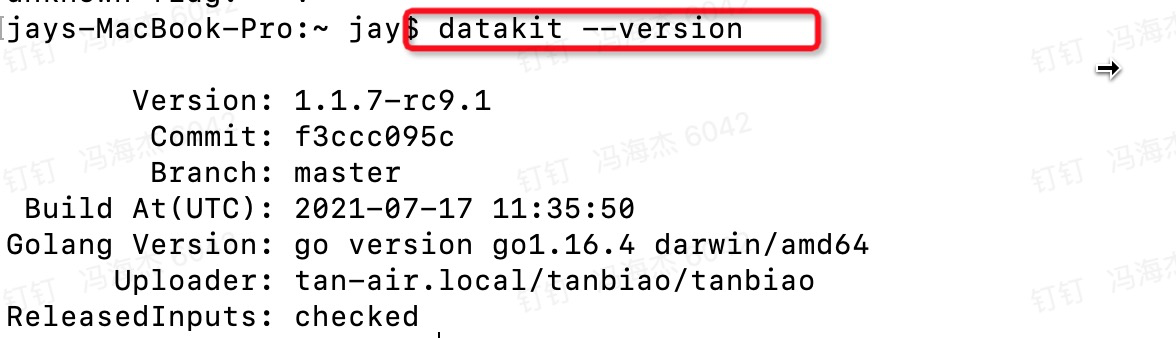
Step 2: Run the upgrade command (select the appropriate command for your platform)
【Installation on Linux】
| X86 amd64 | sudo -- sh -c 'curl https://static.guance.com/datakit/installer-linux-amd64 -o dk-installer && chmod +x ./dk-installer && ./dk-installer -upgrade && rm -rf ./dk-installer' |
|---|---|
| X86 i386 | sudo -- sh -c 'curl https://static.guance.com/datakit/installer-linux-386 -o dk-installer && chmod +x ./dk-installer && ./dk-installer -upgrade && rm -rf ./dk-installer' |
| arm | sudo -- sh -c 'curl https://static.guance.com/datakit/installer-linux-arm -o dk-installer && chmod +x ./dk-installer && ./dk-installer -upgrade && rm -rf ./dk-installer' |
| arm64 | sudo -- sh -c 'curl https://static.guance.com/datakit/installer-linux-arm64 -o dk-installer && chmod +x ./dk-installer && ./dk-installer -upgrade && rm -rf ./dk-installer' |
【Installation on Windows】
| 64-bit | Import-Module bitstransfer; start-bitstransfer -source [https://static.guance.com/datakit/installer-windows-amd64.exe](https://static.guance.com/datakit/installer-windows-amd64.exe) -destination .dk-installer.exe; .dk-installer.exe -upgrade; rm .dk-installer.exe |
|---|---|
| 32-bit | Import-Module bitstransfer; start-bitstransfer -source [https://static.guance.com/datakit/installer-windows-386.exe](https://static.guance.com/datakit/installer-windows-amd64.exe) -destination .dk-installer.exe; .dk-installer.exe -upgrade; rm .dk-installer.exe |
【Installation on macOS】
| all | sudo -- sh -c "curl [https://static.guance.com/datakit/installer-darwin-amd64](https://static.guance.com/datakit/installer-darwin-amd64) -o dk-installer && chmod +x ./dk-installer && ./dk-installer -upgrade && rm -rf ./dk-installer" |
|---|---|
2: Auto Update (Currently only supported on Linux)
Step 1: Prepare the update script
Copy the following script content to the installation directory of the DataKit machine and save it as datakit-update.sh (you can use any name).
#!/bin/bash
# Update DataKit if new version available

otalog=/usr/local/datakit/ota-update.log
installer=https://static.guance.com/datakit/installer-linux-amd64

# Note: If you do not want to update RC versions of DataKit, you can remove `--accept-rc-version`
/usr/local/datakit/datakit --check-update --accept-rc-version --update-log $otalog

if [[ $? == 42 ]]; then
 echo "update now..."
 sudo -- sh -c "curl ${installer}  -o dk-installer &&
     chmod +x ./dk-installer &&
     ./dk-installer --upgrade --ota --install-log "${otalog}" &&
     rm -rf ./dk-installer"
fi
Step 2: Add a crontab task
Run the following command to enter the crontab rule editing interface:
Add the following rule:
Tips: Basic crontab syntax:
*   *   *   *   *     <command to be execute>
^   ^   ^   ^   ^
|   |   |   |   |
|   |   |   |   +----- day of week (0 - 6) (Sunday=0)
|   |   |   +--------- month (1 - 12)
|   |   +------------- day of month (1 - 31)
|   +----------------- hour (0 - 23)
+--------------------- minute (0 - 59)
Run the following command to verify that the crontab job is installed successfully:
Ensure the crontab service is started:
If the installation is successful and an update attempt is made, you can see logs similar to the following in update_log:
2021-05-10T09:49:06.083+0800 DEBUG  ota-update datakit/main.go:201  get online version...
2021-05-10T09:49:07.728+0800 DEBUG  ota-update datakit/main.go:216  online version: datakit 1.1.6-rc0/9bc4b960, local version: datakit 1.1.6-rc0-62-g7a1d0956/7a1d0956
2021-05-10T09:49:07.728+0800 INFO   ota-update datakit/main.go:224  Up to date(1.1.6-rc0-62-g7a1d0956)
If an update actually occurs, you will see logs similar to the following:
2021-05-10T09:52:18.352+0800 DEBUG ota-update datakit/main.go:201 get online version...
2021-05-10T09:52:18.391+0800 DEBUG ota-update datakit/main.go:216 online version: datakit 1.1.6-rc0/9bc4b960, local version: datakit 1.0.1/7a1d0956
2021-05-10T09:52:18.391+0800 INFO  ota-update datakit/main.go:219 New online version available: 1.1.6-rc0, commit 9bc4b960 (release at 2021-04-30 14:31:27)
...