ddtrace-api Usage Guide
Warning
The current example is tested with the corresponding version of ddtrace
Prerequisites
-
Enable the DataKit ddtrace collector
-
Prepare the Shell
java -javaagent:dd-java-agent-v1.34.0-guance.jar \
-Ddd.service.name=ddtrace-server \
-Ddd.agent.port=9529 \
-jar springboot-ddtrace-server.jar
Installation and Deployment
Add Maven POM Dependencies
    <dependency>
        <groupId>com.datadoghq</groupId>
        <artifactId>dd-trace-api</artifactId>
        <version>1.34.0</version>
    </dependency>

    <dependency>
        <groupId>io.opentracing</groupId>
        <artifactId>opentracing-api</artifactId>
        <version>0.33.0</version>
    </dependency>
    <dependency>
        <groupId>io.opentracing</groupId>
        <artifactId>opentracing-mock</artifactId>
        <version>0.33.0</version>
    </dependency>
    <dependency>
        <groupId>io.opentracing</groupId>
        <artifactId>opentracing-util</artifactId>
        <version>0.33.0</version>
    </dependency>
Obtain the Tracer
Obtain the Tracer object via GlobalTracer
Tracer tracer = GlobalTracer.get();
Through the Tracer, you can retrieve the current span information
Span span = tracer.activeSpan();
    // Obtain the tracer object
    Tracer tracer = GlobalTracer.get();
    // Obtain the current span object
    Span span = tracer.activeSpan();
    if (span!=null) {
        // Get traceId
        String traceId = span.context().toTraceId();
        // Get spanId
        String spanId = span.context().toSpanId();
    }
Method-Level Instrumentation
In addition to the dd.trace.methods approach for automatic method instrumentation, ddtrace provides an API for more flexible business instrumentation.
- Add the
@Traceannotation to the method that needs instrumentation
- Then call it in the
gatewaymethod
- Restart, then access the gateway
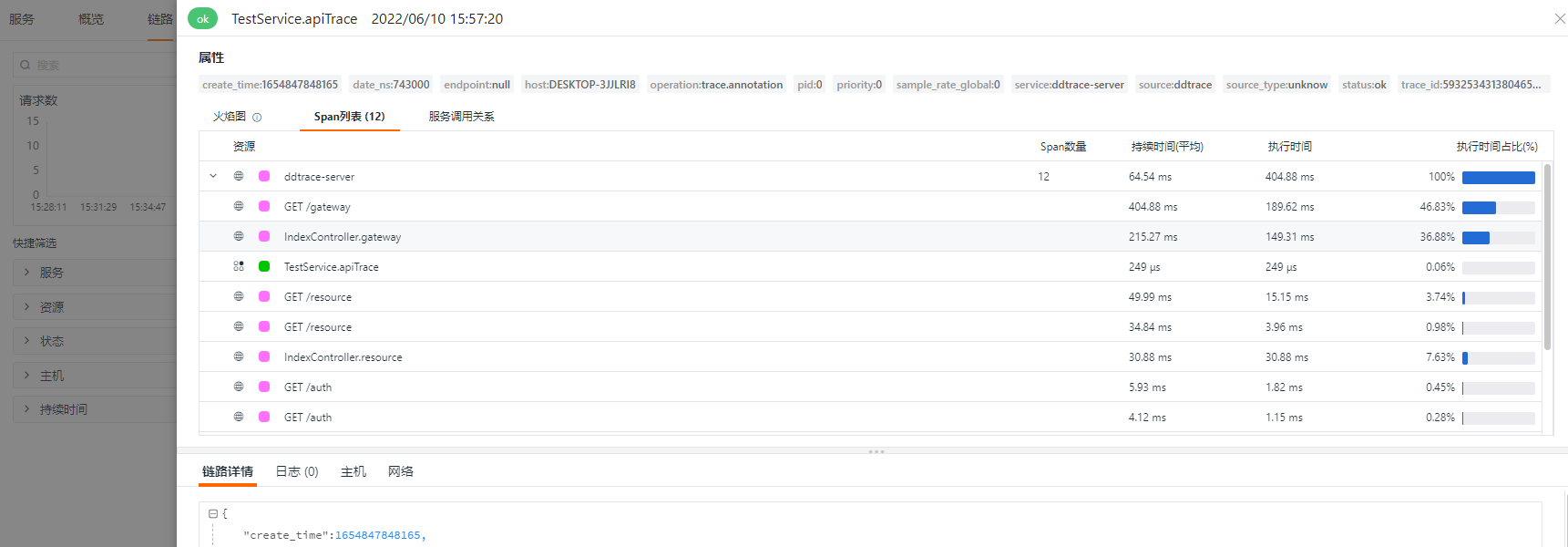
Note: Invasive instrumentation does not mean the application can start without the agent. Without the agent, the
@Traceannotation will be ineffective. The@Traceannotation has a default operation nametrace.annotation, and the traced method has a default resource.
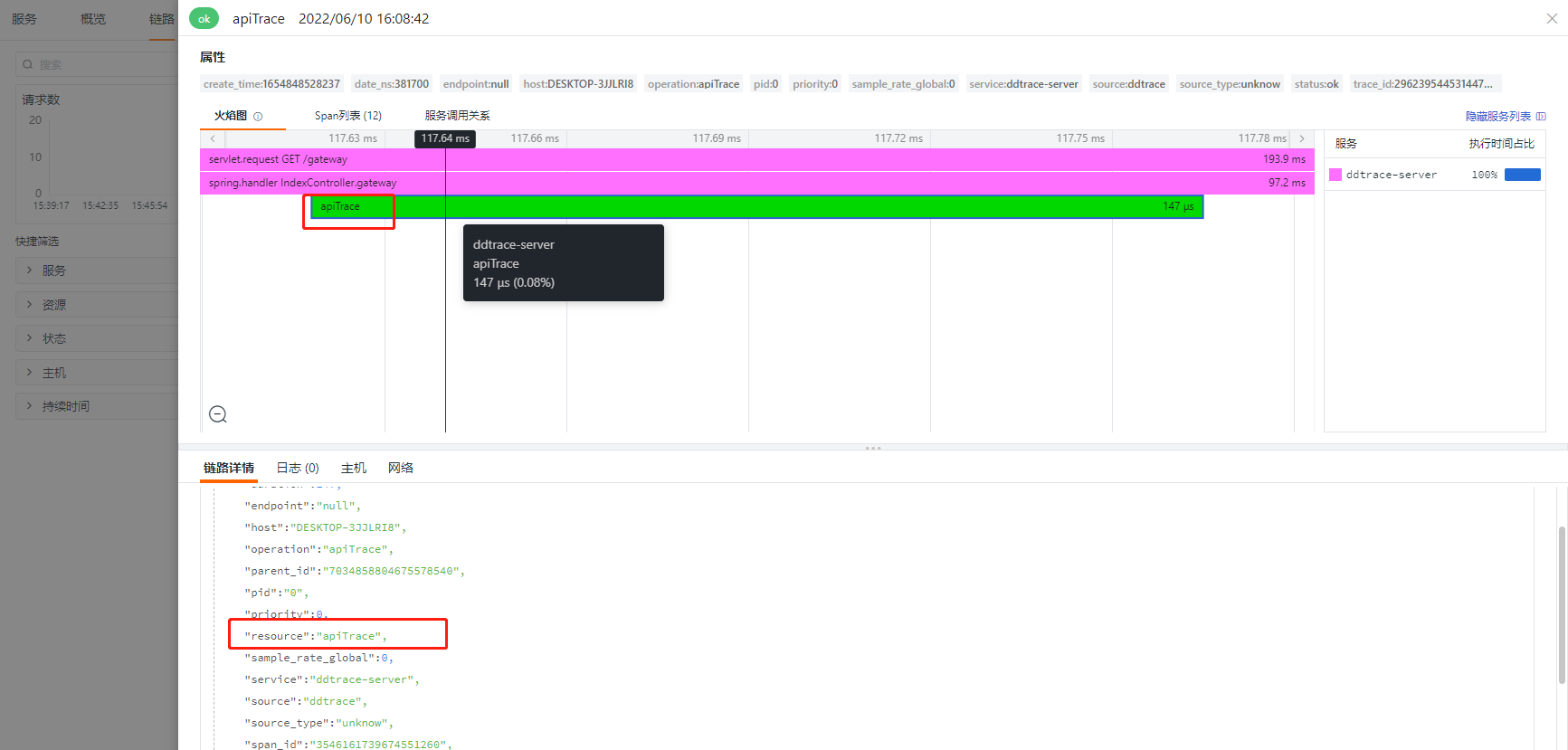
You can customize the names:
    @Trace(resourceName = "apiTrace",operationName = "apiTrace")
    public String apiTrace(){
        return "apiTrace";
    }
After modification, the effect is as follows:
Using Baggage to Propagate Business-Critical Tags Across the Backend Trace
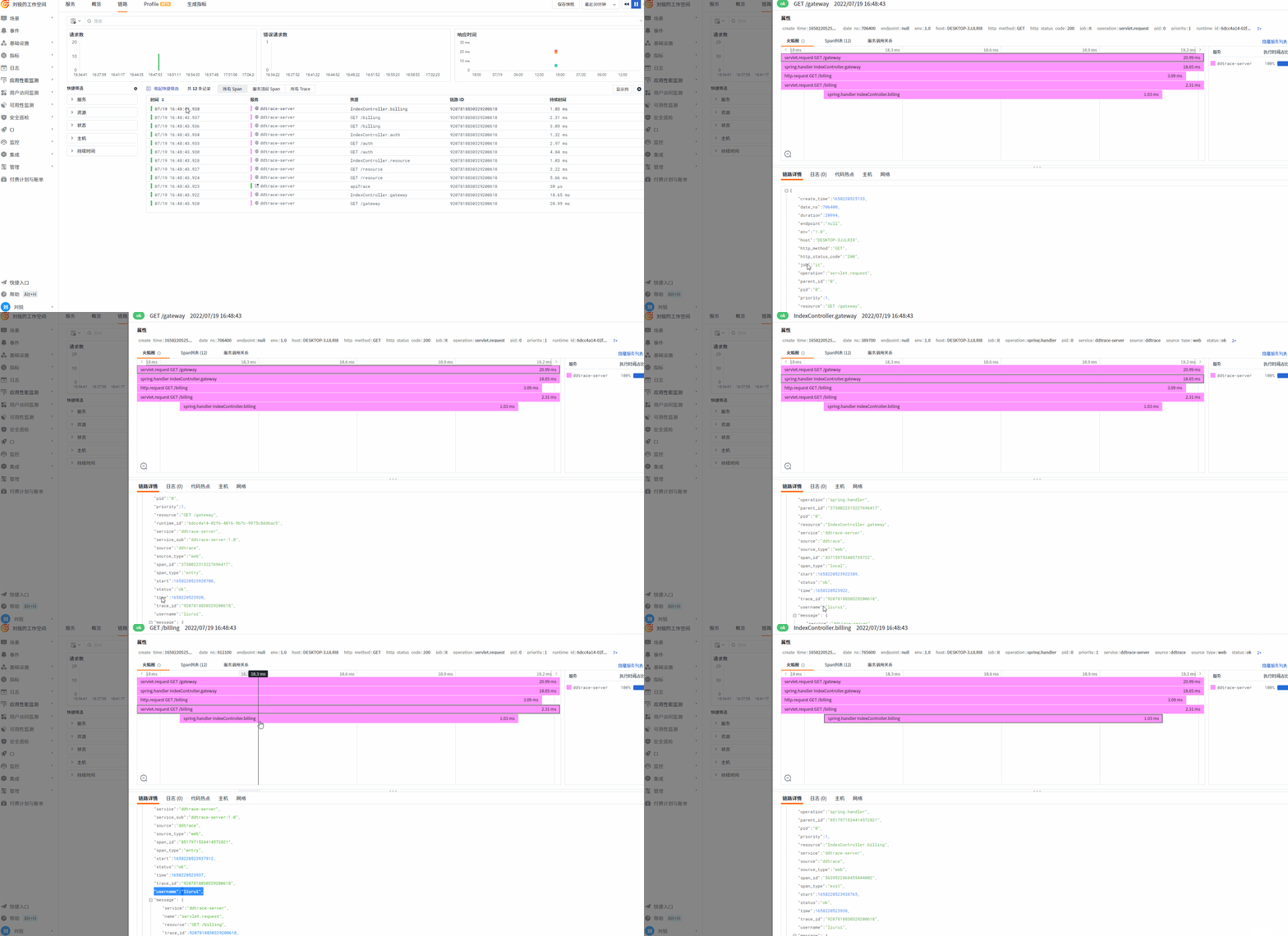
ddtrace provides the Baggage mechanism—more precisely, ddtrace uses OpenTracing's Baggage feature to propagate specific tags across the trace. For example, user name, job title, etc., to facilitate user behavior analysis.
1 Write a TraceBaggageFilter
Use the TraceBaggageFilter to intercept requests and propagate relevant request header parameters via Baggage.
package com.zy.observable.ddtrace;


import io.opentracing.Span;
import io.opentracing.util.GlobalTracer;
import org.apache.commons.lang3.StringUtils;
import org.springframework.stereotype.Component;

import javax.servlet.*;
import javax.servlet.http.HttpServletRequest;
import java.io.IOException;
import java.util.Enumeration;

/**
 * Baggage allows tags to be propagated between traces. By obtaining the current request headers,
 * headers with a specified prefix are set as Baggage.
 * @author liurui
 * @date 2022/7/19 14:59
 */
@Component
public class TraceBaggageFilter implements Filter {

    /**
     * Headers with this prefix will be propagated across the trace
     */
    private static final String PREFIX = "dd-";

    @Override
    public void doFilter(ServletRequest servletRequest, ServletResponse servletResponse, FilterChain filterChain) throws IOException, ServletException {
        final Span span = GlobalTracer.get().activeSpan();
        if (span != null) {
            HttpServletRequest request = (HttpServletRequest)servletRequest;
            Enumeration<String> headerNames = request.getHeaderNames();
            while (headerNames.hasMoreElements()) {
                final String header = headerNames.nextElement();
                String value = request.getHeader(header);
                if (StringUtils.startsWith(header,PREFIX) && StringUtils.isNotBlank(value)){
                    // Baggage can be propagated between traces, while ordinary tags cannot
                    span.setBaggageItem(header.replace(PREFIX,""),value);
                }
            }

        }
        filterChain.doFilter(servletRequest,servletResponse);
    }
}
2 DataKit Configuration
This needs to be used together with the DataKit ddtrace collector configuration. Add custom tags via the customer_tags field; otherwise, this data will only exist in meta.
3 Send a Request
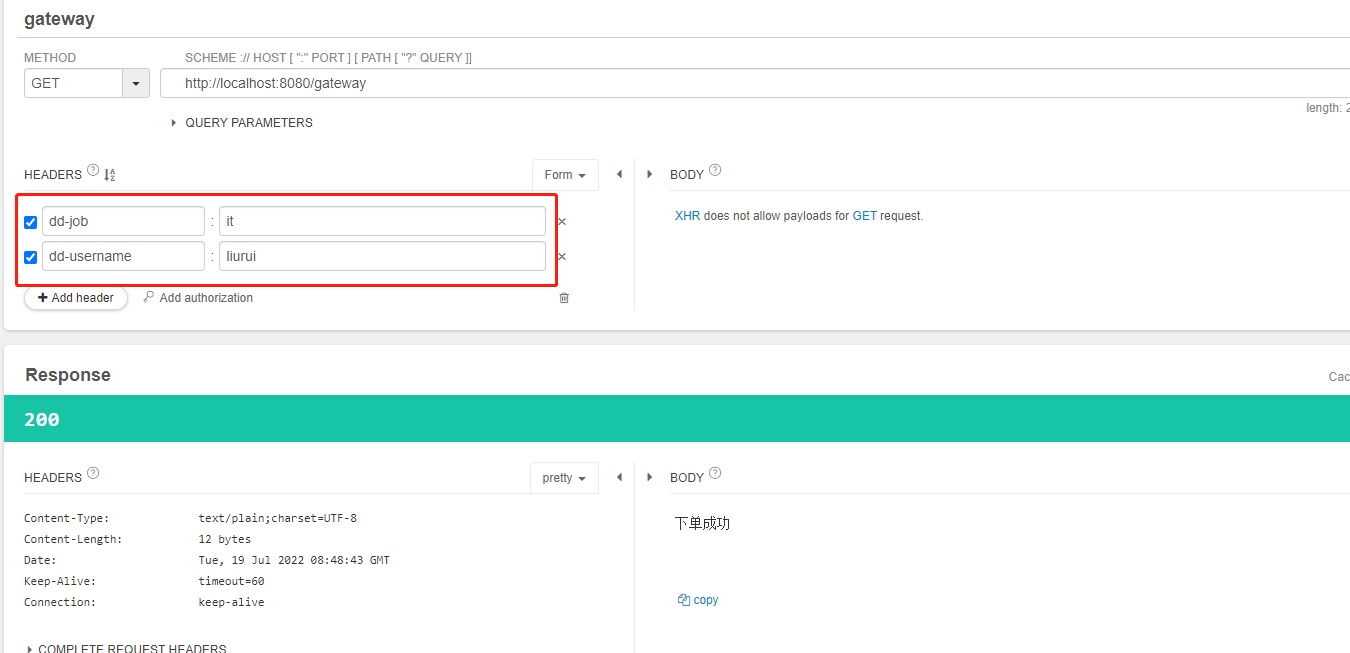
Send a request to the gateway with two headers: dd-username and dd-job. The system will recognize headers starting with dd and propagate them across all spans in the current trace.
Result
Customization
Custom traceId
Refer to the best practice document: <Using extract + TextMapAdapter to implement custom traceId>
Custom Span
Often, applications handle exceptions in business logic, and the related trace may not be marked as error, causing the application's error traces not to be counted correctly. This commonly occurs with try-catch blocks or global exception handlers.
In such cases, you need to mark the trace accordingly. You can mark the current span as an error span by customizing the span—just mark it in the catch block.
- Obtain the current span information as follows:
- Mark the span as error:
If the current method is inside a catch block, you can also output the stack trace information to the span.
You can encapsulate the error span handling logic into a common function for global use, as shown below:
    private void buildErrorTrace(Exception ex) {
        final Span span = GlobalTracer.get().activeSpan();
        if (span != null) {
            span.setTag(Tags.ERROR, true);
            span.log(Collections.singletonMap(Fields.ERROR_OBJECT, ex));
            span.setTag(DDTags.ERROR_MSG, ex.getMessage());
            span.setTag(DDTags.ERROR_TYPE, ex.getClass().getName());

            final StringWriter errorString = new StringWriter();
            ex.printStackTrace(new PrintWriter(errorString));
            span.setTag(DDTags.ERROR_STACK, errorString.toString());
        }

    }
Caller code:
@GetMapping("/gateway")
    @ResponseBody
    public String gateway(String tag) {
        ......
        try {
            if (client) {
                httpTemplate.getForEntity("http://" + extraHost + ":8081/client", String.class).getBody();
            }
        } catch (Exception e) {
            buildErrorTrace(e);
        }
        return httpTemplate.getForEntity(apiUrl + "/billing?tag=" + tag, String.class).getBody();
    }