K8s Log Collection with Logback Socket Best Practices
Overview
In addition to the commonly used file and stdout log output, Logback also supports socket (TCP) output. The biggest advantage of socket-based log reporting is the reduction in storage costs. Logs generated by the application are buffered in local memory and then reported to the collector.
DataKit also supports socket log collection. This article mainly introduces how to push logs from a Spring Boot application running on K8s to the Guance platform for monitoring via the Logback Socket method.
Prerequisites
- Create a Guance account
- A Spring Boot application
- docker-harbor
- A K8s cluster
Installation and Deployment
DataKit Installation and Configuration on K8s
For DataKit installation under Kubernetes, refer to the document <RUM-APM-LOG Correlation Analysis for Kubernetes Applications>.
1 Configure the Log Collection File
To receive logs, you need to enable the log socket, open port 9541, and configure the Pipeline parsing.
logging-socket-demo.conf
      [[inputs.logging]]
        ## required
        #  logfiles = [
        #    "/var/log/syslog",
        #    "/var/log/message",
        #  ]
          # only two protocols are supported:TCP and UDP
          sockets = [
                  "tcp://0.0.0.0:9541",
          #      "udp://0.0.0.0:9531",
          ]
          ## glob filteer
          ignore = [""]

          ## your logging source, if it's empty, use 'default'
          source = "socket_log"

          ## add service tag, if it's empty, use $source.
          service = "socket_service"

          ## grok pipeline script name
          pipeline = "logback_socket_pipeline.p"

          ## optional status:
          ##   "emerg","alert","critical","error","warning","info","debug","OK"
          ignore_status = []

          ## optional encodings:
          ##    "utf-8", "utf-16le", "utf-16le", "gbk", "gb18030" or ""
          character_encoding = ""

          ## The pattern should be a regexp. Note the use of '''this regexp'''
          ## regexp link: [https://golang.org/pkg/regexp/syntax/#hdr-Syntax](https://golang.org/pkg/regexp/syntax/#hdr-Syntax)
          # multiline_match = '''^\S'''

          ## removes ANSI escape codes from text strings
          remove_ansi_escape_codes = false

          [inputs.logging.tags]
            service = "socket-demo"
2 Pipeline for Log Parsing
logback_socket_pipeline.p is used to parse the socket log format, making it easier for you to view and use in Guance.
Full content:
logback_socket_pipeline.p
        #------------------------------------   WARNING   -------------------------------------
        # Do not modify this file. If you need to update, copy it to another file, preferably with a prefix to distinguish it, to avoid being overwritten after restart.
        #-----------------------------------------------------------------------------------
        # access log
        json(_,msg,"message")
        json(_,class,"class")
        json(_,appName,"service")
        json(_,thread,"thread")
        json(_,severity,"status")
        json(_,trace,"trace_id")
        json(_,span,"span_id")
        json(_,`@timestamp`,"time")
        default_time(time)
3 Replace the Token
You need to replace the token in datakit.yaml with your own token. Full content:
datakit.yaml
apiVersion: v1
kind: Namespace
metadata:
  name: datakit
---
apiVersion: rbac.authorization.k8s.io/v1
kind: ClusterRole
metadata:
  name: datakit
rules:
  - apiGroups:
      - rbac.authorization.k8s.io
    resources:
      - clusterroles
    verbs:
      - get
      - list
      - watch
  - apiGroups:
      - ""
    resources:
      - nodes
      - nodes/proxy
      - namespaces
      - pods
      - pods/log
      - events
      - services
      - endpoints
      - ingresses
    verbs:
      - get
      - list
      - watch
  - apiGroups:
      - apps
    resources:
      - deployments
      - daemonsets
      - statefulsets
      - replicasets
    verbs:
      - get
      - list
      - watch
  - apiGroups:
      - batch
    resources:
      - jobs
      - cronjobs
    verbs:
      - get
      - list
      - watch
  - apiGroups:
      - metrics.k8s.io
    resources:
      - pods
      - nodes
    verbs:
      - get
      - list
  - nonResourceURLs: ["/metrics"]
    verbs: ["get"]

---
apiVersion: v1
kind: ServiceAccount
metadata:
  name: datakit
  namespace: datakit

---
apiVersion: v1
kind: Service
metadata:
  name: datakit-service
  namespace: datakit
spec:
  selector:
    app: daemonset-datakit
  ports:
    - protocol: TCP
      port: 9529
      targetPort: 9529

---
apiVersion: rbac.authorization.k8s.io/v1
kind: ClusterRoleBinding
metadata:
  name: datakit
roleRef:
  apiGroup: rbac.authorization.k8s.io
  kind: ClusterRole
  name: datakit
subjects:
  - kind: ServiceAccount
    name: datakit
    namespace: datakit

---
apiVersion: apps/v1
kind: DaemonSet
metadata:
  labels:
    app: daemonset-datakit
  name: datakit
  namespace: datakit
spec:
  revisionHistoryLimit: 10
  selector:
    matchLabels:
      app: daemonset-datakit
  template:
    metadata:
      labels:
        app: daemonset-datakit
      annotations:
        datakit/logs: |
          [
            {
              "disable": true
            }
          ]
    spec:
      hostNetwork: true
      dnsPolicy: ClusterFirstWithHostNet
      containers:
        - env:
            - name: HOST_IP
              valueFrom:
                fieldRef:
                  apiVersion: v1
                  fieldPath: status.hostIP
            - name: NODE_NAME
              valueFrom:
                fieldRef:
                  apiVersion: v1
                  fieldPath: spec.nodeName
            - name: ENV_DATAWAY
              value: https://openway.guance.com?token=<you token>
            - name: ENV_GLOBAL_HOST_TAGS
              value: host=__datakit_hostname,host_ip=__datakit_ip,cluster_name=k8s-dev
            - name: ENV_DEFAULT_ENABLED_INPUTS
              value: cpu,disk,diskio,mem,swap,system,hostobject,net,host_processes,container,statsd,ddtrace
            - name: ENV_ENABLE_ELECTION
              value: enable
            - name: ENV_HTTP_LISTEN
              value: 0.0.0.0:9529
            - name: ENV_LOG_LEVEL
              value: info
          image: pubrepo.guance.com/datakit/datakit:1.2.6
          imagePullPolicy: IfNotPresent
          name: datakit
          ports:
            - containerPort: 9529
              hostPort: 9529
              name: port
              protocol: TCP
          securityContext:
            privileged: true
          volumeMounts:
            - mountPath: /var/run/docker.sock
              name: docker-socket
              readOnly: true
            - mountPath: /usr/local/datakit/conf.d/container/container.conf
              name: datakit-conf
              subPath: container.conf
            #- mountPath: /usr/local/datakit/conf.d/log/logging.conf
            #  name: datakit-conf
            #  subPath: logging.conf
            - mountPath: /usr/local/datakit/pipeline/demo_system.p
              name: datakit-conf
              subPath: log_demo_system.p
            - mountPath: /usr/local/datakit/conf.d/log/logging-socket-demo.conf
              name: datakit-conf
              subPath: logging-socket-demo.conf
            - mountPath: /usr/local/datakit/pipeline/logback_socket_pipeline.p
              name: datakit-conf
              subPath: logback_socket_pipeline.p
            - mountPath: /host/proc
              name: proc
              readOnly: true
            - mountPath: /host/dev
              name: dev
              readOnly: true
            - mountPath: /host/sys
              name: sys
              readOnly: true
            - mountPath: /rootfs
              name: rootfs
            - mountPath: /sys/kernel/debug
              name: debugfs
          workingDir: /usr/local/datakit
      hostIPC: true
      hostPID: true
      restartPolicy: Always
      serviceAccount: datakit
      serviceAccountName: datakit
      volumes:
        - configMap:
            name: datakit-conf
          name: datakit-conf
        - hostPath:
            path: /var/run/docker.sock
          name: docker-socket
        - hostPath:
            path: /proc
            type: ""
          name: proc
        - hostPath:
            path: /dev
            type: ""
          name: dev
        - hostPath:
            path: /sys
            type: ""
          name: sys
        - hostPath:
            path: /
            type: ""
          name: rootfs
        - hostPath:
            path: /sys/kernel/debug
            type: ""
          name: debugfs
  updateStrategy:
    rollingUpdate:
      maxUnavailable: 1
    type: RollingUpdate
---
apiVersion: v1
kind: ConfigMap
metadata:
  name: datakit-conf
  namespace: datakit
data:
  #### container
  container.conf: |-
    [inputs.container]
      docker_endpoint = "unix:///var/run/docker.sock"
      containerd_address = "/var/run/containerd/containerd.sock"

      enable_container_metric = true
      enable_k8s_metric = true
      enable_pod_metric = true

      ## Containers logs to include and exclude, default collect all containers. Globs accepted.
      container_include_log = []
      container_exclude_log = ["image:pubrepo.guance.com/datakit/logfwd*", "image:pubrepo.guance.com/datakit/datakit*"]

      exclude_pause_container = true

      ## Removes ANSI escape codes from text strings
      logging_remove_ansi_escape_codes = false

      kubernetes_url = "https://kubernetes.default:443"

      ## Authorization level:
      ##   bearer_token -> bearer_token_string -> TLS
      ## Use bearer token for authorization. ('bearer_token' takes priority)
      ## linux at:   /run/secrets/kubernetes.io/serviceaccount/token
      ## windows at: C:\var\run\secrets\kubernetes.io\serviceaccount\token
      bearer_token = "/run/secrets/kubernetes.io/serviceaccount/token"
      # bearer_token_string = "<your-token-string>"

      [inputs.container.tags]
        # some_tag = "some_value"
        # more_tag = "some_other_value"

  #### logging
  logging.conf: |-
    [[inputs.logging]]
      ## required
      logfiles = [
        "/rootfs/var/log/k8s/ruoyi-system/info.log",
        "/rootfs/var/log/k8s/ruoyi-system/error.log",
      ]

      ## glob filteer
      ignore = [""]

      ## your logging source, if it's empty, use 'default'
      source = "k8s-demo-system1"

      ## add service tag, if it's empty, use $source.
      service = "k8s-demo-system1"

      ## grok pipeline script path
      pipeline = "demo_system.p"

      ## optional status:
      ##   "emerg","alert","critical","error","warning","info","debug","OK"
      ignore_status = []

      ## optional encodings:
      ##    "utf-8", "utf-16le", "utf-16le", "gbk", "gb18030" or ""
      character_encoding = ""

      ## The pattern should be a regexp. Note the use of '''this regexp'''
      ## regexp link: https://golang.org/pkg/regexp/syntax/#hdr-Syntax
      multiline_match = '''^\d{4}-\d{2}-\d{2}'''

      [inputs.logging.tags]
      # some_tag = "some_value"
      # more_tag = "some_other_value"

  #### system-log
  log_demo_system.p: |-
    # Log format
    #2021-06-25 14:27:51.952 [http-nio-9201-exec-7] INFO  c.r.s.c.SysUserController - [list,70] ruoyi-08-system 5430221015886118174 6503455222153372731 - 查询用户

    grok(_, "%{TIMESTAMP_ISO8601:time} %{NOTSPACE:thread_name} %{LOGLEVEL:status}%{SPACE}%{NOTSPACE:class_name} - \\[%{NOTSPACE:method_name},%{NUMBER:line}\\] - %{DATA:service_name} %{DATA:trace_id} %{DATA:span_id} - %{GREEDYDATA:msg}")

    default_time(time,"Asia/Shanghai")

  logback_socket_pipeline.p: |-
    #------------------------------------   WARNING   -------------------------------------
    # Do not modify this file. If you need to update, copy it to another file, preferably with a prefix to distinguish it, to avoid being overwritten after restart.
    #-----------------------------------------------------------------------------------
    # access log
    json(_,msg,"message")
    json(_,class,"class")
    json(_,appName,"service")
    json(_,thread,"thread")
    json(_,severity,"status")
    json(_,trace,"trace_id")
    json(_,span,"span_id")
    json(_,`@timestamp`,"time")
    default_time(time)

  logging-socket-demo.conf: |-
    [[inputs.logging]]
      ## required
    #  logfiles = [
    #    "/var/log/syslog",
    #    "/var/log/message",
    #  ]
      # only two protocols are supported:TCP and UDP
      sockets = [
            "tcp://0.0.0.0:9541",
      #      "udp://0.0.0.0:9531",
      ]
      ## glob filteer
      ignore = [""]

      ## your logging source, if it's empty, use 'default'
      source = "socket_log"

      ## add service tag, if it's empty, use $source.
      service = "socket_service"

      ## grok pipeline script name
      pipeline = "logback_socket_pipeline.p"

      ## optional status:
      ##   "emerg","alert","critical","error","warning","info","debug","OK"
      ignore_status = []

      ## optional encodings:
      ##    "utf-8", "utf-16le", "utf-16le", "gbk", "gb18030" or ""
      character_encoding = ""

      ## The pattern should be a regexp. Note the use of '''this regexp'''
      ## regexp link: https://golang.org/pkg/regexp/syntax/#hdr-Syntax
      # multiline_match = '''^\S'''

      ## removes ANSI escape codes from text strings
      remove_ansi_escape_codes = false

      [inputs.logging.tags]
        service = "sign"
4 Deploy
Check the deployment status
 [root@master ~]# kubectl get pods -n datakit
 NAME            READY   STATUS    RESTARTS   AGE
 datakit-pf4sp   1/1     Running   0          22h
 datakit-tj9zq   1/1     Running   0          22h
Spring Boot Application
The steps for a Spring Boot application are as follows.
1 Add Pom Dependency
<dependency>
   <groupId>net.logstash.logback</groupId>
   <artifactId>logstash-logback-encoder</artifactId>
   <version>4.9</version>
</dependency>
2 Logback Socket Configuration
Logback socket configuration
<!-- Logs are serialized as JSON. DataKit supports text format logs and can be pushed directly via socket. -->
    <appender name="socket" class="net.logstash.logback.appender.LogstashTcpSocketAppender">
        <!-- datakit host: logsocket_port -->
        <destination>${dkSocketHost}:${dkSocketPort}</destination>
        <!-- Log output encoding -->
        <encoder class="net.logstash.logback.encoder.LoggingEventCompositeJsonEncoder">
            <providers>
                <timestamp>
                    <timeZone>UTC+8</timeZone>
                </timestamp>
                <pattern>
                        <pattern>
                            {
                            "severity": "%level",
                            "appName": "${logName:-}",
                            "trace": "%X{dd.trace_id:-}",
                            "span": "%X{dd.span_id:-}",
                            "pid": "${PID:-}",
                            "thread": "%thread",
                            "class": "%logger{40}",
                            "msg": "%message\n%exception"
                            }
                        </pattern>
                </pattern>
            </providers>
        </encoder>
    </appender>

<root level="info">
    <!-- socket appender -->
    <appender-ref ref="socket" />
</root>
3 logback-spring.xml
Full content: (Note: Adjust according to the actual application.)
logback-spring.xml
<?xml version="1.0" encoding="UTF-8"?>
<configuration scan="true" scanPeriod="30 seconds">
    <!-- Some parameters come from the properties file -->
    <springProperty scope="context" name="logName" source="spring.application.name" defaultValue="localhost.log"/>
    <springProperty scope="context" name="dkSocketHost" source="datakit.socket.host" />
    <springProperty scope="context" name="dkSocketPort" source="datakit.socket.port" />
    <!-- Allows dynamic modification of log levels after configuration -->
    <jmxConfigurator />
    <property name="log.pattern" value="%d{yyyy-MM-dd HH:mm:ss.SSS} [%thread] %-5level %logger{20} - [%method,%line] %X{dd.service} %X{dd.trace_id} %X{dd.span_id} - %msg%n" />

    <!-- %m: message, %p: log level, %t: thread name, %d: date, %c: fully qualified class name -->
    <appender name="STDOUT" class="ch.qos.logback.core.ConsoleAppender">
        <encoder>
            <pattern>${log.pattern}</pattern>
            <charset>UTF-8</charset>
        </encoder>
    </appender>

    <appender name="FILE" class="ch.qos.logback.core.rolling.RollingFileAppender">
        <file>logs/${logName}/${logName}.log</file>    <!-- Usage -->
        <append>true</append>
        <rollingPolicy class="ch.qos.logback.core.rolling.SizeAndTimeBasedRollingPolicy">
            <fileNamePattern>logs/${logName}/${logName}-%d{yyyy-MM-dd}.log.%i</fileNamePattern>
            <maxFileSize>64MB</maxFileSize>
            <maxHistory>30</maxHistory>
            <totalSizeCap>1GB</totalSizeCap>
        </rollingPolicy>
        <encoder>
            <pattern>${log.pattern}</pattern>
            <charset>UTF-8</charset>
        </encoder>
    </appender>

    <!-- Logs are serialized as JSON. DataKit supports text format logs and can be pushed directly via socket. -->
    <appender name="socket" class="net.logstash.logback.appender.LogstashTcpSocketAppender">
        <!-- datakit host: logsocket_port -->
        <destination>${dkSocketHost}:${dkSocketPort}</destination>
        <!-- Log output encoding -->
        <encoder class="net.logstash.logback.encoder.LoggingEventCompositeJsonEncoder">
            <providers>
                <timestamp>
                    <timeZone>UTC+8</timeZone>
                </timestamp>
                <pattern>
                        <pattern>
                            {
                            "severity": "%level",
                            "appName": "${logName:-}",
                            "trace": "%X{dd.trace_id:-}",
                            "span": "%X{dd.span_id:-}",
                            "pid": "${PID:-}",
                            "thread": "%thread",
                            "class": "%logger{40}",
                            "msg": "%message\n%exception"
                            }
                        </pattern>
                </pattern>
            </providers>
        </encoder>
    </appender>


    <!-- Only print ERROR level content -->
    <logger name="com.netflix" level="ERROR" />
    <logger name="net.sf.json" level="ERROR" />
    <logger name="org.springframework" level="ERROR" />
    <logger name="springfox" level="ERROR" />

    <!-- SQL logging configuration -->
    <logger name="com.github.pagehelper.mapper" level="DEBUG" />
    <logger name="org.apache.ibatis" level="DEBUG" />

    <root level="info">
        <appender-ref ref="STDOUT" />
        <appender-ref ref="FILE" />
        <appender-ref ref="socket" />
    </root>
</configuration>
4 application.properties
datakit.socket.host=192.168.11.12
datakit.socket.port=9542
server.port=8080
spring.application.name=socket-demo
5 Dockerfile
FROM openjdk:8u292
RUN /bin/cp /usr/share/zoneinfo/Asia/Shanghai /etc/localtime
RUN echo 'Asia/Shanghai' >/etc/timezone

ENV jar springboot-logback-socket-appender-demo.jar
ENV workdir /data/app/
RUN mkdir -p ${workdir}
COPY ${jar} ${workdir}
WORKDIR ${workdir}

ENTRYPOINT ["sh", "-ec", "exec java ${JAVA_OPTS}   -jar ${jar} ${PARAMS}  2>&1 > /dev/null"]
6 Docker Image Publishing
Copy the jar to the current directory and build the image.
docker build -t registry.cn-shenzhen.aliyuncs.com/lr_715377484/springboot-logback-socket-appender-demo:v1 .
Push to docker-hub. The example here pushes to the Alibaba Cloud hub repository.
docker push registry.cn-shenzhen.aliyuncs.com/lr_715377484/springboot-logback-socket-appender-demo:v1
7 Deploy
-
Create the
springboot-logback-socket-appender-demo-deployment.yamlfile. Modify the following parameters: -
DATAKIT_SOCKET_PORT: DataKit log socket port.
- dd-java-agent is Datadog's Java agent for tracing. If not needed, you can remove the related configuration.
Full content:
springboot-logback-socket-appender-demo-deployment.yaml
apiVersion: v1
kind: Service
metadata:
  name: logback-socket-service
  labels:
    app: logback-socket-service
spec:
  selector:
    app: logback-socket-service
  ports:
    - protocol: TCP
      port: 8080
      nodePort: 32100
      targetPort: 8080
  type: NodePort
---
apiVersion: apps/v1
kind: Deployment
metadata:
  name: logback-socket-service
  labels:
    app: logback-socket-service
spec:
  replicas: 1
  selector:
    matchLabels:
      app: logback-socket-service
  template:
    metadata:
      labels:
        app: logback-socket-service
    spec:
      nodeName: master
      containers:
        - env:
            - name: POD_NAME
              valueFrom:
                fieldRef:
                  fieldPath: metadata.name
            - name: DATAKIT_SOCKET_PORT
              value: "9541"
            - name: JAVA_OPTS
              value: |-
                -javaagent:/usr/dd-java-agent/agent/dd-java-agent.jar -Ddd.service.name=demo-k8s-logback-socket  -Ddd.tags=container_host:$(PODE_NAME) -Ddd.service.mapping=mysql:mysql-k8s,redis:redisk8s -Ddd.env=dev -Ddd.agent.port=9529
            - name: PARAMS
              value: "--datakit.socket.host=$(DD_AGENT_HOST) --datakit.socket.port=$(DATAKIT_SOCKET_PORT)"
            - name: DD_AGENT_HOST
              valueFrom:
                fieldRef:
                  apiVersion: v1
                  fieldPath: status.hostIP
          name: logback-socket-service
          image: registry.cn-shenzhen.aliyuncs.com/lr_715377484/springboot-logback-socket-appender-demo:v1
          #command: ["sh","-c"]
          ports:
            - containerPort: 8080
              protocol: TCP
          volumeMounts:
            - name: ddagent
              mountPath: /usr/dd-java-agent/agent
          resources:
            limits:
              memory: 512Mi
            requests:
              memory: 256Mi
      initContainers:
        - command:
          - sh
          - -c
          - set -ex;mkdir -p /ddtrace/agent;cp -r /datadog-init/* /ddtrace/agent;
          image: pubrepo.guance.com/datakit-operator/dd-lib-java-init
          imagePullPolicy: Always
          name: ddtrace-agent-sidecar
          volumeMounts:
            - mountPath: /ddtrace/agent
              name: ddagent
      restartPolicy: Always
      volumes:
        - name: ddagent
          emptyDir: {}
- Deploy the application
- Check the application status
[root@master logback-socket]# kubectl get pods  -l app=logback-socket-service
NAME                                      READY   STATUS    RESTARTS   AGE
logback-socket-service-74bd778fcf-cqcn9   1/1     Running   0          5h41m
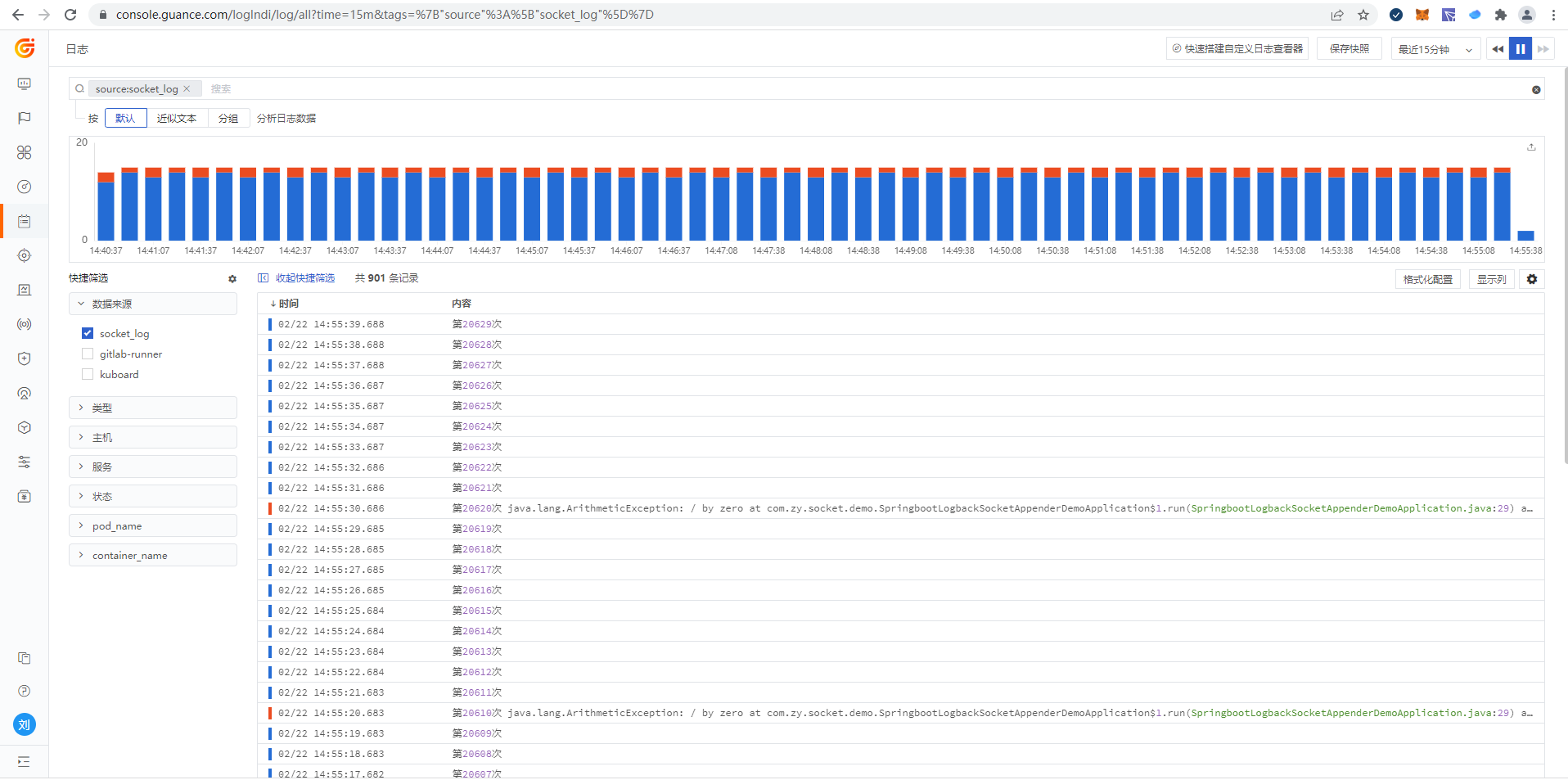
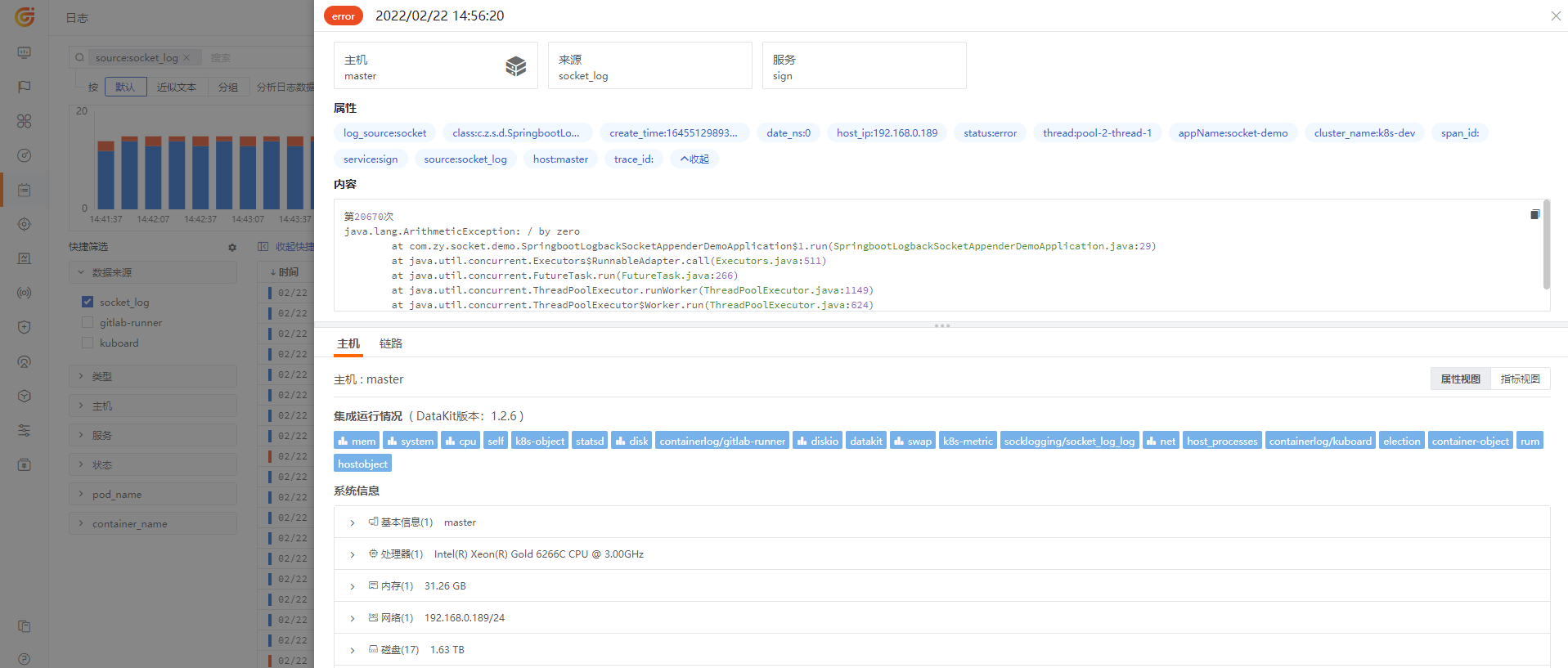
Viewing Logs in Guance
Log Explorer
Log details
Related Best Practices
<RUM-APM-LOG Correlation Analysis for Kubernetes Applications>