Best Practices for Observability of RuoYi Monolithic Application Deployed on Tomcat
This guide implements observability best practices for the RuoYi monolithic application running on an external Tomcat environment.
Implementation Goals
- Collect metrics
- Collect traces
- Collect logs
- Collect RUM data
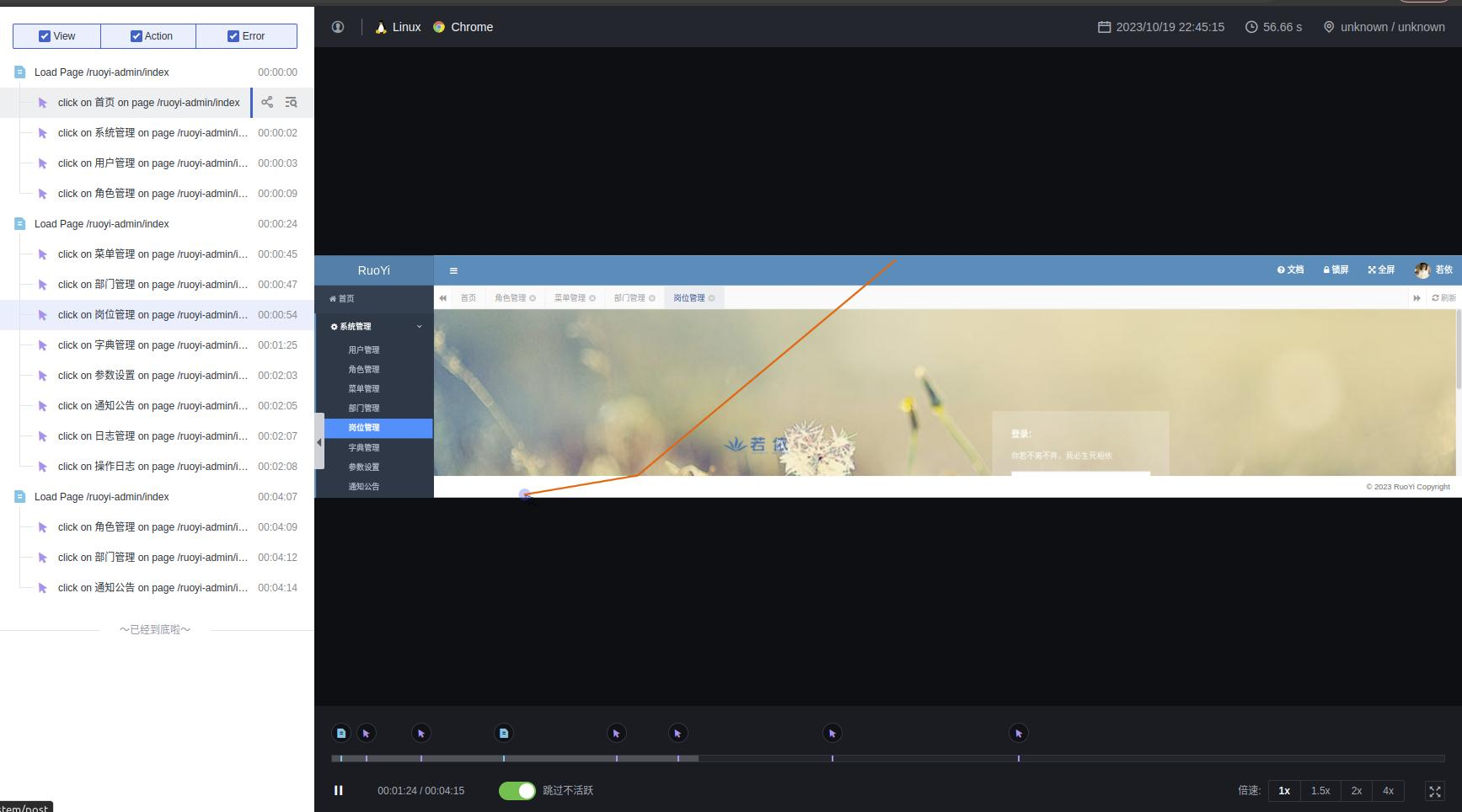
- Session Replay Capture the entire user session recording during frontend visits, including button clicks, interface interactions, dwell time, etc., to help understand user intent and reproduce operations.
Version Information
- Tomcat (9.0.81)
- Spring Boot (2.6.2)
- JDK (>=8)
- DDTrace (>=1.0)
Note
For Spring Boot projects, the major version of Tomcat must match the embedded Tomcat version in Spring Boot; otherwise, startup issues may occur.
RuoYi Monolithic Application
- Download source code
- Remove embedded Tomcat
Edit the pom.xml in the project root directory:
......
    <dependencyManagement>
        <dependencies>

            <!-- SpringBoot dependency configuration -->
            <dependency>
                <groupId>org.springframework.boot</groupId>
                <artifactId>spring-boot-dependencies</artifactId>
                <version>2.5.15</version>
                <type>pom</type>
                <scope>import</scope>
                <!-- Remove embedded Tomcat -->
                <exclusions>
                    <exclusion>
                        <artifactId>spring-boot-starter-tomcat</artifactId>
                        <groupId>org.springframework.boot</groupId>
                    </exclusion>
                </exclusions>
            </dependency>
......
- Output as
war
Edit the pom.xml file under the ruoyi-admin module:
- Configure logging
Create logback-spring.xml in ruoyi-admin/src/main/resources with the following content:
logback-spring.xml
<?xml version="1.0" encoding="UTF-8"?>
<configuration>
    <!-- Log storage path -->
    <property name="log.path" value="/home/root/ruoyi/logs" />
    <!-- Log output format -->
    <property name="log.pattern" value="%d{yyyy-MM-dd HH:mm:ss.SSS} [%thread] %-5level %logger - [%method,%line] %X{dd.service} %X{dd.trace_id} %X{dd.span_id} - %msg%n" />

    <!-- Console output -->
    <appender name="console" class="ch.qos.logback.core.ConsoleAppender">
        <encoder>
            <pattern>${log.pattern}</pattern>
        </encoder>
    </appender>

    <!-- System log output -->
    <appender name="file_info" class="ch.qos.logback.core.rolling.RollingFileAppender">
        <file>${log.path}/sys-info.log</file>
        <!-- Rolling policy: create log files based on time -->
        <rollingPolicy class="ch.qos.logback.core.rolling.TimeBasedRollingPolicy">
            <!-- Log file name pattern -->
            <fileNamePattern>${log.path}/sys-info.%d{yyyy-MM-dd}.log</fileNamePattern>
            <!-- Maximum history: 60 days -->
            <maxHistory>60</maxHistory>
        </rollingPolicy>
        <encoder>
            <pattern>${log.pattern}</pattern>
        </encoder>
        <filter class="ch.qos.logback.classic.filter.LevelFilter">
            <!-- Filter level -->
            <level>INFO</level>
            <!-- Action on match: accept (record) -->
            <onMatch>ACCEPT</onMatch>
            <!-- Action on mismatch: deny (do not record) -->
            <onMismatch>DENY</onMismatch>
        </filter>
    </appender>

    <appender name="file_error" class="ch.qos.logback.core.rolling.RollingFileAppender">
        <file>${log.path}/sys-error.log</file>
        <!-- Rolling policy: create log files based on time -->
        <rollingPolicy class="ch.qos.logback.core.rolling.TimeBasedRollingPolicy">
            <!-- Log file name pattern -->
            <fileNamePattern>${log.path}/sys-error.%d{yyyy-MM-dd}.log</fileNamePattern>
            <!-- Maximum history: 60 days -->
            <maxHistory>60</maxHistory>
        </rollingPolicy>
        <encoder>
            <pattern>${log.pattern}</pattern>
        </encoder>
        <filter class="ch.qos.logback.classic.filter.LevelFilter">
            <!-- Filter level -->
            <level>ERROR</level>
            <!-- Action on match: accept (record) -->
            <onMatch>ACCEPT</onMatch>
            <!-- Action on mismatch: deny (do not record) -->
            <onMismatch>DENY</onMismatch>
        </filter>
    </appender>

    <!-- User access log output -->
    <appender name="sys-user" class="ch.qos.logback.core.rolling.RollingFileAppender">
        <file>${log.path}/sys-user.log</file>
        <rollingPolicy class="ch.qos.logback.core.rolling.TimeBasedRollingPolicy">
            <!-- Roll daily -->
            <fileNamePattern>${log.path}/sys-user.%d{yyyy-MM-dd}.log</fileNamePattern>
            <!-- Maximum history: 60 days -->
            <maxHistory>60</maxHistory>
        </rollingPolicy>
        <encoder>
            <pattern>${log.pattern}</pattern>
        </encoder>
    </appender>

    <!-- System module log level control -->
    <logger name="com.ruoyi" level="info" />
    <!-- Spring log level control -->
    <logger name="org.springframework" level="warn" />

    <root level="info">
        <appender-ref ref="console" />
    </root>

    <!-- System operation logs -->
    <root level="debug">
        <appender-ref ref="file_info" />
        <appender-ref ref="file_error" />
    </root>

    <!-- System user operation logs -->
    <logger name="sys-user" level="info">
        <appender-ref ref="sys-user"/>
    </logger>
</configuration>
- Build
Run the following command in the project root directory to build:
If Maven is not installed, install it first before building.
[INFO] --- spring-boot:2.5.15:repackage (default) @ ruoyi-admin ---
[INFO] Replacing main artifact with repackaged archive
[INFO] ------------------------------------------------------------------------
[INFO] Reactor Summary for ruoyi 4.7.7:
[INFO]
[INFO] ruoyi .............................................. SUCCESS [  0.179 s]
[INFO] ruoyi-common ....................................... SUCCESS [  4.622 s]
[INFO] ruoyi-system ....................................... SUCCESS [  0.770 s]
[INFO] ruoyi-framework .................................... SUCCESS [  0.950 s]
[INFO] ruoyi-quartz ....................................... SUCCESS [  0.388 s]
[INFO] ruoyi-generator .................................... SUCCESS [  0.378 s]
[INFO] ruoyi-admin ........................................ SUCCESS [  4.554 s]
[INFO] ------------------------------------------------------------------------
[INFO] BUILD SUCCESS
[INFO] ------------------------------------------------------------------------
[INFO] Total time:  12.287 s
[INFO] Finished at: 2023-10-13T16:30:12+08:00
[INFO] ------------------------------------------------------------------------
DataKit
- Install DataKit
- Enable collectors
Install DataKit
Refer to the DataKit Installation Guide.
Enable the DDTrace Collector on DataKit
The DDTrace Collector is used to collect application trace data. Refer to the DDTrace Collector integration guide.
Enable the Log Collector on DataKit
The Log Collector is used to collect log data. Refer to the Log Collector integration guide.
Adjust the following settings:
 logfiles = [
    "/home/liurui/ruoyi/logs/*.log",
  ]
  ## Add service tag, if it's empty, use $source.
  service = "ruoyi"

  ## Grok pipeline script name.
  pipeline = "ruoyi.p"
logfiles: Paths to the log files to be collected.service: Service name.pipeline: Log parsing pipeline.
Pipeline Configuration
Pipeline is used for data governance. Here, it extracts information from logs to correlate with trace data.
Create a file ruoyi.p in the datakit/pipeline/ directory with the following content:
grok(_, "%{TIMESTAMP_ISO8601:time} %{NOTSPACE:thread_name} %{LOGLEVEL:status}%{SPACE}%{NOTSPACE:class_name} - \\[%{NOTSPACE:method_name},%{NUMBER:line}\\] %{DATA:service_name2} %{DATA:trace_id} %{DATA:span_id} - %{GREEDYDATA:msg}")

default_time(time,"Asia/Shanghai")
Enable the StatsD Collector on DataKit
The StatsD Collector is used to collect metrics. Refer to the StatsD Collector integration guide.
Enable the RUM Collector on DataKit
The RUM Collector: The RUM (Real User Monitoring) collector gathers Real User Monitoring data reported from web or mobile clients. Refer to the RUM Collector integration guide.
Restart DataKit
DDTrace
Download dd-trace-java — use the latest version if possible.
Create a RUM Application
- Log in to Guance
- Go to User Access Monitoring, select Application List, and click Create Application.
- Set Application Name to
ruoyi-admin. You can either customize the Application ID or click Random Generate. - Set Application Type to
web. Under SDK Configuration on the right, choose CDN Sync Load. Copy the corresponding script content; it will be used later. - Click Create to finish.
Tomcat
Download Tomcat
Download the appropriate version of Tomcat.
Configure DDTrace
Create a setenv.sh script file in the Tomcat bin directory:
export CATALINA_OPTS="-javaagent:/home/root/agent/dd-java-agent-1.14.0-guance.jar \
                      -Ddd.tags=env:test \
                      -Ddd.jmxfetch.enabled=true \
                      -Ddd.jmxfetch.statsd.host=localhost \
                      -Ddd.jmxfetch.statsd.port=8125 \
                      -Ddd.jmxfetch.tomcat.enabled=true\
                      -Dlogging.config=classpath:logback-spring.xml"
javaagent: Path to the DDTrace agent.Dlogging.config: Specifies the application's logging configuration usinglogback. If the application uses log4j internally, specify the corresponding file instead.
Deploy the Application
Copy the built application RuoYi/ruoyi-admin/target/ruoyi-admin.war to Tomcat's webapps directory.
Start Tomcat
Run bin/startup.sh:
apache-tomcat-9.0.81/bin$ ./startup.sh
Using CATALINA_BASE:   /home/root/middleware/apache-tomcat-9.0.81
Using CATALINA_HOME:   /home/root/middleware/apache-tomcat-9.0.81
Using CATALINA_TMPDIR: /home/root/middleware/apache-tomcat-9.0.81/temp
Using JRE_HOME:        /home/root/middleware/jdk/jdk-11.0.18
Using CLASSPATH:       /home/root/middleware/apache-tomcat-9.0.81/bin/bootstrap.jar:/home/root/middleware/apache-tomcat-9.0.81/bin/tomcat-juli.jar
Using CATALINA_OPTS:   -javaagent:/home/root/agent/dd-java-agent-1.14.0-guance.jar                       -Ddd.tags=env:test                       -Ddd.jmxfetch.enabled=true                       -Ddd.jmxfetch.statsd.host=localhost                       -Ddd.jmxfetch.statsd.port=8125                       -Ddd.jmxfetch.tomcat.enabled=true                      -Dlogging.config=classpath:logback-spring.xml
Tomcat started.
Integrate RUM
After Tomcat starts, the war application is automatically extracted. Navigate to /webapps/ruoyi-admin/WEB-INF/classes/templates, edit include.html, and paste the script code copied in the previous step inside the <head> tag.
<head th:fragment=header(title)>
...
<script src="https://static.guance.com/browser-sdk/v3/dataflux-rum.js" type="text/javascript"></script>
<script>
  window.DATAFLUX_RUM &&
    window.DATAFLUX_RUM.init({
      applicationId: 'APP_ID',
      datakitOrigin: 'http://localhost:9529', // Protocol (including ://), domain (or IP address) [and port]
      env: 'production',
      version: '1.0.0',
      service: 'browser',
      sessionSampleRate: 100,
      sessionReplaySampleRate: 70,
      trackInteractions: true,
      traceType: 'ddtrace', // Optional, defaults to ddtrace. Currently supports: ddtrace, zipkin, skywalking_v3, jaeger, zipkin_single_header, w3c_traceparent
      allowedTracingOrigins: ['http://localhost:8080','http://localhost:8080/ruoyi-admin'],  // Optional, list of origins (or regex) allowed to inject trace collector headers.
    });
    window.DATAFLUX_RUM && window.DATAFLUX_RUM.startSessionReplayRecording()
</script>
...
</head>
applicationId: If copied from the creation step, no adjustment is needed.datakitOrigin: The DataKit address that receives RUM data.allowedTracingOrigins: Connects with the backend APM; when the frontend calls API endpoints, the required Trace headers are added to those requests.
Results
Access http://localhost:8080/ruoyi-admin. Default username: admin, password: admin123.
Logs
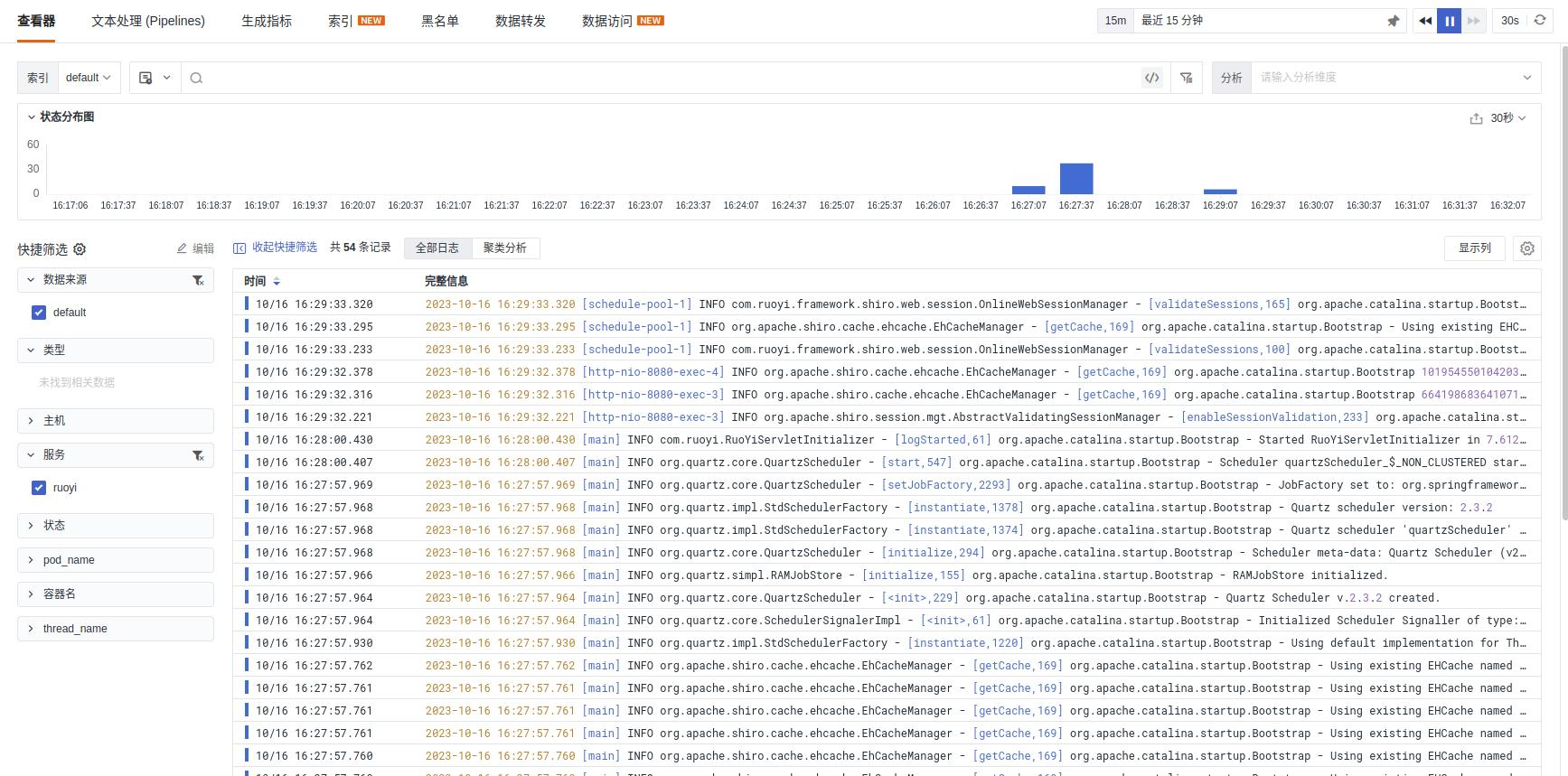
Click into a log entry to view the associated trace information:

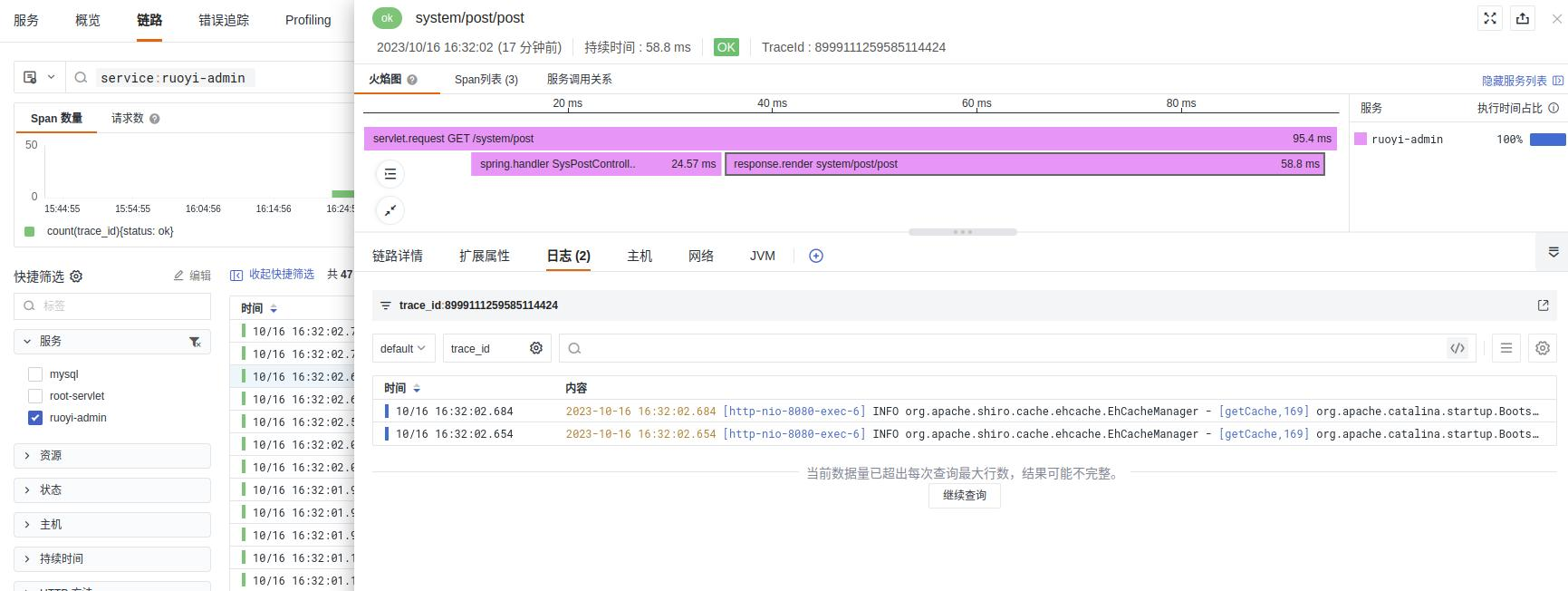
Trace Data
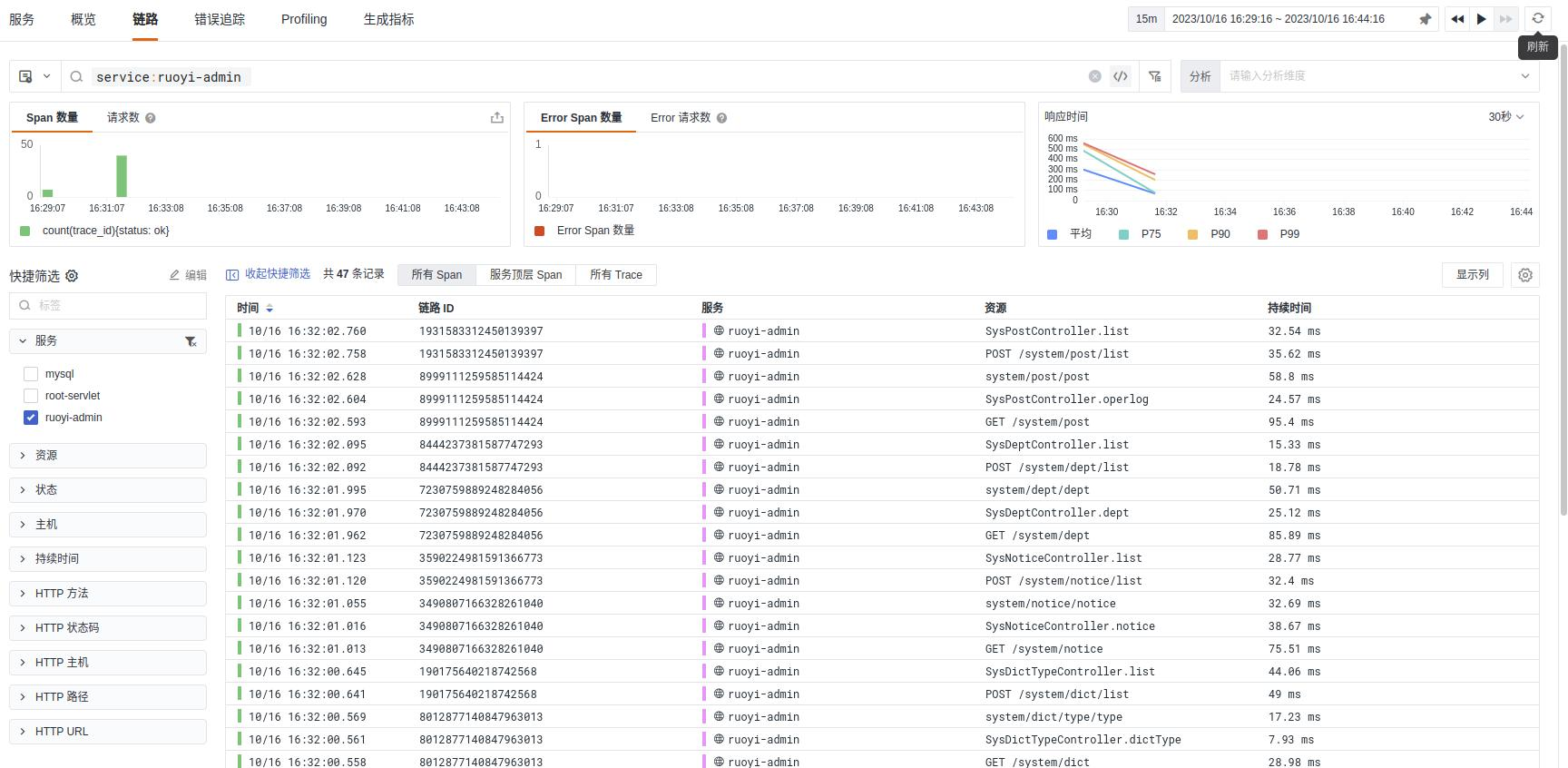
You can also view logs and metrics from the trace view:
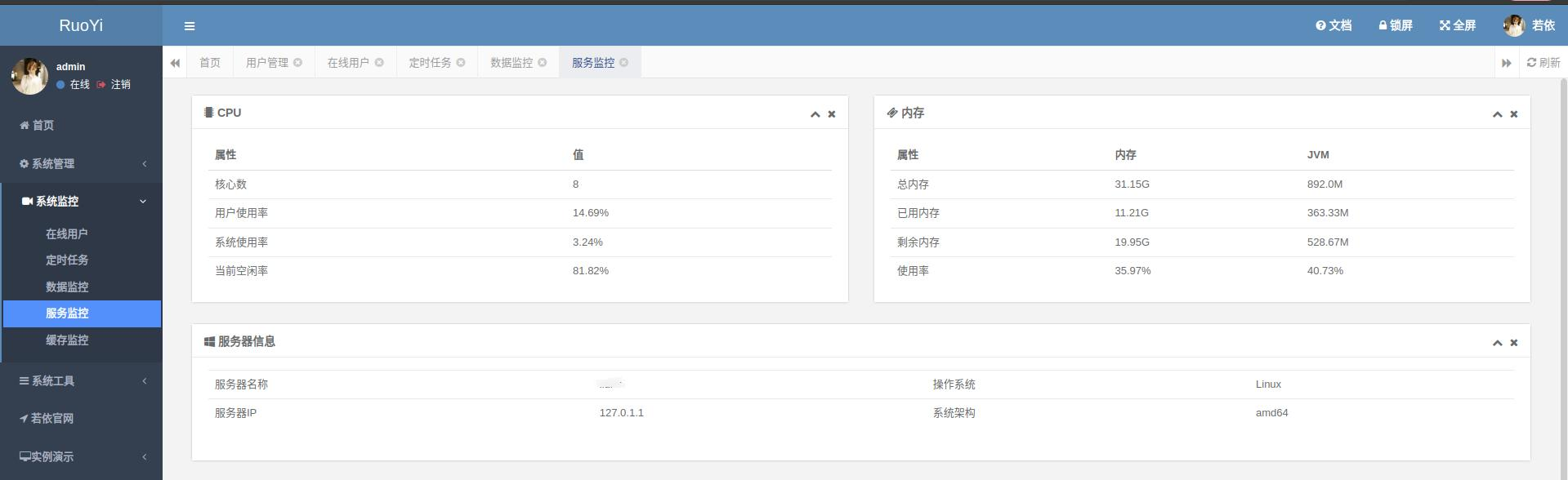
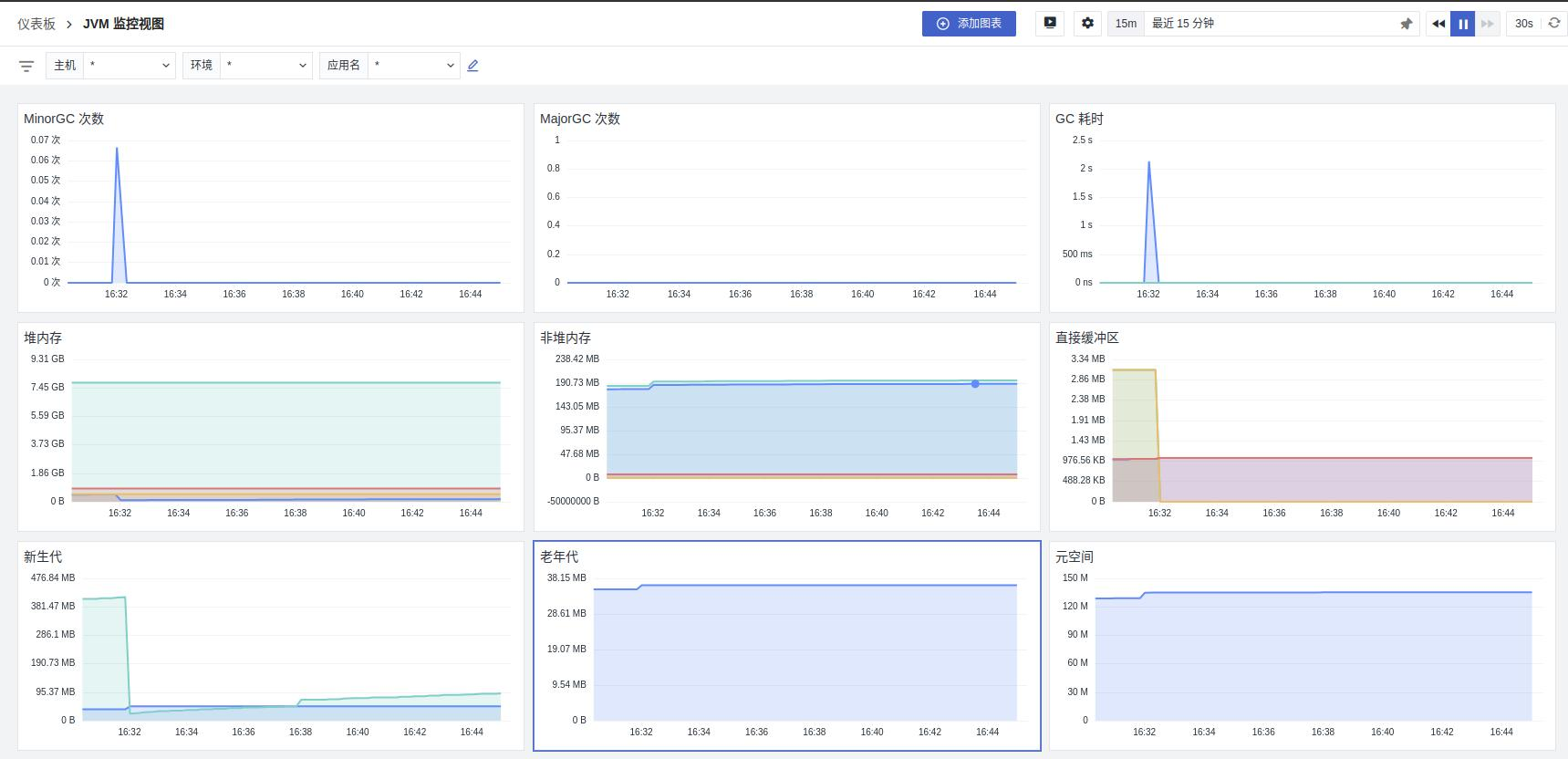
Metrics
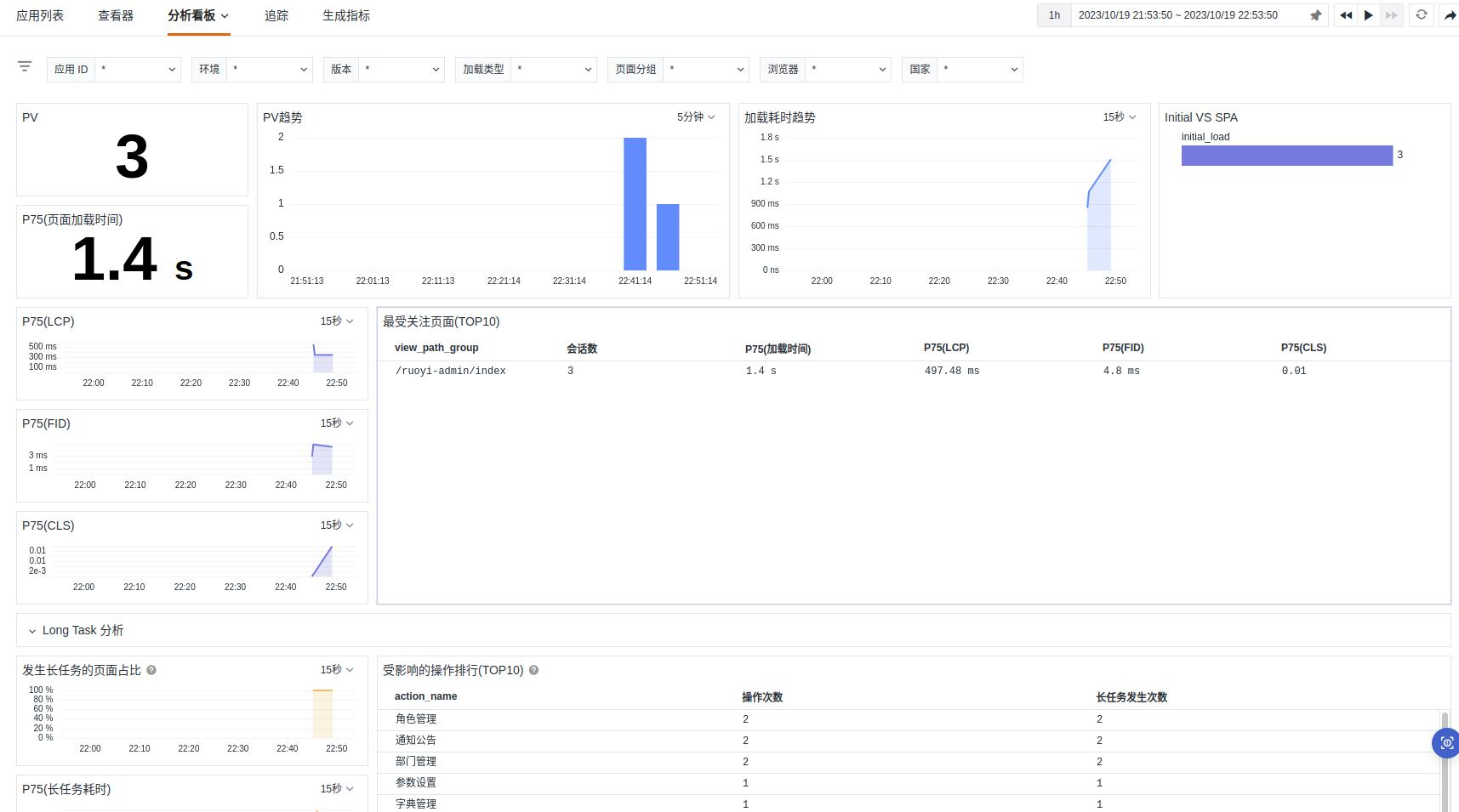
RUM Dashboard
Session Replay