Scheck Connection to DataKit
- Version: 1.0.7-7-g251eead
- Release Date: 2023-04-06 11:17:57
- Supported OS: windows/amd64, windows/386, linux/arm, linux/arm64, linux/386, linux/amd64
To address the security issues mentioned above, Scheck, developed by DataFlux, provides a new secure scripting approach to ensure all behaviors are safe and controllable:
- Scheck uses the Lua language to write detection scripts and executes them on a scheduled basis. The Lua runtime is provided by Scheck, which ensures that only safe operations are allowed in scripts (restricting command execution, local I/O, and network I/O).
- Each detection rule in Scheck consists of a script and a manifest file. The manifest file defines the format of the detection result, which is then reported as a log via a unified network model.
Additionally, Scheck provides a massive library of updatable rule scripts covering system, container, network, security, and other inspection areas.
Prerequisites
| Service Name | Version | Required | Purpose |
|---|---|---|---|
| DataKit | 1.1.6 or later Installation Guide | Yes | Accept Scheck signals |
Real-Time Collection of Host Security Status with DataFlux (Enabled by Default)
Scheck supports sending detection results to DataKit, so install DataKit first.
After installing Scheck, edit the configuration file scheck.conf in the /usr/local/scheck/ directory:
...
[scoutput]
   # ##Messages generated during security checks can be sent to local, http, or Alibaba Cloud SLS.
   # ##Remote server, e.g.: http(s)://your.url
  [scoutput.http]
    enable = true
    output = "http://127.0.0.1:9529/v1/write/security"
...
Edit the Scheck configuration file (usually located at /usr/local/scheck/scheck.conf), point output to the DataKit time series data interface, and set enable to true:
output = 'http://localhost:9529/v1/write/security' # Supported by DataKit 1.1.6 (inclusive) and later
Place the written detection rules in the directory specified by rule_dir in the configuration file, and Scheck will automatically execute them on a scheduled basis.
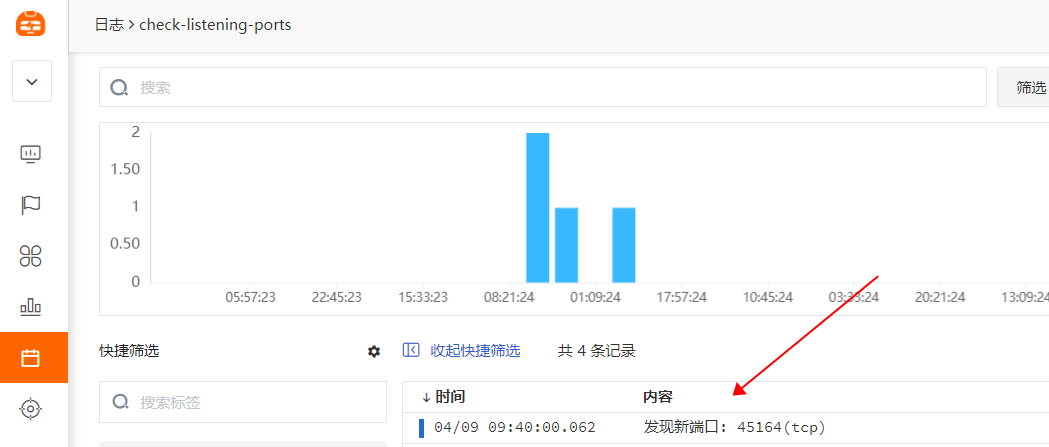
Next, when a detection event is triggered (assuming monitoring changes to the Linux passwd file), Scheck sends the collected logs to DataKit, which then forwards them to the DataFlux platform. You can then view the corresponding logs on the DataFlux platform: