Best Practices for Observing Java OOM Exceptions
Common OOM Exception Scenarios
- Heap overflow –
java.lang.OutOfMemoryError: Java heap space.- Stack overflow –
java.lang.OutOfMemoryError.- Stack overflow –
java.lang.StackOverFlowError.- Metaspace overflow –
java.lang.OutOfMemoryError: Metaspace.- Direct buffer memory overflow –
java.lang.OutOfMemoryError: Direct buffer memory.- GC overhead limit exceeded –
java.lang.OutOfMemoryError: GC overhead limit exceeded.
Garbage Collectors
Garbage collectors are the practitioners of memory reclamation. Garbage collectors can vary greatly across different vendors and different versions of the virtual machine. Different virtual machines generally provide various parameters for users to combine collectors for different memory generations based on their application characteristics and requirements. — Deep Understanding of the Java Virtual Machine
Regarding garbage collectors (also called garbage collectors), the third edition of Deep Understanding of the Java Virtual Machine has already listed most of them in its table of contents, as shown in the figure below:

Viewing the Local JVM Garbage Collector
Use the command java -XX:+PrintFlagsFinal -version |FINDSTR /i ":" to view the local garbage collector. The output shows Parallel.
C:\Users\lenovo>java -XX:+PrintFlagsFinal -version |FINDSTR /i ":"
     intx CICompilerCount                          := 4                                   {product}
    uintx InitialHeapSize                          := 266338304                           {product}
    uintx MaxHeapSize                              := 4257218560                          {product}
    uintx MaxNewSize                               := 1418723328                          {product}
    uintx MinHeapDeltaBytes                        := 524288                              {product}
    uintx NewSize                                  := 88604672                            {product}
    uintx OldSize                                  := 177733632                           {product}
     bool PrintFlagsFinal                          := true                                {product}
     bool UseCompressedClassPointers               := true                                {lp64_product}
     bool UseCompressedOops                        := true                                {lp64_product}
     bool UseLargePagesIndividualAllocation        := false                               {pd product}
     bool UseParallelGC                            := true                                {product}
java version "1.8.0_101"
Java(TM) SE Runtime Environment (build 1.8.0_101-b13)
Java HotSpot(TM) 64-Bit Server VM (build 25.101-b13, mixed mode)
Viewing the JVM Garbage Collector in a K8s Environment
In a K8s environment, openjdk:8-jdk-alpine or openjdk:8u292 is typically used as the base image. No garbage collector is found enabled after starting the service.
root@ruoyi-system-c9c54dbd5-ltcvf:/data/app#
root@ruoyi-system-c9c54dbd5-ltcvf:/data/app# java -XX:+PrintCommandLineFlags -version
-XX:InitialHeapSize=8388608 -XX:MaxHeapSize=134217728 -XX:+PrintCommandLineFlags -XX:+UseCompressedClassPointers -XX:+UseCompressedOops
openjdk version "1.8.0_292"
OpenJDK Runtime Environment (build 1.8.0_292-b10)
OpenJDK 64-Bit Server VM (build 25.292-b10, mixed mode)
root@ruoyi-system-c9c54dbd5-ltcvf:/data/app#
Prerequisites
1. JDK version is 1.8, also known as JDK8.
Each JDK has a different garbage collection mechanism, and the memory structure has also changed significantly, especially across versions 1.6, 1.7, and 1.8. Most enterprises currently use JDK 1.8. This best practice is also based on JDK 1.8. For other JDK versions, you can adapt the ideas.
2. Enable JVM observability.
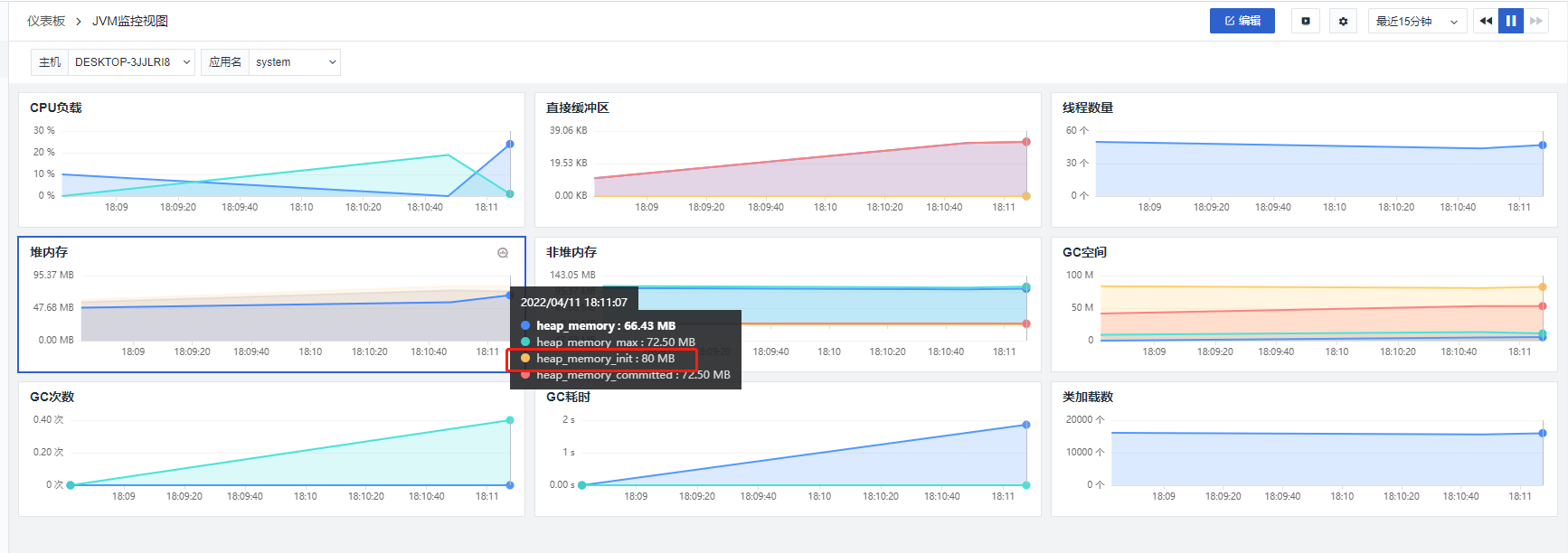
First, enable JVM Observability. From the Guance view, we can see that the initial heap memory is 80 M, which matches the parameter specified at startup.
3. Enable log observability.
Refer to Several Ways to Collect Logs in a Kubernetes Cluster. This practice uses the socket method, but other methods are also acceptable.
Heap Overflow – java.lang.OutOfMemoryError: Java heap space
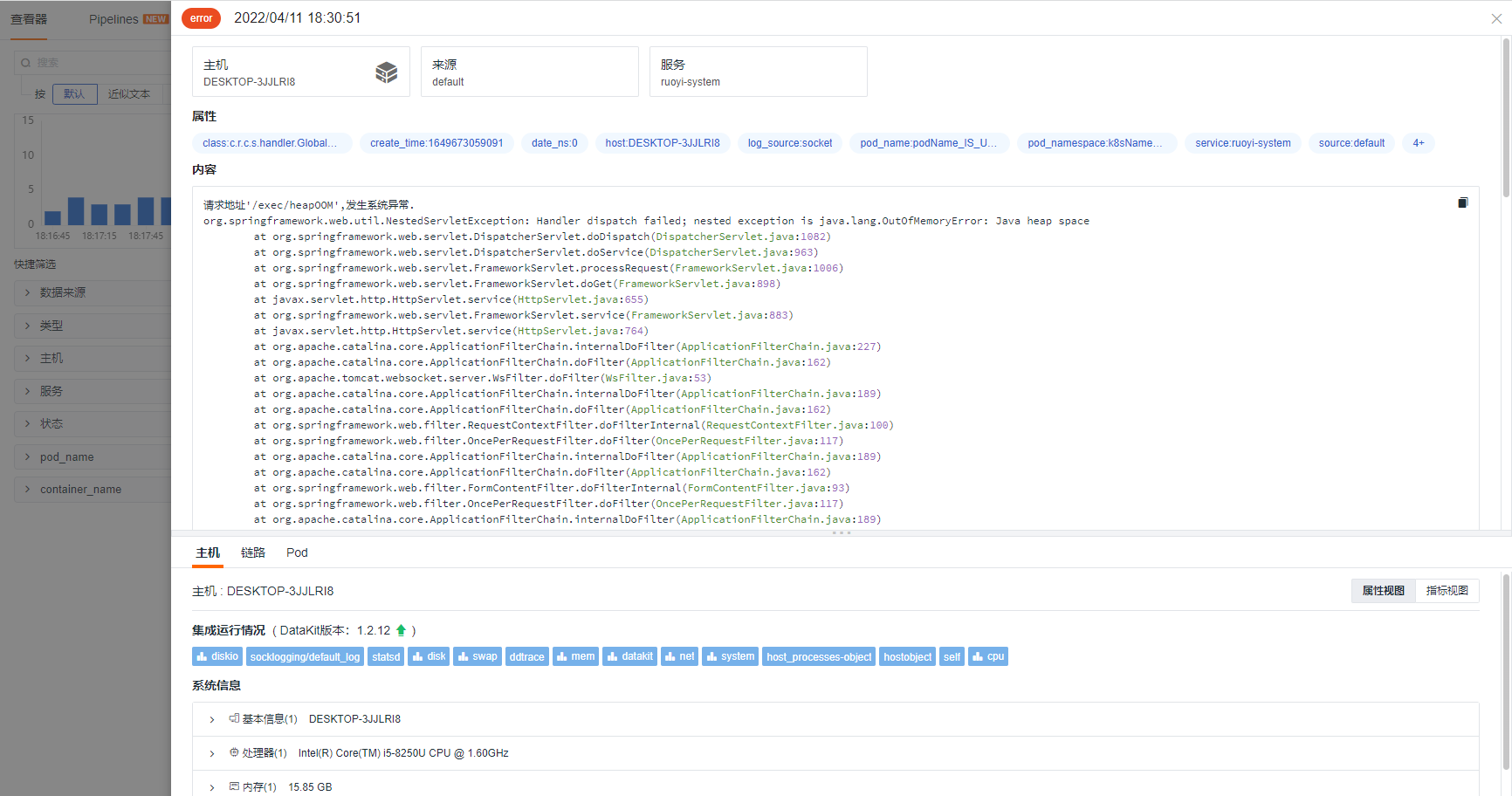
The heap overflow exception is very common. It occurs when objects in the heap cannot be reclaimed, the heap memory continues to increase, reaches the maximum heap memory, and the heap is full. Below is the code sample to trigger the overflow. Set the maximum heap memory to -Xmx80m, which will cause the error to appear quickly after running.
1. Startup Parameters
-Xmx80m -javaagent:C:/"Program Files"/datakit/data/dd-java-agent.jar -Ddd.service.name=system -Ddd.agent.port=9529
2. Request
Open http://localhost:9201/exec/heapOOM in a browser. Wait for a while until the exception is output. Then go to Guance to view the corresponding logs.
3. View Logs in Guance
Stack Overflow – java.lang.OutOfMemoryError
The thrown exception is as follows. If threads need to be created, adjust the stack frame size -Xss512k. The default stack frame size is 1M. If set smaller, more threads can be created. If the stack frame is insufficient, use the jstack command to export the current thread state to a file, then upload the file to the fastthread.io website for analysis. If the code indeed requires many threads, reduce the heap memory or Xss according to JVM total memory - heap = n * Java virtual machine stack to increase the number of allocatable threads.
1. Startup Parameters
-Xmx80m -javaagent:C:/"Program Files"/datakit/data/dd-java-agent.jar -Ddd.service.name=system -Ddd.agent.port=9529
2. Request
Open http://localhost:9201/exec/stackOOM in a browser.
3. View Logs in Guance
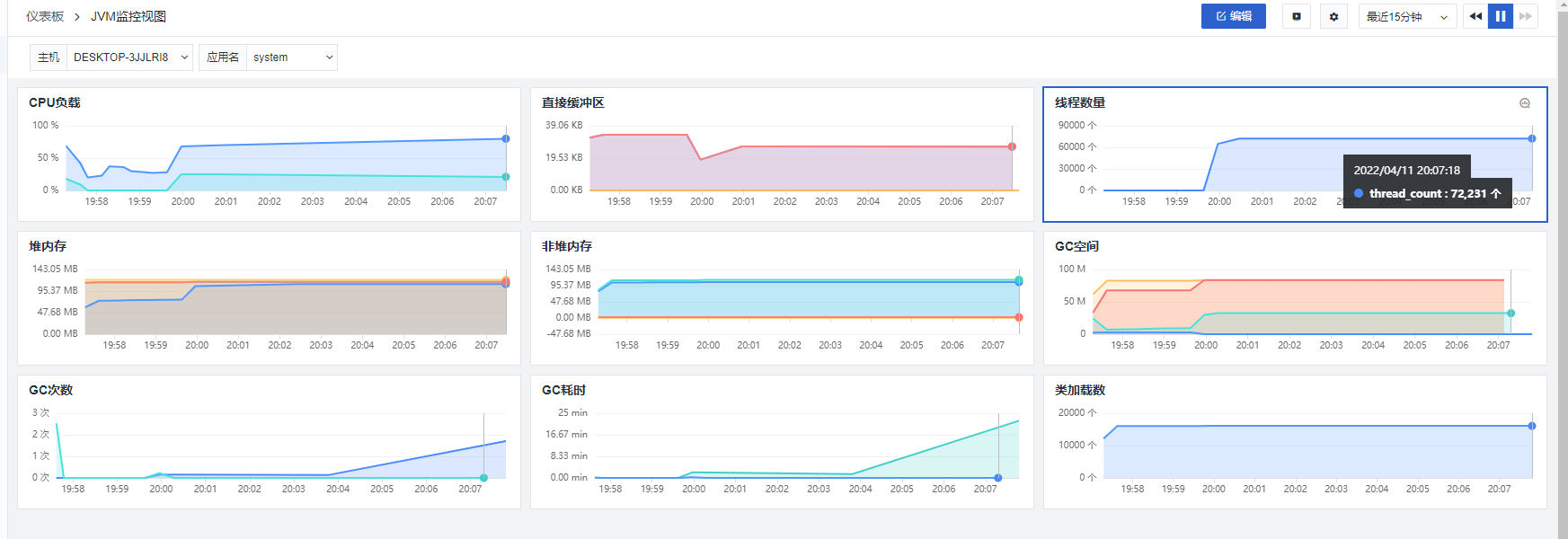
Threads are created instantly. The JVM built-in tools no longer report thread-related monitoring metrics, but Guance still reports the latest JVM monitoring metrics.
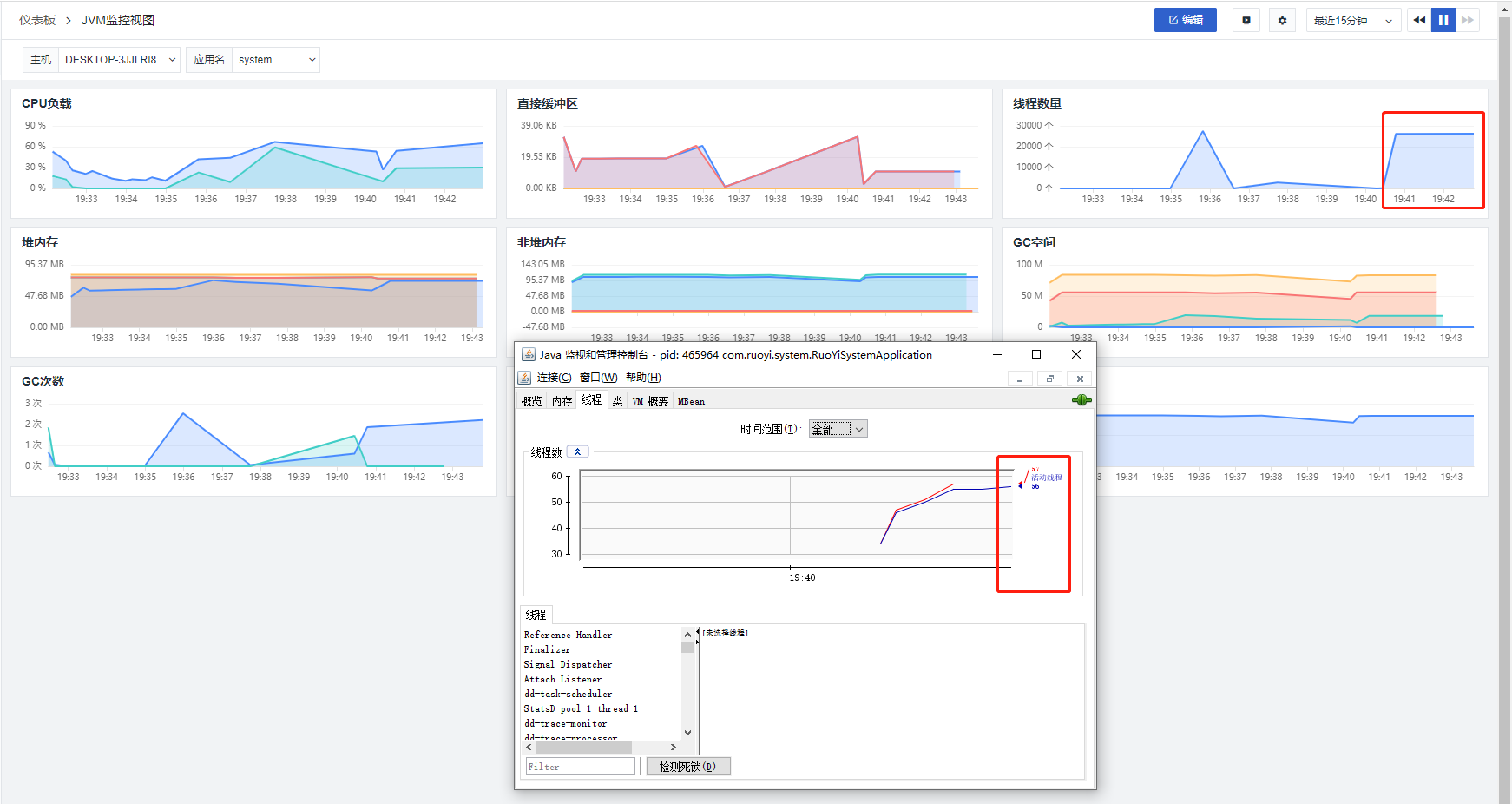
After a while, the JVM built-in tools show an exception.
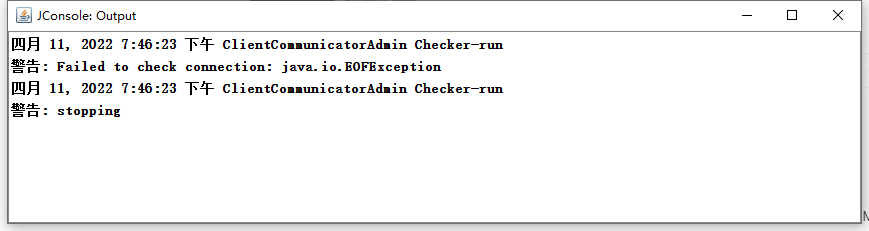
Then the system appears to hang.
Stack Overflow – java.lang.StackOverFlowError
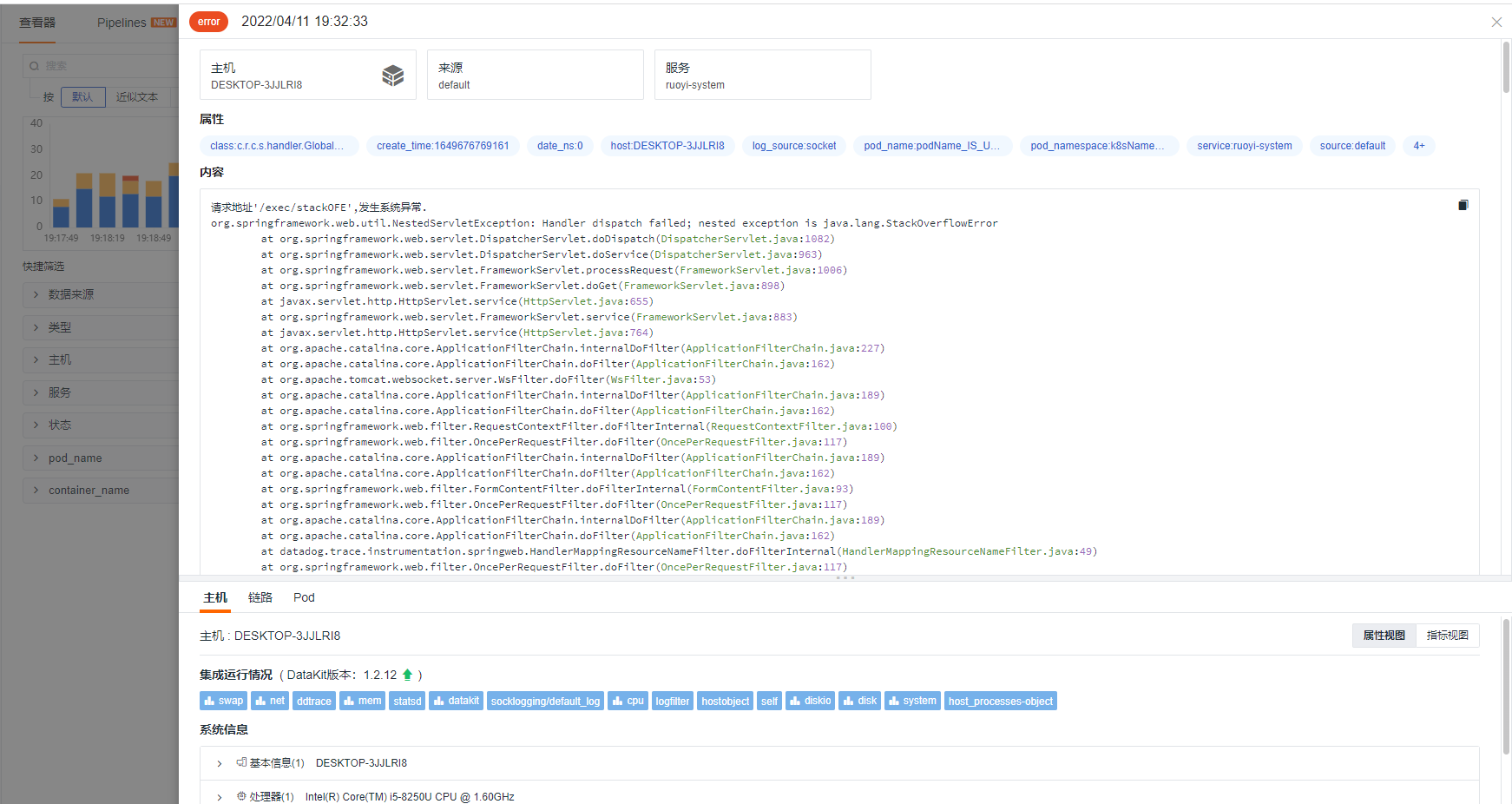
This mainly occurs in recursive calls or infinite loops. Whether due to a stack frame being too large or the virtual machine stack capacity being too small, when a new stack frame cannot be allocated, the HotSpot virtual machine throws a StackOverFlowError. Each time the program recurses, data results (including pointers) are pushed onto the stack. A larger stack frame is needed to withstand more recursive calls.
1. Startup Parameters
-Xmx80m -javaagent:C:/"Program Files"/datakit/data/dd-java-agent.jar -Ddd.service.name=system -Ddd.agent.port=9529
2. Request
Open http://localhost:9201/exec/stackOFE in a browser.
3. View Logs in Guance
Metaspace Overflow – java.lang.OutOfMemoryError: Metaspace
After JDK 8, the permanent generation was completely removed, and Metaspace took its place. The Metaspace area also became the method area. Under default settings, it is difficult to force a method area (Metaspace) overflow. It stores class-related information, constant pool, method descriptors, field descriptors, etc. Generating a large number of classes at runtime can cause this area to overflow. If -XX:MetaspaceSize and -XX:MaxMetaspaceSize are set too small at startup, the application will fail to start.
1. Startup Parameters
-Xmx80m -XX:MetaspaceSize=30M -XX:MaxMetaspaceSize=90M -javaagent:C:/"Program Files"/datakit/data/dd-java-agent.jar -Ddd.service.name=system -Ddd.agent.port=9529
2. Request
Open http://localhost:9201/exec/metaspaceOOM in a browser.
3. View Logs
After Metaspace overflow, logs and other operations will no longer be written.
Direct Buffer Memory Overflow – java.lang.OutOfMemoryError: Direct buffer memory
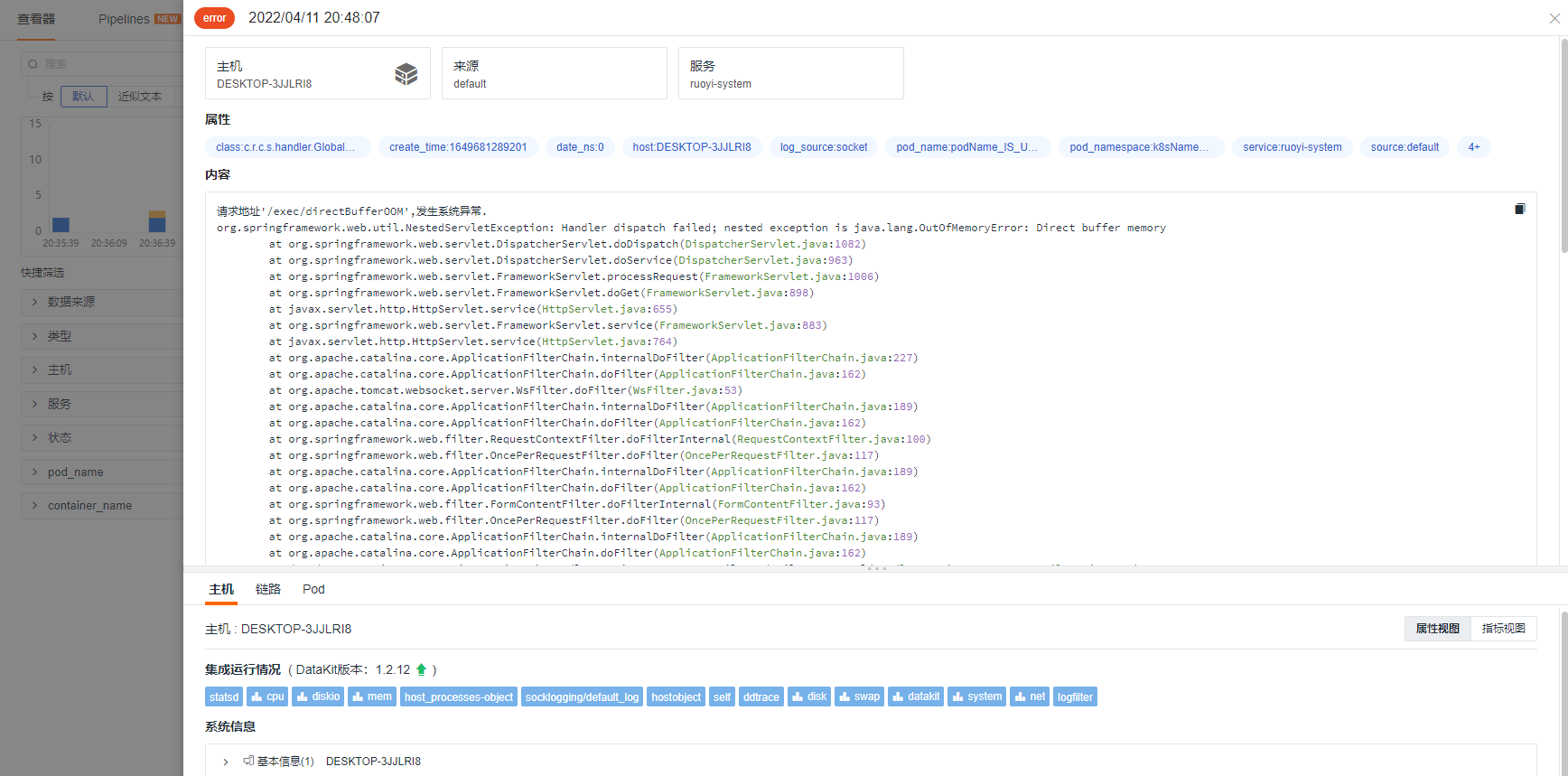
In addition to heap memory, we may also use direct memory (off-heap memory). NIO uses direct memory to avoid switching between Java Heap and native Heap, improving performance. By default, the size of direct memory is the same as the heap memory. Off-heap memory is not limited by the JVM but is constrained by the total machine memory. The following code sets the maximum heap memory to 80m and direct memory to 70m, then allocates 1M each time into a list. After about 70 allocations (fewer for a Spring Boot application), the next allocation will throw nested exception is java.lang.OutOfMemoryError: Direct buffer memory.
1. Startup Parameters
-Xmx80m -javaagent:C:/"Program Files"/datakit/data/dd-java-agent.jar -Ddd.service.name=system -Ddd.agent.port=9529
2. Request
Open http://localhost:9201/exec/directBufferOOM in a browser.
3. View Logs in Guance
GC Overhead Limit Exceeded – java.lang.OutOfMemoryError: GC overhead limit exceeded
The previous three types can all cause this error. JDK 1.6 introduced this error type. It occurs when the heap memory is too small. If 98% of GC time recovers less than 2% of the heap, this error is thrown. It indicates a problem with the minimum and maximum memory settings.
Guance
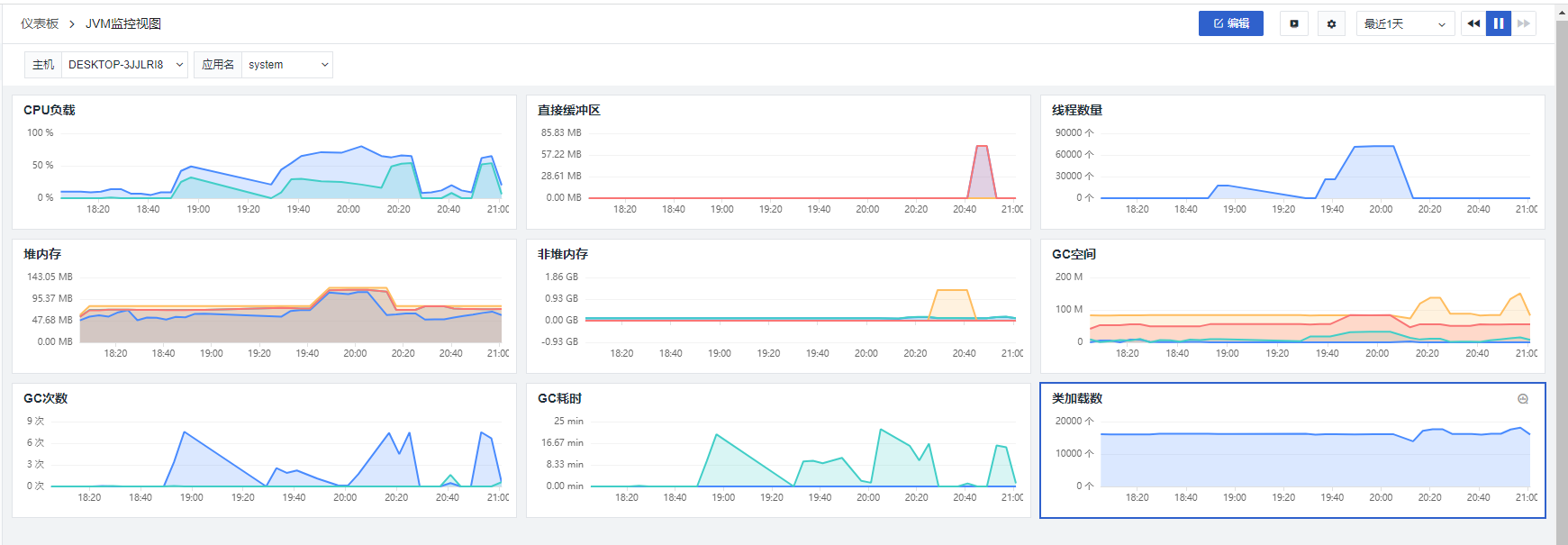
Regardless of the exception type, you can find clues in the Guance JVM Monitoring View and, combined with log analysis, tune the JVM parameters. Events such as too many or too few GCs, long GC pauses, sudden thread increases, or sudden heap memory increases all require attention.
Guance OOM Log Alerting
The above OOM exception scenarios only demonstrate how to generate exceptions and how they appear in Guance. In real production, OOM exceptions can affect business logic and, in severe cases, cause system outages. You can use the Guance alerting feature to quickly notify relevant personnel for intervention.
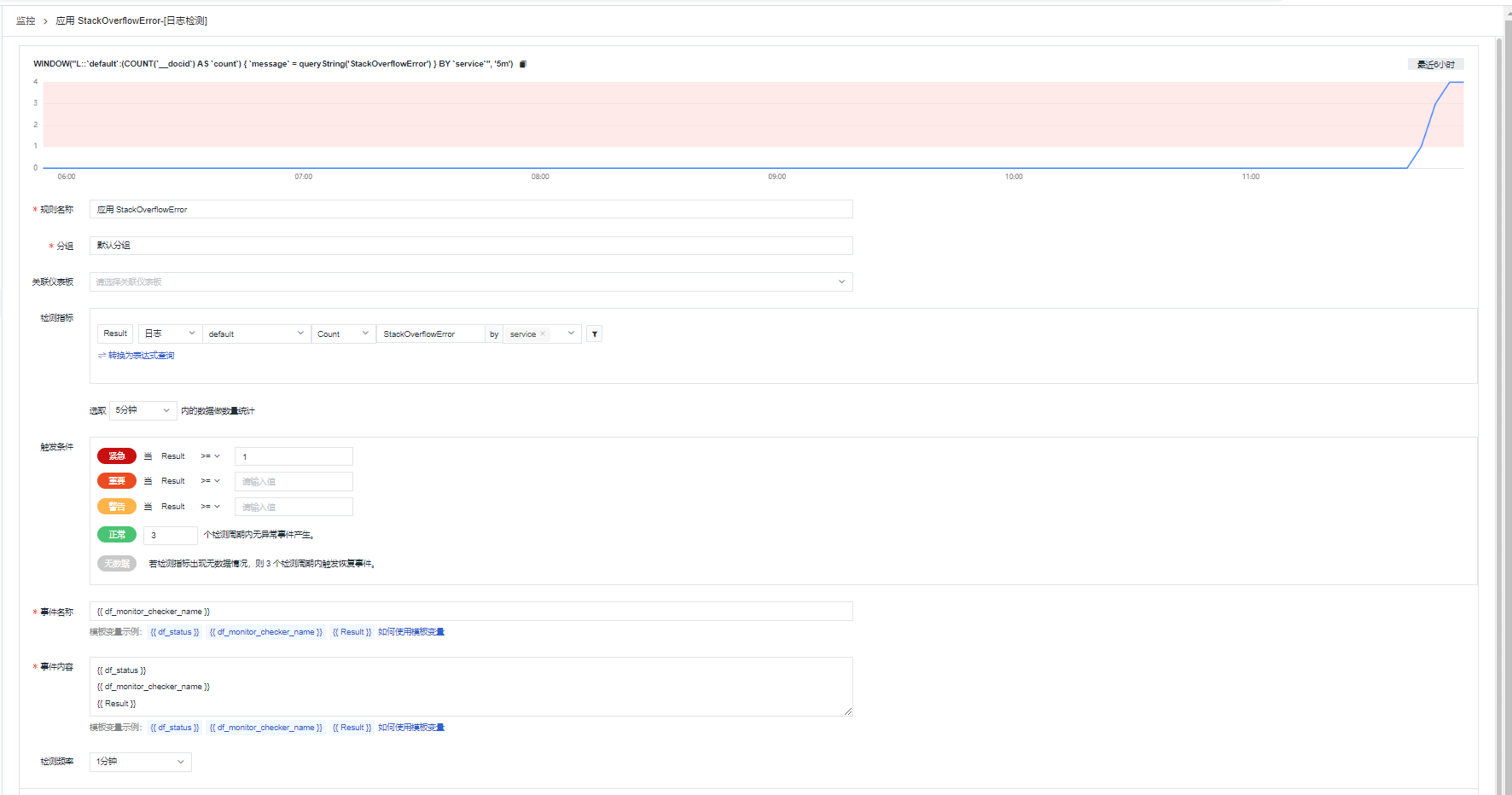
Configure StackOverflowError Detection
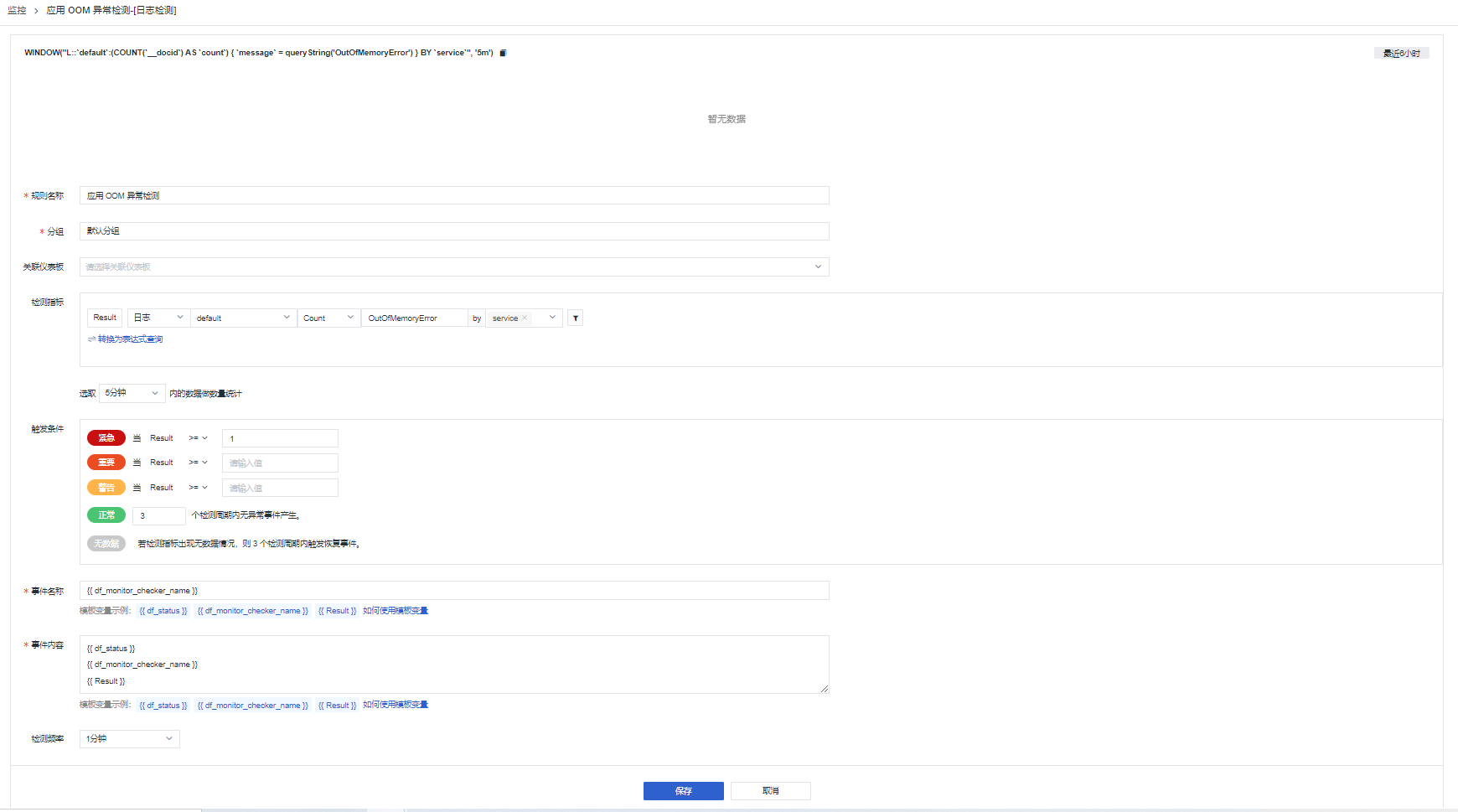
Configure OutOfMemoryError Detection
Configure Alert Notifications
Monitor list – Group, click the alert notification button.
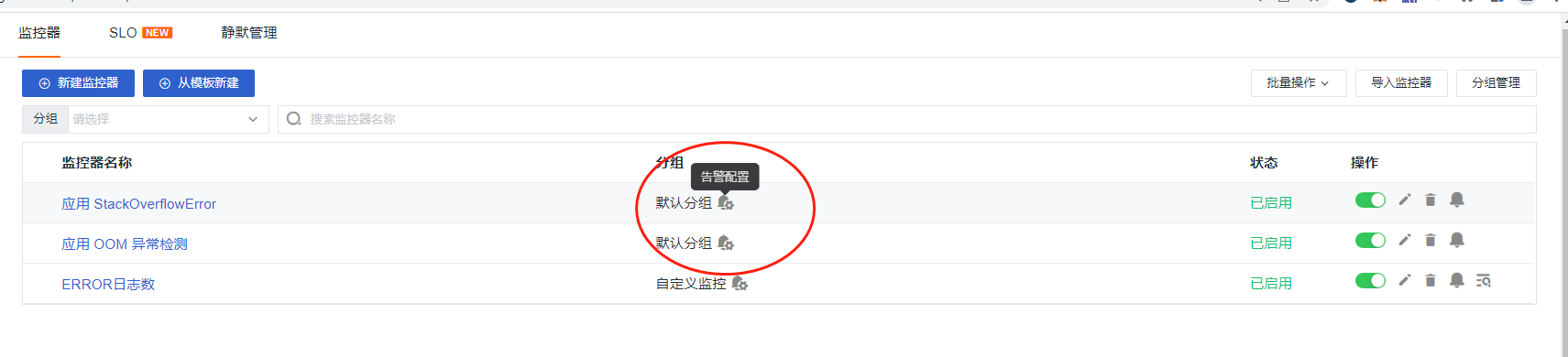
Configure the notification target. Guance supports multiple notification methods. Currently, email notification is used.

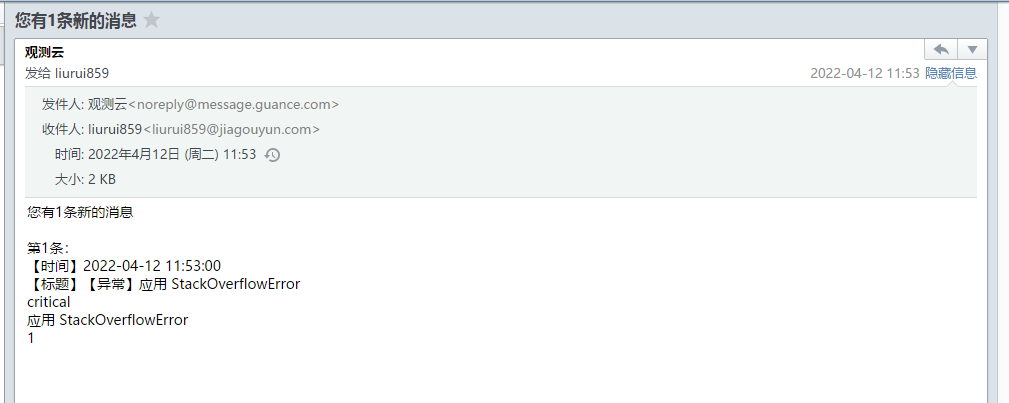
When an exception is triggered, you will receive an email notification with the following content:
Demo Code
This code is demonstrated using the RuoYi microservice framework.
package com.ruoyi.system.controller;

import com.ruoyi.common.core.domain.system.SysDept;
import com.ruoyi.common.core.web.domain.AjaxResult;
import org.springframework.cglib.proxy.Enhancer;
import org.springframework.cglib.proxy.MethodInterceptor;
import org.springframework.cglib.proxy.MethodProxy;
import org.springframework.web.bind.annotation.GetMapping;
import org.springframework.web.bind.annotation.RequestMapping;
import org.springframework.web.bind.annotation.RestController;

import java.lang.reflect.Method;
import java.nio.ByteBuffer;
import java.util.ArrayList;
import java.util.List;
import java.util.concurrent.TimeUnit;

/**
 * @author liurui
 * @date 2022/4/11 9:28
 */
@RequestMapping("/exec")
@RestController
public class ExceptionController {

    @GetMapping("/heapOOM")
    public AjaxResult heapOOM() {
        List<SysDept> list = new ArrayList<>();
        while (true) {
            try {
                TimeUnit.MILLISECONDS.sleep(1);
            } catch (InterruptedException e) {
                e.printStackTrace();
            }
            list.add(new SysDept());
        }
    }

    @GetMapping("/stackOOM")
    public AjaxResult stackOOM() {
        while (true) {
            Thread thread = new Thread(() -> {
                while (true) {
                    try {
                        TimeUnit.HOURS.sleep(1);
                    } catch (InterruptedException e) {
                        e.printStackTrace();
                    }
                }

            });
            thread.start();
        }
    }

    @GetMapping("/directBufferOOM")
    public AjaxResult directBufferOOM() {
        final int _1M = 1024 * 1024 * 1;
        List<ByteBuffer> buffers = new ArrayList<>();
        int count = 1;
        while (true) {
            ByteBuffer byteBuffer = ByteBuffer.allocateDirect(_1M);
            buffers.add(byteBuffer);
            System.out.println(count++);
        }
    }

    @GetMapping("/stackOFE")
    public AjaxResult StackOFE() {
        stackOverFlowErrorMethod();
        return AjaxResult.success();
    }

    public static void stackOverFlowErrorMethod() {
        stackOverFlowErrorMethod();
    }

    @GetMapping("/metaspaceOOM")
    public AjaxResult metaspaceOOM() {
        while (true) {
            Enhancer enhancer = new Enhancer();
            enhancer.setSuperclass(SysDept.class);
            enhancer.setUseCache(false);
            enhancer.setCallback(new MethodInterceptor() {
                @Override
                public Object intercept(Object obj, Method method,
                                        Object[] args, MethodProxy proxy) throws Throwable {
                    return proxy.invokeSuper(obj, args);
                }
            });
            enhancer.create();
        }
    }
}