Composing Entities and Health
What Are Composing Entities
System (system) is a business-level aggregation concept, such as "payment system" or "order system". A system is typically supported by multiple lower-level entities, which are its composing entities, including services, hosts, databases, and so on.
The system itself does not generate monitoring data directly; its health is calculated by aggregating the operational status of these composing entities. When any composing entity has an unrecovered alert, it directly affects the health of the system it belongs to.
Note
If a system has no composing entities configured, its health will display as Unknown.
Health of Other Entity Types
Health for non-system entity types does not rely on composing entities; instead, it is calculated through custom functions. You can freely define the evaluation logic in the functions.
How Composing Entities Affect System Health
Different composing entities have different degrees of impact on the system. Guance uses importance to reflect this difference: the higher the importance of a composing entity, the greater its alerts affect system health.
Base Importance Tier tier
Each entity has a default base importance tier, representing its general criticality under normal circumstances:
| Tier | Description | Impact Weight |
|---|---|---|
| L0, Most Critical | The most critical component in the system, must not be disrupted | 5 |
| L1, Critical | High-priority component | 3 |
| L2, Important | Important component | 1.5 |
| L3, Normal | General component | 1 |
| L4, Low Impact | Test or auxiliary component | 0.5 |
| Missing | Entity has no tier set | 1 (treated as L3) |
Adjusting Impact Individually Within a System
In a specific system, the importance of a composing entity may differ from its default tier. For example, a database of normal importance might be a critical dependency in a particular system.
Therefore, Guance supports setting the impact of composing entities individually at the system level, overriding their default tier:
| Setting | Description |
|---|---|
inherit |
Inherits the default tier; the entity uses its base importance tier in the current system |
override |
Override Adjust the impact of this entity in the current system. Options: critical: critical componentimportant: important componentnormal: normal componentlow: low-impact component |
disabled |
Disabled The entity belongs to this system but its alerts do not affect system health |
How to Configure Composing Entities
When creating or editing a system entity, maintain the composing entities in the "Relationships" area:
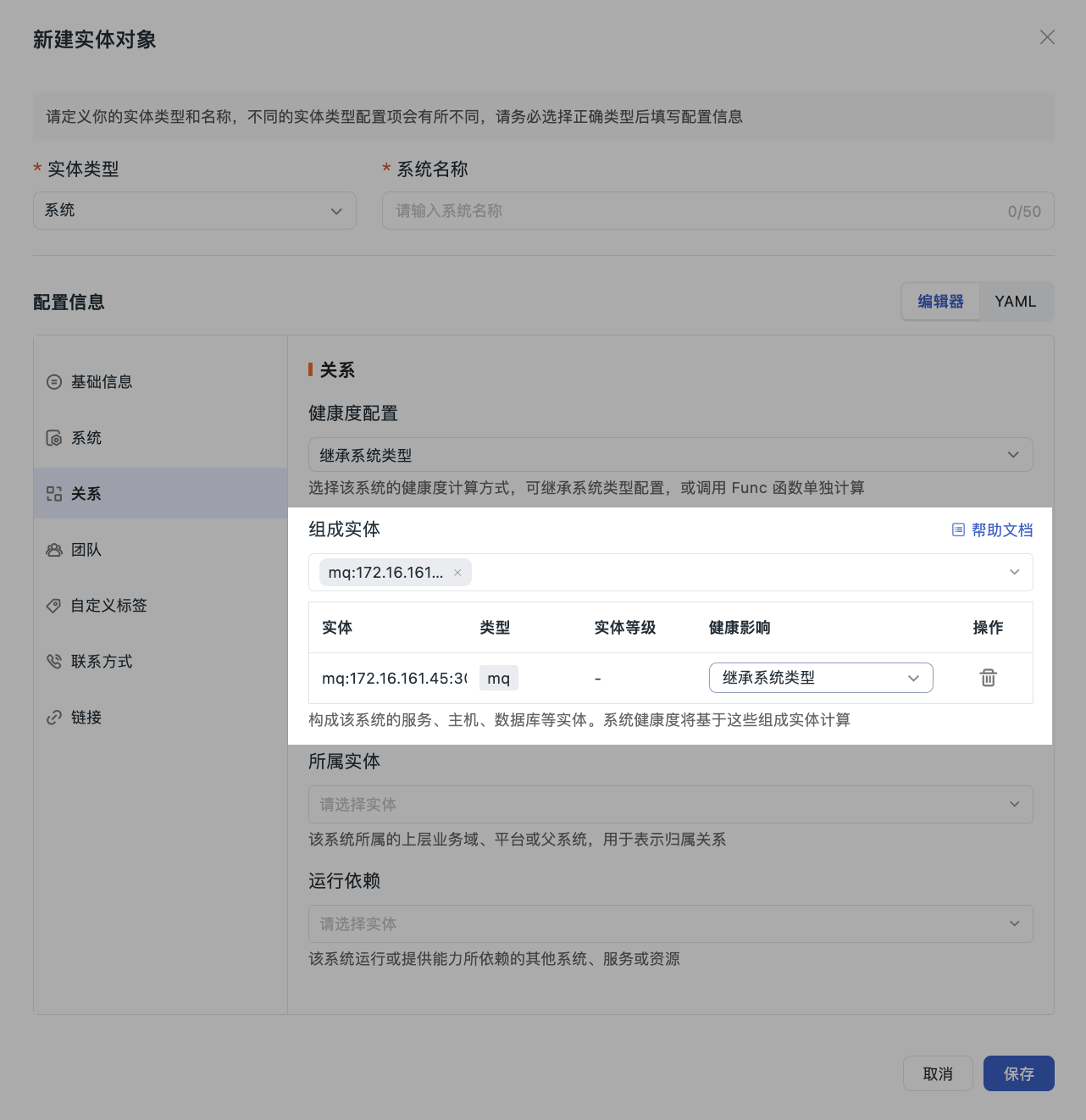
- Add composing entities: select the services, hosts, databases, etc. that constitute the system; after adding, they will be displayed in the list.
- Adjust health impact: in the "Health Impact" column of the composing entity list, click the dropdown to select the impact level.
- Remove a composing entity: click the delete icon in the action column. This entity will no longer participate in system health calculation.
Relationship Synchronization
Whether you add composing entities on the system side or set the belonging system on the child entity side, the two sides are automatically synchronized. An entity can belong to multiple systems at the same time, and each system independently calculates that entity's impact on its own health.