Using async-profiler for Application Performance Tuning
Info
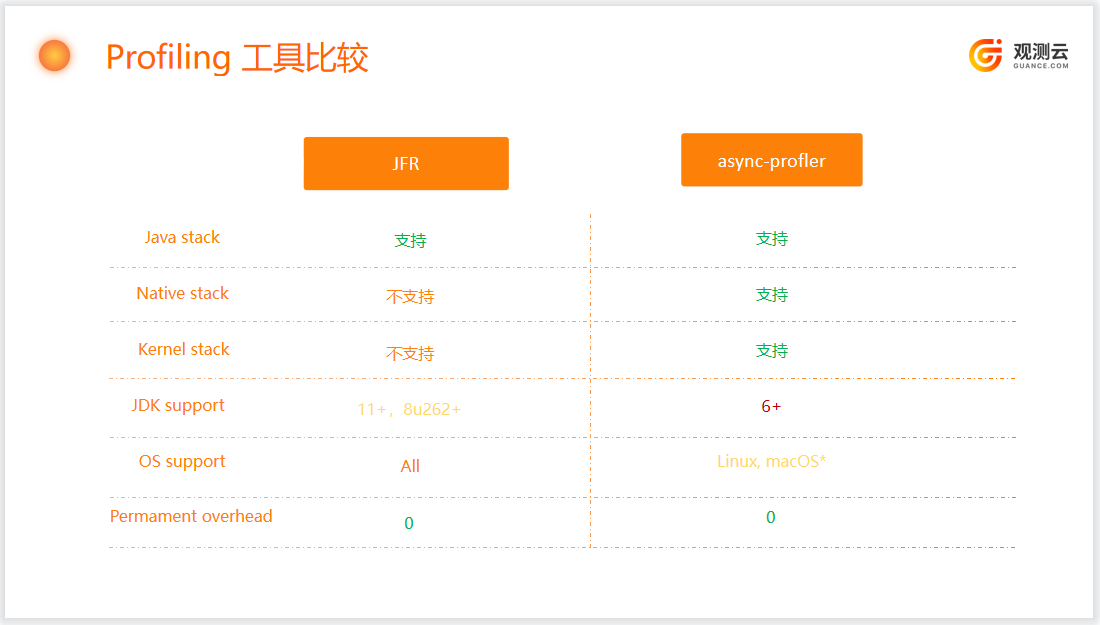
In addition to obtaining Java profiling data via JFR (Java Flight Recording), another approach is to use async-profiler.
Introduction to async-profiler
async-profiler is a low-overhead Java profiling tool that does not suffer from the Safepoint bias problem. It leverages HotSpot's special API to collect stack traces and memory allocation information, and works on OpenJDK, Oracle JDK, and other HotSpot-based Java virtual machines.
async-profiler can collect the following events:
- CPU cycles
- Hardware and software performance counters, such as cache misses, branch misses, page faults, context switches, etc.
- Java heap allocations
- Contented lock attempts, including Java object monitors and ReentrantLocks
1. CPU Profiling
In this mode, the profiler collects stack trace samples that include Java methods, native calls, JVM code, and kernel functions.
The general approach is to receive call stacks generated by perf_events and match them with call stacks generated by AsyncGetCallTrace to produce an accurate profile of both Java and native code.
Additionally, async-profiler provides a workaround to recover stack traces in some cases where AsyncGetCallTrace fails.
The advantages of this method over using perf_events directly with a Java agent that converts addresses to Java method names are:
- Works with older Java versions, as it does not require
-XX:+PreserveFramePointer, which is only available in JDK 8u60 and later. - Does not introduce the performance overhead of
-XX:+PreserveFramePointer, which can be up to 10% in rare cases. - Does not require generating mapping files to map Java code addresses to method names.
- Works with the interpreter frame.
- Does not require writing out a
perf.datafile for further processing in user-space scripts.
2. Memory Allocation Profiling
The profiler can be configured to collect call sites that allocate the largest amount of heap memory, instead of detecting CPU-consuming code.
async-profiler does not use intrusive techniques such as bytecode instrumentation or expensive DTrace probes, which can have a significant performance impact. It also does not affect escape analysis or prevent JIT optimizations like allocation elimination. It only measures actual heap allocations.
The profiler features TLAB-driven sampling. It relies on HotSpot-specific callbacks to receive two types of notifications:
- When an object is allocated in a newly created TLAB (aqua frames in the flame graph);
- When an object is allocated on the slow path outside the TLAB (brown frames).
This means it does not count every allocation, but only every N kB of allocation, where N is the average size of the TLAB. This makes heap sampling very cheap and suitable for production. On the other hand, the collected data may be incomplete, although in practice it usually reflects the top allocation sources.
The sampling interval can be adjusted using the --alloc option. For example, --alloc 500k will take a sample after an average of 500 KB of allocated space. However, intervals smaller than the TLAB size will not take effect.
The minimum supported JDK version is 7u40, which introduced TLAB callbacks.
3. Wall-clock Profiling
The -e wall option tells async-profiler to sample all threads at a given interval, regardless of thread state: running, sleeping, or blocked. This is useful, for example, when analyzing application startup time.
The wall-clock profiler is most useful in per-thread mode: -t.
Example: ./profiler.sh -e wall -t -i 5ms -f result.html 8983
4. Java Method Profiling
The -e ClassName.methodName option instruments a given Java method to record all calls to this method with stack traces.
- For non-native methods, example:
-e java.util.Properties.getPropertywill profile all locations that callgetProperty. - For native methods, use hardware breakpoint events instead, example:
-e Java_java_lang_Throwable_fillInStackTrace
Note: If you attach async-profiler at runtime, the first instrumentation of a non-native Java method may cause deoptimization of all compiled methods. Subsequent instrumentations only flush the relevant code.
If async-profiler is attached as an agent, a large CodeCache flush does not occur.
Here are some useful native methods you might want to profile:
G1CollectedHeap::humongous_obj_allocate- track humongous allocation in G1 GC;JVM_StartThread- track new thread creation;Java_java_lang_ClassLoader_defineClass1- track class loading.
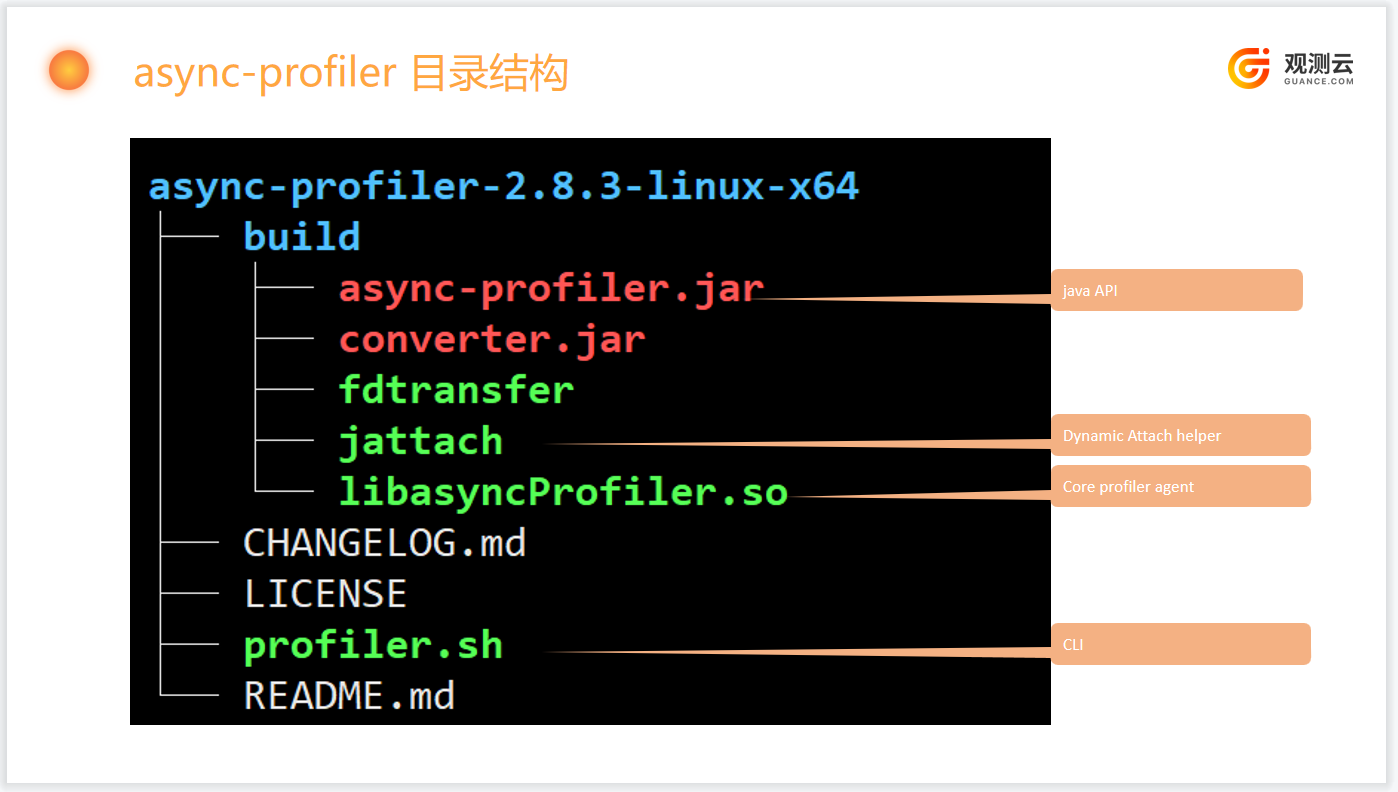
Directory Structure
Startup Methods
async-profiler is an Agent developed based on JVMTI (JVM Tool Interface) and supports two startup methods:
-
- Start with the Java process, automatically loading the shared library;
-
- Dynamically load at runtime via the attach API.
1 Loading at Startup
Note
Loading at startup is only suitable for analyzing the application during startup and cannot be used to analyze the application in real-time at runtime.
If you need to analyze some code immediately after JVM startup, instead of using the profiler.sh script, you can add async-profiler as an agent on the command line. For example:
$ java -agentpath:async-profiler-2.8.3/build/libasyncProfiler.so=start,event=alloc,file=profile.html -jar ...
The agent library is configured via the JVMTI argument interface, and the format of the argument string is described in the source code.
- The
profiler.shscript actually converts command-line arguments to this format.
For example,-e wallis converted toevent=wall,-f profile.htmlis converted tofile=profile.html. - Some parameters are processed directly by the
profiler.shscript.
For example:-d 5includes 3 operations: attach the profiler agent with thestartcommand, sleep for 5 seconds, then attach the agent again with thestopcommand.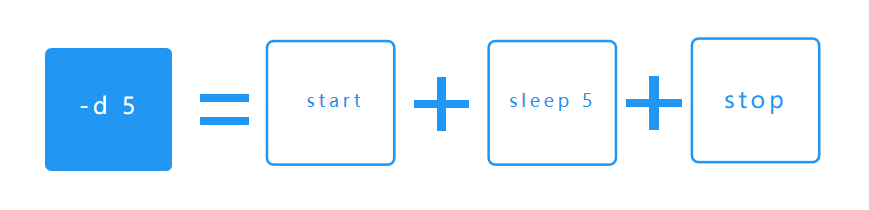
2 Loading at Runtime
More often, the application is already running and needs to be analyzed.
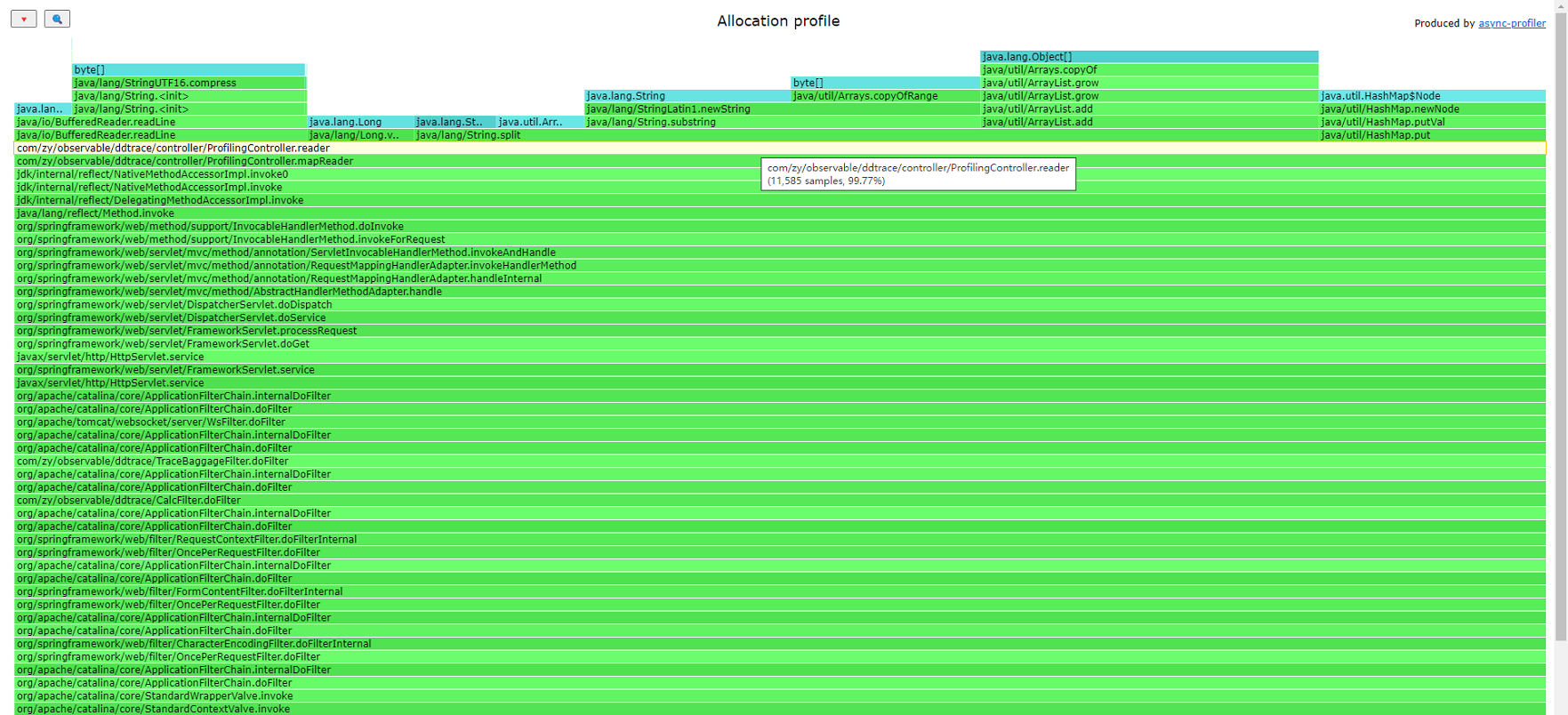
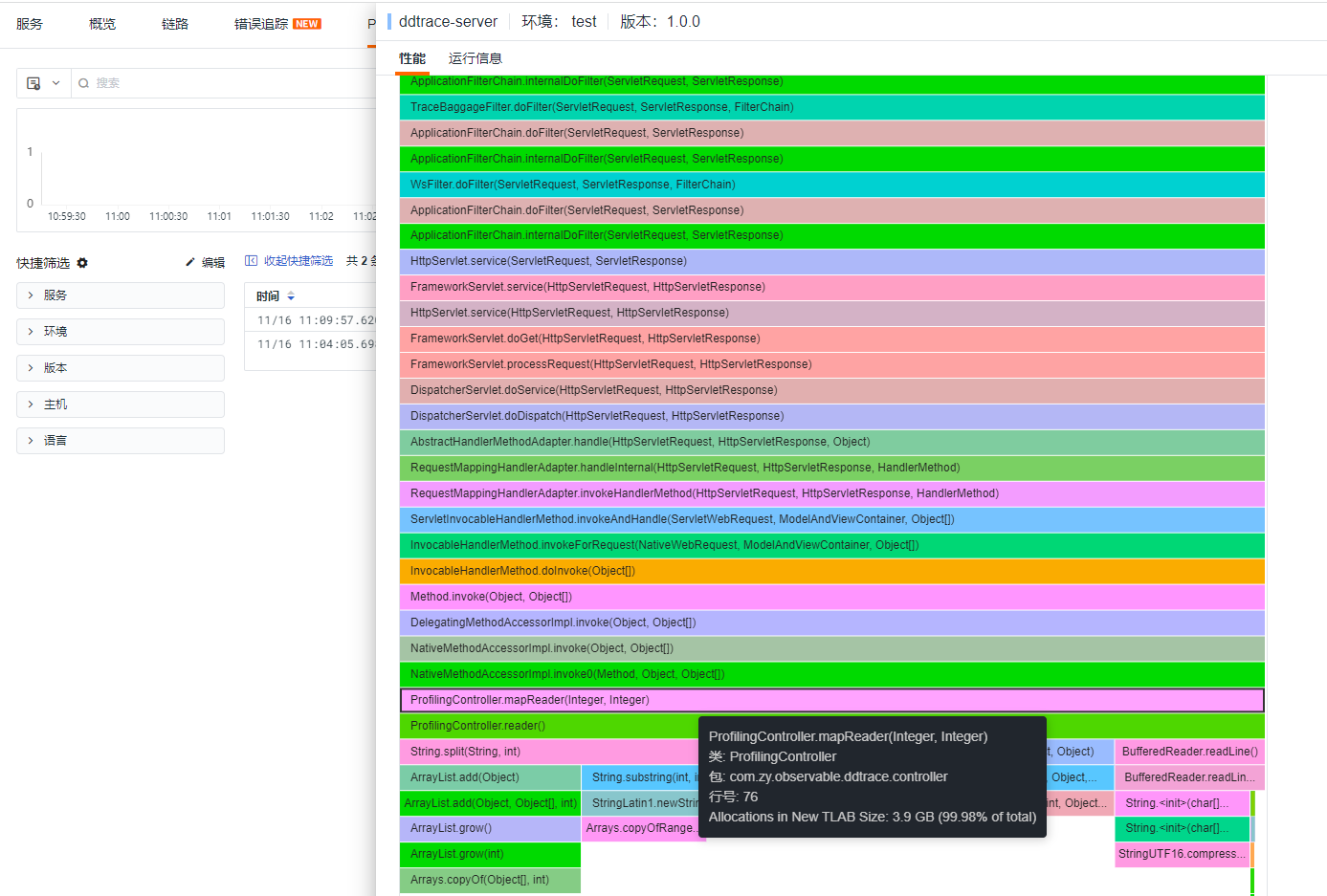
You can view the memory allocation distribution at that time. reader allocated 99.77% of the memory.
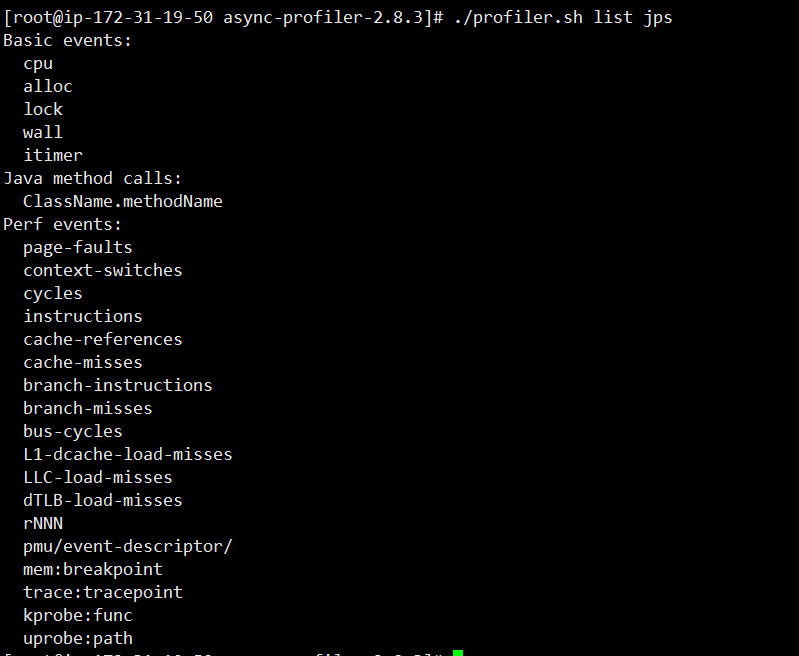
Check the events supported by the current application:
Note
The HTML format only supports single events, while the JFR format supports multiple event output.
async-profiler and Guance
Guance is deeply integrated with async-profiler, allowing data to be sent to DataKit. With Guance's powerful UI and analysis capabilities, users can easily analyze data from different dimensions.
Refer to the relevant integration documentation
Case Study
Quickly read a large file stored in key-value format (key:value) and parse it into a map.
1 Writing a Large File
import java.io.FileWriter;

public class MapGenerator {
    public static String fileName = "/opt/profiling/map-info.txt";
    public static void main(String[] args) {

        try (FileWriter writer = new FileWriter(fileName)) {
            writer.write(""); // Clear original file content
            for (int i = 0; i < 16500000; i++) {
                writer.write("name"+i+":"+i+"\n");
            }
            writer.flush();
            System.out.println("write success!");
        } catch (Exception e) {
            e.printStackTrace();
        }

    }
}
2 Reading a Large File
private static Map<String,Long> readMap(String fileName) throws IOException {
        Map<String,Long> map = new HashMap<>();
        try(BufferedReader br = new BufferedReader(new FileReader(fileName))) {
            for (String line ;(line = br.readLine())!=null;){
                String[] kv = line.split(":",2);
                String key = kv[0].trim();
                String value = kv[1].trim();
                map.put(key,Long.parseLong(value));
            }
        }
        return map;
    }
Running MapReader, the entire process took 15.5 seconds.
[root@ip-172-31-19-50 profiling]# java MapReader
Profiling started
Read 16500000 elements in 15.531 seconds
While running MapReader, execute async-profiler and push the profiling information to the Guance platform for analysis.
[root@ip-172-31-19-50 async-profiler-2.8.3-linux-x64]# DATAKIT_URL=http://localhost:9529 APP_ENV=test APP_VERSION=1.0.0 HOST_NAME=datakit PROFILING_EVENT=cpu,alloc,lock PROFILING_DURATION=10 PROCESS_ID=`ps -ef |grep java|grep springboot|grep -v grep|awk '{print $2}'` SERVICE_NAME=demo bash collect.sh
profiling process 16134

Profiling for 10 seconds
Done
generate profiling file successfully for MapReader, pid 16134
  % Total    % Received % Xferd  Average Speed   Time    Time     Time  Current
                                 Dload  Upload   Total   Spent    Left  Speed
100  110k  100    64  100  110k     99   172k --:--:-- --:--:-- --:--:--  172k
Info: send profile file to datakit successfully
[root@ip-172-31-19-50 async-profiler-2.8.3-linux-x64]#
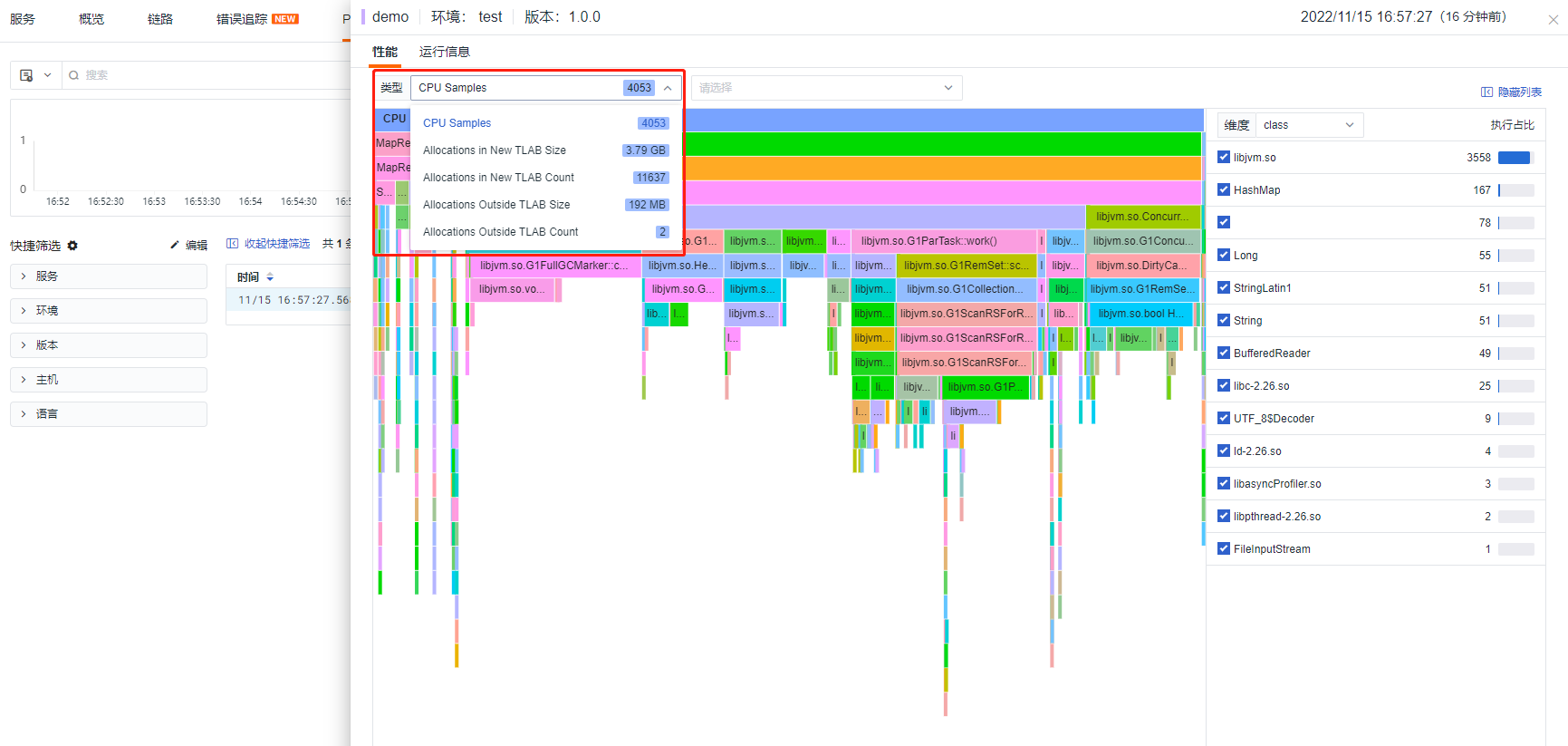
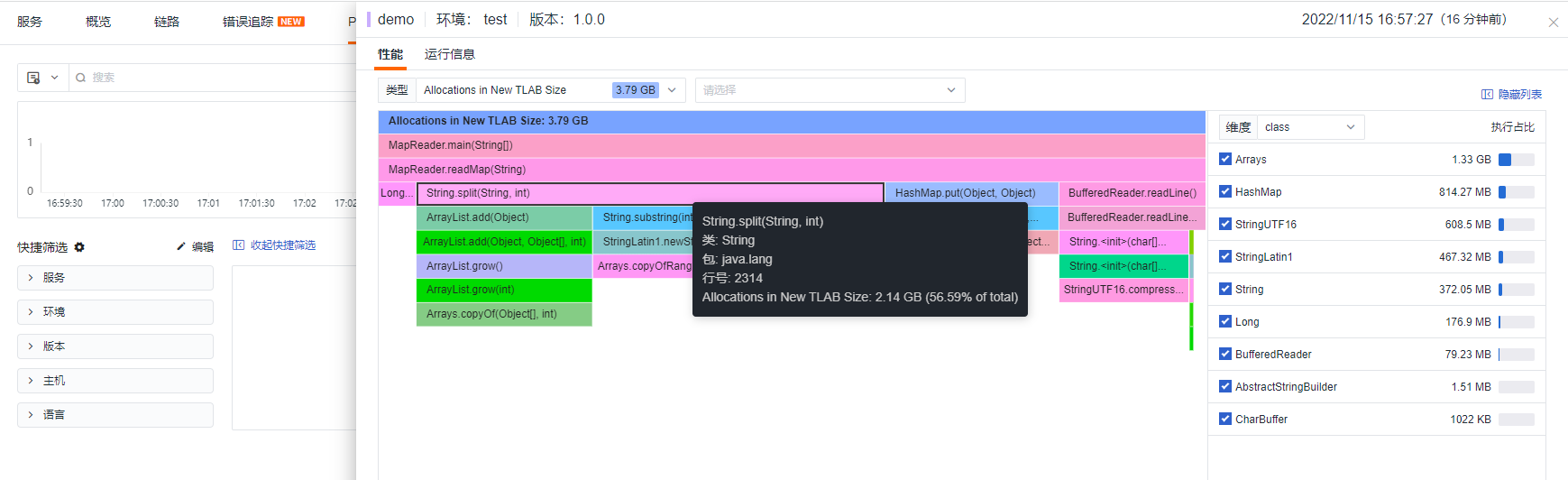
Result
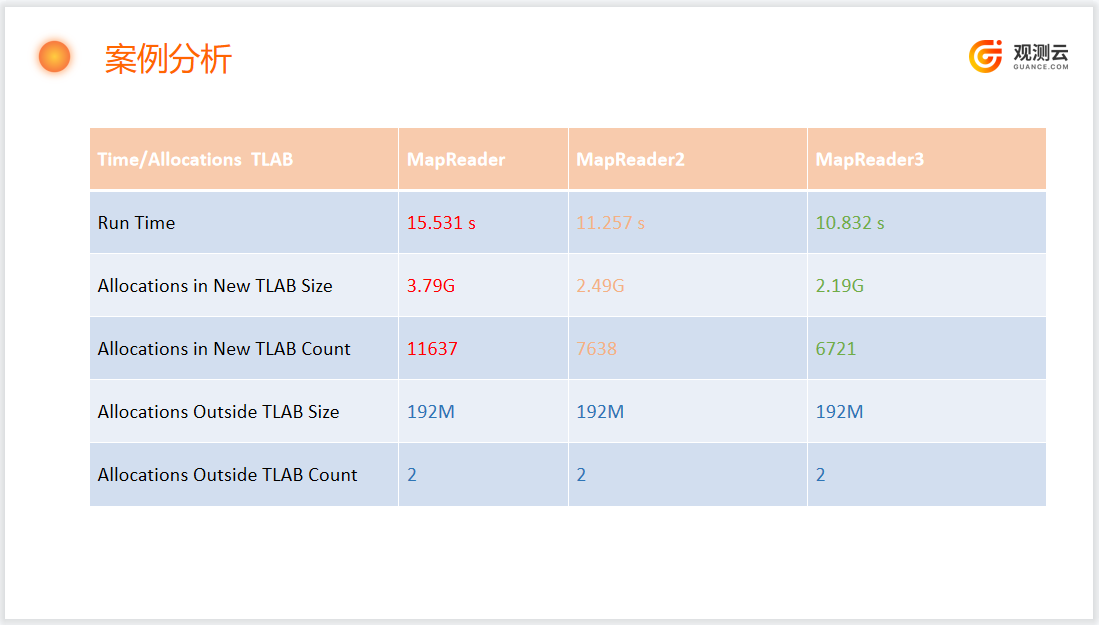
Viewing the memory allocation situation, a total of 3.79 GB of memory was generated.
private static Map<String,Long> readMap(String fileName) throws IOException {
        Map<String,Long> map = new HashMap<>();
        try(BufferedReader br = new BufferedReader(new FileReader(fileName))) {
            for (String line ;(line = br.readLine())!=null;){
                int sep = line.indexOf(":");
                String key = trim(line,0,sep);
                String value = trim(line,sep+1,line.length());
                map.put(key,Long.parseLong(value));
            }
        }
        return map;
    }

    private static String trim(String line,int from,int to){
        while (from<to && line.charAt(from) <= ' '){
            from ++;
        }
        while (to > from && line.charAt(to-1) <= ' '){
            to--;
        }
        return line.substring(from,to);
    }
Running MapReader2, the entire process took 11.257 seconds.
[root@ip-172-31-19-50 profiling]# java MapReader2
Profiling started
Read 16500000 elements in 11.257 seconds
[root@ip-172-31-19-50 profiling]#
While running MapReader2, execute async-profiler and push the profiling information to the Guance platform for analysis, using the same command as Method 1.
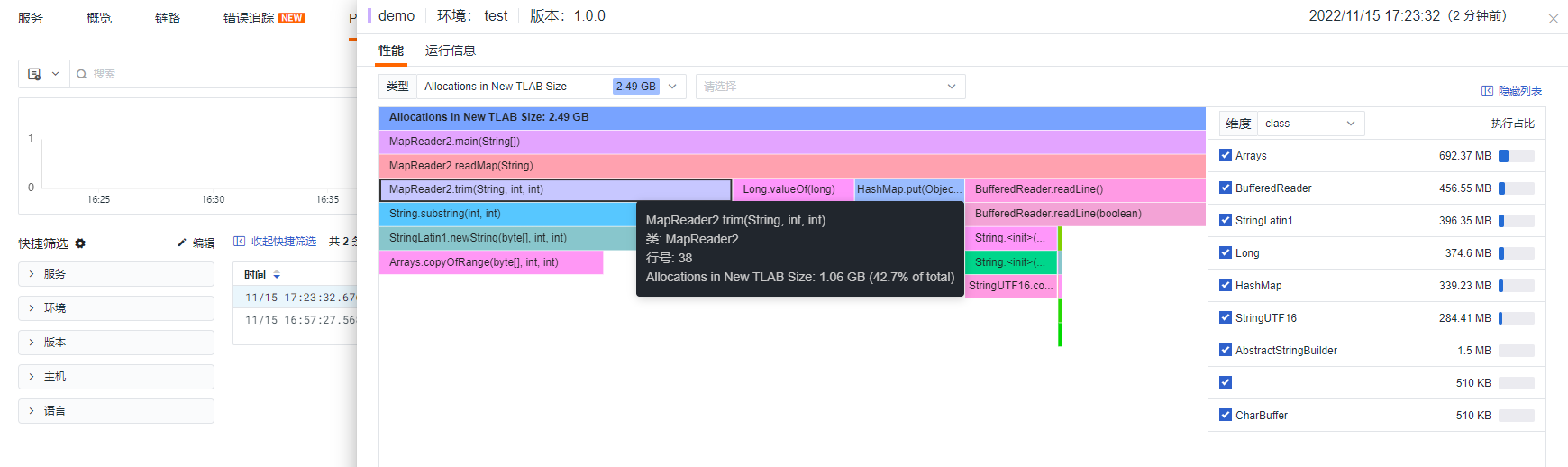
Result
Viewing the memory allocation situation, a total of 2.49 GB of memory was generated. This saves 1.3 GB of memory compared to Method 1, and the time consumed is reduced by about 4 seconds.
private static Map<String,Long> readMap(String fileName) throws IOException {
        Map<String,Long> map = new HashMap<>(600000);
        try(BufferedReader br = new BufferedReader(new FileReader(fileName))) {
            for (String line ;(line = br.readLine())!=null;){
                int sep = line.indexOf(":");
                String key = trim(line,0,sep);
                String value = trim(line,sep+1,line.length());
                map.put(key,Long.parseLong(value));
            }
        }
        return map;
    }

    private static String trim(String line,int from,int to){
        while (from<to && line.charAt(from) <= ' '){
            from ++;
        }
        while (to > from && line.charAt(to-1) <= ' '){
            to--;
        }
        return line.substring(from,to);
    }
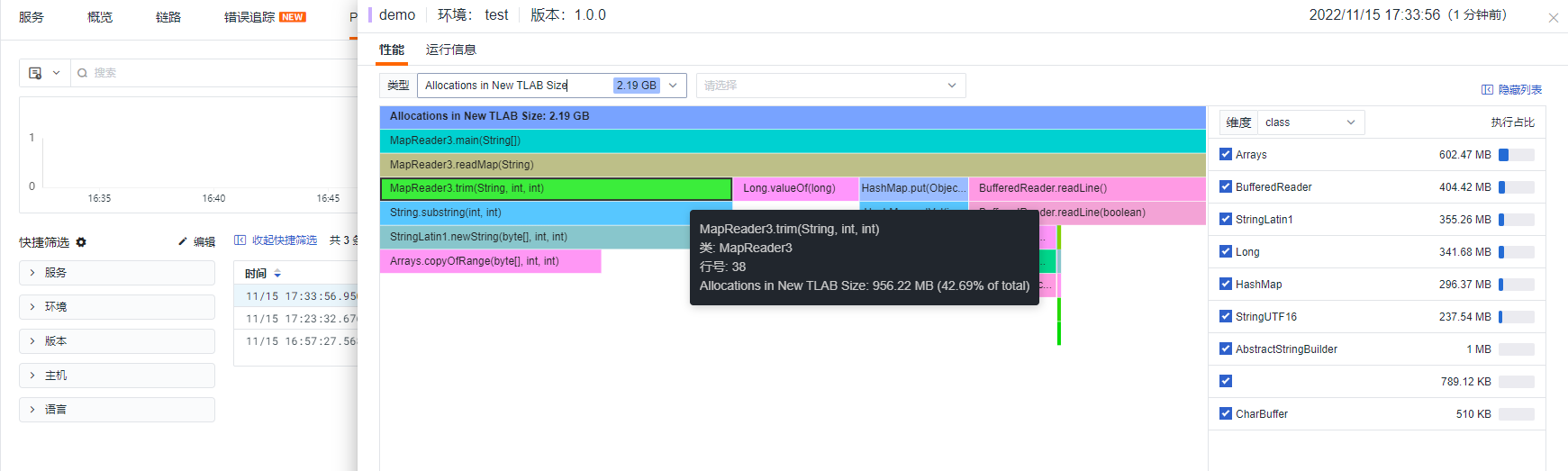
Result
The operation steps are the same as Method 2. The difference between MapReader3 and MapReader2 is that MapReader3 specifies the initial capacity when creating the Map. Therefore, Method 3 saves 0.3 GB of memory compared to Method 2, and 1.6 GB of memory compared to Method 1.
3 Combined Analysis with Metrics and Traces
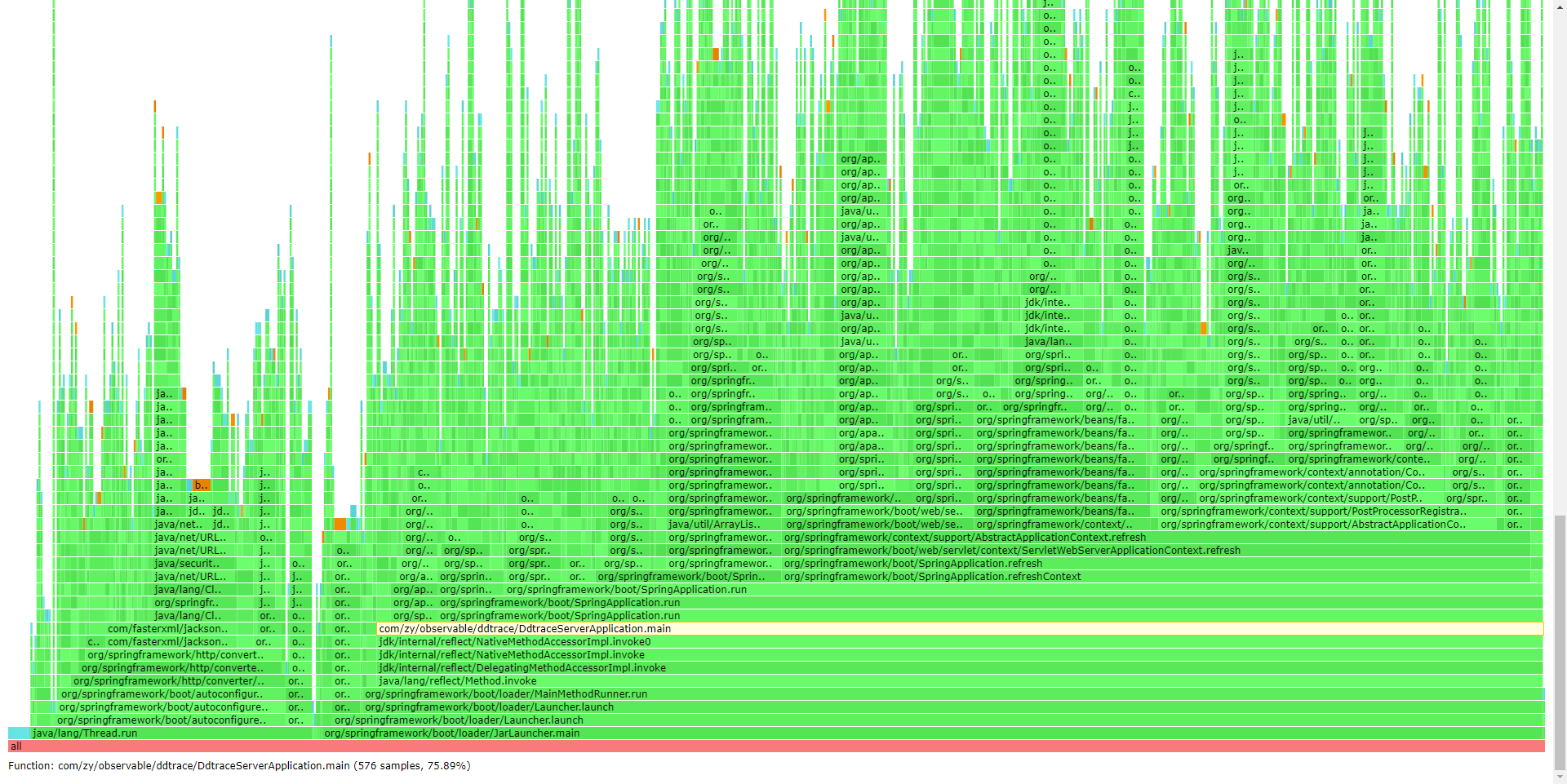
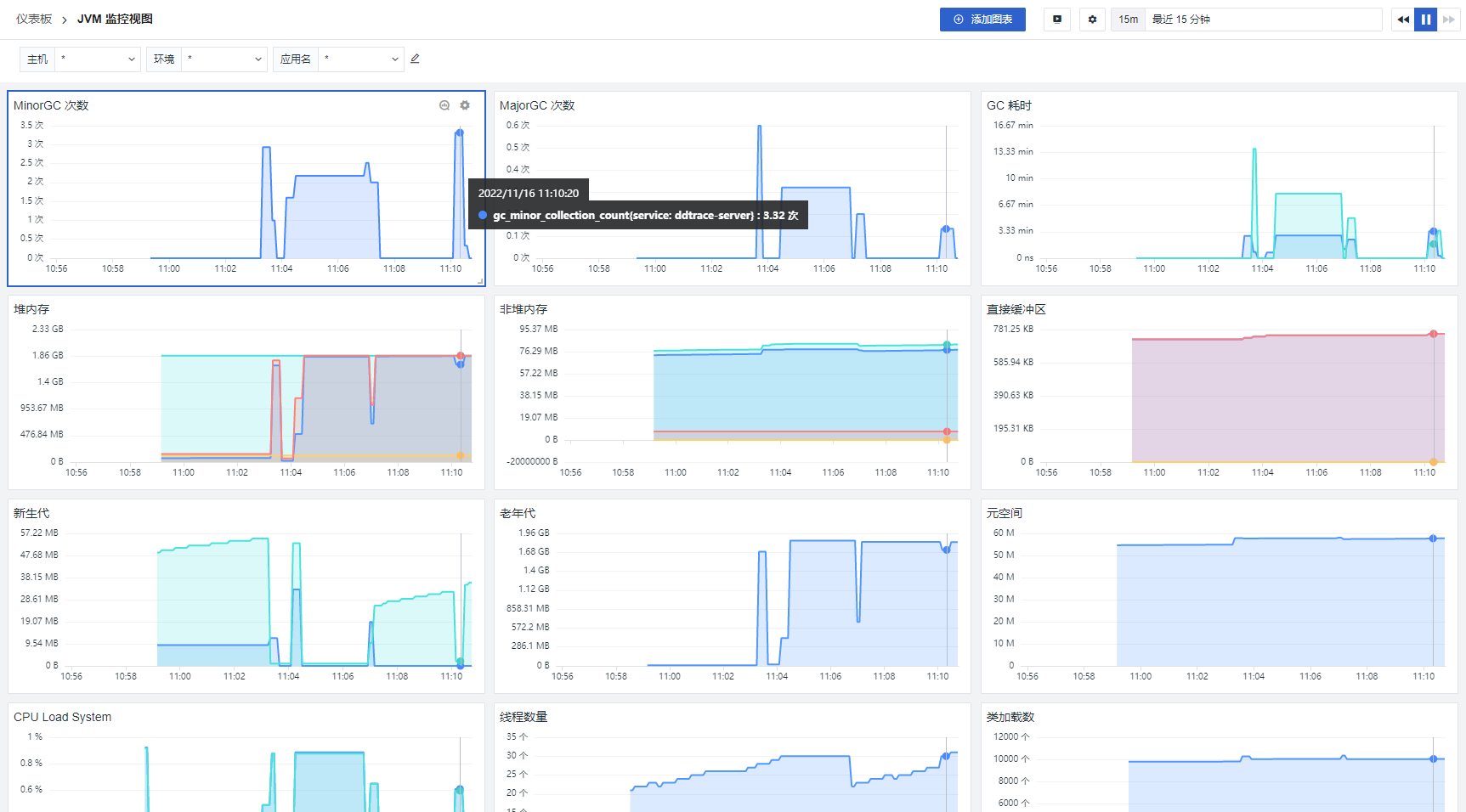
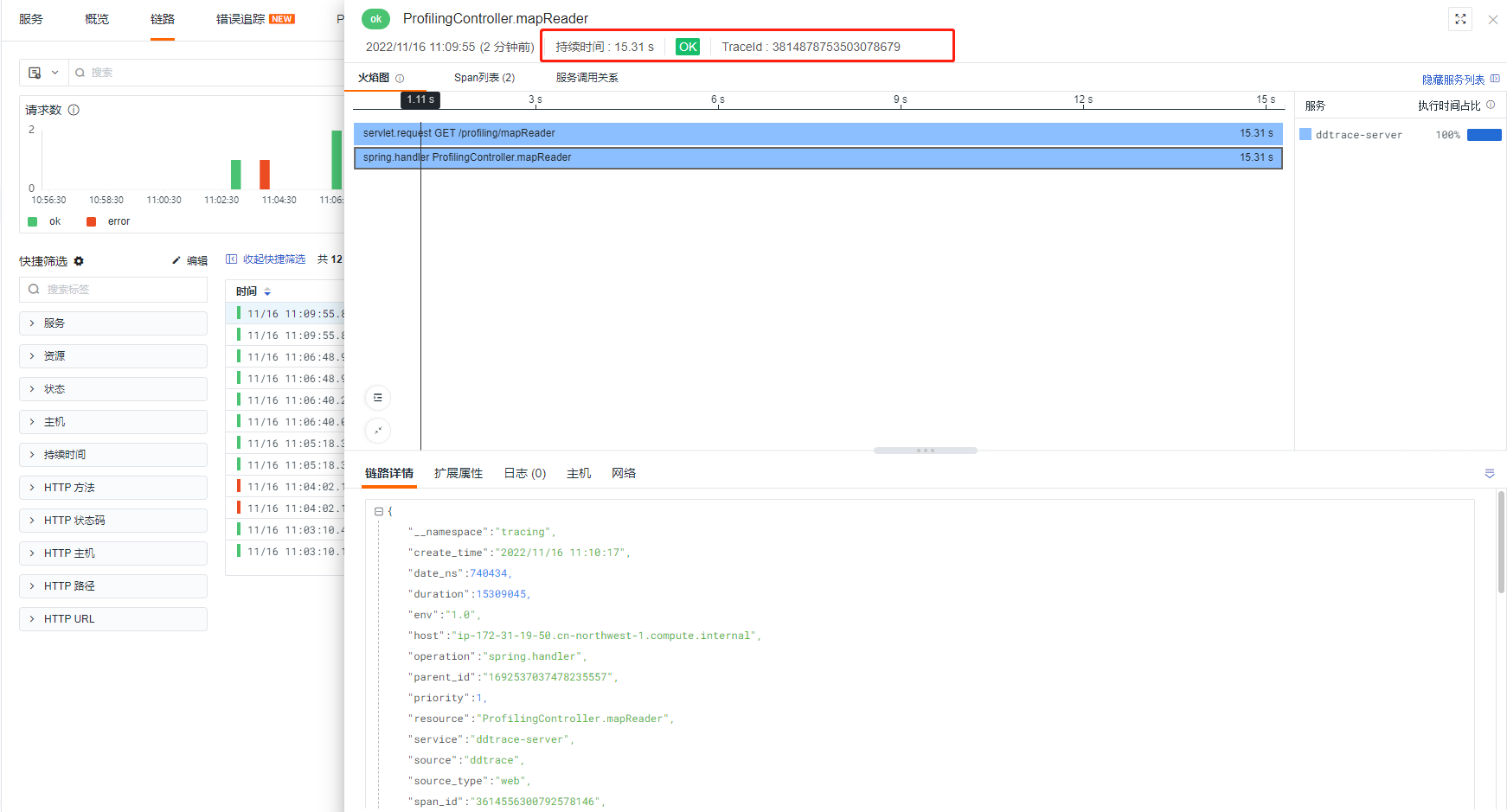
Since the demo code above has a very short lifecycle, it is not possible to perform comprehensive observability (JVM-related metrics, host-related metrics, etc.). To address this, migrate the demo code to a Spring Boot application and use APM (ddtrace-agent) combined with JVM metrics and async-profiler, enabling observability from three dimensions: metrics (JVM/host), traces (current trace status), and profiling (performance analysis). By accessing the corresponding URL, perform async-profiler analysis operations.
- Profiling View
- JVM View
- Trace View
4 Summary
About TLAB
TLAB stands for Thread Local Allocation Buffer, a concept in Java memory allocation. It is a thread-specific memory allocation area used when threads create objects to allocate memory. It is primarily designed to reduce contention for memory allocation among threads in a multi-threaded concurrent environment. Once a thread has allocated a memory region, if the current thread needs to allocate memory, it will first request it from this region. Therefore, this region is private to the current thread, and no locking or other protective operations are required during allocation.
Note
For most JVM applications, most objects are allocated in TLABs. If there are too many allocations outside TLABs or too many TLAB reallocations, we should inspect the code for large objects or irregularly sized object allocations in order to optimize the code.
Allocations in New TLAB Size
Primarily collects the jdk.ObjectAllocationInNewTLAB event, referred to as "TLAB slow allocation".
Allocations Outside TLAB Size
Primarily collects the jdk.ObjectAllocationOutsideTLAB event, referred to as "allocation outside TLAB".
Comparison of Profiling Tools