Quick Start: Best Practices for the Pythond Collector
Pythond is a complete solution for periodically triggering user-defined Python collection scripts. This document uses "get the number of logged-in users per hour" as a metric reported to the central platform as an example.
Business Scenario Overview
The business flow is roughly as follows:
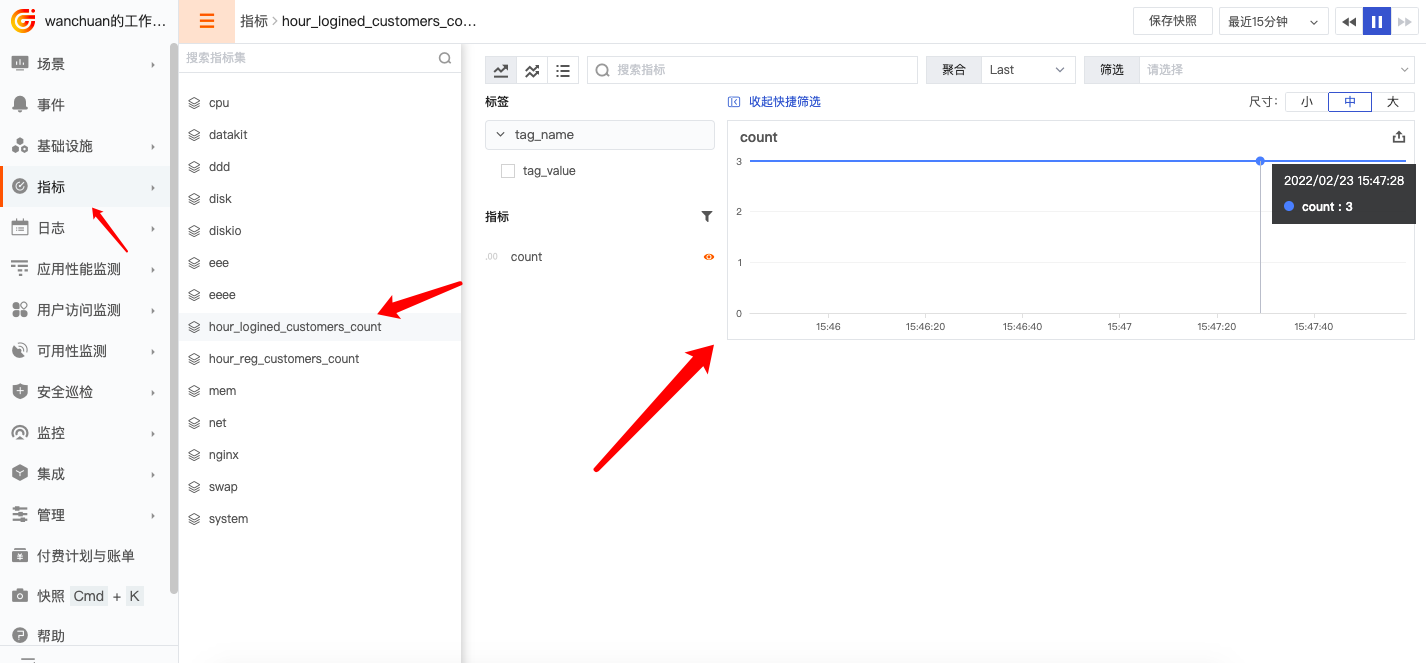
Collect data from the database (Python script) → Pythond collector periodically triggers the script to report data (DataKit) → View the metric from the central platform (web).
The database has a table named customers with the following fields:
name: name (string)last_logined_time: login time (timestamp)
The table creation statement is as follows:
create table customers
(
  `id`                BIGINT(20)  not null AUTO_INCREMENT COMMENT 'Auto-increment ID',
  `last_logined_time` BIGINT(20)  not null DEFAULT 0      COMMENT 'Login time (timestamp)',
  `name`              VARCHAR(48) not null DEFAULT ''     COMMENT 'Name',

  primary key(`id`),
  key idx_last_logined_time(last_logined_time)
) ENGINE=InnoDB DEFAULT CHARSET=utf8mb4;
Insert test data into the table above:
INSERT INTO customers (id, last_logined_time, name) VALUES (1, 1645600127, 'zhangsan');
INSERT INTO customers (id, last_logined_time, name) VALUES (2, 1645600127, 'lisi');
INSERT INTO customers (id, last_logined_time, name) VALUES (3, 1645600127, 'wangwu');
Use the following SQL statement to get "the number of logged-in users per hour":
Report the above data as a metric to the central platform.
The detailed steps to implement the above business are described below.
Prerequisites
Python Environment
Currently in the alpha stage, only compatible with Python 3+. Tested version:
- 3.10.1
Python Dependencies
Install the following dependencies:
requests(network operations, for reporting metrics)pymysql(MySQL operations, for connecting to the database to retrieve business data)
Installation method:
The above installation requires pip. If you don't have it, refer to the following method (source: here):
Installation and Deployment
1 Write a User-Defined Script
The user needs to inherit the DataKitFramework class and override the run method. The source file of the DataKitFramework class is datakit_framework.py, located at datakit/python.d/core/datakit_framework.py.
For specific usage, refer to the source file
datakit/python.d/core/demo.py.
Based on the above requirements, write the following Python script and name it hellopythond.py:
hellopythond.py
from datakit_framework import DataKitFramework
import pymysql
import re
import logging

class MysqlConn():
    def __init__(self, logger, config):
        self.logger = logger
        self.config = config
        self.re_errno = re.compile(r'^\((\d+),')

        try:
            self.conn = pymysql.Connect(**self.config)
            self.logger.info("pymysql.Connect() ok, {0}".format(id(self.conn)))
        except Exception as e:
            raise e

    def __del__(self):
        self.close()

    def close(self):
        if self.conn:
            self.logger.info("conn.close() {0}".format(id(self.conn)))
            self.conn.close()


    def execute_query(self, sql_str, sql_params=(), first=True):
        res_list = None
        cur = None
        try:
            cur = self.conn.cursor()
            cur.execute(sql_str, sql_params)
            res_list = cur.fetchall()
        except Exception as e:
            err = str(e)
            self.logger.error('execute_query: {0}'.format(err))
            if first:
                retry = self._deal_with_network_exception(err)
                if retry:
                    return self.execute_query(sql_str, sql_params, False)
        finally:
            if cur is not None:
                cur.close()
        return res_list

    def execute_write(self, sql_str, sql_params=(), first=True):
        cur = None
        n = None
        err = None
        try:
            cur = self.conn.cursor()
            n = cur.execute(sql_str, sql_params)
        except Exception as e:
            err = str(e)
            self.logger.error('execute_query: {0}'.format(err))
            if first:
                retry = self._deal_with_network_exception(err)
                if retry:
                    return self.execute_write(sql_str, sql_params, False)
        finally:
            if cur is not None:
                cur.close()
        return n, err

    def _deal_with_network_exception(self, stre):
        errno_str = self._get_errorno_str(stre)
        if errno_str != '2006' and errno_str != '2013' and errno_str != '0':
            return False
        try:
            self.conn.ping()
        except Exception as e:
            return False
        return True

    def _get_errorno_str(self, stre):
        searchObj = self.re_errno.search(stre)
        if searchObj:
            errno_str = searchObj.group(1)
        else:
            errno_str = '-1'
        return errno_str

    def _is_duplicated(self, stre):
        errno_str = self._get_errorno_str(stre)
        # 1062: Duplicate field value, insert failed
        # 1169: Duplicate field value, update record failed
        if errno_str == "1062" or errno_str == "1169":
            return True
        return False

class HelloPythond(DataKitFramework):
    __name = 'HelloPythond'
    interval = 10 # Collect and report every 10 seconds. Adjust according to actual business needs; this is just for demonstration.

    # If your DataKit IP is 127.0.0.1 and port is 9529, you don't need this,
    # just comment it out.
    # def __init__(self, **kwargs):
    #     super().__init__(ip = '127.0.0.1', port = 9529)

    def run(self):
        config = {
            "host": "172.16.2.203",
            "port": 30080,
            "user": "root",
            "password": "Kx2ADer7",
            "db": "df_core",
            "autocommit": True,
            # "cursorclass": pymysql.cursors.DictCursor,
            "charset": "utf8mb4"
        }

        mysql_conn = MysqlConn(logging.getLogger(''), config)
        query_str = "select count(1) from customers where last_logined_time>=(unix_timestamp()-%s)"
        sql_params = ('3600')
        n = mysql_conn.execute_query(query_str, sql_params)

        data = [
        {
            "measurement": "hour_logined_customers_count", # Metric name.
            "tags": {
                "tag_name": "tag_value", # Custom tag, fill in as needed; this is just an example.
            },
            "fields": {
                "count": n[0][0], # Metric, the number of logged-in users per hour.
            },
        },
        ]

        in_data = {
            'M':data,
            'input': "pyfromgit"
        }

        return self.report(in_data) # You must call self.report here.
2 Place the Custom Script in the Correct Location
In the DataKit installation directory, create a new folder under the python.d directory and name it hellopythond. This folder name must match the class name written above, i.e., hellopythond.
Then put the script hellopythond.py into this folder. The final directory structure is as follows:
├── ...
├── datakit
└── python.d
    ├── core
    │   ├── datakit_framework.py
    │   └── demo.py
    └── hellopythond
        └── hellopythond.py
Note: The
corefolder above is the core folder of Pythond; do not modify it.
The above is for the case where the gitrepos feature is not enabled. If gitrepos is enabled, the directory structure is as follows:
├── ...
├── datakit
├── python.d
├── gitrepos
│   └── yourproject
│       ├── conf.d
│       ├── pipeline
│       └── python.d
│           └── hellopythond
│               └── hellopythond.py
3 Enable the Pythond Configuration File
Copy the Pythond configuration file.
In the conf.d/pythond directory, copy pythond.conf.sample to pythond.conf, then configure it as follows:
[[inputs.pythond]]

    # Python collector name
    name = 'some-python-inputs'  # required

    # Environment variables required to run the Python collector
    #envs = ['LD_LIBRARY_PATH=/path/to/lib:$LD_LIBRARY_PATH',]

    # Python collector executable path (use absolute path if possible)
    cmd = "python3" # required. python3 is recommended.

    # Relative path to the user script (fill in the folder name; modules and .py files in the subdirectory of this folder will be applied)
    dirs = ["hellopythond"] # Fill in the folder name, i.e., the class name.
4 Restart DataKit
Results
If everything goes smoothly, you should see the metric chart in the central platform within about 1 minute.