DDtrace Custom Instrumentation
Author: Liu Rui
Introduction to Java Instrumentation
Instrumentation: Also known as probes or instrumentation points (translations are fine, just understand the concept).
Java Instrumentation is a new feature in Java SE 6. Through Java code, i.e., java.lang.instrument, you can implement instrument functionality to solve problems using Java code.
Using Instrumentation, developers can build an agent program independent of the application to monitor and assist programs running on the JVM, and even replace or modify the definitions of certain classes. With this functionality, developers can achieve more flexible runtime virtual machine monitoring and Java class manipulation. This feature actually provides an AOP implementation supported at the virtual machine level, allowing developers to implement certain AOP functionalities without any upgrades or modifications to the JDK.
In Java SE 6, the instrumentation package was given more powerful features: post-startup instrument, native code instrument, and dynamic classpath changes, etc. These changes mean that Java has stronger dynamic control and interpretation capabilities, making the Java language more flexible and versatile.
DDtrace Custom Instrumentation Structure Analysis
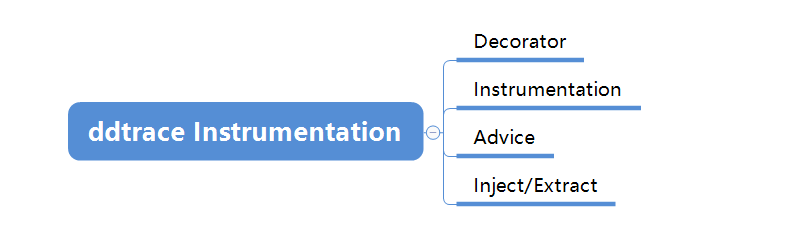
- Decorator: Used to decorate Instrumentation.
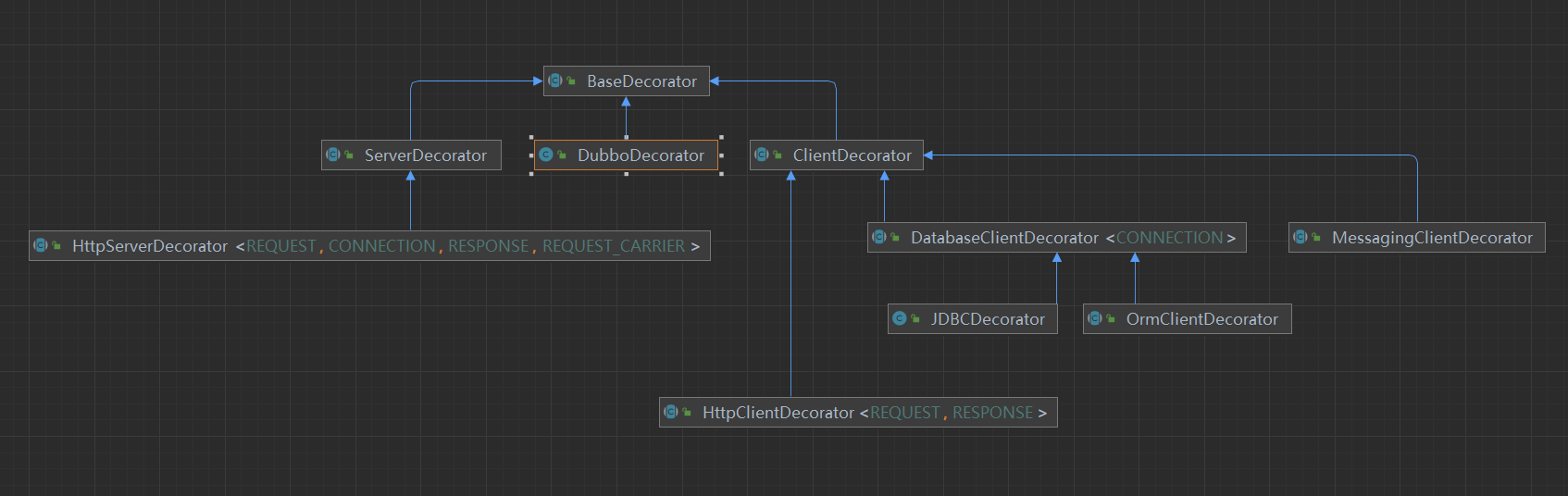
BaseDecoratoris a base decorator, so all custom decorators need to inheritBaseDecoratoror its subclasses. Operations on spans, custom tags, etc., are all implemented throughBaseDecorator. - Instrumentation: The instrumentation program. Uses the
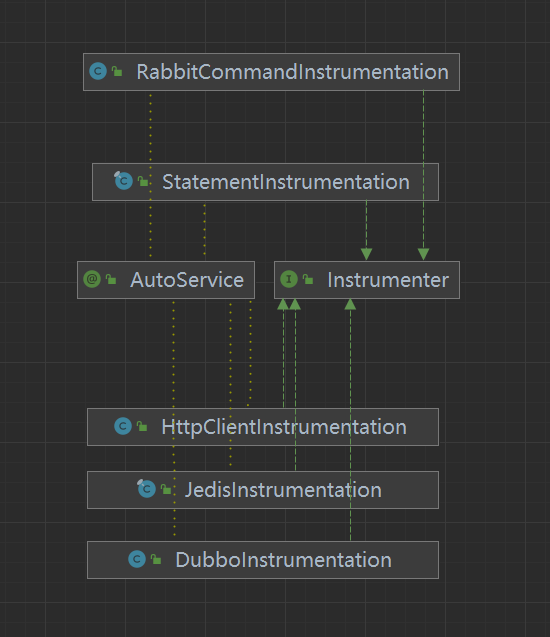
@AutoService(Instrumenter.class)annotation to register the current class as an instrumentation application. When the agent starts, it loads classes annotated with@AutoService(Instrumenter.class). - Advice: Enhances the methods that need to be instrumented by the Instrumentation. It mainly provides two method-level annotations:
@Advice.OnMethodEnterand@Advice.OnMethodExit, which are called when entering a method and when exiting a method, respectively. - Inject/Extract: Represents injection/extraction. Not mandatory to implement. The main function is to inject and extract trace information. It is used to propagate trace information such as traceid, spanid, and related propagation parameters.
Decorator Class Diagram
Partial class diagram shown here.
Instrumentation Class Diagram
Partial class diagram shown here.
Instrumenter is an interface that provides a rich set of interfaces to implement based on different definitions.
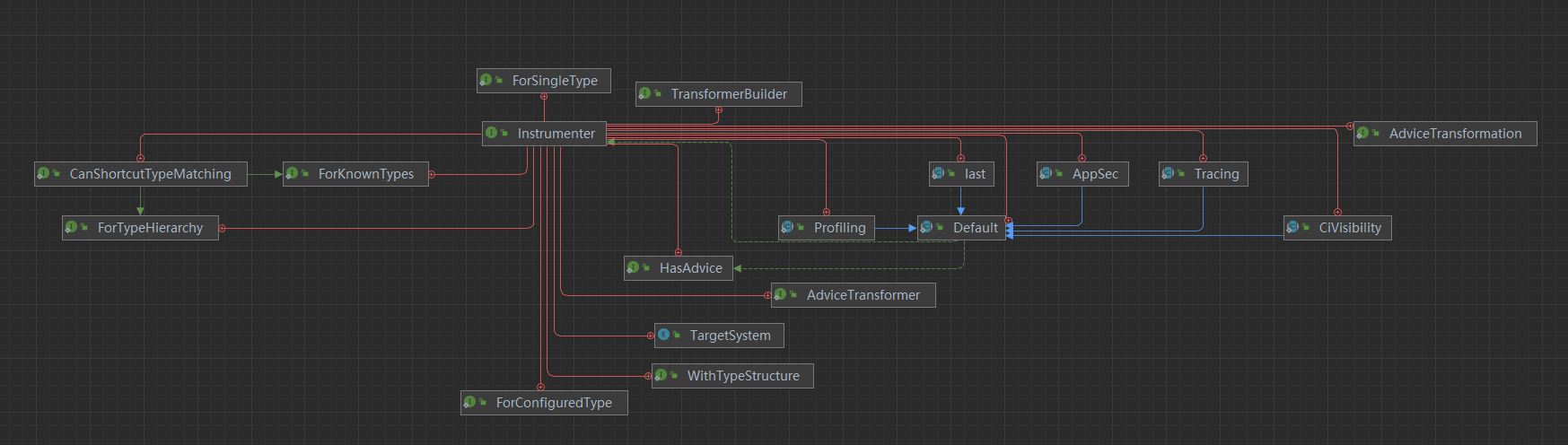
HasAdvice: Performs around handling on methods, i.e., what we usually call instrumentation. It mainly provides an interface method for registering methods that need to be instrumented. Multiple methods can be instrumented:
/**
 * Instrumenters should register each advice transformation by calling {@link
 * AdviceTransformation#applyAdvice(ElementMatcher, String)} one or more times.
 */
void adviceTransformations(AdviceTransformation transformation);
Tracing: Used for tracing.
/** Parent class for all tracing related instrumentations */
abstract class Tracing extends Default{...}
Profiling: Indicates that the current is a profiling instrumentation.
/** Parent class for all profiling related instrumentations */
abstract class Profiling extends Default{...}
CiVisibility: CI instrumentation type.
/** Parent class for all CI related instrumentations */
abstract class CiVisibility extends Default {...}
Default: A default implementation.
@SuppressFBWarnings("IS2_INCONSISTENT_SYNC")
abstract class Default implements Instrumenter, HasAdvice{...}
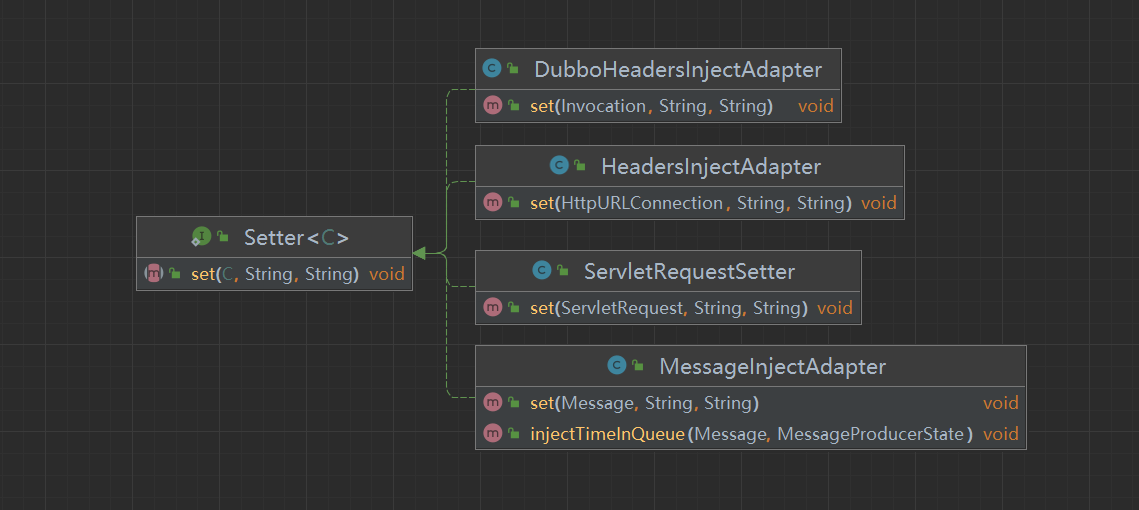
Inject Class Diagram
Setter
Extract Class Diagram
ContextVisitor
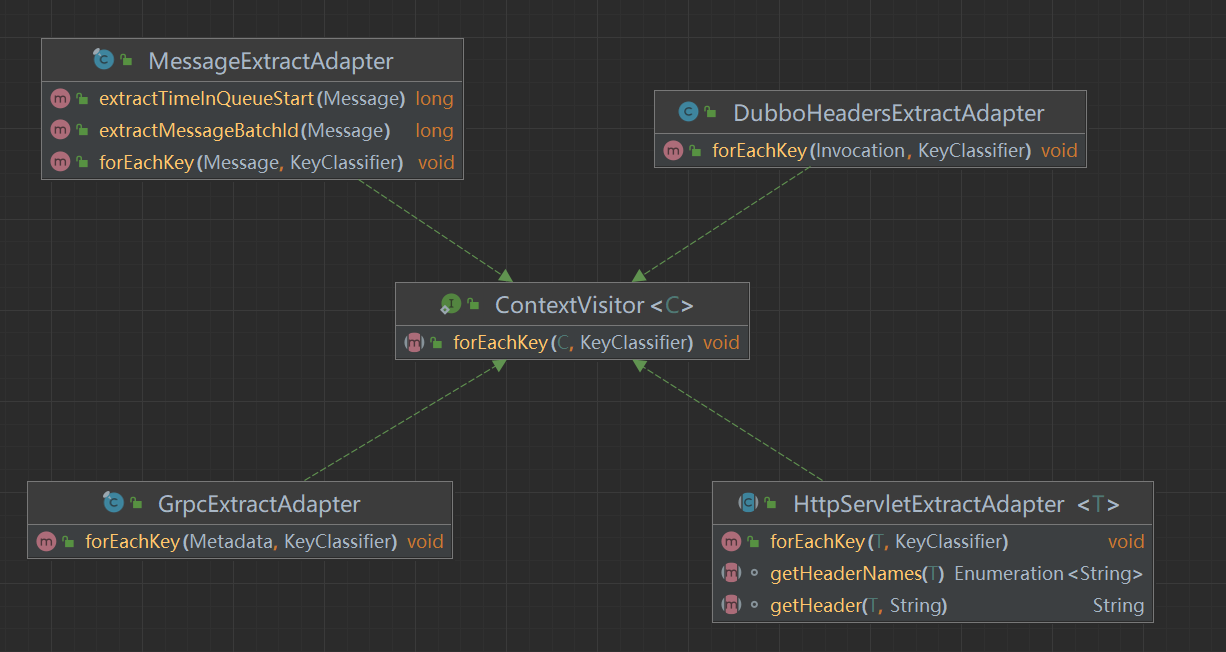
Both Inject and Extract involve Propagation. For usage and introduction of Propagation, refer to the documentation: Using extract + TextMapAdapter to implement custom traceId
Hands-on: Customizing Dubbo Instrumentation with DDtrace
Integration Approach
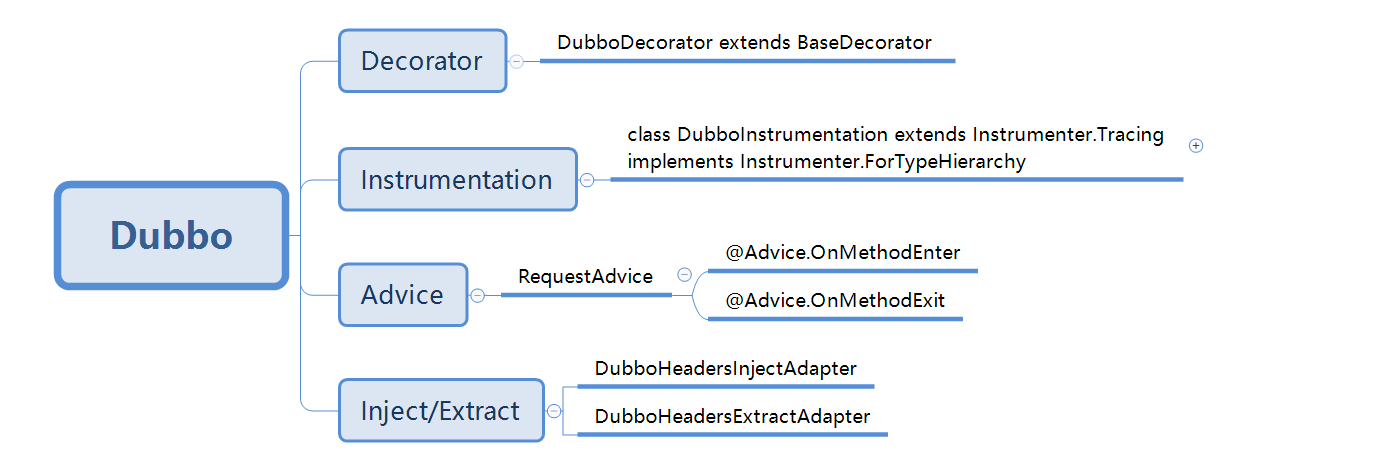
- Create the DubboInstrumentation class and configure instrumentation-related information.
- Use
adviceTransformationsto enhance the relevant methods. The enhancement logic is implemented in the RequestAdvice class, which mainly implements two methods:@Advice.OnMethodEnterand@Advice.OnMethodExit, called when entering and exiting the method, respectively. - DubboDecorator acts as a decorator, for example, performing operations on spans such as setting relevant tags or closing a span.
- Inject/Extract represents injection/extraction, mainly used to inject and extract trace information. It is used to propagate trace information such as traceid, spanid, and related propagation parameters. DubboHeadersInjectAdapter is mainly used for the consumer to propagate traceId, spanId, etc., and the provider extracts relevant parameters through DubboHeadersExtractAdapter to construct spans.
Integration Steps
1 Under the dd-java-agent\instrumentation directory, create a module using Gradle.
Since Dubbo has different package names, class names, and method names across major versions, include the major version number when creating the module for easier maintenance, e.g., dubbo-2.7 indicates support for Dubbo 2.7 and above. The specific version support is modified in the build.gradle file of the current module. Since the build.gradle name is not easy to maintain, here we adjust it to dubbo-2.7.gradle.
muzzle {
  pass {
    group = "org.apache.dubbo"
    module = "dubbo"
    versions = "[2.7.0,)"
//    assertInverse = true
  }
}

apply from: "$rootDir/gradle/java.gradle"

apply plugin: 'org.unbroken-dome.test-sets'

dependencies {
  compileOnly(group: 'org.apache.dubbo', name: 'dubbo', version: '2.7.0')
}

testSets {
  latestDepTest {
    dirName = 'test'
  }
}

tasks.withType(Test).configureEach {
  usesService(testcontainersLimit)
}
Also add dubbo-2.7.gradle in the settings.gradle file:
...
include ':dd-java-agent:instrumentation:dropwizard'
include ':dd-java-agent:instrumentation:dropwizard:dropwizard-views'
include ':dd-java-agent:instrumentation:dubbo-2.7'
include ':dd-java-agent:instrumentation:elasticsearch'
include ':dd-java-agent:instrumentation:elasticsearch:rest-5'
include ':dd-java-agent:instrumentation:elasticsearch:rest-6.4'
include ':dd-java-agent:instrumentation:elasticsearch:rest-7'
...
2 Create the package datadog.trace.instrumentation.dubbo_2_7x.
3 Create the instrumentation class DubboInstrumentation.java
package datadog.trace.instrumentation.dubbo_2_7x;

import com.google.auto.service.AutoService;
import datadog.trace.agent.tooling.Instrumenter;
import datadog.trace.bootstrap.instrumentation.api.AgentSpan;
import net.bytebuddy.description.type.TypeDescription;
import net.bytebuddy.matcher.ElementMatcher;

import java.util.Map;

import static datadog.trace.agent.tooling.bytebuddy.matcher.ClassLoaderMatchers.hasClassesNamed;
import static datadog.trace.agent.tooling.bytebuddy.matcher.HierarchyMatchers.implementsInterface;
import static datadog.trace.agent.tooling.bytebuddy.matcher.NameMatchers.nameStartsWith;
import static datadog.trace.agent.tooling.bytebuddy.matcher.NameMatchers.named;
import static java.util.Collections.singletonMap;
import static net.bytebuddy.matcher.ElementMatchers.*;

@AutoService(Instrumenter.class)
public class DubboInstrumentation extends Instrumenter.Tracing
    implements Instrumenter.ForTypeHierarchy {

  public DubboInstrumentation() {
    super("apache-dubbo");
  }

//  public static final String CLASS_NAME = "org.apache.dubbo.rpc.Filter";
  public static final String CLASS_NAME = "org.apache.dubbo.monitor.support.MonitorFilter";

  @Override
  public ElementMatcher<ClassLoader> classLoaderMatcher() {
    return  hasClassesNamed(CLASS_NAME);
  }

  @Override
  public ElementMatcher<TypeDescription> hierarchyMatcher() {
    return extendsClass(named(CLASS_NAME));
  }

  @Override
  public void adviceTransformations(AdviceTransformation transformation) {
    transformation.applyAdvice(
        isMethod()
            .and(isPublic())
            .and(nameStartsWith("invoke"))
            .and(takesArguments(2))
            .and(takesArgument(0, named("org.apache.dubbo.rpc.Invoker")))
            .and(takesArgument(1, named("org.apache.dubbo.rpc.Invocation"))),
        packageName + ".RequestAdvice");
  }

  @Override
  public String[] helperClassNames() {
    return new String[]{
        packageName + ".DubboDecorator",
        packageName + ".RequestAdvice",
        packageName + ".DubboHeadersExtractAdapter",
        packageName + ".DubboHeadersInjectAdapter"
    };
  }

  @Override
  public Map<String, String> contextStore() {
    return singletonMap("org.apache.dubbo.rpc.RpcContext", AgentSpan.class.getName());
  }
}
Let's first look at the source code of org.apache.dubbo.rpc.Filter:
@SPI
public interface Filter {
    /**
     * Make sure call invoker.invoke() in your implementation.
     */
    Result invoke(Invoker<?> invoker, Invocation invocation) throws RpcException;

    interface Listener {

        void onResponse(Result appResponse, Invoker<?> invoker, Invocation invocation);

        void onError(Throwable t, Invoker<?> invoker, Invocation invocation);
    }

}
Filter is an interface, so we need to use the implementsInterface approach to intercept all implementations of the Filter interface. org.apache.dubbo.rpc.Filter provides the invoke method with two parameters, Invoker and Invocation, which will be used later.
By overriding void adviceTransformations(AdviceTransformation transformation), we implement interception of org.apache.dubbo.rpc.Filter.
applyAdvice parameter description:
isMethod(): indicates interception of methods;isPublic(): indicates the access modifier is public;nameStartsWith("invoke"): method name;takesArguments: required number of arguments fornameStartsWith("invoke");takesArgument: relevant arguments fornameStartsWith("invoke"), fill in as needed. Incorrect parameter types or order will cause the current instrumentation to be invalid.takesArgument(0, named("org.apache.dubbo.rpc.Invoker")): indicates the first parameter typetakesArgument(1, named("org.apache.dubbo.rpc.Invocation")): second parameter type
helperClassNames(): auxiliary classes; any additional custom classes must be declared here.
Map<String, String> contextStore(): used for storing context information, mainly storing AgentSpan or AgentScope related information (such as traceid, spanid, etc.). Here, singletonMap("org.apache.dubbo.rpc.RpcContext", AgentSpan.class.getName()) indicates enhancement of org.apache.dubbo.rpc.RpcContext.
@AutoService is an SPI interface specification provided by Google, processed at compile time. The instrumentation class is the core; you need to add the annotation @AutoService(Instrumenter.class) under the class name, indicating an instrumentation application. When compiling and packaging the application, classes related to @AutoService(Instrumenter.class) are iterated and their class names are placed into a file named META-INF/services/datadog.trace.agent.tooling.Instrumenter, which is loaded when the class loader starts. The META-INF/services/datadog.trace.agent.tooling.Instrumenter file is auto-generated; part of the code is as follows:
...
datadog.trace.instrumentation.datastax.cassandra.CassandraClientInstrumentation
datadog.trace.instrumentation.datastax.cassandra4.CassandraClientInstrumentation
datadog.trace.instrumentation.dubbo.DubboInstrumentation
datadog.trace.instrumentation.dubbo_2_7x.DubboInstrumentation
datadog.trace.instrumentation.elasticsearch5.Elasticsearch5RestClientInstrumentation
datadog.trace.instrumentation.elasticsearch6_4.Elasticsearch6RestClientInstrumentation
datadog.trace.instrumentation.elasticsearch7.Elasticsearch7RestClientInstrumentation
datadog.trace.instrumentation.elasticsearch2.Elasticsearch2TransportClientInstrumentation
datadog.trace.instrumentation.elasticsearch5.Elasticsearch5TransportClientInstrumentation
datadog.trace.instrumentation.elasticsearch5_3.Elasticsearch53TransportClientInstrumentation
datadog.trace.instrumentation.elasticsearch6.Elasticsearch6TransportClientInstrumentation
datadog.trace.instrumentation.elasticsearch7_3.Elasticsearch73TransportClientInstrumentation
...
4 Create DubboDecorator
Partial code is as follows:
...
public class DubboDecorator extends BaseDecorator {
  private static final Logger log = LoggerFactory.getLogger(DubboDecorator.class);
  public static final CharSequence DUBBO_REQUEST = UTF8BytesString.create("dubbo");

  public static final CharSequence DUBBO_SERVER = UTF8BytesString.create("apache-dubbo");

  public static final DubboDecorator DECORATE = new DubboDecorator();

  public static final String SIDE_KEY = "side";

  public static final String PROVIDER_SIDE = "provider";

  public static final String CONSUMER_SIDE = "consumer";

  public static final String GROUP_KEY = "group";

  public static final String VERSION = "release";
  @Override
  protected String[] instrumentationNames() {
    return new String[]{"apache-dubbo"};
  }

  @Override
  protected CharSequence spanType() {
    return DUBBO_SERVER;
  }

  @Override
  protected CharSequence component() {
    return DUBBO_SERVER;
  }

  public AgentSpan startDubboSpan(Invoker invoker, Invocation invocation) {
    URL url = invoker.getUrl();
    boolean isConsumer = isConsumerSide(url);

    String methodName = invocation.getMethodName();
    String resourceName = generateOperationName(url,invocation);
    String shortUrl = generateRequestURL(url,invocation);
    System.out.println("isConsumer : "+isConsumer);
    if (log.isDebugEnabled()) {
      log.debug("isConsumer:{},method:{},resourceName:{},shortUrl:{},longUrl:{},version:{}",
          isConsumer,
          methodName,
          resourceName,
          shortUrl,
          url.toString(),
          getVersion(url)
          );
    }
    AgentSpan span;
    RpcContext rpcContext = RpcContext.getContext();
    if (isConsumer){
      // this is consumer
      span = startSpan(DUBBO_REQUEST);
    }else{
      // this is provider
      AgentSpan.Context parentContext = propagate().extract(rpcContext, GETTER);
      span = startSpan(DUBBO_REQUEST,parentContext);
    }
    span.setTag("url", url.toString());
    span.setTag("short_url", shortUrl);
    span.setTag("method", methodName);
    span.setTag("dubbo-version",getVersion(url));
    afterStart(span);

    withMethod(span, resourceName);
    if (isConsumer){
      propagate().inject(span, rpcContext, SETTER);
//      InstrumentationContext.get(Invocation.class, AgentSpan.class).put(invocation, span);
    }
    return span;
  }

  public void withMethod(final AgentSpan span, final String methodName) {
    span.setResourceName(methodName);
  }

  @Override
  public AgentSpan afterStart(AgentSpan span) {
    return super.afterStart(span);
  }

    ...
}


...
As an RPC framework, Dubbo has consumer and provider. The isConsumer flag determines whether the current execution is on the consumer or provider side. If it is a consumer, directly create a span; its traceid and parentId come from propagation carried by other traces, and propagate data to the provider via propagate().inject(span, invocation, SETTER). If it is a provider, extract via propagate().extract(invocation, GETTER) to construct a parentContext, then use the parentContext to construct the current span information, completing the trace chain.
5 Create RequestAdvice
public class RequestAdvice {

  @Advice.OnMethodEnter(suppress = Throwable.class)
  public static AgentScope beginRequest(@Advice.This Filter filter,@Advice.Argument(0) final Invoker invoker,
                                        @Advice.Argument(1) final Invocation invocation) {

    System.out.println(filter.getClass().getName());
    final int callDepth = CallDepthThreadLocalMap.incrementCallDepth(RpcContext.class);
    if (callDepth > 0) {
      return null;
    }

    AgentScope agentScope = DECORATE.buildSpan(invoker, invocation);
    return agentScope;
  }

  @Advice.OnMethodExit(onThrowable = Throwable.class, suppress = Throwable.class)
  public static void stopSpan(
      @Advice.Enter final AgentScope scope, @Advice.Thrown final Throwable throwable) {
    if (scope == null) {
      return;
    }
    DECORATE.onError(scope.span(), throwable);
    DECORATE.beforeFinish(scope.span());

    scope.close();
    scope.span().finish();
    CallDepthThreadLocalMap.reset(RpcContext.class);
  }
}
The RequestAdvice class mainly implements two methods. The method names are customizable. The two methods use the @Advice.OnMethodEnter and @Advice.OnMethodExit annotations respectively, representing operations to be performed when entering and exiting the method. Using CallDepthThreadLocalMap.incrementCallDepth(RpcContext.class) prevents method re-entry. On exit, you need to reset with CallDepthThreadLocalMap.reset(RpcContext.class).
6 Compile and Package
Use gradle shadowJar to package. After packaging, the file is stored in dd-java-agent\build\libs.