Mobile Test
Mobile Test uses mobile nodes in different regions and on different carriers to execute HTTP, DNS, TCP, or PING requests. You can use it to compare access performance across networks, or separately check domain name resolution, port connectivity, and request responses to identify where access slows down.
Create a Test
On first use, if the page prompts you to confirm the Mobile Test Service Special Terms, the Owner or administrator of the current Workspace must read and confirm them before you can enter the creation page.
- Go to Synthetic Monitoring > Tests, click Create Synthetic Test, and select Mobile Test.
-
Select a protocol, enter a test name, and configure the request target according to the table below. When using HTTP, you can add assertions as needed.
Protocol Request Target Example Results HTTP Select a request method and enter a full URL HTTP status code, total duration, time to first byte DNS Enter the domain name to query; you can specify a DNS server DNS resolution time, resolved IP TCP Enter the host and port, and set the connection timeout TCP connection time, target IP PING Enter the host, select ICMP or TCP, and set the number of packets to send Average duration, execution count, success count, and failure count -
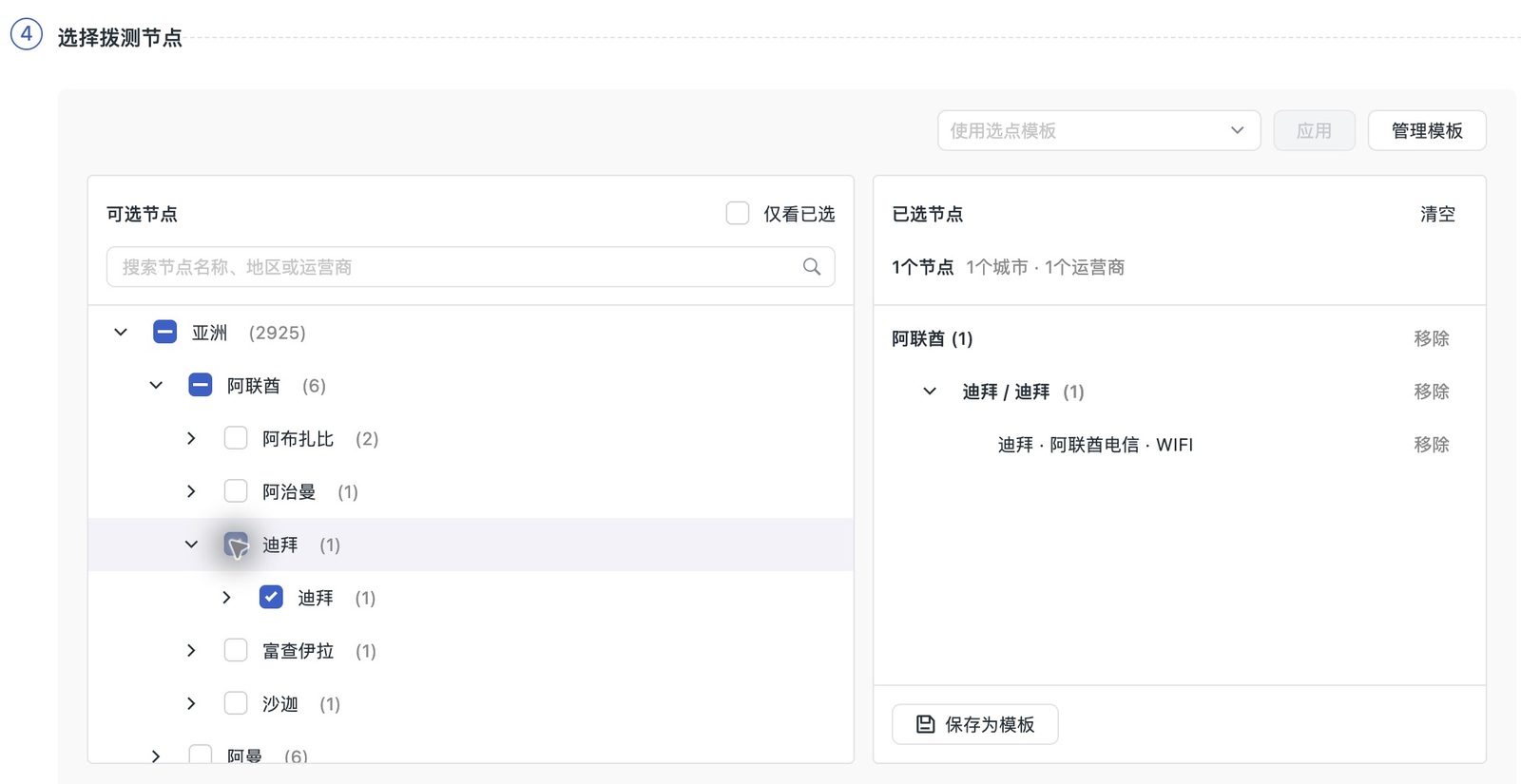
In Select Test Nodes, search by node name, region, or carrier, or expand a region and select nodes. On the right, verify the selected nodes, covered cities, and carriers. If a node selection template already exists, you can also select a template and click Apply.
-
Set Samples per Node (1–5 samples per execution), select the test frequency under Set Execution Policy, and click Save.
Billing
Both the Commercial Plan and the Enterprise Plan track the execution usage of HTTP, DNS, TCP, and PING Mobile Tests on a daily basis. Each execution on a node in mainland China counts as one execution, and each execution on a node in Hong Kong (China) and other countries and regions counts as four executions.
Contact your Account Manager to confirm the specific unit price for the Enterprise Plan. For the billing item, see Enterprise Plan Billing.
Commercial Plan Unit Prices and Examples
| Test Node | Price per Execution (RMB) | Price per Execution (USD) |
|---|---|---|
| Mainland China nodes | ¥0.05 | US$0.007 |
| Nodes in Hong Kong (China) and other countries and regions | ¥0.20 | US$0.029 |
The unit price for nodes in Hong Kong (China) and other countries and regions in the table already includes the 4x billing multiplier. For example, if nodes in mainland China and nodes in Hong Kong (China) and other countries and regions each execute 10 times in one day, the total billable usage is 50 executions (10 × 1 + 10 × 4). Settled in RMB, the test execution charge for that day is 10 × ¥0.05 + 10 × ¥0.20 = ¥2.50.
For the unit prices in each settlement currency for the Commercial Plan, see Commercial Plan Pricing Details.
On Console > Plans & Billing > Usage Analysis, view "Mobile Test Executions", and verify the charges in Billing Details. Test execution usage and the number of result data records are calculated separately.
Manage Tests
Return to Synthetic Monitoring > Tests, expand Mobile Test on the left, select a protocol, and find the test by name. To change nodes, the request target, or the test frequency, edit the test and save it. To pause or resume execution, use the status toggle in the test row; to remove a test, select Delete from the actions menu.
View Results
After a test runs and reports data, go to the Synthetic Monitoring Explorer, and under the Mobile Test group in the test type drop-down, select the protocol used by the test. Filter by time and test, and click a record to view the protocol metrics, node information, and failure reason for that execution.
To compare multiple regions or carriers, go to Overview, select the same test type and protocol, and then view trends by region, carrier, or network type.